
Creating an AWS Backup Account
ACM.186 Prevent Ransomware and other malicious actors from accessing your backups
~~~~~~~~~~~~~~~~~~~~~~~~~~~~~~~~~~~~~~~~~~~~~~~~~~~~~~~~~~~
⚙️ Check out my series on Automating Cybersecurity Metrics. The Code.
🔒 Related Stories: AWS Security | Cloud Architecture | Cloud Governance
💻 Free Content on Jobs in Cybersecurity | ✉️ Sign up for the Email List
~~~~~~~~~~~~~~~~~~~~~~~~~~~~~~~~~~~~~~~~~~~~~~~~~~~~~~~~~~~
In the last post I showed you how to unmanage accounts that are managed by AWS Control Tower in the case where you need to shut one down.
I have some assets that I want to move over to my new account structure before shutting down those old accounts. Where should I put them? And what if I’m in a hurry and don’t have all the security controls set up in my new account structure yet?
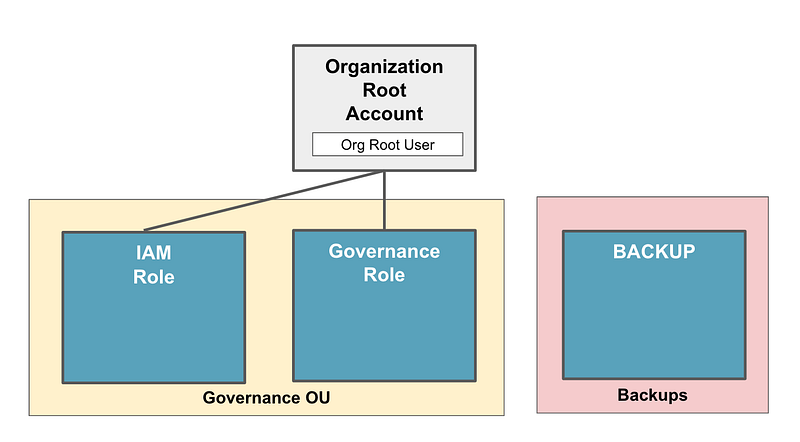
To solve this problem, I want to create an account that is not accessible from any of my other accounts where I can back up these assets. This account should also not have access to any of the assets in my other accounts. In my case, I’m going to remove the AWS Organizations role in this account, and I won’t be accessing this account via Okta, either. I will use a separate set of credentials that are specifically for use when backing up data, and will have break-glass permissions for the case where I need to access that backup data.
These are assets which, for the most part, I have stored across multiple cloud systems. In other cases, I’m keeping some assets for archive purposes only and do not expect I will need to access them again in the near future, if ever.
Prevent Ransomware from accessing your backups
In many cases, ransomware will try to obtain access to backups before triggering in your cloud environment. To prevent this, you’ll need to consider all the attack paths that can allow an attacker to get from one system or one set of credentials to the next. This is a common mistake I find on security assessments.
When you create a backup account you do not want to allow access from the accounts and roles that are operating in a cloud environment on a regular basis. You want to set these resources up in a separate account that is rarely accessed and has different roles and permissions.
These roles and permissions should not be accessible if an attacker accesses a developer machine — as was the case in the Circle CI breach. Once the attackers got onto a developer’s laptop, they were able to access credentials stored in a password manager to get to sensitive resources.
Separate your credentials used to access sensitive data from your developer machines as much as possible. I’ve written about using cloud virtual machines for development purposes and I’ll address that in more detail in relation to Circle CI in a future post because I got some relevant questions on Twitter which I want to explore further.
Consider a separate account with break glass credentials. Remember the risks I mentioned related to service-linked roles. I am going to create a backup account and completely remove the AWS Organizations role used for cross-account access. I’m going to create separate credentials that do not exist in Okta or in any other AWS accounts to manage backups. For retrieval or deletion these will be break-glass credentials.
Roles used for backups will be restricted to only write new files with no permission to alter prior versions or delete files. I will need to consider whether I want to use any AWS service-linked roles for replication or create my own, after reviewing the policies associated with those service-linked roles. For example, AWS offers replication of objects in S3 buckets.
Other services offer automated backups which is super helpful, you will want to review those policies to understand how those backup services operate and what they can do in your AWS accounts.
Permissions and policies for backup accounts
When creating backup accounts for an organization you’ll want to create roles that can write backups to the account, but not edit or delete the files.
Ensure backups are encrypted in transit. You can enforce this in settings such as restrictions in S3 bucket policies.
Consider turning on versioning and restrict access to versions. That way, if something gets deleted — or encrypted by ransomware — you can access prior versions to resolve the problem.
On that note, it is better to use a customer managed KMS key to protect backups than the default AWS encryption. That way you can create policies on the KMS key as I’ve shown in prior posts, in addition to the bucket itself. Limit who can use the key in IAM policies as well. I wrote about different types of policies in AWS here:
Of course we can also use policies at the organizational level to restrict access to the account such as the SCPs we’ve been setting up in our new organizational structure.
Restrict the ability to make resources public. Limit network access with Endpoints and IP restrictions.
Consider requiring MFA to retrieve or delete backups or change the related policies.
Monitoring backup accounts
We will want to severely restrict what has access to our backup account, but we will want to enable AWS CloudTrail service and AWS GuardDuty so we can monitor this account at the organizational level. We’ll do that in upcoming posts. That will require some changes to our organization.
You will probably want to set up specific alerts and monitoring so you know as soon as someone leverages a backup-related permission that should not be in use.
You can use AWS Services like Simple Notification Service (SNS) for this purpose.
I started looking into using AWS SMS services for alerts here, but this has become much more complicated. I actually never got past step one due to the complexity but will probably revisit it at some point.
Sending an SMS Message from a Lambda Function
ACM.54 Getting a phone number from Pinpoint
medium.com
If you are using email to receive alerts you may want to look into additional security for DNS and email records as explained in these posts.
You may want to check the integrity of your backups periodically to ensure they are still in tact. This all depends on how much you trust the cloud services you use to maintain your backups.
Investments in backup infrastructure
Your legal team may have reviewed the cloud services contract and determined that the cloud provider is liable if the integrity of your backups is not maintained to an acceptable level. In the case the integrity is not maintained, the cloud provider will have to pay for any losses due to the missing data. This all comes down to your contract in place with the cloud provider. Consult a lawyer regarding that matter.
Be aware that there are different levels of service at different price points with different guarantees for backup data. What is “durability” and how does it affect your backups?
Amazon defines that here:
Durability
A system that is durable is able to perform its responsibilities over time, even when unexpected events may occur. For example, a durable storage system will reliably store data without data loss.
Understand the service level agreement for each service you use for backups and how this may affect you if you have an urgent need to access your data. Businesses always need to consider the cost of the data not being available when they need it versus the cost to maintain additional backups (part of your disaster recovery and business continuity plan).
In some cases, the cost of maintaining additional backups is not worth it when compared to the potential losses if the backups are not maintained at a higher price point. This is a security architecture concern, and a business decision ultimately.
For example, if your business website is down for 3 hours, how much impact will that have to your business? In some cases, a company may lose millions of dollars, or customers may stop using the company’s services. They may opt to pay for extensive backups across multiple cloud providers and the most expensive options for maintaining the availability of their website.
In another case, a company’s website may go down for three hours and customers will not even notice because the company rarely even refers people to their website. Most of their business is obtained through sales reps or word of mouth. People do not carry out transactions on the website. This company may opt for minimal backups and even consider restoring their website manually in the case of related data loss.
Another company has a service that makes them $50 per month. They use it for marketing but it is not core their business. Their core business and most of their income comes from unrelated services. This company may not invest much time into the assets producing a $50 per month revenue stream compared to services that pay thousands of dollars.
I would highly recommend that your backup account is in a stand-alone OU with a stand-alone service policy applied to it. Consider all the ways in which your back data could be accessed and use that threat model to help you define your policies.
In some cases, an organization may also wish to backup the data to a completely separate AWS account in the case of compromise of the root credentials of the entire organization.
What if a particular data center fails completely? In this case you will want to make sure your backups and systems span multiple availability zones.
What if an entire region is affected? In this case your backups and systems need to span multiple regions.
Other companies may wish to backup resources or at least critical resources to a separate cloud provide in the case of a complete outage, such as the one recently experienced by Microsoft customers.
How much you need to segregate and ensure you can access your backups is a specific decision for each business as I have explained. Could a cloud provider completely fail? How long might the service be unavailable? How much can your business withstand? Will the cost of the additional backups put your business into an unprofitable state? The answers to these questions will help you define your disaster recovery and business continuity plans.
As I’ve explained before, there is no “reference architecture.” Your security architecture is dependent on your specific business needs and policies.
Test your backups
This is related to investments in backup infrastructure. Your backups are not that useful if they don’t actually work. For one things, refer to my comments about ransomware above. Make sure you are using separate credentials. Have someone on your QA team and security team and possibly external auditors check this. This is something I check on cloud security assessments.
Periodically test your backups if they are necessary for critical assets in the event of an emergency. In my case, I am backup up files that are unrelated to applications at the moment. I don’t need them to restore critical systems. However, I have worked on trading systems processing billions of dollars of assets under management. That is a different scenario!
That particular company would perform physical failover of an entire data center to one in another region on a regular basis. During that failover, numerous applications would break an it would be a long night and next day for those involved in the failover deployment night. When you test your backups you may find that things do not work as expected. You may even find some interesting security problems along the way. Make sure you document any failures and get them into your bug tracking system for further review. Don’t just tweak the files and move on.
Now that I’ve explained some of the things I want to do to get a backup account set up so I can transfer some resources from my old to new accounts, I’ll explain how to do some of the above so we can get things done.
Follow for updates.
Teri Radichel | © 2nd Sight Lab 2023
About Teri Radichel:
~~~~~~~~~~~~~~~~~~~~
⭐️ Author: Cybersecurity Books
⭐️ Presentations: Presentations by Teri Radichel
⭐️ Recognition: SANS Award, AWS Security Hero, IANS Faculty
⭐️ Certifications: SANS ~ GSE 240
⭐️ Education: BA Business, Master of Software Engineering, Master of Infosec
⭐️ Company: Penetration Tests, Assessments, Phone Consulting ~ 2nd Sight Lab
Need Help With Cybersecurity, Cloud, or Application Security?
~~~~~~~~~~~~~~~~~~~~~~~~~~~~~~~~~~~~~~~~~~~~~~~~~~~~~~~~~~~~~
🔒 Request a penetration test or security assessment
🔒 Schedule a consulting call
🔒 Cybersecurity Speaker for PresentationFollow for more stories like this:
~~~~~~~~~~~~~~~~~~~~~~~~~~~~~~~~~~~~~~~~~~~~~~~~~~~~~~~~~~~~~
❤️ Sign Up my Medium Email List
❤️ Twitter: @teriradichel
❤️ LinkedIn: https://www.linkedin.com/in/teriradichel
❤️ Mastodon: @teriradichel@infosec.exchange
❤️ Facebook: 2nd Sight Lab
❤️ YouTube: @2ndsightlab


