avatarJohn Walter 📣Therapy and creativity

Free AI web copilot to create summaries, insights and extended knowledge, download it at here

2491

Abstract

="56a3"><img src="https://cdn-images-1.readmedium.com/v2/resize:fit:800/1*ZJ_ByqDvaFac3HoP0KdKsw.jpeg"><figcaption>Image created by author in Midjourney</figcaption></figure><p id="6906">So from the cleaned up original I created 3 images in the style I was after using the following prompt</p><p id="b278" type="7">prompt: originalimage.jpg A graphic novel character design by (name your own favourite artist) an intense young man wearing glasses in a grey jacket/ sides of head shaved with curly hair on top</p><blockquote id="6d37"><p>EDIT JAN 23 — I no longer reference any other artists in my work to be sensitive to copyright issues etc. Instead I create my own description of style. I might go to CHAT GPT and ask for a description of an artist’s style without mentioning any artists.</p></blockquote><p id="b8b1">You can then add any style or rendering info you want.</p><h2 id="eed3">Adding emotions</h2><p id="68ae">The next process was to create some more reference images with differing emotions.</p><figure id="a759"><img src="https://cdn-images-1.readmedium.com/v2/resize:fit:800/1*luul_duMqn_WPGVMsIow7Q.jpeg"><figcaption>Image created by author on Midjourney</figcaption></figure><p id="19fb" type="7">prompt: originalimage.jpg A graphic novel character design by (name your own favourite artist) an (emotion word) young man wearing glasses in a grey jacket/ sides of head shaved with curly hair on top</p><h2 id="4fed">Ready to go</h2><p id="205f">From this point on I have 8 new reference images all created in my chosen graphic novel style. All the prompts now are very simple using whichever reference image fits the scene.</p><p id="2e16" type="7">prompt: referenceimage3.jpg A young man having a drink with some friends</p><figure id="780f"><img src="https://cdn-images-1.readmedium.com/v2/resize:fit:800/1*toLkj6mDQBJBq5B6ttSSog.jpeg"><figcaption>Image created by author in Midjourney</figcaption></figure><p id="2462">You no longer have to add style prompts because the image dictates the style. However, I did find it useful to sometimes add in the emotion word at this stage. Also, I occasionally added in “wearing glasses” when MJ started forgetting the glasses.</p><p id="c0c4">Here are a few more situations I put the character in.</p><figure id="d53b"><img src="https://cdn-images-1.readmedium.com/v2/resize:fit:800/1*FBgz3ZrWXsWc8HQSxgin6w.jpeg"><figcaption>Image created by the author on Midjourney</figcaption></figure><p id="9b77">I hope that is enough to ge

Options

t you started. MJV4 is developing really fast so if you find out any new tricks please let me know in the comments below.</p><p id="0c3c">Please write a comment. I like getting into conversations on this platform. Highlighting useful passages is also handy feedback on what is working and not working.</p><p id="5f5e">Add as many claps as you can and follow me or subscribe to my email list, to get to know about updates as they happen.</p><blockquote id="31d6"><p>EDIT Jan 30 2023: Here are the latest articles related to characters</p></blockquote><div id="8f14" class="link-block"> <a href="https://readmedium.com/how-to-place-a-character-in-different-scenes-in-midjourney-v4-dcc2534c7fe4"> <div> <div> <h2>How to Place a Character in Different Scenes in Midjourney V4</h2> <div><h3>Jack goes to the beach</h3></div> <div><p>medium.com</p></div> </div> <div> <div style="background-image: url(https://miro.readmedium.com/v2/resize:fit:320/1*nbPgpxxJ7yEAWPI7saqj8w.png)"></div> </div> </div> </a> </div><div id="6072" class="link-block"> <a href="https://readmedium.com/how-to-create-action-shots-in-midjourney-using-niji-a6c2cb17afb9"> <div> <div> <h2>How to Create Action Shots in Midjourney Using Niji.</h2> <div><h3>My character Jack goes surfing.</h3></div> <div><p>medium.com</p></div> </div> <div> <div style="background-image: url(https://miro.readmedium.com/v2/resize:fit:320/1*XdVzY7oEG87kH2ADGd8pqQ.jpeg)"></div> </div> </div> </a> </div><div id="f1af" class="link-block"> <a href="https://johnwalter-counsellor.medium.com/membership"> <div> <div> <h2>Join Medium with my referral link - John Walter 📣</h2> <div><h3>Read every story from John Walter 📣 (and thousands of other writers on Medium). Your membership fee directly supports…</h3></div> <div><p>johnwalter-counsellor.medium.com</p></div> </div> <div> <div style="background-image: url(https://miro.readmedium.com/v2/resize:fit:320/0*9-3tN76wEltvIJwv)"></div> </div> </div> </a> </div></article></body>

Creating A Consistent Story Character In Midjourney V4

Without having to use celebrity references
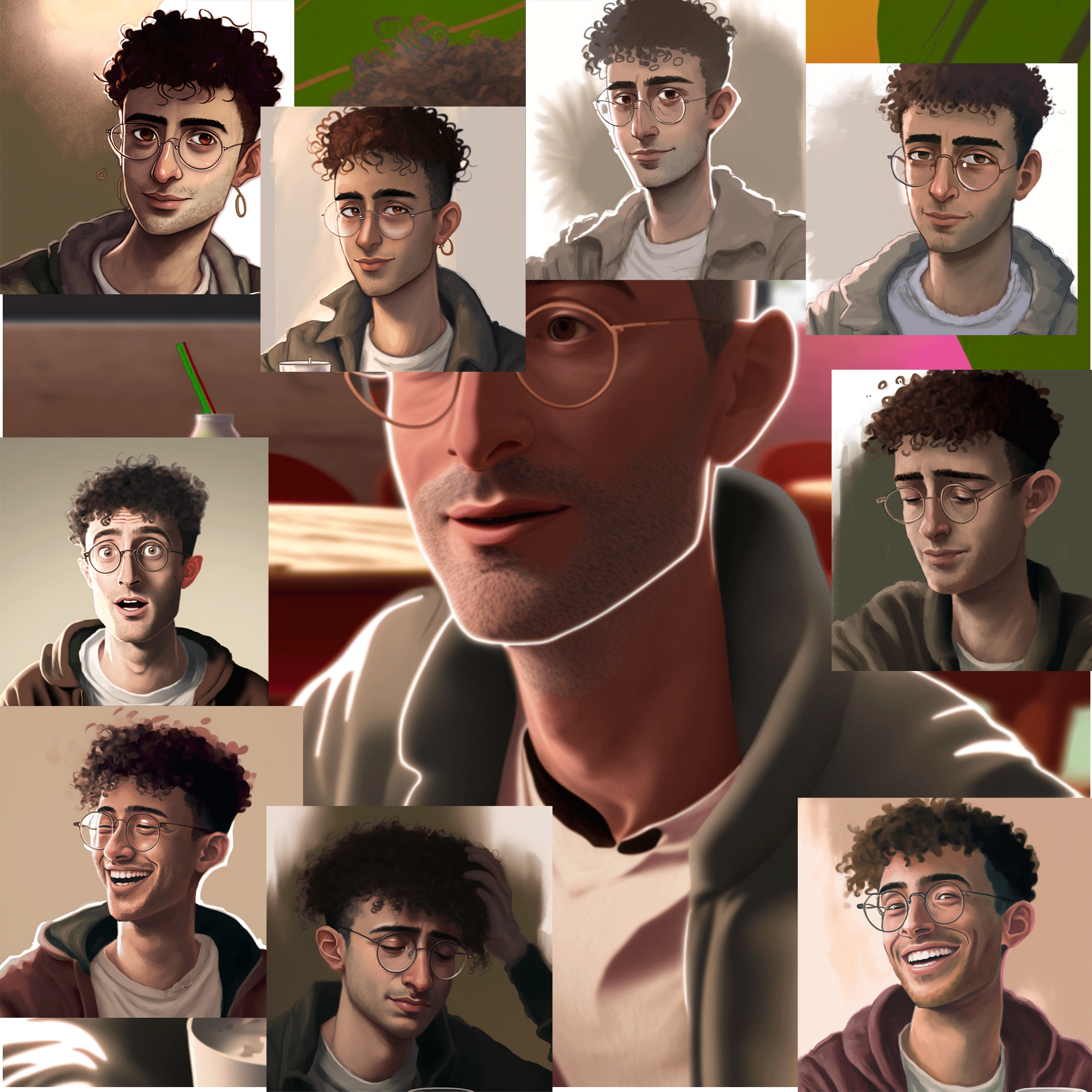
Image created by the author in Midjourney

What I love about Midjourney V4 is that there is still the possibility of randomness and chaos whilst being simply able to produce usable images on the initial upscale. There is no longer a need to use celebrity references to create consistency which saves a whole lot of hassle on copyright issues.

I have just added an updated article for V5

I call this character young piano man. Like all of my best ideas, he popped up whilst I was working on another project. As shown below I took my own profile photograph and created some papercut versions of it. MJ kindly added some curly hair on the top for me. I was trying out this elderly character in coffee shops when one of the images took a good 30 years off my age. Voila, Young Piano man was born.
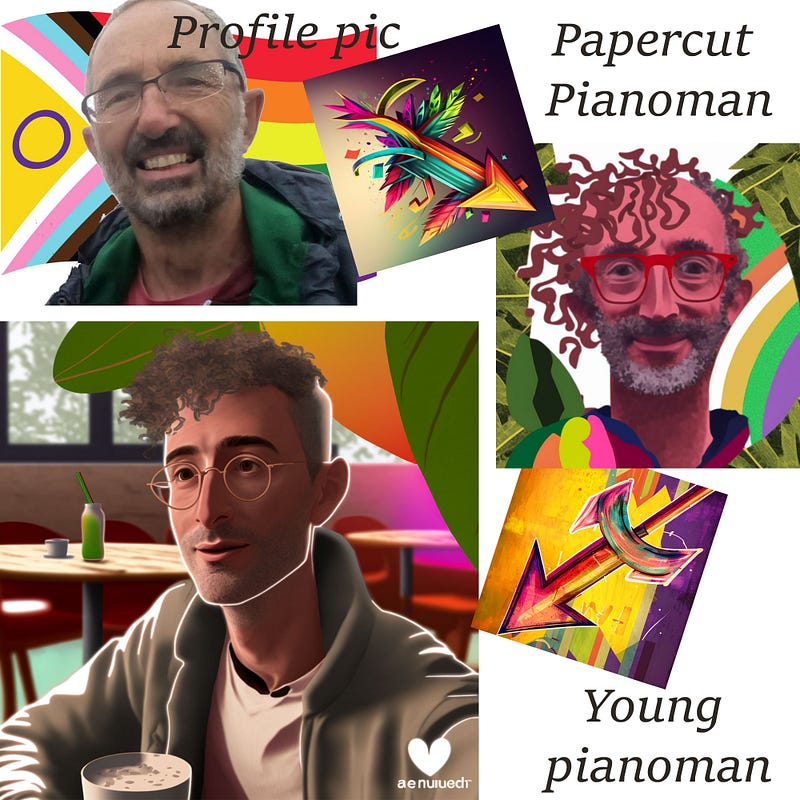
Image created by author on Midjourney

I decided to use this image as the reference for this character. First I had to clean it up. For it to be a good starter image it needs a blank background and there is also one of those annoying watermarks in one corner. I tried lots of “no” prompts but nothing got it clean enough. (— no background — no watermark — no leaves — no tables — no window). I gave up and went to Photoshop.

So a few minutes in photoshop cleaned it up and I could start creating the character.
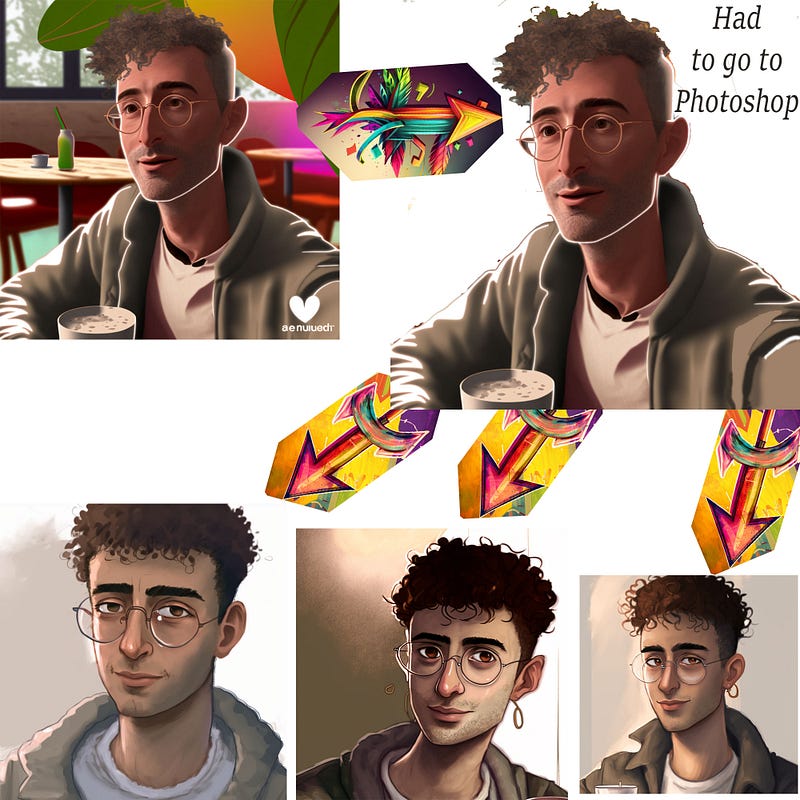
Image created by author in Midjourney

So from the cleaned up original I created 3 images in the style I was after using the following prompt

prompt: originalimage.jpg A graphic novel character design by (name your own favourite artist) an intense young man wearing glasses in a grey jacket/ sides of head shaved with curly hair on top

EDIT JAN 23 — I no longer reference any other artists in my work to be sensitive to copyright issues etc. Instead I create my own description of style. I might go to CHAT GPT and ask for a description of an artist’s style without mentioning any artists.

You can then add any style or rendering info you want.

Adding emotions

The next process was to create some more reference images with differing emotions.
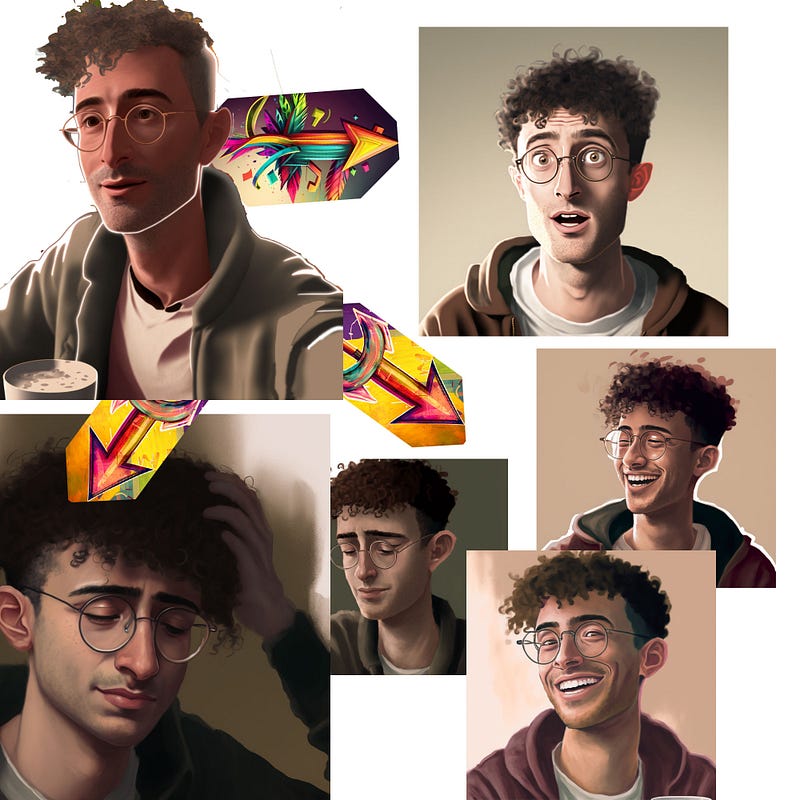
Image created by author on Midjourney

prompt: originalimage.jpg A graphic novel character design by (name your own favourite artist) an (emotion word) young man wearing glasses in a grey jacket/ sides of head shaved with curly hair on top

Ready to go

From this point on I have 8 new reference images all created in my chosen graphic novel style. All the prompts now are very simple using whichever reference image fits the scene.

prompt: referenceimage3.jpg A young man having a drink with some friends
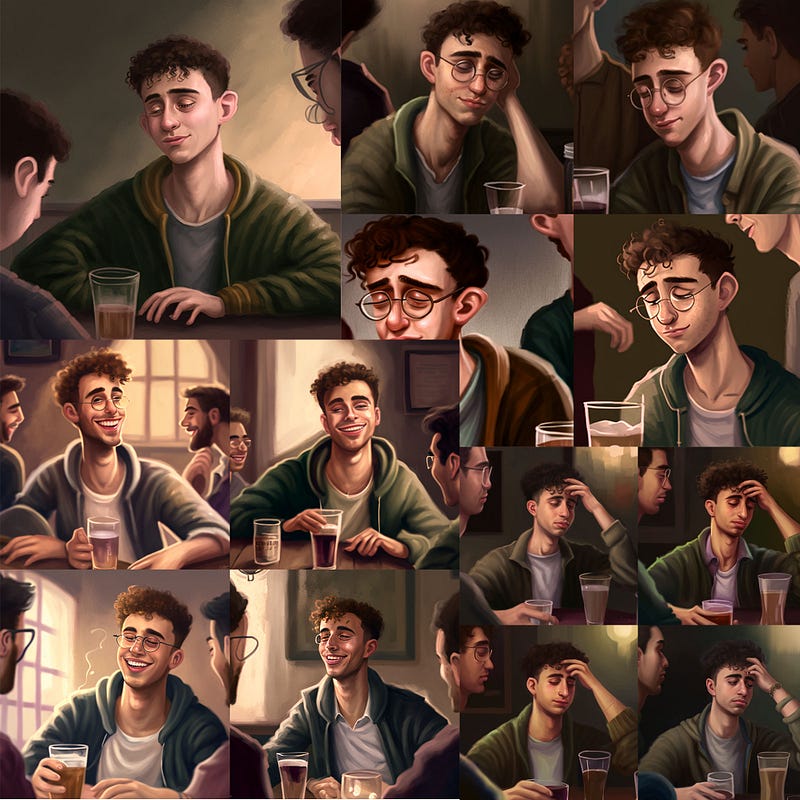
Image created by author in Midjourney

You no longer have to add style prompts because the image dictates the style. However, I did find it useful to sometimes add in the emotion word at this stage. Also, I occasionally added in “wearing glasses” when MJ started forgetting the glasses.

Here are a few more situations I put the character in.
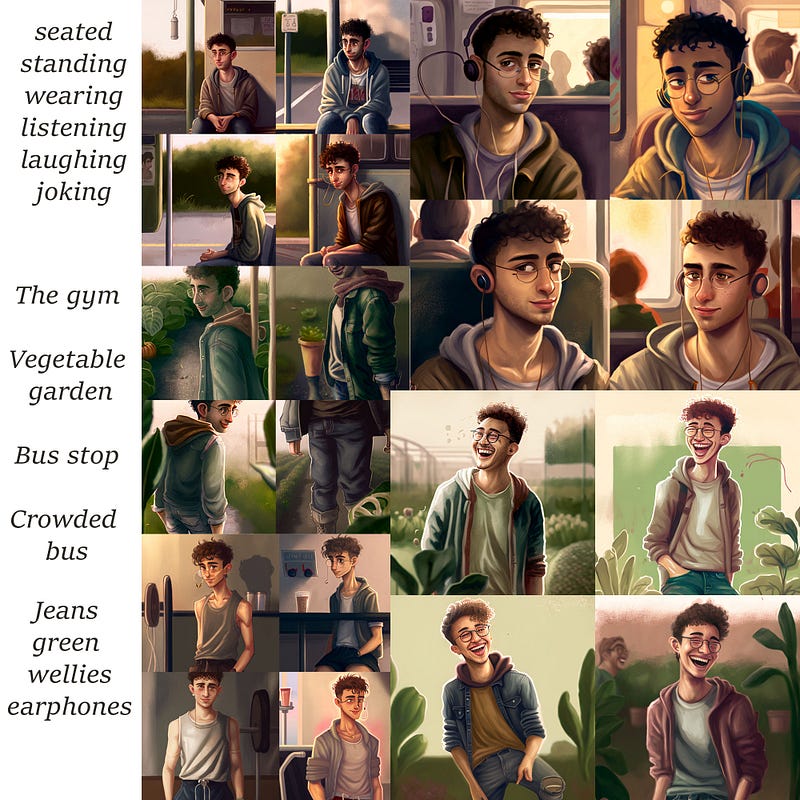
Image created by the author on Midjourney

I hope that is enough to get you started. MJV4 is developing really fast so if you find out any new tricks please let me know in the comments below.

Please write a comment. I like getting into conversations on this platform. Highlighting useful passages is also handy feedback on what is working and not working.

Add as many claps as you can and follow me or subscribe to my email list, to get to know about updates as they happen.

EDIT Jan 30 2023: Here are the latest articles related to characters

Midjourney
Character
Ai Art
How To
Graphic Novels
Recommended from ReadMedium