
Complete Guide on React Error Boundary
Write your own error boundary or use react-error-boundary

The Problem
All software has bugs; it is normal.
React application errors could be JavaScript/TypeScript mistakes, lazy loading failing, or any kind of errors.
If encountering an error, a React application could be removed from the browser screen. We set up the Create React App to show how it happens.
The following command creates a React project:
% yarn create react-app react-error-boundary-app --template typescript
% cd react-error-boundary-app
Modify src/App.tsx to inject an error:
import logo from './logo.svg';
import './App.css';

function App(props: any) {
  props.map((a: any) => a); // this throws the error that props.map is not a function
  return (
    <div className="App">
      <header className="App-header">
        <img src={logo} className="App-logo" alt="logo" />
        <p>
          Edit <code>src/App.tsx</code> and save to reload.
        </p>
        <a
          className="App-link"
          href="https://reactjs.org"
          target="_blank"
          rel="noopener noreferrer"
        >
          Learn React
        </a>
      </header>
    </div>
  );
}

export default App;
Execute yarn start, and we see runtime errors on the browser. The following error screen is only visible in development mode during hot reload. It is react-error-overlay used by the Create React app.
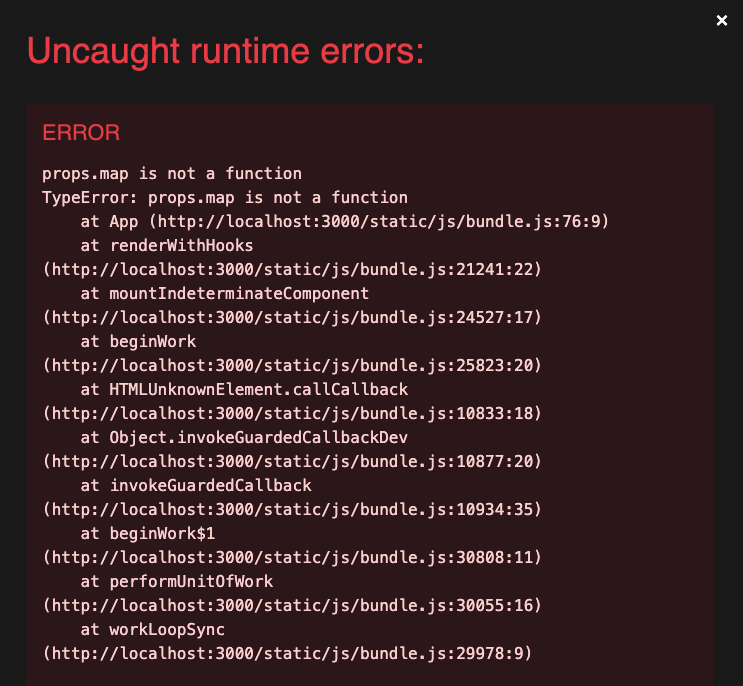
Errors not caught by error boundaries could unmount the React component tree. Closing the overlay with the X button at the top-right corner, we will see a blank screen.
react-error-overlay can be turned off by the Webpack configuration in webpack.config.js:
module.exports = {
  //...
  devServer: {
    overlay: false, // turn off react-error-overlay with one flag

    // or turn off react-error-overlay with the more granual setting
    // overlay: {
      // errors: false,
      // warnings: false,
      // runtimeErrors: false,
    // },
  },
};
For an un-ejected Create React app, the overlay can be hidden by hiding iframe with the following CSS styling in src/index.css:
body > iframe {
  display: none;
}
The Error Boundary
An error boundary is a special component that catches errors anywhere in its child component tree. It commonly logs errors and displays a fallback UI. Wrapping a React application in an error boundary or multiple error boundaries is recommended. There are two ways to create an error boundary:
- Write your own error boundary.
- Use react-error-boundary.
Both ways work effectively, and we will detail how they work.
Write Your Own Error Boundary
Writing an error boundary is standard practice. React document explains how it works and provides a comprehensive example.
The standard error boundary
Here is the standard error boundary code, which is added as src/ErrorBoundary.tsx:
import { Component, ErrorInfo, ReactNode } from 'react';

interface Props {
  children?: ReactNode;
}

interface State {
  hasError: boolean;
}

class ErrorBoundary extends Component<Props, State> {
  constructor(props: Props) {
    super(props);
    this.state = { hasError: false };
  }

  // update state so the next render will show the fallback UI
  static getDerivedStateFromError(error: Error): State {
    console.error('getDerivedStateFromError is called:', error);
    // getDerivedStateFromError is called: TypeError: props.map is not a function
    //   at App (bundle.js:76:9)
    //   at renderWithHooks (react-dom.development.js:16305:1)
    //   at mountIndeterminateComponent (react-dom.development.js:20074:1)
    //   at beginWork (react-dom.development.js:21587:1)
    //   at beginWork$1 (react-dom.development.js:27426:1)
    //   at performUnitOfWork (react-dom.development.js:26557:1)
    //   at workLoopSync (react-dom.development.js:26466:1)
    //   at renderRootSync (react-dom.development.js:26434:1)
    //   at recoverFromConcurrentError (react-dom.development.js:25850:1)
    //   at performConcurrentWorkOnRoot (react-dom.development.js:25750:1)
    return { hasError: true };
  }

  // optionally to add some extra logic if needed
  componentDidCatch(error: Error, errorInfo: ErrorInfo) {
    console.error('Uncaught error:', error, errorInfo);
    // Uncaught error: TypeError: props.map is not a function
    //   at App (App.tsx:5:1)
    //   at renderWithHooks (react-dom.development.js:16305:1)
    //   at mountIndeterminateComponent (react-dom.development.js:20074:1)
    //   at beginWork (react-dom.development.js:21587:1)
    //   at beginWork$1 (react-dom.development.js:27426:1)
    //   at performUnitOfWork (react-dom.development.js:26557:1)
    //   at workLoopSync (react-dom.development.js:26466:1)
    //   at renderRootSync (react-dom.development.js:26434:1)
    //   at recoverFromConcurrentError (react-dom.development.js:25850:1)
    //   at performConcurrentWorkOnRoot (react-dom.development.js:25750:1)
    //
    // {componentStack: '\n    at App (http://localhost:3000/static/js/bundl…(http://localhost:3000/static/js/bundle.js:180:5)'}
  }

  render() {
    if (this.state.hasError) {
      return <h1>Something went wrong...</h1>; // display a fallback UI
    }

    return this.props.children; // display the normal UI
  }
}

export default ErrorBoundary;
The above code is written as a class component, and there is no way to write an error boundary as a function component.
Change src/index.tsx to wrap <App /> with an ErrorBoundary:
import React from 'react';
import ReactDOM from 'react-dom/client';
import './index.css';
import App from './App';
import reportWebVitals from './reportWebVitals';
import ErrorBoundary from './ErrorBoundary';

const root = ReactDOM.createRoot(
  document.getElementById('root') as HTMLElement
);
root.render(
  <React.StrictMode>
    <div>Other Part of UI still works</div>
    <ErrorBoundary>
      <App />
    </ErrorBoundary>

  </React.StrictMode>
);

// If you want to start measuring performance in your app, pass a function
// to log results (for example: reportWebVitals(console.log))
// or send to an analytics endpoint. Learn more: https://bit.ly/CRA-vitals
reportWebVitals();
Execute yarn start, and we see the application shows a fallback UI.

Outside of the error boundary, another part of the UI works as usual.
An application can have multiple error boundaries. Everything inside the React.StrictMode component can be wrapped by another error boundary.
Special cases in an error boundary
We can also have a special fallback UI for the specific error, props.map is not a function — displaying nothing:
import { Component, ReactNode } from 'react';

interface Props {
  children?: ReactNode;
}

interface State {
  error: string;
}

class ErrorBoundary extends Component<Props, State> {
  constructor(props: Props) {
    super(props);
    this.state = { error: '' };
  }

  static getDerivedStateFromError(error: Error) {
    return { error: error.message };
  }

  render() {
    if (/props\.map is not a function/.test(this.state.error)) {
      return null;
    } else if (this.state.error) {
      return <h1>Something went wrong...</h1>;
    }

    return this.props.children;
  }
}

export default ErrorBoundary;
The above code retains the error message as a state, { error: error.message } instead of a boolean value. This approach enables additional processing based on the error text.
Execute yarn start, and we see the blank fallback UI for the uncaught error that props.map is not a function.

The error boundary that ignores harmless errors
As some errors are harmless, we can simply ignore them in render():
render() {
  if (this.state.error && !/js-agent\.newrelic\.com|reading 'parentElement'/.test(this.state.error)) {
    return <h1>Something went wrong...</h1>;
  }

  return this.props.children;
}
There are two errors ignored:
js-agent.newrelic.com: It is part ofthis.state.error.toString()when an ad blocker detects newrelic code for tracking and analytics.reading ‘parentElement’: It is part ofthis.state.error.toString()thrown occasionally from the Ant Design System.
Sometimes, we may not be able to rely on this.state.error.toString(). For example, the following Unhandled Promise Rejection: Failed to fetch is a common error is too common, and we have to check this.state.error.stack to ignore a specific error thrown from newrelic.
Uncaught (in promise) TypeError: Unhandled Promise Rejection: Failed to fetch
    at e.<computed> (vdsfdsdfdsf:2:16380)
    at o (js-agent.newrelic.com/async-api.30bd804e-1.236.0.min.js:2:1266)
    at C._send (js-agent.newrelic.com/148.1a20d5fe-1.236.0.min.js:2:3697)
    at C.sendX (js-agent.newrelic.com/148.1a20d5fe-1.236.0.min.js:2:1787)
    at r (js-agent.newrelic.com/ajax-aggregate.998ef92b-1.236.0.min.js:1:2176)
    at js-agent.newrelic.com/ajax-aggregate.998ef92b-1.236.0.min.js:1:2289
    at Array.forEach (<anonymous>)
    at d.runHarvest (js-agent.newrelic.com/ajax-aggregate.998ef92b-1.236.0.min.js:1:2276)
    at d.unload (js-agent.newrelic.com/ajax-aggregate.998ef92b-1.236.0.min.js:1:1330)
    at HTMLDocument.<anonymous> (vdsfdsdfdsf:2:13714)
Although error.stack is non-standard and is not on a standards track, most browsers support it. We can use the condition, error.stack && this.state.error.stack.includes('js-agent.newrelic.com'), to ignore this error.
The error boundary that reloads the code
Occasionally, React/Webpack throws an error, Loading chunk 4 failed. The actual chunk id could be different for each case. The application needs a reload to recover. This can be implemented automatically:
render() {
  if (this.state.error) {
    // recover from the chunk loading error
    if (/Loading chunk [\d]+ failed/.test(this.state.error)) {
      console.error(`reload to recover from the error: ${this.state.error}`);
      const lastReloadTime = localStorage.getItem('reload-to-recover-time');
      if (!lastReloadTime || Date.now() - Number(lastReloadTime) > 300000) { // 5 minutes
        localStorage.setItem('reload-to-recover-time', String(Date.now()));
        window.location.reload();
        return;
      }
    }

    return <h1>Something went wrong...</h1>;
  }

  return this.props.children;
}
The above code saves the reload timestamp in the local storage, which controls the minimal reload interval (300,000 milliseconds = 5 minutes).
The error boundary that recovers from an error
An error boundary takes a unique key prop. When the key changes, the error boundary will be unmounted and remounted. It could make the application recover from the error state.
Here is the modify src/App.tsx:
import { useState } from 'react';
import ErrorBoundary from './ErrorBoundary';

const RandomNumber = ({ value }: { value: number }) => {
  // there is 50% chance that the component crashes
  if (value > 0.5) {
    throw new Error('Crash');
  }
  return <p>The random number is {value}</p>;
};

const App = () => {
  const [value, setValue] = useState(0);
  return (
    <>
      <button onClick={() => setValue(Math.random())}>click</button>
      <ErrorBoundary key={value}> // a unique key prop to recover
        <RandomNumber value={value} />
      </ErrorBoundary>
    </>
  );
};

export default App;
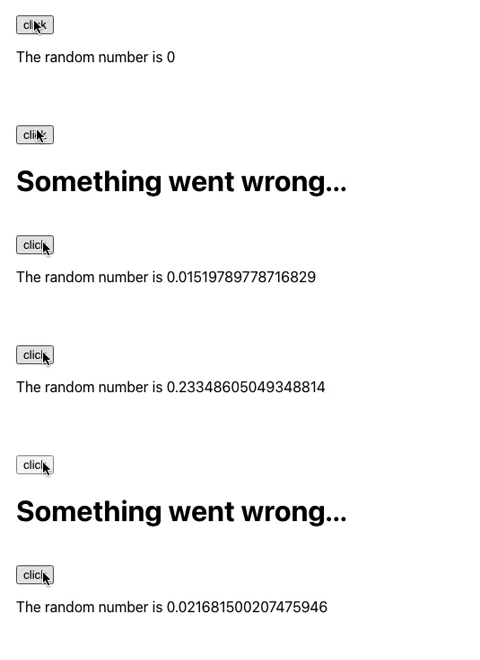
Execute yarn start, and there is a 50% chance that the component crashes. We can see the fallback UI and application recover from an error state by clicking the button. The action triggers the remount of the error boundary:
Error boundary limitations
Error boundaries have limitations. The React documentation states that error boundaries do not catch errors for the following cases:
- Event handlers
- Asynchronous code (e.g.,
setTimeoutorrequestAnimationFramecallbacks) - Server-side rendering
- Errors are thrown in the error boundary itself (rather than its children)
Use react-error-boundary
It is easy to write an error boundary, and it is easier to use an existing error boundary. react-error-boundary is a popular React error boundary component.
Install the package with this command:
% yarn add react-error-boundary
After the installation, react-error-boundary becomes part of dependencies in package.json:
"dependencies": {
  "react-error-boundary": "^4.0.10"
}
The following is the type definition of the builtin ErrorBoundary, which looks similar to the class component we created.
import { Component, ErrorInfo, PropsWithChildren, PropsWithRef } from "react";
import { ErrorBoundaryProps } from "./types.js";
type ErrorBoundaryState = {
    didCatch: boolean;
    error: any;
};
export declare class ErrorBoundary extends Component<PropsWithRef<PropsWithChildren<ErrorBoundaryProps>>, ErrorBoundaryState> {
    constructor(props: ErrorBoundaryProps);
    static getDerivedStateFromError(error: Error): {
        didCatch: boolean;
        error: Error;
    };
    resetErrorBoundary(...args: any[]): void;
    componentDidCatch(error: Error, info: ErrorInfo): void;
    componentDidUpdate(prevProps: ErrorBoundaryProps, prevState: ErrorBoundaryState): void;
    render(): import("react").FunctionComponentElement<import("react").ProviderProps<import("./ErrorBoundaryContext.js").ErrorBoundaryContextType | null>>;
}
export {};
It supports three types of error boundaries, ErrorBoundaryPropsWithFallback, ErrorBoundaryPropsWithRender, and ErrorBoundaryPropsWithComponent.
export type ErrorBoundaryProps = ErrorBoundaryPropsWithFallback | ErrorBoundaryPropsWithComponent | ErrorBoundaryPropsWithRender;Let’s take a look at the detail.
ErrorBoundaryPropsWithFallback
Here is the definition of ErrorBoundaryPropsWithFallback, where never indicates a value that will never occur.
export type ErrorBoundaryPropsWithFallback = ErrorBoundarySharedProps & {
  fallback: ReactElement<unknown, string | FunctionComponent | typeof Component> | null;
  FallbackComponent?: never;
  fallbackRender?: never;
};
Our recoverable error boundary can be implemented by react-error-boundary using the fallback prop.
Here is the modified src/App.tsx:
import { useState } from 'react';
import { ErrorBoundary } from 'react-error-boundary';

const RandomNumber = ({ value }: { value: number }) => {
  if (value > 0.5) {
    throw new Error('Crash');
  }
  return <p>The random number is {value}</p>;
};

const App = () => {
  const [value, setValue] = useState(0);
  return (
    <>
      <button onClick={() => setValue(Math.random())}>click</button>
      <ErrorBoundary key={value} fallback={<h1>Something went wrong...</h1>}>
        <RandomNumber value={value} />
      </ErrorBoundary>
    </>
  );
};

export default App;
ErrorBoundaryPropsWithRender
Here is the definition of ErrorBoundaryPropsWithRender:
export type ErrorBoundaryPropsWithRender = ErrorBoundarySharedProps & {
  fallback?: never;
  FallbackComponent?: never;
  fallbackRender: typeof FallbackRender;
};
We actually should not use ErrorBoundary’s key prop to recover from the error. The following ErrorBoundarySharedProps shows that ErrorBoundary itself can reset:
type ErrorBoundarySharedProps = {
  onError?: (error: Error, info: {
    componentStack: string;
  }) => void;
  onReset?: (details: {
    reason: "imperative-api";
    args: any[];
  } | {
    reason: "keys";
    prev: any[] | undefined;
    next: any[] | undefined;
  }) => void;
  resetKeys?: any[];
};
The fallbackRender prop is a render prop that is invoked by two parameters, error and resetErrorBoundary. resetErrorBoundary is a function that triggers a reset.
export type FallbackProps = {
  error: any;
  resetErrorBoundary: (...args: any[]) => void;
};
Upon calling resetErrorBoundary, onReset is invoked, where we can reset the app to a good value or reload the app.
Here is the modified src/App.tsx:
import { useState } from 'react';
import { ErrorBoundary, FallbackProps } from 'react-error-boundary';

const RandomNumber = ({ value }: { value: number }) => {
  if (value > 0.5) {
    throw new Error('Crash');
  }
  return <p>The random number is {value}</p>;
};

function fallbackRender({ error, resetErrorBoundary }: FallbackProps) {
  console.error(error.message);
  return (
    <div role="alert">
      <h1>Something went wrong...</h1>
      <button onClick={resetErrorBoundary}>try again</button>
    </div>
  );
}

const App = () => {
  const [value, setValue] = useState(0);
  return (
    <>
      <button onClick={() => setValue(Math.random())}>click</button>
      <ErrorBoundary
        fallbackRender={fallbackRender}
        onReset={(details) => {
          console.log(details);
          // {args: [SyntheticBaseEvent], reason: 'imperative-api'}

          // reset to a good value
          setValue(0);
          // or reload the app
          // window.location.reload();
        }}
      >
        <RandomNumber value={value} />
      </ErrorBoundary>
    </>
  );
};

export default App;
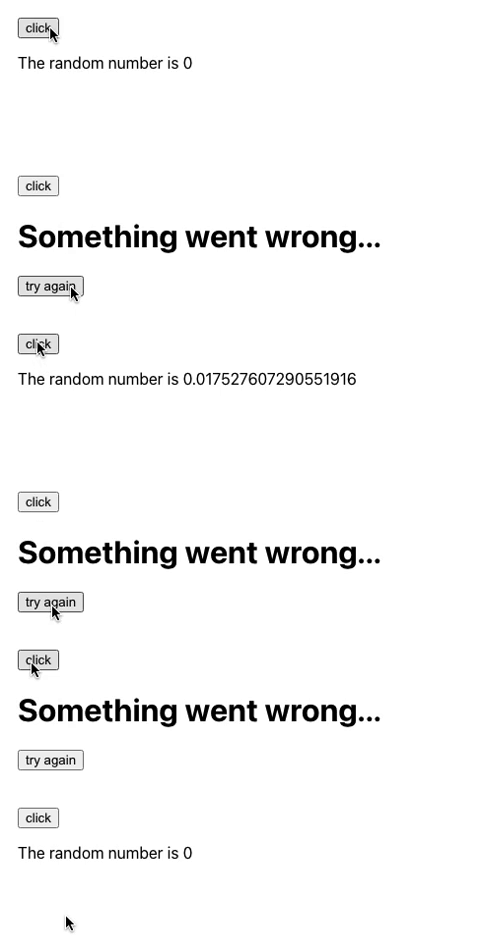
Execute yarn start. When the component crashes, there is a button, try again, to recover from the error state.
ErrorBoundaryPropsWithComponent
Here is the definition of ErrorBoundaryPropsWithComponent:
export type ErrorBoundaryPropsWithComponent = ErrorBoundarySharedProps & {
  fallback?: never;
  FallbackComponent: ComponentType<FallbackProps>;
  fallbackRender?: never;
};
ErrorBoundaryPropsWithComponent has all the capability that ErrorBoundaryPropsWithRender has, except that it is a component instead of a render function.
Here is the modified src/App.tsx:
import { useState } from 'react';
import { ErrorBoundary, FallbackProps } from 'react-error-boundary';

const RandomNumber = ({ value }: { value: number }) => {
  if (value > 0.5) {
    throw new Error('Crash');
  }
  return <p>The random number is {value}</p>;
};

function Fallback({ error, resetErrorBoundary }: FallbackProps) {
  console.error(error.message);
  return (
    <div role="alert">
      <h1>Something went wrong...</h1>
      <button onClick={resetErrorBoundary}>try again</button>
    </div>
  );
}

const App = () => {
  const [value, setValue] = useState(0);
  return (
    <>
      <button onClick={() => setValue(Math.random())}>click</button>
      <ErrorBoundary
        FallbackComponent={Fallback}
        onReset={(details) => {
          console.log(details);
          // {args: [SyntheticBaseEvent], reason: 'imperative-api'}

          // reset to a good value
          setValue(0);
          // or reload the app
          // window.location.reload();
        }}
      >
        <RandomNumber value={value} />
      </ErrorBoundary>
    </>
  );
};

export default App;
Logging errors with onError
We have seen the definition of onError from ErrorBoundarySharedProps.
onError?: (error: Error, info: {
  componentStack: string;
}) => void;
onError is invoked with similar parameters as componentDidCatch.
Here is the ErrorBoundary with the onError prop:
<ErrorBoundary
  FallbackComponent={Fallback}
  onReset={(details) => {
    console.log(details);
    // {args: [SyntheticBaseEvent], reason: 'imperative-api'}

    // reset to a good value
    setValue(0);
    // or reload the app
    // window.location.reload();
    }}
    onError={(error: Error, info: { componentStack: string }) => {
      console.error('error', error);
      // error Error: Crash
      //   at RandomNumber (App.tsx:6:1)
      //   at renderWithHooks (react-dom.development.js:16305:1)
      //   at updateFunctionComponent (react-dom.development.js:19588:1)
      //   at beginWork (react-dom.development.js:21601:1)
      //   at beginWork$1 (react-dom.development.js:27426:1)
      //   at performUnitOfWork (react-dom.development.js:26557:1)
      //   at workLoopSync (react-dom.development.js:26466:1)
      //   at renderRootSync (react-dom.development.js:26434:1)
      //   at recoverFromConcurrentError (react-dom.development.js:25850:1)
      //   at performSyncWorkOnRoot (react-dom.development.js:26096:1)
      //   at ErrorBoundary (http://localhost:3000/static/js/bundle.js:32944:5)
      //   at App (http://localhost:3000/main.9d4b79bf702600a2d8a7.hot-update.js:72:76)

      console.info('info', info);
      // {componentStack: '\n    at RandomNumber (http://localhost:3000/main.9…00/main.9d4b79bf702600a2d8a7.hot-update.js:72:76)'}
  }}
>
  <RandomNumber value={value} />
</ErrorBoundary>
useErrorBoundary hook
react-error-boundary provides the useErrorBoundary hook, which includes two methods, resetBoundary and showBoundary.
export type UseErrorBoundaryApi<Error> = {
    resetBoundary: () => void;
    showBoundary: (error: Error) => void;
};
export declare function useErrorBoundary<Error = any>(): UseErrorBoundaryApi<Error>;resetBoundary: It requests the nearest error boundary to retry the failed render.
Here is an example of resetBoundary:
function Fallback({ error }: FallbackProps) {
  console.error(error.message);
  const { resetBoundary } = useErrorBoundary();
  return (
    <div role="alert">
      <h1>Something went wrong...</h1>
      <button onClick={resetBoundary}>try again</button>
    </div>
  );
}showBoundary: It requests the nearest error boundary to show the received error.
React only handles errors thrown during render or component lifecycle methods. Errors thrown in event handlers and asynchronous code will not be caught.
The following example shows that the error in setTimeout() will not be caught.
import { useState } from 'react';
import {
  ErrorBoundary,
  FallbackProps,
} from 'react-error-boundary';

const RandomNumber = ({ value }: { value: number }) => {
  if (value > 0.5) {
    setTimeout(() => {
      new Error('Crash');
    }, 0);
  }
  return <p>The random number is {value}</p>;
};

function fallbackRender({ error, resetErrorBoundary }: FallbackProps) {
  console.error(error.message);
  return (
    <div role="alert">
      <h1>Something went wrong...</h1>
      <button onClick={resetErrorBoundary}>try again</button>
    </div>
  );
}

const App = () => {
  const [value, setValue] = useState(0);
  return (
    <>
      <button onClick={() => setValue(Math.random())}>click</button>
      <ErrorBoundary
        fallbackRender={fallbackRender}
        onReset={() => window.location.reload()}
      >
        <RandomNumber value={value} />
      </ErrorBoundary>
    </>
  );
};

export default App;
However, showBoundary can be used to catch errors to the nearest error boundary.
Here is an example of showBoundary:
import { useState } from 'react';
import {
  ErrorBoundary,
  FallbackProps,
  useErrorBoundary,
} from 'react-error-boundary';

const RandomNumber = ({ value }: { value: number }) => {
  const { showBoundary } = useErrorBoundary();
  if (value > 0.5) {
    setTimeout(() => {
      showBoundary(new Error('Crash'));
    }, 0);
  }
  return <p>The random number is {value}</p>;
};

function fallbackRender({ error, resetErrorBoundary }: FallbackProps) {
  console.error(error.message);
  return (
    <div role="alert">
      <h1>Something went wrong...</h1>
      <button onClick={resetErrorBoundary}>try again</button>
    </div>
  );
}

const App = () => {
  const [value, setValue] = useState(0);
  return (
    <>
      <button onClick={() => setValue(Math.random())}>click</button>
      <ErrorBoundary
        fallbackRender={fallbackRender}
        onReset={() => window.location.reload()}
      >
        <RandomNumber value={value} />
      </ErrorBoundary>
    </>
  );
};

export default App;
Execute yarn start, and the error in setTimeout() is caught by the nearest error boundary.
withErrorBoundary HOC
react-error-boundary can also be used as a higher-order component that accepts all of the same props of ErrorBoundary:
Here is the definition of withErrorBoundary.
import { RefAttributes, ForwardRefExoticComponent, PropsWithoutRef, ComponentType } from "react";
import { ErrorBoundaryProps } from "./types.js";
export declare function withErrorBoundary<Props extends Object>(component: ComponentType<Props>, errorBoundaryProps: ErrorBoundaryProps): ForwardRefExoticComponent<PropsWithoutRef<Props> & RefAttributes<any>>;
We can use withErrorBoundary to wrap a component with an error boundary:
import logo from './logo.svg';
import './App.css';
import { withErrorBoundary } from 'react-error-boundary';

function App(props: any) {
  props.map((a: any) => a); //this throws the error that props.map is not a function
  return (
    <div className="App">
      <header className="App-header">
        <img src={logo} className="App-logo" alt="logo" />
        <p>
          Edit <code>src/App.tsx</code> and save to reload.
        </p>
        <a
          className="App-link"
          href="https://reactjs.org"
          target="_blank"
          rel="noopener noreferrer"
        >
          Learn React
        </a>
      </header>
    </div>
  );
}

export default withErrorBoundary(App, {
  fallback: <h1>Something went wrong...</h1>,
  onError(error, info) {
    console.error('error', error);
    console.info('info', info);
  },
});
Execute yarn start, and it shows the fallback UI:

Conclusion
We have explained that an error boundary is a special component that catches errors anywhere in its child component tree. It commonly logs errors and displays a fallback UI. Wrapping a React application in an error boundary or multiple error boundaries is recommended.
We have walked through details on two ways to create an error boundary:
- Write your own error boundary.
- Use react-error-boundary.
Both ways work effectively. What is your choice?
Thanks for reading.
Thanks, S Sreeram and Pendri Laxmi Prasanna, for working with me on error boundary.
Want to Connect?

If you are interested, check out my directory of web development articles.


