avatarMonu Kumar Modi

Free AI web copilot to create summaries, insights and extended knowledge, download it at here

2000

Abstract

ac">Look at the screenshots I took of these articles presented with the same headline and same read time. It is not a surprise that those articles match word-to-word. Someone tell me this is not true, or I am missing something?</p><figure id="bf2b"><img src="https://cdn-images-1.readmedium.com/v2/resize:fit:800/1*Yvwm56waUypCgfbrgwa8sw.png"><figcaption>Image: Author</figcaption></figure><h2 id="f987">How did I find this out?</h2><p id="3dcb">I’m a blogger in the home automation space and recently penned an article on <a href="https://brindakoushik.medium.com/amazon-sidewalk-network-rolled-out-dec-2020-88e07c737801">Amazon’s new Sidewalk feature</a> on my blog and published it on Medium as well. Call it a hunch or just curiosity; I searched for the term “<b>Sidewalk</b>” on Medium as I wanted to see other articles on the same topic. After I saw a few related posts, I saw the same titles of articles in a row as I scrolled down. I clicked a few of them and saw; they have precisely the same content. They are different Medium users. I couldn’t think of any other reason than they are stealing and cashing in on it. I see all those articles have links pointing to other posts that belong to a major tech website. I looked up that article online, and as expected, I see that article published <a href="https://www.techhive.com/article/3599458/how-to-turn-off-amazon-sidewalk.html">on that website</a>. Pity they forgot to remove the hyperlinks on the post.</p><blockquote id="0533"><p><b>“Medium! Wake Up!”</b></p></blockquote><p id="0b81">I can report those posts to Medium and forget about it, but I also want us “<b>real writers</b>” to be aware of such incidences. Like me, you might be keen to import your <a href="https://help.medium.com/hc/en-us/articles/217991468-About-SEO-and-duplicate-content">articles from your website on to Medium</a>, but watch out! Your content might get misused, not just on Medium, but even outside of Medium by ravens trying to drive traffic to their websi

Options

te but cannot produce content themselves. Such apathy!</p><p id="62d4">P.S — Search the titles of your best articles and see if you find them duplicated on Medium or elsewhere. And leave a comment with — “I found a copycat!” with the copied link of your article if you find one. Let’s stop them, shame them, and get them kicked off Medium before they savage the spirit of this beautiful platform.</p><p id="366a"><b>Are you on Twitter?<a href="https://twitter.com/brindakoushik"> I’d love to connect</a> :)</b></p><p id="aab1"><b><i>Also, feel free to read my other most-loved articles on Medium.</i></b></p><div id="05e1" class="link-block"> <a href="https://readmedium.com/9-hacks-busy-writers-can-use-to-increase-productivity-and-do-much-more-4c2c1b2462d4"> <div> <div> <h2>9 Hacks Busy Writers Can Use to Increase Productivity and Do Much More</h2> <div><h3>Simple apps and tips to unleash your creative genius</h3></div> <div><p>medium.com</p></div> </div> <div> <div style="background-image: url(https://miro.readmedium.com/v2/resize:fit:320/0*DypXYekbRX-3kBPT)"></div> </div> </div> </a> </div><div id="c285" class="link-block"> <a href="https://readmedium.com/12-no-b-s-reasons-why-medium-can-boost-your-writing-and-springboard-you-into-a-full-time-writer-558d6a9a4aea"> <div> <div> <h2>12 No B.S. Reasons Why Medium Can Boost Your Writing and Springboard You Into a Full-Time Writer</h2> <div><h3>What if you can pay your bills with your words?</h3></div> <div><p>medium.com</p></div> </div> <div> <div style="background-image: url(https://miro.readmedium.com/v2/resize:fit:320/0*L6QSSkShmlPDUNLU)"></div> </div> </div> </a> </div></article></body>

Coding: Converting Roman Numerals to Integers in JavaScript- LeetCode(13)

In this article, we will be discussing a piece of code that is designed to convert roman values into integers.
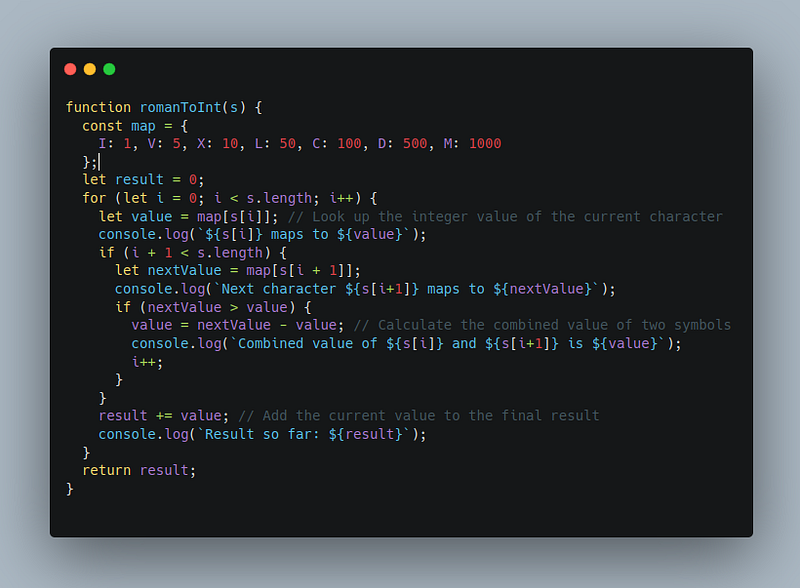
The code is a JavaScript function named “romanToInt” that takes a string argument “s”, which represents a Roman numeral. The function converts the Roman numeral to an integer and returns the result.

The function starts by defining an object “map” that maps each Roman numeral symbol to its corresponding integer value. For example, “I” maps to 1, “V” maps to 5, and so on.

Next, the function declares a variable “result” and initializes it to 0. This variable will be used to store the final integer result.

The function then uses a for loop to iterate over each character in the input string “s”. For each character, the function looks up its corresponding integer value in the “map” object.

If the current character is not the last character in the string, the function checks the value of the next character. If the next character has a higher value than the current character, the function adds the difference between the two values to the “result” variable. This is because Roman numeral symbols can be combined to represent larger values, such as “IV” (4) or “IX” (9).

Finally, the function returns the final “result” value, which represents the integer equivalent of the input Roman numeral.

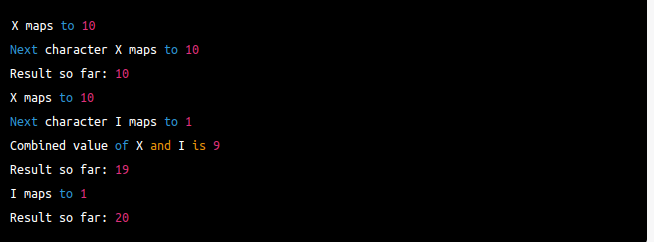
For example, if we call “romanToInt(“XXI”)”, the function would return 21.

Here’s a code snippet that explains the function “romanToInt” in a step-by-step manner:

function romanToInt(s) {
  const map = {
    I: 1,
    V: 5,
    X: 10,
    L: 50,
    C: 100,
    D: 500,
    M: 1000
  };
  let result = 0;
  for (let i = 0; i < s.length; i++) {
    let value = map[s[i]]; // Look up the integer value of the current character
    console.log(`${s[i]} maps to ${value}`);
    if (i + 1 < s.length) {
      let nextValue = map[s[i + 1]];
      console.log(`Next character ${s[i+1]} maps to ${nextValue}`);
      if (nextValue > value) {
        value = nextValue - value; // Calculate the combined value of two symbols
        console.log(`Combined value of ${s[i]} and ${s[i+1]} is ${value}`);
        i++;
      }
    }
    result += value; // Add the current value to the final result
    console.log(`Result so far: ${result}`);
  }
  return result;
}

The code above includes console log statements that show the intermediate values at each step of the conversion process. These log statements help to understand what the code is doing and how the final result is being calculated.

For example, if we call “romanToInt(“XXI”)”, the console output would look like this:
If you’re interested in learning more about coding in Javascript, be sure to follow me for more code snippets and examples. I’ll be sharing valuable information and tips on how to master the language and improve your skills as a developer. So, stay tuned for more updates, and let’s continue learning together.

Thanks for reading.Happy learning 😄

Do support our publication by following it

JavaScript
Interview
Coding
Recommended from ReadMedium