
Serialization & Deserialization in Java [ Java Internals Part 6 ] [ Second part]
In this Article we will see how Serialization Happens in Java Using the ObjectOutputStream Class . We will see the internal implementations of the things which we use in our ObjectOutputStream classes first before coming to its implementation so that we have a history of understanding !
we discuss here about the classes mentioned below :
- ObjectOutput Interface
- BlockDataOutputStream
- HandleTable
- ReplaceTable
ObjectOutputStream
extends OutputStream implements ObjectOutput , ObjectStreamConstants
- writes primitive dataTypes and Graphs of Java Objects to the Stream
- class of each serializable object is encoded using
1.name of the class
2. signature of the class
3. values of the object fields and arrays
4. closure of any other objects
- writeObject method is used to write to a stream
- primitive data types -> written to stream using the Dataoutput methods
- string can be written using the writeUTF method
Serialization of Enum Values :
- the serialized form of a enum constant consists only of its name
- field values of the constants are not transmitted
- the process by which enum constants are serialized cannot be customized
- any class specific writeObject , writeReplace methods are ignored
- any serialPersistantFields or SerialVersionUID fields declarations are also ignored
- enum type have fixed serialVersionUUID => OL
ObjectOutput Interface :
extends DataOutput , AutoCloseable .
DataOutput Interface :
there are several methods under this interface :
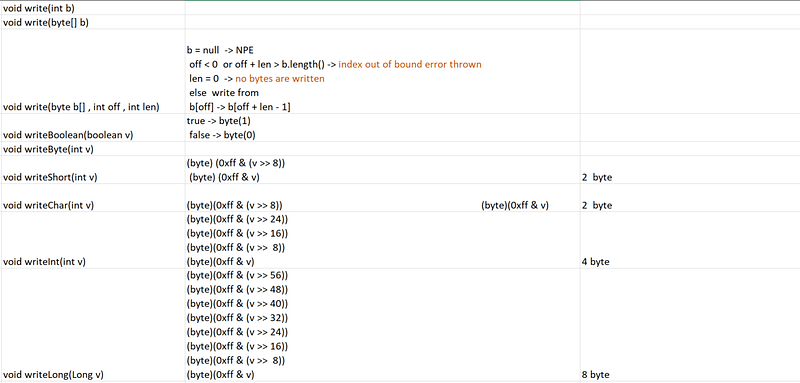

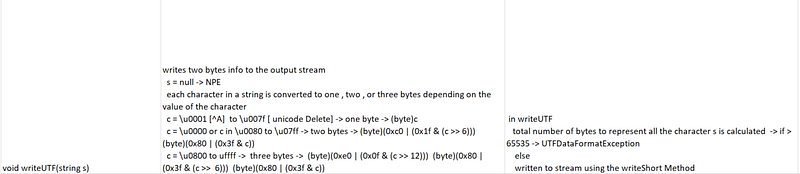
in our ObjectOutput interface we have :
- void writeObject(Object obj)
- void write(int b) => writes a byte , this methods blocks untill a byte is written
- void write(byte b[]) -> writes an array of bytes , will block untill written
- void write(byte b[] , int off , int len) -> writes a subarray of bytes
- void flush() -> flushes the stream , will write any buffered output bytes
- void close() -> closes the stream
ObjectOutputStream class :
member variables :
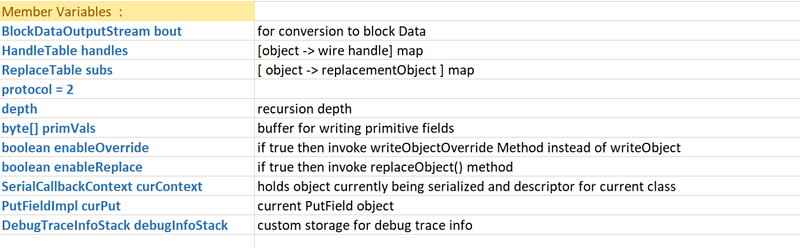
BlockDataOutputStream :
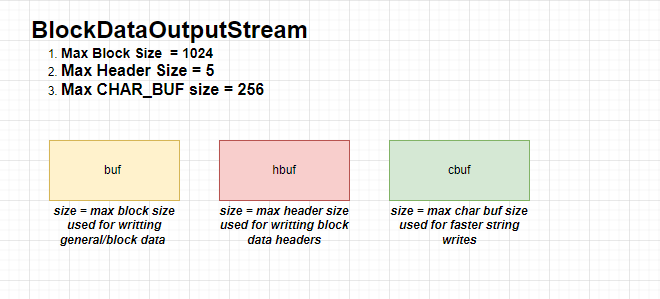

Constructor :
BlockDataOutputStream(OutputStream out)
{
 this.out = out;
 dout = new DataOutputStream(this);
}
setBlockDataMode:
- sets the data mode
- if the current mode is same as the input then no action is taken
- otherwise we first drain() the buffered data
- we return the previous mode value
drain() :
writes all buffered data from this stream to the underlying stream .
void drain() throws IOException {
    if (pos == 0) {
        return;
    }
    if (blkmode) {
        writeBlockHeader(pos);
    }
    out.write(buf, 0, pos);
    pos = 0;
}
Writes block data header. Data blocks shorter than 256 bytes are prefixed
with a 2-byte header; all others start with a 5-byte header.
private void writeBlockHeader(int len) throws IOException {
if (len <= 0xFF) {
hbuf[0] = TC_BLOCKDATA;
hbuf[1] = (byte) len;
out.write(hbuf, 0, 2);
} else {
hbuf[0] = TC_BLOCKDATALONG;
Bits.putInt(hbuf, 1, len);
out.write(hbuf, 0, 5);
}
}boolean setBlockDataMode(boolean mode) throws IOException {
if (blkmode == mode) {
return blkmode;
}
drain();
blkmode = mode;
return !blkmode;
}getBlockDataMode : returns the value of blkMode
void write(int b) :
it checks if the position is greater than the max block size -> drain()
else it writes the data to the buffer .
public void write(int b) throws IOException {
    if (pos >= MAX_BLOCK_SIZE) {
        drain();
    }
    buf[pos++] = (byte) b;
}
flush() :
public void flush() throws IOException {
    drain();
    out.flush();
}
close() :
public void close() throws IOException {
    flush();
    out.close();
}
write() :
void write(byte[] b, int off, int len, boolean copy)
    throws IOException
{
    if we are not having  blkmode or no need to copy then we can write
    the bytes directly

    if (!(copy || blkmode)) {           // write directly
        drain();
        out.write(b, off, len);
        return;
    }
   we simply keep writting untill our len > 0  ,  in case our pos goes out
    we drain  else we increment the offset and decrement the len as we go on
    writting
    while (len > 0) {
        if (pos >= MAX_BLOCK_SIZE) {
            drain();
        }
        if (len >= MAX_BLOCK_SIZE && !copy && pos == 0) {
            // avoid unnecessary copy
            writeBlockHeader(MAX_BLOCK_SIZE);
            out.write(b, off, MAX_BLOCK_SIZE);
            off += MAX_BLOCK_SIZE;
            len -= MAX_BLOCK_SIZE;
        } else {
            int wlen = Math.min(len, MAX_BLOCK_SIZE - pos);
            System.arraycopy(b, off, buf, pos, wlen);
            pos += wlen;
            off += wlen;
            len -= wlen;
        }
    }
}
besides this there a lot of output methods for primitive data types which are not necessary and can be used whenever required.
HandleTable :
it is a very intresting alike implementation with the hashTable.
Lightweight identity hash table which maps objects to integer handles, assigned in ascending order.
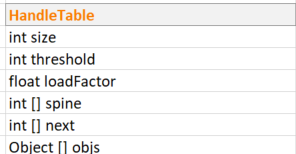
Constructor :
HandleTable(int initialCapacity, float loadFactor) {
    this.loadFactor = loadFactor;
    spine = new int[initialCapacity];
    next = new int[initialCapacity];
    objs = new Object[initialCapacity];
    threshold = (int) (initialCapacity * loadFactor);
    clear();
}
assign :
Assigns next available handle to given object, and returns handle value. Handles are assigned in ascending order starting at 0.
- here we first check if our size has exceeded our next.length array capacity [ next array stores the next candidate Handle Value ]
- in case size ≥ next.length then we grow our capacity of the hash Table by lengthening entry arrays .
here our newLength becomes = 2 * prevLength + 1
and we copy our next array to new sized array
as well as we create new array for objects
private void growEntries() {
    int newLength = (next.length << 1) + 1;
    int[] newNext = new int[newLength];
    System.arraycopy(next, 0, newNext, 0, size);
    next = newNext;

    Object[] newObjs = new Object[newLength];
    System.arraycopy(objs, 0, newObjs, 0, size);
    objs = newObjs;
}- otherwise in case our size ≥ threshold ( initialCapacity * loadFactor ) then we increase our spine [ equivalent to increasing the number of buckets in a hash Table ]
so our new spine array becomes of size prevSpineSize * 2 + 1
we have a new threshold now i,e spine.length * loadFactor
we now then call the insert method to store the objects back in the hashtable here .
private void growSpine() {
    spine = new int[(spine.length << 1) + 1];
    threshold = (int) (spine.length * loadFactor);
    Arrays.fill(spine, -1);
    for (int i = 0; i < size; i++) {
        insert(objs[i], i);
    }
}
insert Method :
we simple find the hashed Index by getting the hashValue of the Object % spine. Length .
then we add the object to our objs.
we add the next candidate to the handle with the value at the index in the spine and finally we update the spine[index] value.
private void insert(Object obj, int handle) {
    int index = hash(obj) % spine.length;
    objs[handle] = obj;
    next[handle] = spine[index];
    spine[index] = handle;
}
now once both the check for next.length and threshold are done we are sure now that we can insert our object into the HandleTable so now we call the insert function in our assign method and increase the size of the hashTable .
int assign(Object obj) {
    if (size >= next.length) {
        growEntries();
    }
    if (size >= threshold) {
        growSpine();
    }
    insert(obj, size);
    return size++;
}
lookUp function :
it help us to give the handle associated with the object
we basically iterate from the spine [index] value and keep moving to the next value untill our objects matches .
int lookup(Object obj) {
    if (size == 0) {
        return -1;
    }
    int index = hash(obj) % spine.length;
    for (int i = spine[index]; i >= 0; i = next[i]) {
        if (objs[i] == obj) {
            return i;
        }
    }
    return -1;
}
ReplaceTable :
Replace table is used to map to the replacement Object in the stream.
it internally uses the Handle Table which we saw before
and maintains a object of replacements .
members :
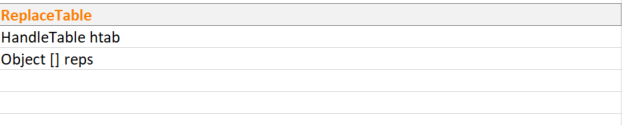
constructor :
ReplaceTable(int initialCapacity, float loadFactor) {
    htab = new HandleTable(initialCapacity, loadFactor);
    reps = new Object[initialCapacity];
}
assign :
takes the index from htab by assigning the object there ,
checks if we can add the value at the given index in case we need to grow the table then we call the grow function and then finally insert the value at the replacement index .
void assign(Object obj, Object rep) {
    int index = htab.assign(obj);
    while (index >= reps.length) {
        grow();
    }
    reps[index] = rep;
}
in the grow function , we simply increase the size by 2 * prevSize + 1 of the reps Object array and then we copy the data from original to the new sized array
private void grow() {
    Object[] newReps = new Object[(reps.length << 1) + 1];
    System.arraycopy(reps, 0, newReps, 0, reps.length);
    reps = newReps;
}
lookup :
Object lookup(Object obj) {
    int index = htab.lookup(obj);
    return (index >= 0) ? reps[index] : obj;
}
in the next part we will continue with the internal implementation of :
- SerialCallBackContext
- DebugTraceInfoStack
and then we are well equipped to see how our ObjectOutputStream class works and do the process of serialization .
Thanks for Reading ! 😁
Do support our publication by following it


