
Clean Architecture — ASP.NET Core API using Partitioned Repository Pattern with Azure Cosmos DB
Discussing a GitHub starter project to build a web API using Partitioned Repository Pattern with Azure Cosmos DB, ASP.NET Core, and Clean Architecture.
UPDATE April 10, 2022: all projects in the GitHub repo have been upgraded to .NET 5.
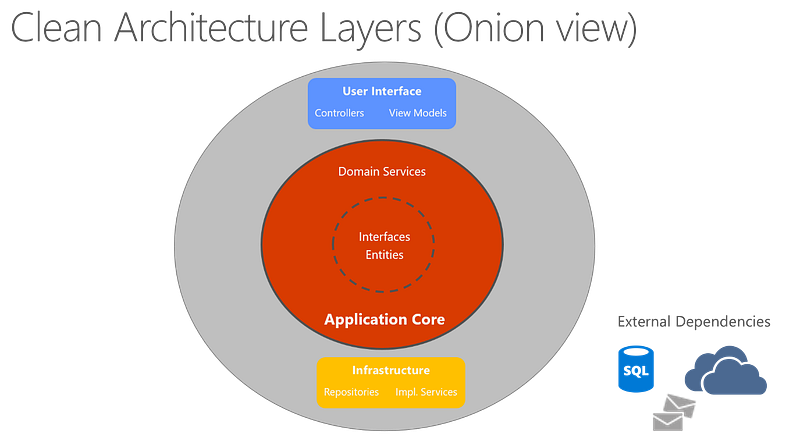
This article describes the GitHub project that can be used as a starting point to work with:
- Clean Architecture (Onion Architecture)
- ASP.NET Core 3.1
- Azure Cosmos DB .NET SDK V3
- Repository Design Pattern
- Partition Key and Partitioned Repository
Popular features also supported in the project include:
- Cosmos DB database initial creation and data seeding
- Query data using Parameterized Query, LINQ and IQueryable, Specification Pattern in Cosmos DB
- REST API with OData support and Swagger UI
- MediatR Command/Query pattern
- MediatR pipeline behaviour for exception handling
- FluentValidation for validation
Please see a full updated feature list in the GitHub repo. If you want to dive straight into the code, please see GitHub repository Clean Architecture with partitioned repository pattern using Azure Cosmos DB. The GitHub repository is work in progress. I will be publishing updates as I add more pieces to it.
Clean Architecture — Introduction
Microsoft has a library of amazing architecture documentations, one of which is called Architect Modern Web Applications with ASP.NET Core and Azure, which is also an e-book written by Steve Smith, aka, “Ardalis”. Clean Architecture is well explained in this e-book if you are interested in the great details.
At the very high-level, Clean Architecture attempts to follow architectural principles like Separation of concerns, Dependency inversion, Persistence ignorance Bounded contexts, etc.. These principles may sound too abstract, but really, they aim to make it easy for the software engineers like you and me to do right, and make it hard for us to do wrong. One of my favorite diagram (see above) from this e-book is the onion view of the architecture layers.
From this diagram, you can tell the development cycle, starting from the core to the outer layers, becomes:
- Define business entities (business requirement)
- Define business services (business requirement)
- Develop infrastructure (implementation)
- Develop UI (presentation)
This cycle allows the software engineers to meet the business requirements first by defining everything in abstraction. Any business requirement revision can be achieved at the early phase easily, compared to revising fully implemented code.
Azure Cosmos DB .NET SDK V3
When I searched in the GitHub community, I could not find a Clean Architecture repo that uses the newest .NET SDK V3 for Cosmos DB. I love the new features in the .NET SDK V3 compared to V2, particularly support for Stream APIs, support for Change Feed processor APIs.
So I decided to take Mr. Ardalis’ starter project Clean Architecture, and
- add support for Cosmos DB using .NET SDK V3
- add partitioning to the repository design pattern
Code Walkthrough
Application Core
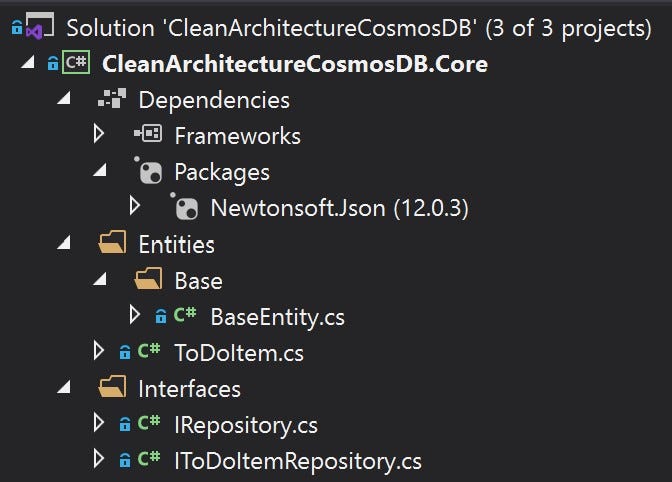
The Core project only defines the domain models and the business logic in abstraction. That’s why the Core project has minimal dependencies and it never would depend on the Infrastructure or Web projects.
IRepository.cs
This interface defines the default database interactions. Notice generics T is defined, so that any type specific repositories can just inherit this interface without duplicating the method definitions. See IToDoItemRepository.cs for example.
IToDoItemRepository.cs
Notice this interface only needs to inherit IRepository.cs without defining the methods again. Less duplicated code and really DRY!
Infrastructure
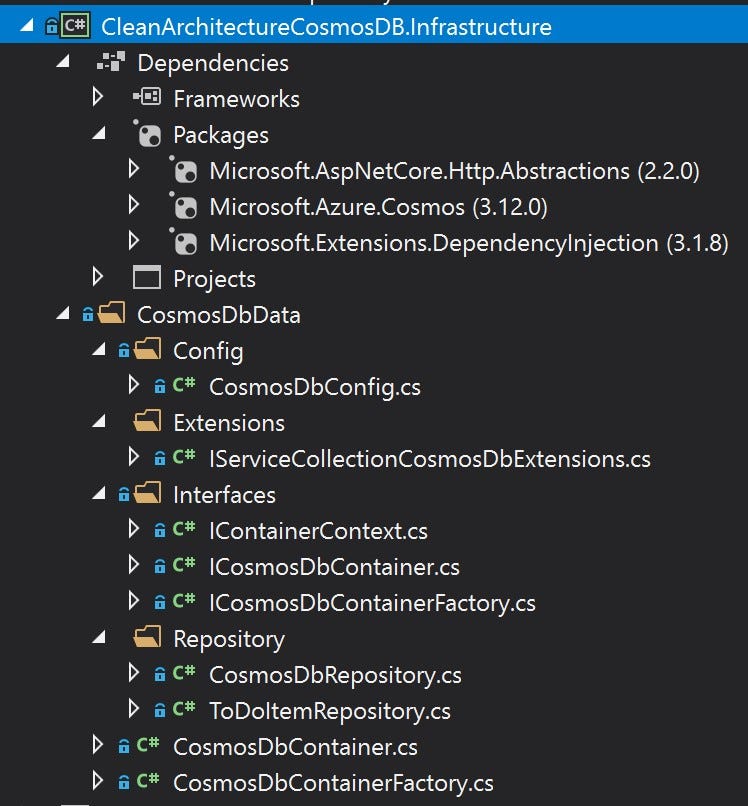
The very first NuGet package we need is the Microsoft.Azure.Cosmos package, which gives us access to Azure CosmosDB .NET SDK V3. If you are familiar with the older version SDK V2, new features in SDK V3 include:
- a new top-level CosmosClient class, which replaces the old DocumentClient. According to Microsoft documentation, “CosmosClient is thread-safe. Its recommended to maintain a single instance of CosmosClient per lifetime of the application which enables efficient connection management and performance.”. You will notice that we are going to register CosmosClient as a singleton instance in the application.
- SDK V3 allows the developers to work with generalized classes like database, container and item, no matter what CosmosDB API you choose. This is a much improvement compared to old SDK V2. See more details, please refer to Work with databases, containers, and items in Azure Cosmos DB
ICosmosDbContainerFactory.cs
This class works like a wrapper for the CosmosClient class, and allows us to easily register a singleton instance for CosmosClient, and to retrieve a specific CosmosDB container. Factory design pattern is outside the scope of this article, but it helps encapsulate the complex logic of creating a CosmosClient instance.
ICosmosDbContainer
Similarly, this class is a wrapper for the built-in Container class, and allows us to use Dependency Injection in our services.
IContainerContext.cs
This class defines the container context and adds the following features:
- use generics
in order to determine the container name - add partition key support in order to naturally support partitioning
CosmosDbRepository.cs
- Implements IRepository, which defines the data access contract
- Implements IContainerContext, which defines the container level information
- Note it is an abstract class and provides abstract implementations, so we can not directly use an instance of it, instead, we are going to use ToDoItemRepository.
AddCosmosDb() method
This is the very last thing we need before we can implement an API project. The following code allows us to call services.AddCosmosDb() in the API project startup.cs class. You will notice that a singleton instance of the CosmosClient wrapper is registered, because accroding to Microsoft documentation, a single instance of CosmosClient should be used.
ToDoItemRepository.cs
This is a concrete implementation of the abstract CosmosDbRepository class with a few quick notes.
- This class allows us to work with a specific container, aka, “Todo”
- In addition to the default repository methods provided by CosmosDbRepository class, this class allows us to add ToDoItem specific repository methods, such as GetItemsAsyncByCategory to demonstrate how Parameterized Query can be used to search data in Cosmos DB.
We are all good to get started with a web portal project or web API project.
API project
The API project is a simple, but fully implemented RESTful API project, and it can be used as a starting point with the following features properly set up:
- REST API
- Swagger UI
- OData support
- IMemoryCache Cache service (Non-distributed in-memory cache)
- Serilog for structured logging
- MediatR Command/Query pattern
- MediatR pipeline behaviour for exception handling
- FluentValidation for validation
- AutoMapper to mapping
- Email Sender using SendGrid
- Cosmos DB Database initial creation
- Cosmos DB initial sample data seeding
- CRUD endpoints using Cosmos DB
- Cosmos DB point-read using partition key and ID
- Cosmos DB single-partition read and cross-partition read
- Search data in Cosmos DB using SQL query directly (demonstration purpose, not recommended in production)
- Search data in Cosmos DB using Parameterized Query
- Search data in Cosmos DB using LINQ and IQueryable
- Search data in Cosmos DB using Specification Pattern to abstract out query-specific logic
- Audit container and automatic auditing
- … more features under development…
Please refer to the GitHub repo for a updated feature list and to see how everything is configured and implemented.
Thanks for reading! Please feel free to use this project as a starter project for you new applications!
If you would like to learn more about the start project used in this article, please check out GitHub repo. You can also check out the relevant articles discussing popular features within this project.
- GitHub repo: Clean Architecture with partitioned repository pattern using Azure Cosmos DB
- Article: Audit Log Using Partitioned Repository Pattern With Cosmos DB
- Article: Clean Architecture — Azure Functions Using Partitioned Repository with Cosmos DB
- Article: Clean Architecture — ASP.NET Core API Starter Project using In-memory Cache Service
- Article: Clean Architecture — ASP.NET Core REST API with OData and Swagger UI
- Article: Azure Cosmos DB — SQL Injection Attack and Defense in Clean Architecture


