
Clean Architecture — Audit Log Using Partitioned Repository Pattern With Cosmos DB
Discussing how to automatically audit changes using Partitioned Repository Pattern with Azure Cosmos DB, ASP.NET Core and Clean Architecture, and partition key design strategy.

UPDATE April 10, 2022: all projects in the GitHub repo have been upgraded to .NET 5.
Why Audit Log?
- Regulation purpose. For example, sensitive data like personal identifiable and patient health data, is regulated by the HIPPA law in US and the PIPEDA law in Canada. Access to data is required to be audited.
- Versioning. Audit log allows you to see the entire history of your data and gives you the ability to restore your data to any point of save point, which is an amazing feature and is seen in more and more applications.
- Many other use cases. If you are reading this article, you probably already have one!
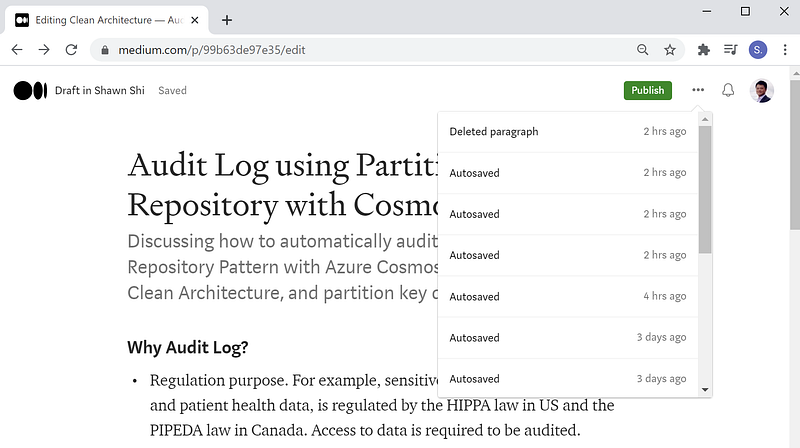
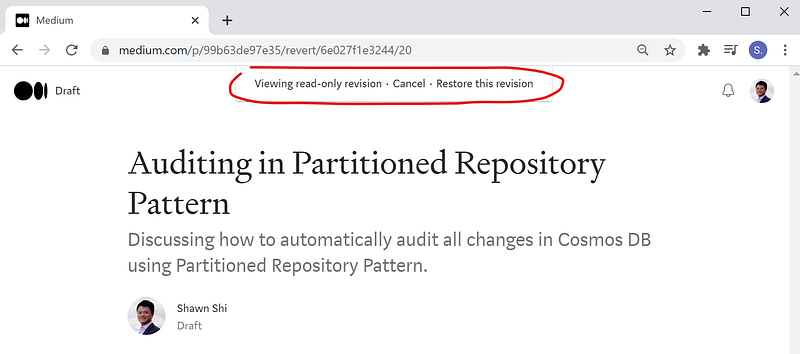
A most common example is Google docs and Microsoft docs that allow you to see full edit history. If you write Medium stories like I do, Medium allows you to see your full story edit history and restore your story to any save point. In the screenshots below, you will see that every time this story got auto-saved, a full version is saved. I can choose to restore the story to any previous version if needed, AMAAAAAAAZING!
This is my motivation to discuss how such full audit log/versioning can be done in an application with about 30 mins efforts! I will cue you to start the timer!
Prerequisites
If you want to dive into the code and see the project running, you will need the following:
- Azure Cosmos DB Emulator. You can download it from Microsoft.
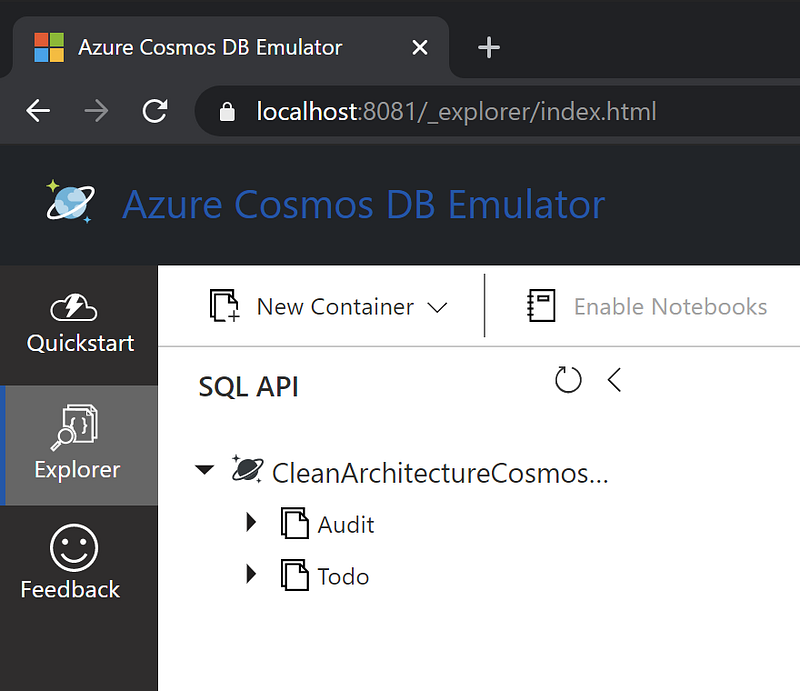
- This GitHub starter project, although the same concepts still apply to any other projects. If you use this starter project, the Azure Cosmos DB database has two containers, “Audit” and “Todo”, for audit log data and todo items, respectively. They will automatically be created when the API project runs.
Data Modeling and Partition Key Design Strategy
On a side note, I want to discuss the partition key strategy. If you are very familiar with partition key design, you can skip this section.
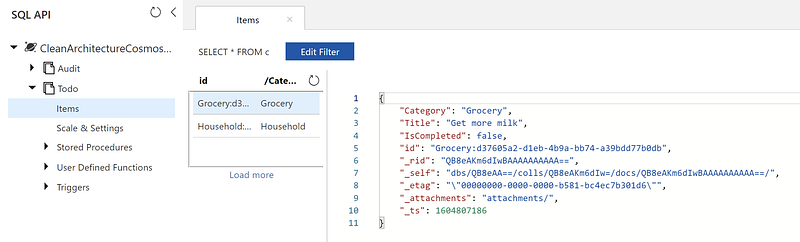
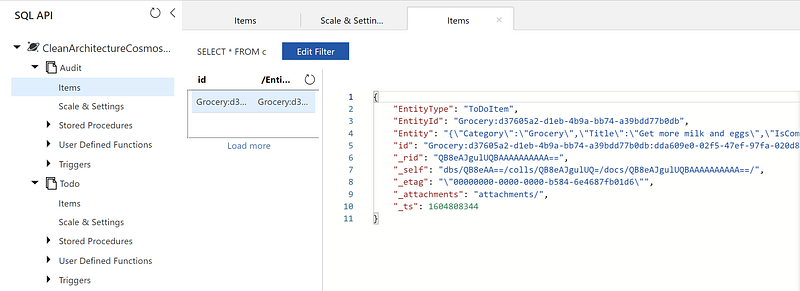
For the Todo container, Category is used as the partition key. This allows us to retrieve all the todo items under one category using single partition read. Because of this, the id of each todo item is designed as $”{entity.Category}:{Guid.NewGuid()}”. Such a design allows us to resolve the partition key by splitting the string by “:” and take the first element as the partition key value. See below for an example todo item in the Todo Container, with id value of “Grocery:d37605a2-d1eb-4b9a-bb74-a39bdd77b0db” and partition key value of “Grocery”.
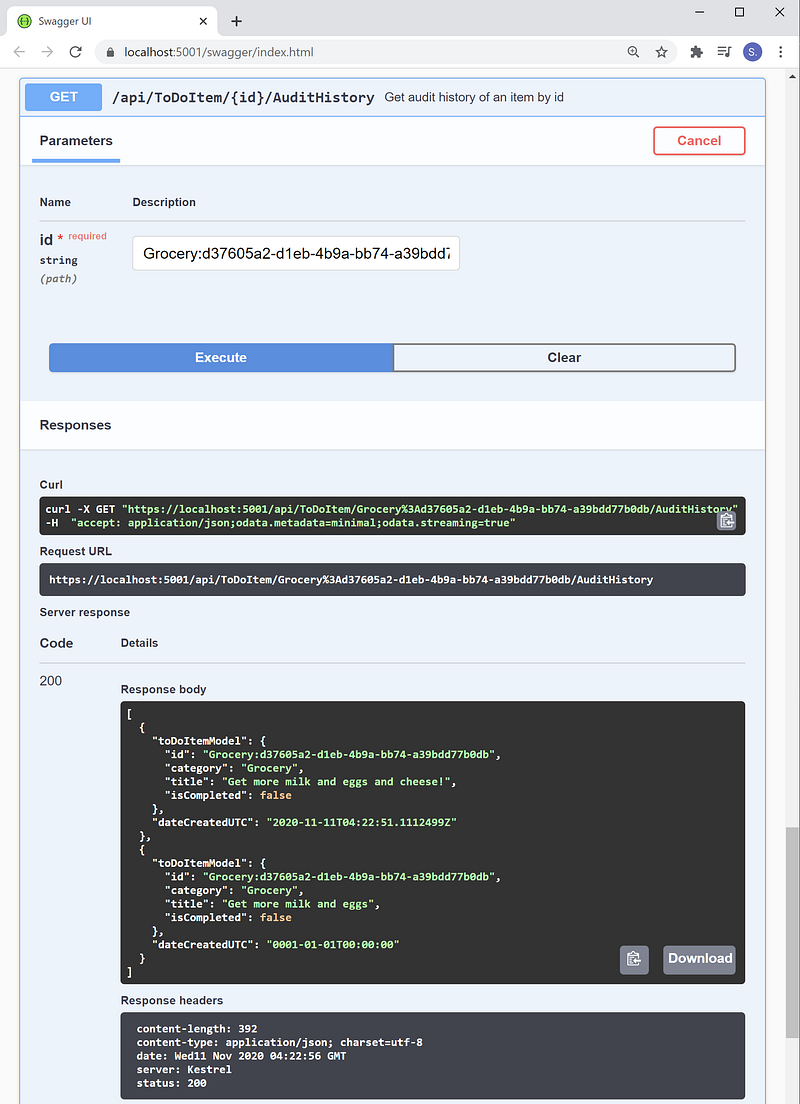
For the audit container, EntityId is used as the partition key. Because id for each entity should be unique across the entire application, each entity record, no matter it is a todo item, or something else, will have a full logical partition (20G) to store its audit log data. 20G should be well enough! For example, when I changed the example todo item above from “Get more milk” to “Get more milk and eggs”, an audit record should be created with “EntityId” value = “Grocery:d37605a2-d1eb-4b9a-bb74-a39bdd77b0db”.
Quick Review — Partitioned repository pattern
To get started, I want to quickly review what is involved with the partitioned repository pattern at the high-level! If you need a bigger picture to see how partitioned repository pattern is defined in a solution using Clean Architecture, please see this article: Clean Architecture — ASP.NET Core API using Partitioned Repository Pattern with Azure Cosmos DB.
IRepository.cs
First, let’s look at IRepository.cs, which is the interface that defines all the database access methods. The interface uses C# generic T where T must inherit the BaseEntity class. This allows the interface to handle any entity in the application, because all entities should inherit the BaseEntity class.
CosmosDbRepository.cs
Second, let’s look at CosmosDbRepository.cs, which is an abstract class that implements IRepository.cs above. A few important take away notes are:
- CosmosDbRepository class needs to be abstract because when we use a repository to read/write data, we need to work at the container level. We can not instantiate an instance of CosmosDbRepository and say “save this item to Cosmos DB”, instead, we will have to instantiate an instance of ToDoItemRepository and say “save this item to the todo container”, or instantiate an instance of Audit Repository and say “save this item to the audit container”.
- CosmosDbRepository class also uses generic T, which allows it to handle any entity that inherit Base Entity.
- CosmosDbRepository also has two virtual methods, which are used to generate ids when writing data to the audit container and to resolve partition keys when reading data from the audit container. Because all entities will share the same audit container, instead of having one method for each entity in the entity specific repository, we can define the default method implementations here. The two methods that are of interest for auditing are: GenerateAuditId() and ResolveAuditPartitionKey().
How to add automatic auditing
Now that we have reviewed out partitioned repository setup, we are ready to add auditing to our application. Start the timer please!
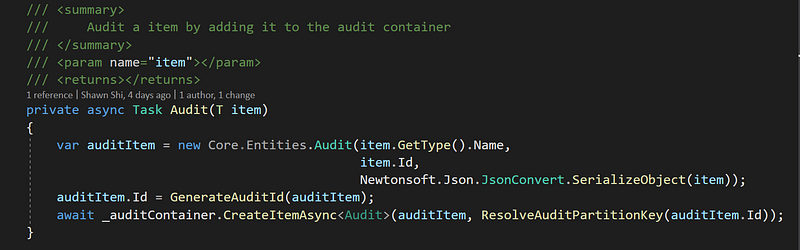
Step 1 — Add one private method, Audit(), to the CosmosDbRepository class above to save an item to the audit container. The item can be anything as long as it is an entity. This method signature takes one argument, item of generic type T. T can entity ToDoItem, or entity Account, or any other entity in your application. Reflection is used to get the name of the entity type.
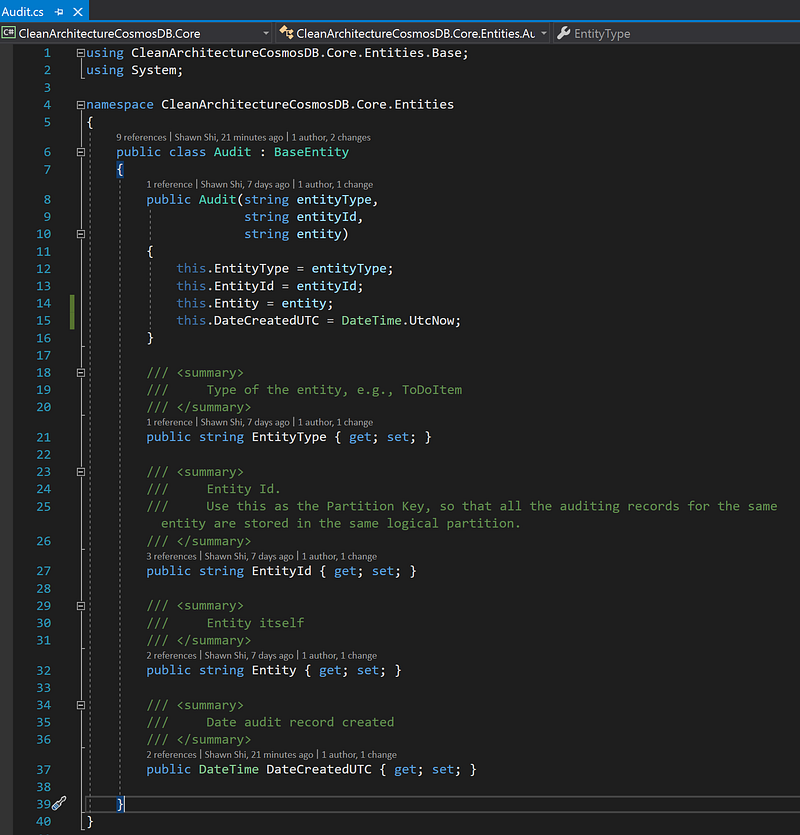
Snapshot of Audit class, which inherits the BaseEntity class, like all other entity classes.
Step 2 — Update the UpdateItemAsync() method so that every time an update is saved, an audit record is saved too.
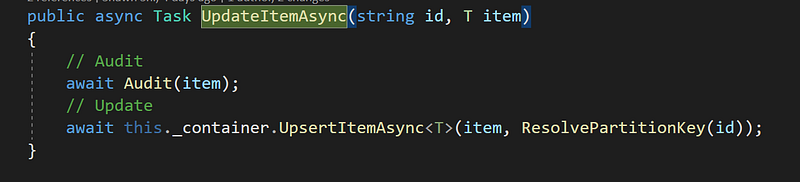
That’s it! Every time you update an item in the application, an audit record will be created and saved in the audit container! Every entity record should get a full logical partition, which is 20G storage size, and should be way more than enough!
Bonus Benefit — Because the addition of auditing is done at the repository level, your API application needs no change at all!
The following steps are optional, as you only need them if you want endpoints to retrieve audit history records.
Step 3— (optional) Add IAuditRepository.cs. We only need to define the interface itself, as the data access methods should come from IRepository.cs.
Step 4 — (Optional) Add AuditRepository to implement IAuditRepository.
Note that for audit repository, we can simply call the virtual method to resolve audit partition key so that we can reuse the same code.
Step 5— (optional) Add an endpoint in the controller to get audit history.
For the starter project, we only have one controller for ToDoItem. But you should be able to add one endpoint to any controller for any entity, because the AuditRepository only needs an entity id to return the JSON object of the entity. See Audit.cs. Please make sure you register the IAuditRepository in your Startup.cs in order to resolve it using dependency injection.
The beauty of Cosmos DB as you can store different schema in the same container! Notice that when we get the audit entities back in the GetAuditHistory handler (MediatR Command/Query pattern), we can map it to a list of ToDoItemAuditModels so we keep everything strongly-typed. No magic strings! Isn’t that awesome!
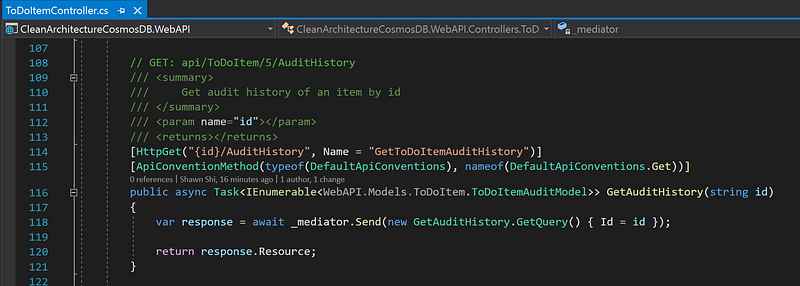
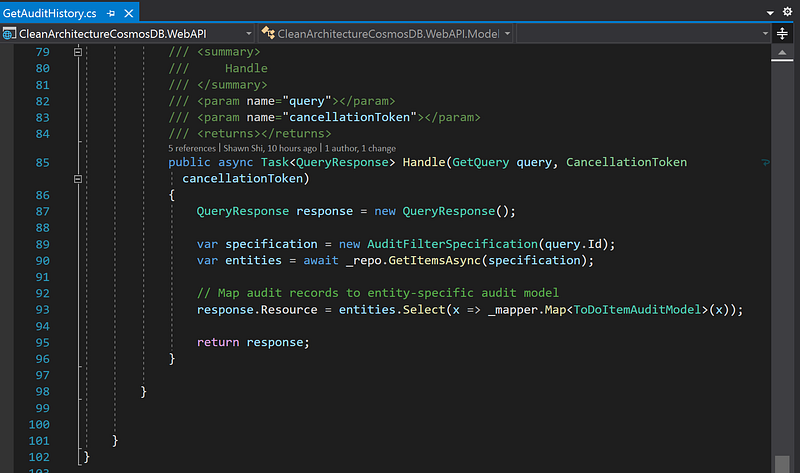
Step 6 — (Optional) Test audit history endpoint. For the same todo item with id value “”, our Swagger UI allows us to call the audit history endpoint and retrieve a full history of changes!
Now you can stop the timer!
Conclusion
Congratulations! Now you can automatically audit changes in your data, and be able to pull a full history of different versions of it!
Audit log, if not already required by regulations, is a very useful feature to add to any application because it opens another door for you to work with historical data. It is extremely cheap nowadays to store data, so why not just store it now just in case you need it in the future! It does not take much efforts/code to add it to a properly setup application!
If you would like to learn more about the start project used in this article, please check out GitHub repo. You can also check out the relevant articles discussing other popular features within this project.
- GitHub repo: Clean Architecture with partitioned repository pattern using Azure Cosmos DB
- Article: Clean Architecture — ASP.NET Core API using Partitioned Repository Pattern and Azure Cosmos DB
- Article: Clean Architecture — Azure Functions Using Partitioned Repository with Cosmos DB
- Article: Clean Architecture — ASP.NET Core API Starter Project using In-memory Cache Service
- Article: Clean Architecture — ASP.NET Core REST API with OData and Swagger UI
- Article: Azure Cosmos DB — SQL Injection Attack and Defense in Clean Architecture


