
Azure Cosmos DB — SQL Injection Attack and Defense using Partitioned Repository Pattern
Does SQL Injection apply to Azure Cosmos DB even though it is NoSQL? YES! Can you prevent it? YES! See SQL Injection prevention using Parameterized Query and LINQ with Partitioned Repository Pattern.
UPDATE April 10, 2022: all projects in the GitHub repo have been upgraded to .NET 5.

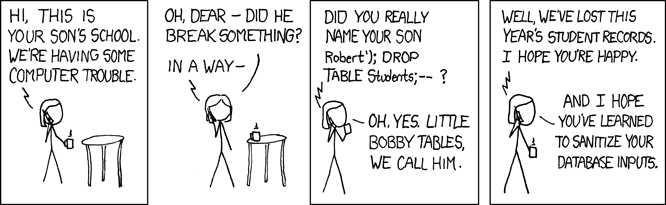
SQL Injection refers to malicious SQL statements being injected the regular application workflow in order to attack the application and its underlying database. If you come from a background of SQL database, whether it is MySQL or SQL Server, you are probably already familiar with SQL Injection and how to prevent it. If you are amused by the following comic, you know what SQL Injection is in essence and can just continue with the article. Otherwise if you need a refresher, Brent Ozar has a short article with good examples.
This article will be broken into two sections to answer the two questions in the subtitle, respectively. All the code examples used are from the GitHub starter project Clean Architecture with partitioned repository pattern using Azure Cosmos DB, which is an ongoing project aiming to provide a starting point to build a web API to work with Azure Cosmos DB using ASP.NET Core and Cosmos DB .NET SDK V3.
Does SQL Injection apply to Azure Cosmos DB?
The answer is YES! To be specific, Yes, SQL Injection applies to Cosmos DB SQL API, which is the default API when you create a new database in Cosmos DB.
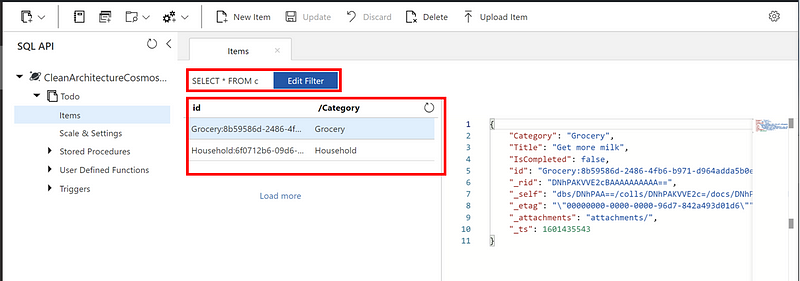
Let’s use an example database with one container called “Todo”. “Todo” container has Partition Key “/Category” so that all Todo items for the same category are stored on the same partition. There are only two items in the container, one is “Get more milk” and the other is “Do laundry”.
If we run the following queries against the Todo container:
SELECT * FROM c
As expected, we will get all the records back.
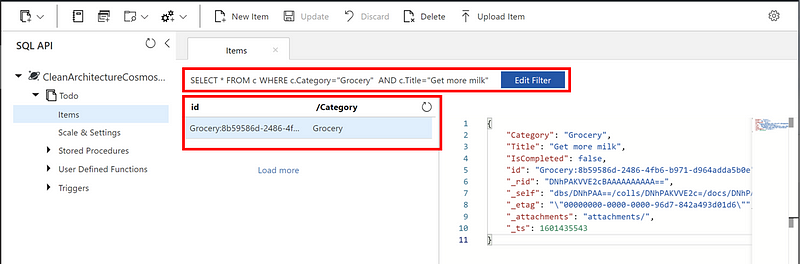
SELECT * FROM c WHERE c.Category=”Grocery” AND c.Title=”Get more milk”
As expected, we will get the one single todo item. If “Get more milk” is from the user input when the user search the todo list, the correct data will be retrieved.
SELECT * FROM c WHERE c.Category=”Grocery” AND c.Title=”Get more milk” OR 1=1
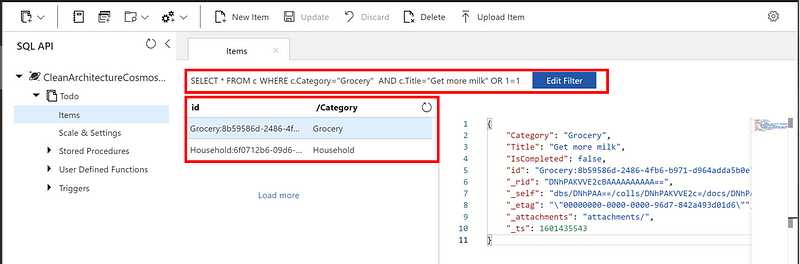
Boooom!! If Title is from the user input and the user managed to add “OR 1=1” to the end, they will get all items back! This can be a data breach problem. Imagine a user only has access to the “Grocery” category in an organization, but does the trick above, whoever wrote the backend code may have just lost their job, unfortunately…
The explosion image below might be overly dramatic, but it is not a bad idea to be dramatic when it comes to security.

Can you prevent it? YES!
There are a few ways to defend our backend system:
Option 1 — User Input Sanitization. Just like what the happy mom says in the comic above, you can certainly sanitize your user input carefully. But this is not the easiest thing to do and if you forget to escape one special character, it might still bite you.
Option 2 — Parameterized Query. As Microsoft recommended, “Parameterized SQL provides robust handling and escaping of user input, and prevents accidental exposure of data through SQL injection”. Here is the explanation on what parameterized query is with some SQL examples from Microsoft Documentation. What I will do in this article is to expand it and demonstrate how to use parameterized queries in C# using Cosmos DB .NET SDK V3.
Option 3 — LINQ. If you are familiar with Entity Framework or Entity Framework Core, you probably have already used LINQ to build IQueryable and query your SQL database. Cosmos DB supports LINQ and allows you to write your query using LINQ. One thing to note is that you will want to use LINQ to build a IQueryable instead of IEnumerable, so that your query will execute and does necessary filtering in the database instead of in the application memory. The latter may cause out of memory exception when working with large dataset.
As of today, Cosmos DB supports the majority of the LINQ operators, which I find cover almost all of my day to day operations. Because we are working with NoSQL, we don’t need the complex joins and includes like we do in SQL.
Now, let’s see how it can be done in the code. I am using a GitHub starter project, Clean Architecture with partitioned repository pattern using Azure Cosmos DB, for demonstration purpose. You can access the repo in the link and feel free to use the repo as a starter for you next project. I have also published an article discussing how partitioning for Cosmos DB is done through repository pattern, which is one of my most popular articles.
Raw SQL string — SQL Injection vulnerable
Code below is snippet copied from the CosmosDbRepository class which implements all the data access contract defined by IRepository. The snippet demonstrates how raw SQL query is used to build a Cosmos DB QueryDefinition and is run against the database. The caller may look something like: GetItemsAsync($”SELECT * FROM c WHERE c.Title = {userInput}”);
Parameterized Query — SQL Injection Prevention
Code below demonstrates how to use Cosmos DB .NET SDK to build a parameterized query and use it to search data. Note I am reusing the previous method just so I do not have duplicated code to to iterate the results and build my IEnumerable
LINQ — SQL Injection Prevention plus Strongly-Typed Query Experience
Code below demonstrates how an IQueryable object built by LINQ can be used to query against Cosmos DB. Here is the high-level workflow:
- A specification object is built built using LINQ
- This method takes a specification in its signature, translates the specification into an IQueryable object, and use the IQueryable object to query against the database and build the response.
Please note here I have abstracted out the query-specific logic using Specification Pattern, which allows me to have a centralized place to build my IQueryable object and be able to reuse it. For example, anytime I need to get all the todo items that are not completed yet, I can just initialize a new instance of ToDoItemSearchSpecification class and pass it to the method above. This reduces the times where the same query is built repetitively, e.g., SELECT * FROM c WHERE c.IsCompleted= 0.
Conclusion
We have answered the two questions asked in the subtitle, and provided sample code to prevent SQL Injection when working with Cosmos DB. Here are some very helpful links from Microsoft if you want to learn more details:
If you would like to learn more about the start project used in this article, please check out GitHub repo. You can also check out the relevant articles discussing this project.
- GitHub repo: Clean Architecture with partitioned repository pattern using Azure Cosmos DB
- Article: Clean Architecture — ASP.NET Core API using Partitioned Repository Pattern and Azure Cosmos DB
- Article: Clean Architecture — ASP.NET Core API Starter Project using In-memory Cache Service
- Article: Clean Architecture — ASP.NET Core REST API with OData and Swagger UI