
Changing Docker Output Colors
If you would prefer less rainbows on your screen
Don’t get me wrong. I love rainbows. ❤️🌈
However, I do not like to see the output on my screen in a million colors.
I also change my backgrounds periodically to spice up my blogs or my work in some little way. I get bored seeing the same thing all the time.
If you have a program outputting your text in a cacophony of colors, sometimes the colors they chose doesn’t mesh with your own choices. In fact, it can be downright hideous.
I just had this issue with docker and was reading this:
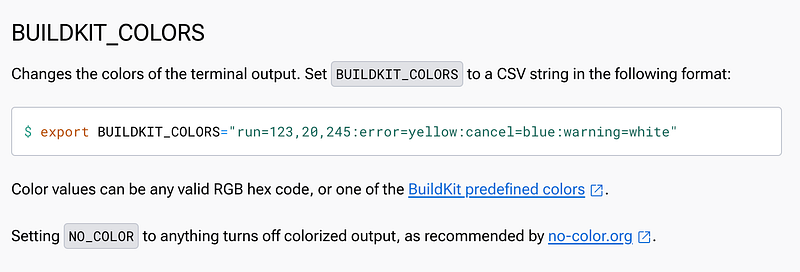
Interesting. If you run this command it turns dockers colors off:
export NO_COLOR=trueThen I set my colors in other ways such as in my terminal settings or the methods in these posts:
Note that I am not sure if NO_COLORS affects vim but if it does, I probably wouldn’t need to do what I did in the above post. I just wanted VIM to match my terminal selections.
Follow for updates.
Teri Radichel | © 2nd Sight Lab 2024
About Teri Radichel:
~~~~~~~~~~~~~~~~~~~~
⭐️ Author: Cybersecurity Books
⭐️ Presentations: Presentations by Teri Radichel
⭐️ Recognition: SANS Award, AWS Security Hero, IANS Faculty
⭐️ Certifications: SANS ~ GSE 240
⭐️ Education: BA Business, Master of Software Engineering, Master of Infosec
⭐️ Company: Penetration Tests, Assessments, Phone Consulting ~ 2nd Sight Lab
Need Help With Cybersecurity, Cloud, or Application Security?
~~~~~~~~~~~~~~~~~~~~~~~~~~~~~~~~~~~~~~~~~~~~~~~~~~~~~~~~~~~~~
🔒 Request a penetration test or security assessment
🔒 Schedule a consulting call
🔒 Cybersecurity Speaker for PresentationFollow for more stories like this:
~~~~~~~~~~~~~~~~~~~~~~~~~~~~~~~~~~~~~~~~~~~~~~~~~~~~~~~~~~~~~
❤️ Sign Up my Medium Email List
❤️ Twitter: @teriradichel
❤️ LinkedIn: https://www.linkedin.com/in/teriradichel
❤️ Mastodon: @teriradichel@infosec.exchange
❤️ Facebook: 2nd Sight Lab
❤️ YouTube: @2ndsightlab