avatarTeri Radichel

Free AI web copilot to create summaries, insights and extended knowledge, download it at here

2077

Abstract

your ~/.bashrc and you can do Y don't…</h3></div> <div><p>apple.stackexchange.com</p></div> </div> <div> <div style="background-image: url(https://miro.readmedium.com/v2/resize:fit:320/0*UIX7yUqw_Ed5sm5E)"></div> </div> </div> </a> </div><p id="313a">Just recording here in case I forget again. And by the way, I changed my colors and title to support my alma mater ~ Go UW Huskies!</p><figure id="eb0e"><img src="https://cdn-images-1.readmedium.com/v2/resize:fit:800/1*cGK8uWVVdu8LDsIW7pMFsw.png"><figcaption></figcaption></figure><div id="4e56"><pre><span class="hljs-comment"># .bashrc</span>

<span class="hljs-comment"># Source global definitions</span> <span class="hljs-keyword">if</span> [ -f /etc/bashrc ]; <span class="hljs-keyword">then</span> . /etc/bashrc <span class="hljs-keyword">fi</span>

<span class="hljs-comment"># Uncomment the following line if you don't like systemctl's auto-paging feature:</span> <span class="hljs-comment"># export SYSTEMD_PAGER=</span>

<span class="hljs-comment"># User specific aliases and functions</span> <span class="hljs-built_in">export</span> PS1=<span class="hljs-string">"\e[0;35m(^: \033[1;33m\033[49m\e]0;GO UW HUSKIES\a"</span> LS_COLORS=<span class="hljs-string">"di=0;1:ex=0;32"</span></pre></div><p id="d764">The weird thing is, why did that work because I think I should have put it in .bash_profile instead.</p><p id="5815">Anyway, later this stopped working at all.</p><p id="f178">Well, the simple solution was to run bashrc on startup by editing this settnig in the gui:</p><figure id="9be1"><img src="https://cdn-images-1.readmedium.com/v2/resize:fit:800/1*8DyaVQyGyB3x7gUZZVMU-Q.png"><figcaption></figcaption></figure><p id="677a">You may also want to adjust vim colors.</p><div id="b1a6" class="link-block"> <a href="https://readmedium.com/changing-vim-colors-and-risks-in-vim-colors-files-from-the-internet-b0276a0fc38e"> <div> <div> <h2>Changing Vi

Options

m Colors And Risks in Vim Colors Files from the Internet</h2> <div><h3>Taking a look at how the VIM colors scripts work a bit more closely</h3></div> <div><p>medium.com</p></div> </div> <div> <div style="background-image: url(https://miro.readmedium.com/v2/resize:fit:320/1*yYYJ3igrVKso6iigJKN68Q.png)"></div> </div> </div> </a> </div><p id="6d60">Follow for updates.</p><p id="4a3a">Teri Radichel | <i>© <a href="https://2ndsightlab.com/?source=post_page---------------------------">2nd Sight Lab</a> 2023</i></p><div id="8b5f"><pre><span class="hljs-section">About Teri Radichel:

⭐️ Author: Cybersecurity Books
⭐️ Presentations: Presentations by Teri Radichel
⭐️ Recognition: SANS Award, AWS Security Hero, IANS Faculty
⭐️ Certifications: SANS ~ GSE 240
⭐️ Education: BA Business, Master of Software Engineering, Master of Infosec
⭐️ Company: Penetration Tests, Assessments, Phone Consulting ~ 2nd Sight Lab</pre></div><div id="caae"><pre><span class="hljs-section">Need Help With Cybersecurity, Cloud, or Application Security?
~~~~~~~~~~~~~~~~~~~~~~~~~~~~~~~~~~~~~~~~~~~~~~~~~~~~~~~~~~~~~</span>
🔒 Request a penetration test or security assessment
🔒 Schedule a consulting call
🔒 Cybersecurity Speaker for Presentation</pre></div><div id="96b9"><pre>Follow <span class="hljs-keyword">for</span> more stories like <span class="hljs-keyword">this</span>:

❤️ Sign Up my Medium Email List ❤️ Twitter: <span class="hljs-meta">@teriradichel</span> ❤️ LinkedIn: https:<span class="hljs-comment">//www.linkedin.com/in/teriradichel</span> ❤️ Mastodon: <span class="hljs-meta">@teriradichel</span><span class="hljs-meta">@infosec</span>.exchange ❤️ Facebook: 2nd Sight Lab ❤️ YouTube: @2ndsightlab</pre></div><figure id="7286"><img src="https://cdn-images-1.readmedium.com/v2/resize:fit:800/1*4oxP4LXk8l8c3mpRvO7ejg.png"><figcaption></figcaption></figure></article></body>

Getting Mac OS to pick up bashrc

~~~~~~~~~~~~~~~~~~~~~~~~~~~~~~~~~~~~~~~~~~~~~~~~~~~~~~~

⚙️ Check out my series on Automating Cybersecurity Metrics | Code.

🔒 Related Stories: Bugs | AWS Security | Secure Code

💻 Free Content on Jobs in Cybersecurity | ✉️ Sign up for the Email List

~~~~~~~~~~~~~~~~~~~~~~~~~~~~~~~~~~~~~~~~~~~~~~~~~~~~~~~
Was copying over my bashrc file to a new machine and wasn’t picking up bashrc changes.

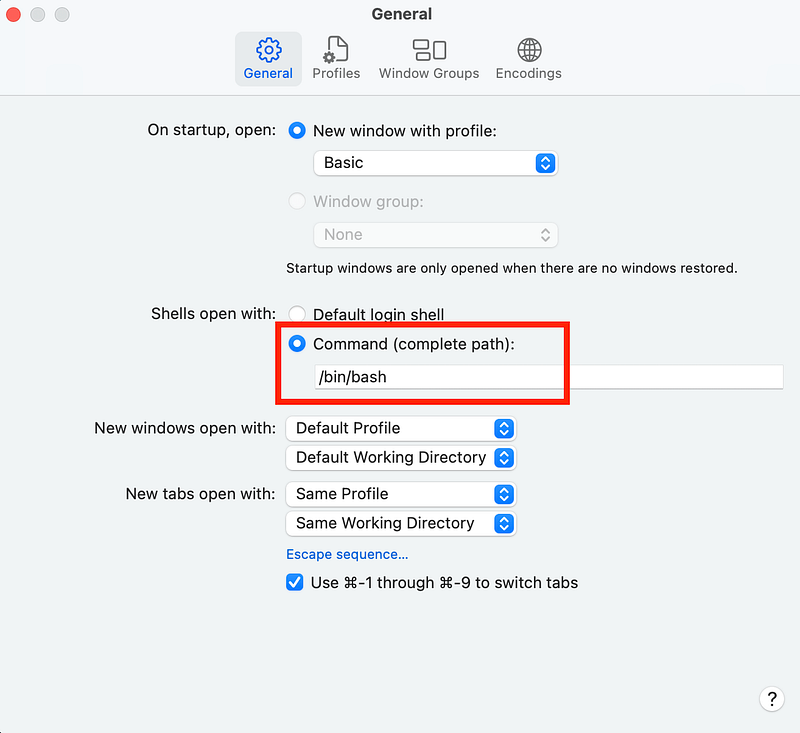
First you have to change your terminal to bash:

chsh -s /bin/bash

Or in the terminal gui:

Then I found this:

if [ -f ~/.bashrc ]; then . ~/.bashrc; fi 

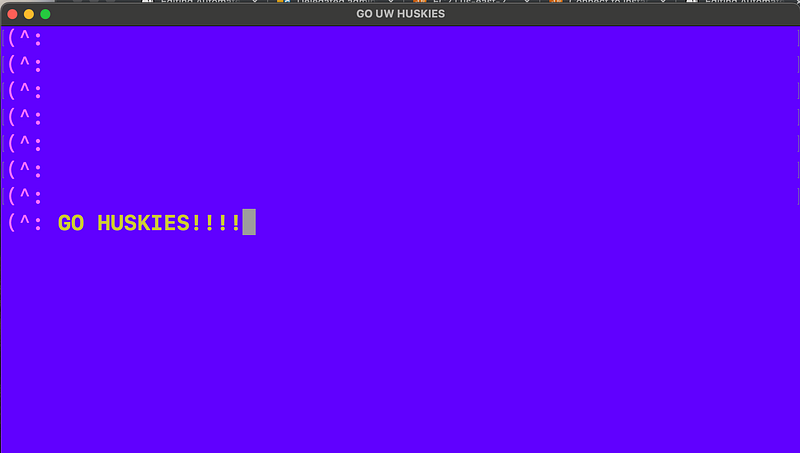
Just recording here in case I forget again. And by the way, I changed my colors and title to support my alma mater ~ Go UW Huskies!
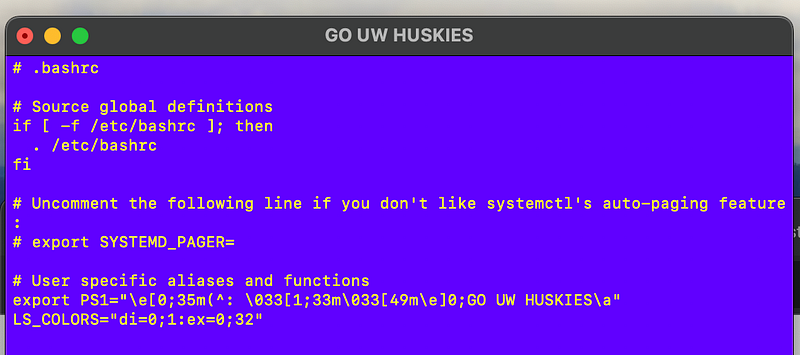
# .bashrc

# Source global definitions
if [ -f /etc/bashrc ]; then
  . /etc/bashrc
fi

# Uncomment the following line if you don't like systemctl's auto-paging feature:
# export SYSTEMD_PAGER=

# User specific aliases and functions
export PS1="\e[0;35m(^: \033[1;33m\033[49m\e]0;GO UW HUSKIES\a"
LS_COLORS="di=0;1:ex=0;32"

The weird thing is, why did that work because I think I should have put it in .bash_profile instead.

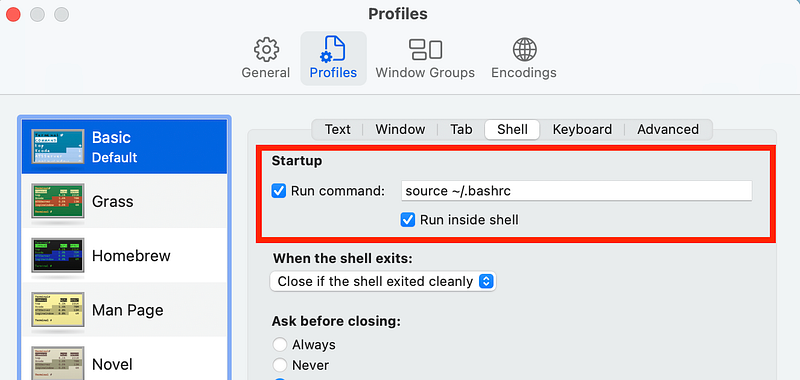
Anyway, later this stopped working at all.

Well, the simple solution was to run bashrc on startup by editing this settnig in the gui:
You may also want to adjust vim colors.

Follow for updates.

Teri Radichel | © 2nd Sight Lab 2023

About Teri Radichel:
~~~~~~~~~~~~~~~~~~~~
⭐️ Author: Cybersecurity Books
⭐️ Presentations: Presentations by Teri Radichel
⭐️ Recognition: SANS Award, AWS Security Hero, IANS Faculty
⭐️ Certifications: SANS ~ GSE 240
⭐️ Education: BA Business, Master of Software Engineering, Master of Infosec
⭐️ Company: Penetration Tests, Assessments, Phone Consulting ~ 2nd Sight Lab
Need Help With Cybersecurity, Cloud, or Application Security?
~~~~~~~~~~~~~~~~~~~~~~~~~~~~~~~~~~~~~~~~~~~~~~~~~~~~~~~~~~~~~
🔒 Request a penetration test or security assessment
🔒 Schedule a consulting call
🔒 Cybersecurity Speaker for Presentation
Follow for more stories like this:
~~~~~~~~~~~~~~~~~~~~~~~~~~~~~~~~~~~~~~~~~~~~~~~~~~~~~~~~~~~~~ 
❤️ Sign Up my Medium Email List
❤️ Twitter: @teriradichel
❤️ LinkedIn: https://www.linkedin.com/in/teriradichel
❤️ Mastodon: @teriradichel@infosec.exchange
❤️ Facebook: 2nd Sight Lab
❤️ YouTube: @2ndsightlab

Bashrc
Macos
Bash
Terminal
Window
Recommended from ReadMedium