avatarTeri Radichel

Free AI web copilot to create summaries, insights and extended knowledge, download it at here

4419

Abstract

    </div>
          <div>
            <div style="background-image: url(https://miro.readmedium.com/v2/resize:fit:320/1*LumkZvnQyC9RW29uddTROw.png)"></div>
          </div>
        </div>
      </a>
    </div><p id="9beb">Also, of great importance in a cloud environment, they have create a more scalable networking model, which decouples hardware and software.</p><p id="714b">From your perspective, when inspecting packets on a virtual machine in the cloud, you will see only minute differences to indicate any of this is happening because AWS has developed this in such a way that it works without any changes to the network interfaces involved.</p><p id="29a7">Cool, huh?</p><p id="b5e8">So if you work at AWS, you might look at a packet and see some things we won’t be seeing in a traditional network. As an AWS customer, you won’t see them because that information is removed prior to the packet reaching your host. In our case, the next layer in our packet is most likely going to be ICMP, TCP or UDP, though there are others. How do we know?</p><h2 id="953d">Finding the next protocol layer in IPv4</h2><p id="9681">The IPv4 header has a protocol field. It has a number in it and that number tells you what the next protocol is. I already mentioned this list in a prior post below in a prior post. The protocol field can hold a decimal value up to 256. The list below is much longer but I’ve cut it short and highlighted the protocols you’ll see most often. You’ll probably want to memorize these numbers.</p><figure id="cc2e"><img src="https://cdn-images-1.readmedium.com/v2/resize:fit:800/1*sL-J2fjX9iG90jhZsys7zw.png"><figcaption></figcaption></figure><p id="5be1">Now remember like I told you before, these are the decimal numbers. So you’ll want to make sure to remember that once you get over 9 hexadecimal is going to start using letters, and then when it hits F it’s going to roll over to 0x10. See the prior posts to recall how that all works. The values for these protocols will be as follows in a packet displayed in hexadecimal:</p><div id="5659"><pre>0x01 ICMP

0x06 TCP 0x11 UDP</pre></div><p id="7007">Where can we find the protocol number? Recall the layout of the ICMP header. The protocol field is 8 bits long.</p><figure id="7fda"><img src="https://cdn-images-1.readmedium.com/v2/resize:fit:800/1*s3AEDdFvNaQ2ozUONMzJxA.png"><figcaption></figcaption></figure><p id="347d">And if you want to use byte offsets its in the 9th byte offset. Remember to start counting from 0. I don’t love this method but I realize that you will need to understand it in some circles so just mentioning it again here more explicitly than in my past post.</p><figure id="6031"><img src="https://cdn-images-1.readmedium.com/v2/resize:fit:800/1*DB9gGPKJ130CQ3crQaqoIA.png"><figcaption></figcaption></figure><p id="1564">The method I use is just to count the bytes up to the start of the protocol field. There are four bytes in the first two rows, so total of 8 bytes. There’s one more byte in the next row before the protocol header so 9 bytes.</p><p id="2c1b">I have to start counting from the first byte in the <b>IP header</b> which I showed you how to find in the last post. Since the protocol field is <b>one byte</b> long and <b>two hexadecimal characters</b> is one byte we can easily see that the protocol number is <b>0x06</b>. Looking at our list above we can see that the next layer or header in our packet is <b>TCP</b>.</p><figure id="b3a5"><img src="https://cdn-images-1.readmedium.com/v2/resize:fit:800/1*irX5du_tVxu_sH3oHeNZPQ.png"><figcaption></figcaption></figure><h2 id="27b2">What about IPv6?</h2><p id="bb2d">IPv6 works a lot differently than IPv4 in many ways. Instead of a protocol field, IPv6 has a <b>next header</b> field that serves roughly the same purpose. That next header field may point to the next protocol in the stack like UDP or TCP. However, that next header field may also point to a next header which is an extension of the IPv6 protocol. You can find a list of possible IPv6 extensions that could be next headers here.</p><div id="ec95" class="link-block"> <a href="https://www.iana.org/assignments/ipv6-parameters/ipv6-parameters.xhtml"> <div> <div> <h2>Internet Protocol Version 6 (IPv6) Parameters</h2> <div><h3>Last Updated 2023-03-15 Available Formats XML HTML Plain text Regi

Options

stries included below Reference…</h3></div> <div><p>www.iana.org</p></div> </div> <div> <div style="background-image: url(https://miro.readmedium.com/v2/resize:fit:320/)"></div> </div> </div> </a> </div><p id="2cac">Here’s what the IPv6 header looks like. You can use all the math I showed you the exact same way to get the values in the fields in an IPv6 header. The challenge is that you’ll need to understand how this new protocol works (and how it might be abused by an attacker.)</p><figure id="6aeb"><img src="https://cdn-images-1.readmedium.com/v2/resize:fit:800/1*S5gEMs7sTCqj5UGMpQtiJA.png"><figcaption></figcaption></figure><div id="6487" class="link-block"> <a href="https://datatracker.ietf.org/doc/rfc8200/"> <div> <div> <h2>RFC 8200: Internet Protocol, Version 6 (IPv6) Specification</h2> <div><h3>undefined</h3></div> <div><p>undefined</p></div> </div> <div> <div style="background-image: url(https://miro.readmedium.com/v2/resize:fit:320/0*0Hgt2aWMMjRO0CD7)"></div> </div> </div> </a> </div><p id="1c14">The protocol value in IPv6 exists in the next header field. Payload length, as it sounds, is the length of the packet and is still expressed in octets.</p><figure id="510c"><img src="https://cdn-images-1.readmedium.com/v2/resize:fit:800/1*nmGJNR-yRHQwkYZvAmBRvw.png"><figcaption></figcaption></figure><p id="9bcc">Now that we know what the next protocol is in our packet, we can take a look at that protocol header as well. I’ll cover that in the next post.</p><p id="ecf1">Follow for updates.</p><p id="bbde">Teri Radichel | <i>© <a href="https://2ndsightlab.com/?source=post_page---------------------------">2nd Sight Lab</a> 2023</i></p><p id="86b1"><i>The best way to support this blog is to sign up for the email list and clap for stories you like. That also helps me determine what stories people like and what to write about more often. Other ways to follow and support are listed below. Thank you!</i></p><div id="a3cb" class="link-block"> <a href="https://2ndsightlab.medium.com/subscribe"> <div> <div> <h2>Get an email whenever Teri Radichel publishes.</h2> <div><h3>Get an email whenever Teri Radichel publishes. By signing up, you will create a Medium account if you don’t already…</h3></div> <div><p>2ndsightlab.medium.com</p></div> </div> <div> <div style="background-image: url(https://miro.readmedium.com/v2/resize:fit:320/0*fjWIo-Np_47AWPAn)"></div> </div> </div> </a> </div><div id="8334"><pre><span class="hljs-section">About Teri Radichel:

Author: Cybersecurity for Executives in the Age of Cloud
Presentations: Presentations by Teri Radichel
Recognition: SANS Difference Makers Award, AWS Security Hero, IANS Faculty
Certifications: SANS
Education: BA Business, Master of Software Engineering, Master of Infosec
Company: Cloud Penetration Tests, Assessments, Training ~ 2nd Sight Lab</pre></div><div id="46f6"><pre><span class="hljs-section">Like this story? Use the options below to help me write more!
~~~~~~~~~~~~~~~~~~~~~~~~~~~~~~~~~~~~~~~~~~~~~~~~~~~~~~~~~~~~~</span>
❤️ Clap
❤️ Referrals
❤️ Medium: Teri Radichel
❤️ Email List: Teri Radichel
❤️ Twitter: @teriradichel
❤️ Mastodon: @[email protected]
❤️ Facebook: 2nd Sight Lab
❤️ YouTube: @2ndsightlab
❤️ Buy a Book: Teri Radichel on Amazon
❤️ Request a penetration test, assessment, or training
<span class="hljs-code"> via LinkedIn: Teri Radichel </span>
❤️ Schedule a consulting call with me through IANS Research</pre></div><p id="5a42">My Cybersecurity Book: <a href="https://www.amazon.com/Cybersecurity-Executives-Cloud-Teri-Radichel/dp/1652474811/ref=as_li_ss_tl?_encoding=UTF8&amp;qid=1601801560&amp;sr=1-1&amp;linkCode=ll1&amp;tag=2ndsightlab-20&amp;linkId=3204d6389211538a20eabff16973183e&amp;language=en_US">Cybersecurity for Executives in the Age of Cloud</a></p><figure id="faf5"><img src="https://cdn-images-1.readmedium.com/v2/resize:fit:800/0*H9Ew1KCl-29nZiPR.jpeg"><figcaption></figcaption></figure></article></body>

Calculating the Next Layer in a Packet

CM.6 Understanding which header follows the IP header in IPv4 or IPv6

Part of a series on Cybersecurity Math. Also, Network Security.

Free Content on Jobs in Cybersecurity | Sign up for the Email List

In the last post I show you a bit about the IP header, one of our layers in a network packet:

We looked at that header in relation to the ethernet header which I covered in the post prior to that.

But what comes next?
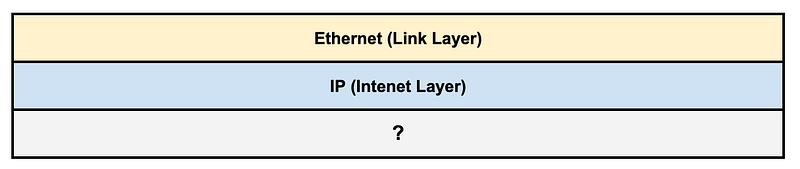
Most packets are going to have an ethernet header followed by an IP header. But not always. Some companies might be using atypical or proprietary network such as the one AWS uses behind the scenes. This is one of my favorite videos ever (well, I have a lot of favorites). It goes into detail explaining how AWS Networking works behind the scenes.

Now that I’ve shown you what packet headers are this will make more sense than if you didn’t understand them before watching it. AWS actually uses their own custom headers that they wrap around your packets to get them from point to point in the AWS cloud.
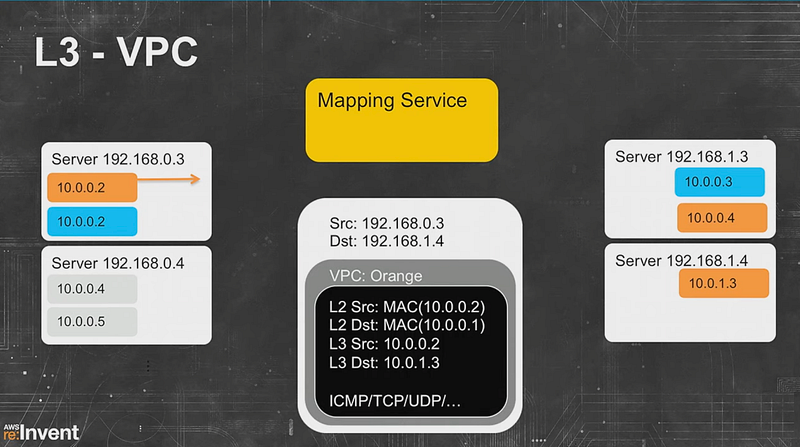
If you’re familiar with ARP, they have also removed the ARP protocol in an AWS VPC (along with its deficiencies). That’s why one attack traditionally leveraged a lot by pentesters and attackers doesn’t work anymore.

Also, of great importance in a cloud environment, they have create a more scalable networking model, which decouples hardware and software.

From your perspective, when inspecting packets on a virtual machine in the cloud, you will see only minute differences to indicate any of this is happening because AWS has developed this in such a way that it works without any changes to the network interfaces involved.

Cool, huh?

So if you work at AWS, you might look at a packet and see some things we won’t be seeing in a traditional network. As an AWS customer, you won’t see them because that information is removed prior to the packet reaching your host. In our case, the next layer in our packet is most likely going to be ICMP, TCP or UDP, though there are others. How do we know?

Finding the next protocol layer in IPv4

The IPv4 header has a protocol field. It has a number in it and that number tells you what the next protocol is. I already mentioned this list in a prior post below in a prior post. The protocol field can hold a decimal value up to 256. The list below is much longer but I’ve cut it short and highlighted the protocols you’ll see most often. You’ll probably want to memorize these numbers.
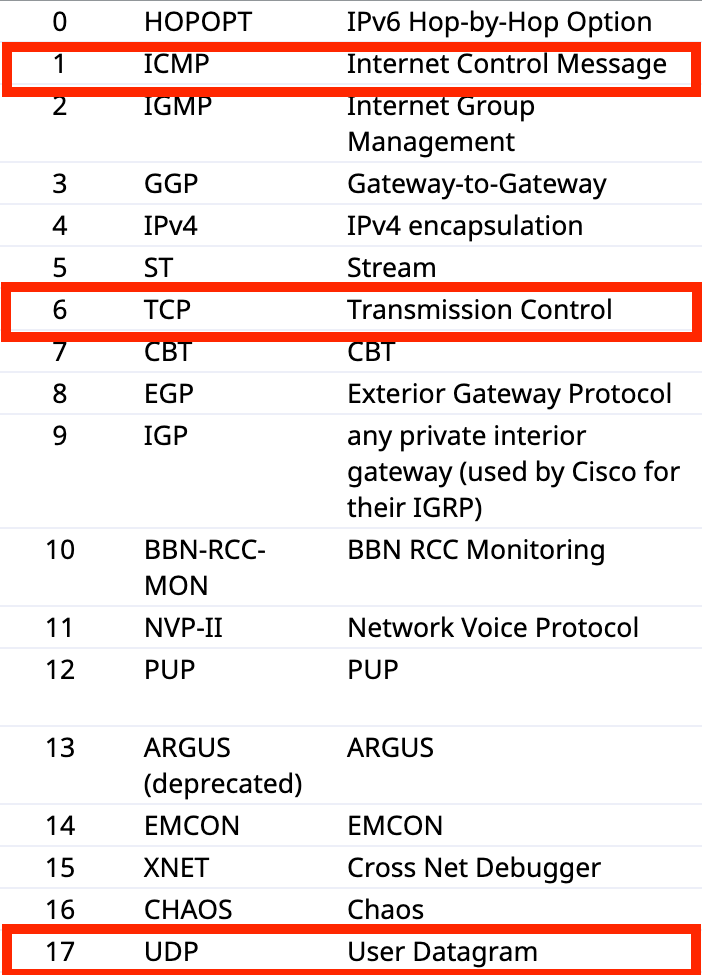
Now remember like I told you before, these are the decimal numbers. So you’ll want to make sure to remember that once you get over 9 hexadecimal is going to start using letters, and then when it hits F it’s going to roll over to 0x10. See the prior posts to recall how that all works. The values for these protocols will be as follows in a packet displayed in hexadecimal:

0x01 ICMP
0x06 TCP
0x11 UDP

Where can we find the protocol number? Recall the layout of the ICMP header. The protocol field is 8 bits long.
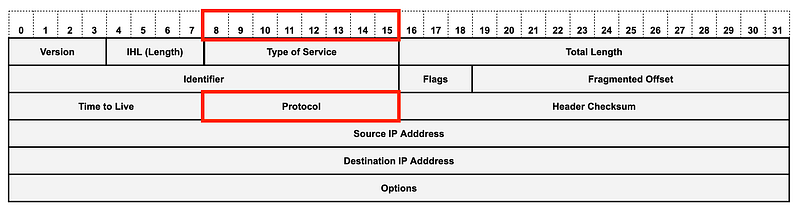
And if you want to use byte offsets its in the 9th byte offset. Remember to start counting from 0. I don’t love this method but I realize that you will need to understand it in some circles so just mentioning it again here more explicitly than in my past post.
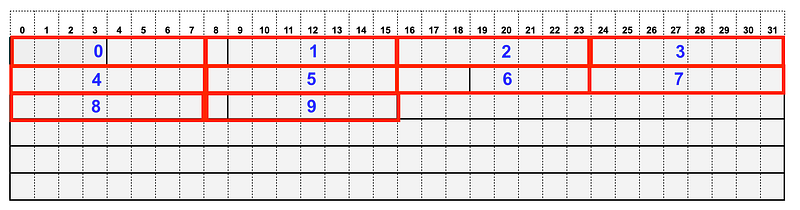
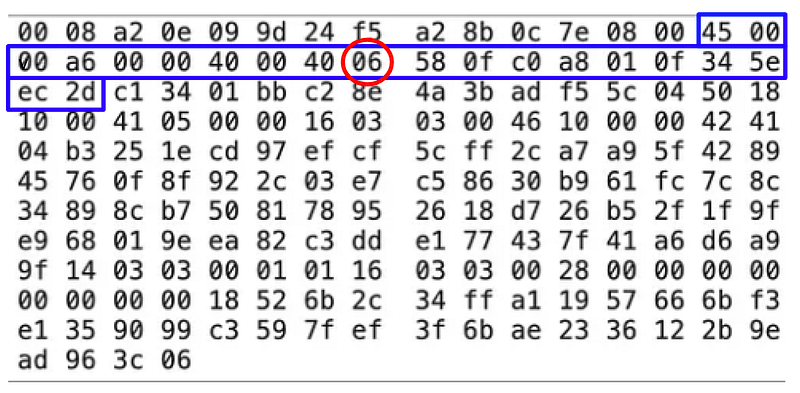
The method I use is just to count the bytes up to the start of the protocol field. There are four bytes in the first two rows, so total of 8 bytes. There’s one more byte in the next row before the protocol header so 9 bytes.

I have to start counting from the first byte in the IP header which I showed you how to find in the last post. Since the protocol field is one byte long and two hexadecimal characters is one byte we can easily see that the protocol number is 0x06. Looking at our list above we can see that the next layer or header in our packet is TCP.
What about IPv6?

IPv6 works a lot differently than IPv4 in many ways. Instead of a protocol field, IPv6 has a next header field that serves roughly the same purpose. That next header field may point to the next protocol in the stack like UDP or TCP. However, that next header field may also point to a next header which is an extension of the IPv6 protocol. You can find a list of possible IPv6 extensions that could be next headers here.

Here’s what the IPv6 header looks like. You can use all the math I showed you the exact same way to get the values in the fields in an IPv6 header. The challenge is that you’ll need to understand how this new protocol works (and how it might be abused by an attacker.)
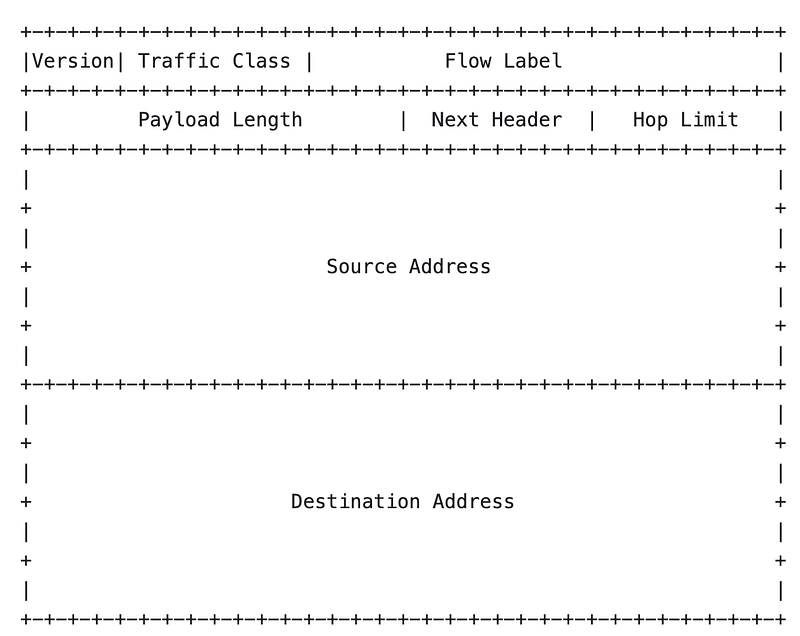
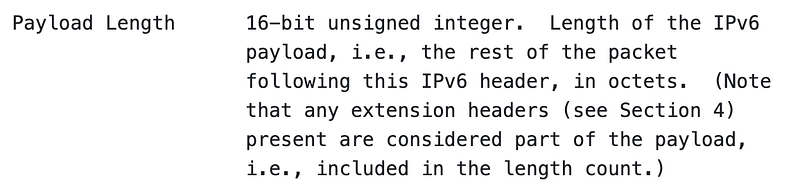
The protocol value in IPv6 exists in the next header field. Payload length, as it sounds, is the length of the packet and is still expressed in octets.
Now that we know what the next protocol is in our packet, we can take a look at that protocol header as well. I’ll cover that in the next post.

Follow for updates.

Teri Radichel | © 2nd Sight Lab 2023

The best way to support this blog is to sign up for the email list and clap for stories you like. That also helps me determine what stories people like and what to write about more often. Other ways to follow and support are listed below. Thank you!

About Teri Radichel:
~~~~~~~~~~~~~~~~~~~~
Author: Cybersecurity for Executives in the Age of Cloud

Presentations: Presentations by Teri Radichel
Recognition: SANS Difference Makers Award, AWS Security Hero, IANS Faculty
Certifications: SANS
Education: BA Business, Master of Software Engineering, Master of Infosec
Company: Cloud Penetration Tests, Assessments, Training ~ 2nd Sight Lab
Like this story? Use the options below to help me write more!
~~~~~~~~~~~~~~~~~~~~~~~~~~~~~~~~~~~~~~~~~~~~~~~~~~~~~~~~~~~~~
❤️ Clap
❤️ Referrals
❤️ Medium: Teri Radichel
❤️ Email List: Teri Radichel
❤️ Twitter: @teriradichel
❤️ Mastodon: @[email protected]
❤️ Facebook: 2nd Sight Lab
❤️ YouTube: @2ndsightlab
❤️ Buy a Book: Teri Radichel on Amazon
❤️ Request a penetration test, assessment, or training
 via LinkedIn: Teri Radichel 
❤️ Schedule a consulting call with me through IANS Research

My Cybersecurity Book: Cybersecurity for Executives in the Age of Cloud

Network Security
Packet Headers
Tcp
Math
Hexadecimal
Recommended from ReadMedium