
Building S3 File Storage With Next.js: 5. Delete files from S3
This article is part of a series of articles about building a file storage application with Next.js, PostgreSQL, and Minio S3. Here are the links to the other articles in the series:
- Building a Local Development Environment
- Main concepts and shared components
- Upload and download files using Next.js API route (4MB limit)
- Upload and download files using presigned URLs
- Delete files from S3
- Deploying locally using Docker Compose
You can find the full source code for this tutorial on GitHub
It is the fifth part of the series where we are building a file storage application with Next.js, Prisma, and Minio. In this part, we will learn how to delete files from the S3 bucket and the database.
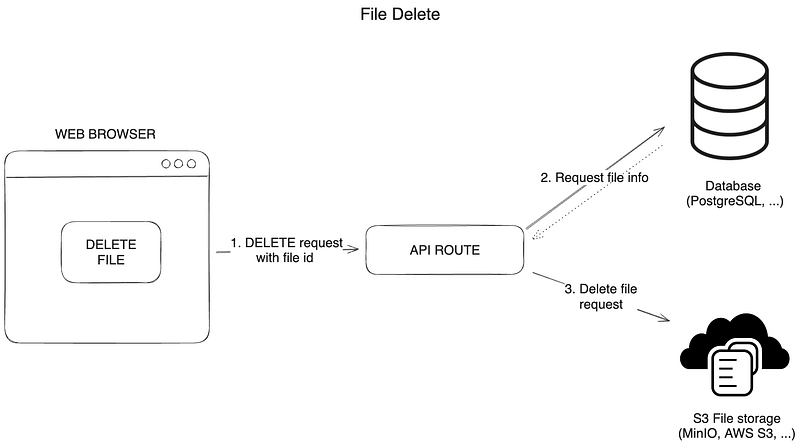
Frontend — Delete files from S3
File deletion can be done using a DELETE request to the API route. I created a delete function in FileItem component, which sends a DELETE request to the API route to delete the file from the S3 bucket and the database.
The algorithm for deleting files from S3:
- Remove the file from the list of files on the client immediately.
- Send a DELETE request to the API route to delete the file from the S3 bucket and the database.
- Fetch the files after deleting.
Here is an example of the delete function in the FileItem component:
async function deleteFile(id: string) {
  // remove file from the list of files on the client
  setFiles((files: FileProps[]) =>
    files.map((file: FileProps) => (file.id === id ? { ...file, isDeleting: true } : file))
  )
  try {
    // delete file request to the server
    await fetch(`/api/files/delete/${id}`, {
      method: 'DELETE',
    })
    // fetch files after deleting
    await fetchFiles()
  } catch (error) {
    console.error(error)
    alert('Failed to delete file')
  } finally {
    // remove isDeleting flag from the file
    setFiles((files: FileProps[]) =>
      files.map((file: FileProps) => (file.id === id ? { ...file, isDeleting: false } : file))
    )
  }
}
Backend — Delete files from S3
1. Create a utility function to delete files from S3
To delete files from S3, we will create a utility function deleteFileFromBucket that uses the removeObject method of the Minio client to delete the file from the S3 bucket.
/**
 * Delete file from S3 bucket
 * @param bucketName name of the bucket
 * @param fileName name of the file
 * @returns true if file was deleted, false if not
 */
export async function deleteFileFromBucket({ bucketName, fileName }: { bucketName: string; fileName: string }) {
  try {
    await s3Client.removeObject(bucketName, fileName)
  } catch (error) {
    console.error(error)
    return false
  }
  return true
}
2. Create an API route to delete files from S3
Here is an example of an API route to delete files from S3. Create a file delete/[id].ts in the pages/api/files/delete folder. This file will delete the file from the S3 bucket and the database.
The algorithm for deleting files from S3:
- Get the file name in the bucket from the database using the file id.
- Check if the file exists in the database.
- Delete the file from the S3 bucket using the
deleteFileFromBucketfunction. - Delete the file from the database using the Prisma
file.deletemethod. - Return the status and message in the response to the client.
import type { NextApiRequest, NextApiResponse } from 'next'
import { deleteFileFromBucket } from '~/utils/s3-file-management'
import { db } from '~/server/db'
import { env } from '~/env'

export default async function handler(req: NextApiRequest, res: NextApiResponse) {
  if (req.method !== 'DELETE') {
    res.status(405).json({ message: 'Only DELETE requests are allowed' })
  }
  const { id } = req.query

  if (!id || typeof id !== 'string') {
    return res.status(400).json({ message: 'Missing or invalid id' })
  }

  // Get the file name in bucket from the database
  const fileObject = await db.file.findUnique({
    where: {
      id,
    },
    select: {
      fileName: true,
    },
  })

  if (!fileObject) {
    return res.status(404).json({ message: 'Item not found' })
  }
  // Delete the file from the bucket
  await deleteFileFromBucket({
    bucketName: env.S3_BUCKET_NAME,
    fileName: fileObject?.fileName,
  })
  // Delete the file from the database
  const deletedItem = await db.file.delete({
    where: {
      id,
    },
  })

  if (deletedItem) {
    res.status(200).json({ message: 'Item deleted successfully' })
  } else {
    res.status(404).json({ message: 'Item not found' })
  }
}
Thanks for reading the fifth part of the series “File storage with Next.js, PostgreSQL, and Minio S3”. In the next part, we will deploy the application locally using Docker Compose.

Here are the links to the other articles in the series:
You can find the full source code for this tutorial on GitHub
Enjoyed the read? Hit 👏 like it’s a high-five — to motivate me to bring more stories!
I’m always looking to meet new people in tech. Feel free to connect with me on LinkedIn!


