
Building Modern ELT Pipelines in Snowflake
How to realize Data Pipelines with SQL and Tasks in Snowflake

Modern Data Warehouses often use a modern ELT approach instead of classical ETL. This article shows you how to realize that certain approach.
In Snowflake, this approach can be implemented relatively well, as already mentioned, e.g. with Tasks and SQL. But first a small recap.
Recap: Data Lakehouse and ELT Approach
Large amounts of data consume a lot of computing power when they are transformed. It is often no longer possible or necessary to distribute the data in the transport, when the data is first stored raw in a Data Lake, for example. From there, they can be transformed for further use cases. For example, Self Service BI, ML, etc. This would be a typical ELT approach.
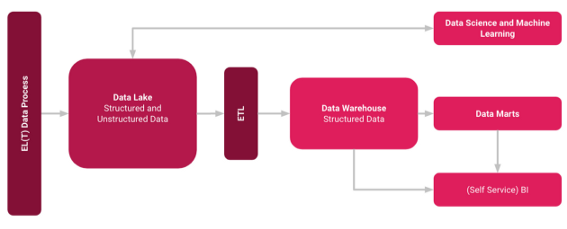
This approach is called a Data Lakehouse. The Data Lakehouse should combine the advantages of Data Lakes and Data Warehouses into a hybrid concept. Read more about the Data Lakehouse concept here.
What is a Task in Snowflake?
You can use tasks in Snowflake for use cases like a single SQL statement, a call to a stored procedure or procedural Logic with Snowflake Scripting [1]. You can combine tasks with table streams for continuous ELT workflows to process recently changed table rows. Streams ensure semantics exactly once for new or changed data in a table [2].
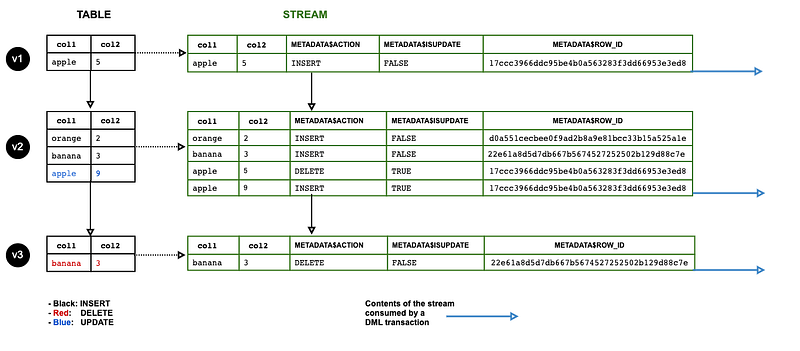
This means that you can easily create tasks via SQL, which are executed on a condition, an event or e.g. by timer. In the following, I have listed a blueprint for how you can create a task in Snowflake SQL. You can also test the whole thing yourself with Snowflake Free Tier. Its is important, that you have to create and select a database in which you are allowed to create these tasks.
--CREATE DATABASE test --if you are using the free tier create a test database first and select it--Create Task
CREATE TASK t1
SCHEDULE = '5 MINUTE'
USER_TASK_MANAGED_INITIAL_WAREHOUSE_SIZE = ‘XSMALL’
AS
SELECT CURRENT_TIMESTAMP;This task would then be executed every 5 minutes, so to speak, a very simple example, but of course new tables, updates and otherwise all possible functions can be scheduled with it.
Summary
Snowflake offers Data Engineers great tools to realize ELT workflows with streams, tasks and the simple use of SQL. Streams generate the data and the changes in the tables, so to speak, which you can then use with tasks for data processes based on them. The advantage of such an approach is that you can realize the transformation easily and with a scalable environment. If you are interested in this topic, the following articles might be also interesting for you.
Sources and Further Readings
[1] Snowflake, Introduction to Tasks (2022)
[2] Snowflake, ELT Data Pipelining in Snowflake Data Warehouse — using Streams and Tasks (2020)


