Binary Search in Python
Master Binary Search in Python: Learn iterative and recursive methods, plus a built-in bisect module for efficient searching.
When you need to find a value in a dataset, your objective is to locate its index or position so that you can access and utilize the value in your code. There are various search algorithms available to assist you in finding the index of a specific value. One of the most efficient and fundamental methods is binary search. A binary search algorithm finds a particular element in the list.✨
Generally, an algorithm is a precise sequence of instructions a computer follows to accomplish a specific task or solve a problem. Check out the blog post, What is an Algorithm, to learn about the many different kinds of algorithms in machine learning.
If you are a free member, continue reading the full article here. Link
Concept of Binary Search
We can find the element position in the binary search algorithm using the following methods.
- Recursive Method: This is like asking a friend to help you find the book. You ask them to look in one half of the library; if they don’t see it, they ask another friend to look in the other half. This keeps happening until the book is found.
- Iterative Method: This is like searching for the book yourself. You look in one half of the library, then the other half, and keep doing this until you find the book.
Both methods help you find what you’re looking for quickly and efficiently!
Let’s implement binary search in a step-by-step manner.
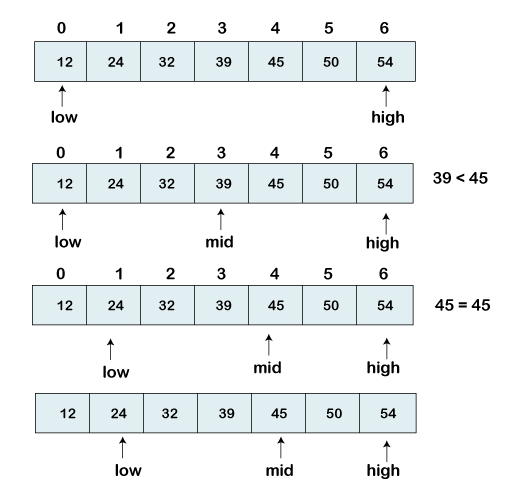
We have a sorted list of elements and are looking for the index position of 45.
[12, 24, 32, 39, 45, 50, 54]
So, we are setting two pointers in our list. One pointer denotes the smaller value, low, and the second denotes the highest value, high.
Next, we calculate the value of the middle element in the array.
mid = (low+high)/2 Here, the low is 0, and the high is 7.
mid = (0+7)/2
mid = 3 (Integer)
Now, we will compare the searched element to the mid-index value. In this case, 32 is not equal to 45, so we need to make further comparisons to find the element.
If the number we are searching is equal to the mid, then return mid; otherwise, move to the next comparison.
The number to be searched is greater than the middle number; we compare the n with the middle element of the elements on the right side of the mid and set low to low = mid + 1.
Otherwise, compare the n with the middle element of the elements on the left side of mid and set high to high = mid -1.
Implementing Binary Search in Python
Let’s explore a few ways of implementing a simple binary search in Python. But first, we need to establish a simple dataset to work with and a target value to search for. Imagine we have the following sorted array and search target:
arr = [12, 24, 32, 39, 45, 50, 54]
target = 45
Iterative method
The iterative method is perhaps the most straightforward approach. Using this method, we use a while loop to repeatedly divide the search interval in half until we find our target. This method is often favored for its clarity and efficiency.
def binary_search_iterative(arr, target):
  """
  Performs a binary search iteratively.

  Args:
    arr: A sorted array of numbers.
    target: The number to search for.

  Returns:
    The index of the target if found, otherwise -1.
  """
  low = 0
  high = len(arr) - 1
  while low <= high:
    mid = (low + high) // 2
    if arr[mid] == target:
      return mid
    elif arr[mid] < target:
      low = mid + 1
    else:
      high = mid - 1
  return -1

arr = [12, 24, 32, 39, 45, 50, 54]
target = 45
result = binary_search_iterative(arr, target)
print(f"Target found at index: {result}")
Output:

Recursive method
The recursive method for binary search is another way to implement this algorithm. Instead of using a loop, the function calls itself, adjusting the search bounds each time until it finds the target or determines that the target isn’t present.
Here’s how you can implement binary search recursively:
def binary_search_recursive(arr, low, high, target):
  """
  Performs a binary search recursively.

  Args:
    arr: A sorted array of numbers.
    low: The starting index of the search interval.
    high: The ending index of the search interval.
    target: The number to search for.

  Returns:
    The index of the target if found, otherwise -1.
  """
  if high >= low:
    mid = (low + high) // 2
    if arr[mid] == target:
      return mid
    elif arr[mid] > target:
      return binary_search_recursive(arr, low, mid - 1, target)
    else:
      return binary_search_recursive(arr, mid + 1, high, target)
  else:
    return -1

arr = [12, 24, 32, 39, 45, 50, 54]
target = 45
result = binary_search_recursive(arr, 0, len(arr) - 1, target)
print(f"Target found at index: {result}")
Output:
Supercharge your search with Python’s bisect module!
Use Python’s bisect module for fast and easy binary search. Say goodbye to building your own function!
# Import the bisect module
import bisect

arr = [12, 24, 32, 39, 45, 50, 54]
target = 45

# Call the module and provide the array and the target value
index = bisect.bisect_left(arr, target)

if index < len(arr) and arr[index] == target:
    print(f"Target found at index: {index}")
else:
    print("Target not found")
Output:
Conclusion
Binary search is a powerful and efficient algorithm that every Python developer should have in their toolkit. It provides a significant performance advantage over linear search, especially with large datasets, whether implemented iteratively or recursively.
Further Resources:
- Top 10 Machine Learning Algorithms for 2024
- Top 5 Must-read Computer Vision Books in 2024
- Mastering Gradient Descent: A Step-by-Step Guide
- The Era of Large Language Models
- How To Become a Computer Vision Engineer
- Pandas Cheat Sheet
- Python Cheatsheet
- Regex Cheat Sheet
- Learn SQL
- OOP in Python: Guide to Key Terms and Concepts
Thanks for reading✨ If you like the article, make sure to: