avatarChristianlauer

Free AI web copilot to create summaries, insights and extended knowledge, download it at here

991

Abstract

cdn-images-1.readmedium.com/v2/resize:fit:800/0*5VFizsWv0GRHrXfc.jpg"><figcaption>Data Lakehouse on GCP — Source: <a href="https://cloud.google.com/blog/products/data-analytics/open-data-lakehouse-on-google-cloud">Google</a> [1]</figcaption></figure><p id="0b11">What was still in need of improvement were the settings for refreshing data sources in Data Studio. Google is now following suit with the BigQuery data source. As of today, you can use more intervals here:</p><blockquote id="baff"><p>You can customize the data refresh rate for BigQuery data sources. Custom refresh lets you choose from increments of 1, 2, 3, 4, 5, 10, 15, 20, 25, 30, 40, 50 minutes, and from 1 to 12 hours. — Google [2]</p></blockquote><figure id="ee53"><img src="https://cdn-images-1.readmedium.com/v2/resize:fit:800/1*3mDfIELAZbGfvRR_0wSP5Q.png"><figcaption>Setting options in Data Studio for Data Freshness — Image by Author</figcaption></figure><p id="7a5a">What may appear to be a marginal update can cau

Options

se quite a bit of operational problems. For example, if data sources follow different update cycles and you as a department are dependent on them, this can of course be an exclusion criterion for data studio. That’s why I find the new features in Data Studio once again very helpful. At the same time, the heat map graphic element was added (Read <a href="https://readmedium.com/6b536bef9b6e">here</a> more about it). So for me both are pretty useful new features what Google has released this week.</p><p id="245b">Let’s see what will be improved and added next to Data Studio I’m curious!</p><h2 id="22eb">Sources and Further Readings</h2><p id="d4e8">[1] Google Cloud, <a href="https://cloud.google.com/blog/products/data-analytics/open-data-lakehouse-on-google-cloud">Open data lakehouse on Google Cloud</a> (2021)</p><p id="65a4">[2] Google, <a href="https://support.google.com/datastudio/answer/11521624?hl=en&amp;ref_topic=6267740#zippy=">Release Notes</a> (2022)</p></article></body>

Better Integration of Google BigQuery and Data Studio

How to keep your Data Fresh

Photo by Casey Horner on Unsplash

When providing data via report or dashboard, data should be as up-to date as possible. If you are working with BigQuery as a Data Warehouse or Data Lakehouse solution, my first choice is Google Data Studio as a BI layer. It is free, easy to use and of course very well integrated with Big Query.
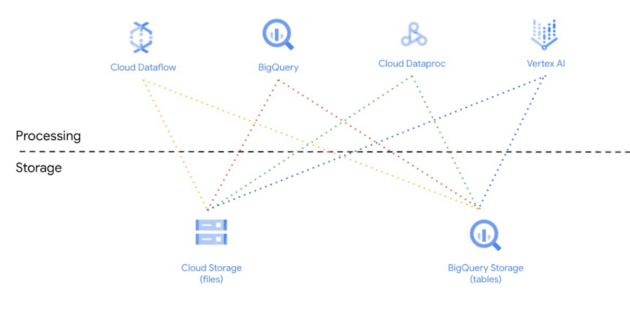
Data Lakehouse on GCP — Source: Google [1]

What was still in need of improvement were the settings for refreshing data sources in Data Studio. Google is now following suit with the BigQuery data source. As of today, you can use more intervals here:

You can customize the data refresh rate for BigQuery data sources. Custom refresh lets you choose from increments of 1, 2, 3, 4, 5, 10, 15, 20, 25, 30, 40, 50 minutes, and from 1 to 12 hours. — Google [2]
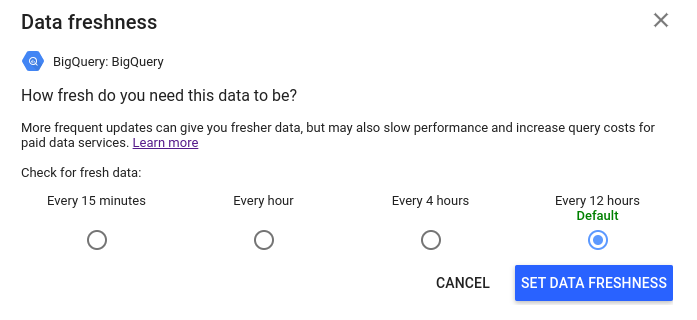
Setting options in Data Studio for Data Freshness — Image by Author

What may appear to be a marginal update can cause quite a bit of operational problems. For example, if data sources follow different update cycles and you as a department are dependent on them, this can of course be an exclusion criterion for data studio. That’s why I find the new features in Data Studio once again very helpful. At the same time, the heat map graphic element was added (Read here more about it). So for me both are pretty useful new features what Google has released this week.

Let’s see what will be improved and added next to Data Studio I’m curious!

Sources and Further Readings

[1] Google Cloud, Open data lakehouse on Google Cloud (2021)

[2] Google, Release Notes (2022)

Data Science
Sql
Bigquery
Google Cloud Platform
Google Data Studio
Recommended from ReadMedium