
ASP.NET Core Identity — How to Create DbContext and Database at Design-Time without a Web Host
Discuss a class library that can be used for design-time DbContext creation and database creation for ASP.NET Core Identity using EF Code First, without a web or API project.
Goal
The goal is to create a stand-alone class library whose sole purpose is to host ASP.NET Core Identity models, DbContext and EF Core migrations, and be able to create Identity database by applying migrations without relying on an actual web host. This is particularly useful if you follow Microsoft recommended Clean Architecture and want to develop your core entities and infrastructure first and not worry about the web app or the API (UI layer).
This article extends the Microsoft documentation on how to create DbContext from a design-time factory.
See screenshot below for the folder structure of the class library, “CleanArchitectureCosmosDB.Infrastructure”, that fully supports ASP.NET Core Identity DbContext creation, customized identity models like ApplicationUser which inherits IdentityUser, and migrations management, and database creation through applying migrations.
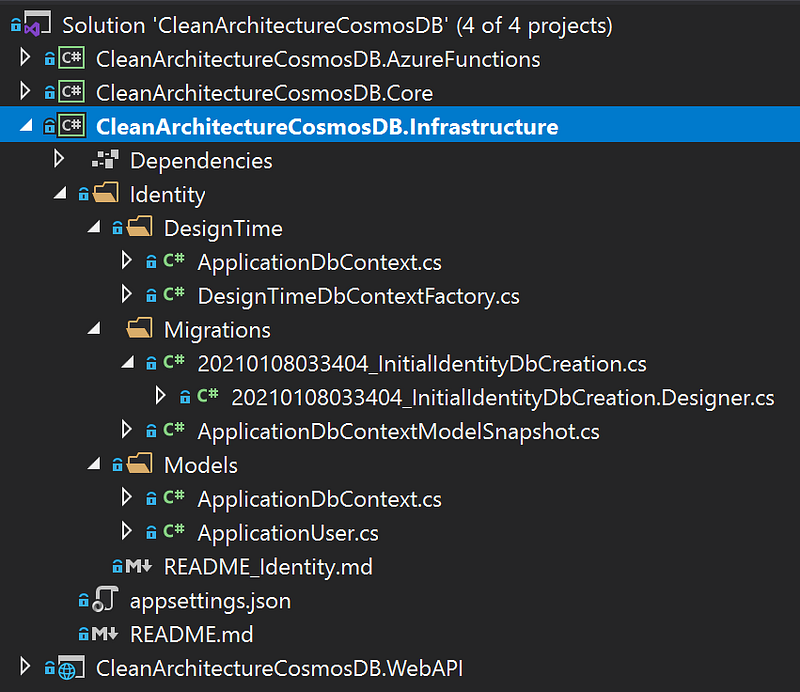
Let’s break down the class library!
NuGet packages required:
- Microsoft.AspNetCore.Identity
- Microsoft.AspNetCore.Identity.EntityFrameworkCore
- Microsoft.EntityFrameworkCore
- Microsoft.EntityFrameworkCore.SqlServer
- Microsoft.EntityFrameworkCore.Tools
- Microsoft.Extensions.Configuration
- Microsoft.Extensions.Configuration.Json
Step 1 — Customize Identity models and Identity DbContext
Let’s customize our entity type User with our ApplicationUser.cs, which inherits the default IdentityUser and adds FirstName and Last Name to it.
We will then create a customized ApplicationDbContext by deriving from the default IdentityDbContext, and specify that the custom ApplicationUser should be used for entity type User, which relates to the AspNetUsers table in the database that we will cover soon.
Step 2 — Create our design-time factory
According to Microsoft documentation, if a class implementing the IDesignTimeDbContextFactory
DesignTimeDbContextFactory.cs
- This class implements the IDesignTimeDbContextFactory
- The CreateDbContext method returns an ApplicationDbContext, which is our custom DbContext using ApplicationUser defined above
- We first build our configuration instance, which contains the connection string to the SQL Server database.
- We then build the options by calling AddBaseOptions (explained in the next paragraph), and return an instance of ApplicationDbContext.
Partial ApplicationDbContext.cs
The reason our ApplicationDbContext above is a partial class is that we can add some additional methods that are not tied to the DbContext itself. Here we want to setup SQL Server connection string that will be used.
appsettings.json, where the long waited configuration values are stored in.
- Notice the key value matches the config.GetConnectionString(“CleanArchitectureIdentity”) method.
Step 3 — Add README file (the future you and also your co-workers will love you for this!)
The read me file lists all the commands that the next developer will need to get started.
Step 4 — Create migrations
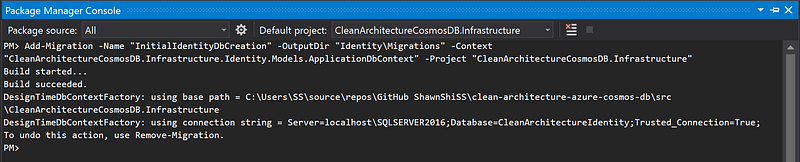
Thanks to the readme file above, we have the command to create the initial migration. We can run the command in the Package Manager Console. In the screenshot below, you can see we’ve successfully used the connection string value from appsettings.json and created one migration for the initial DbContext creation.
Step 5 — Apply migrations
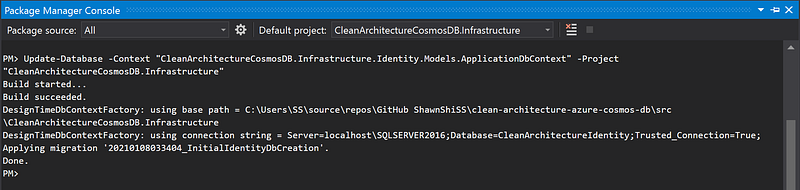
Thanks to the readme file again, we have the command to apply the migration(s) and create the initial database. We can run the command in the Package Manager Console. In the screenshot below, you can see we’ve successfully used the connection string value from appsettings.json and applied the migrations.
Step 6 — Verify database is created
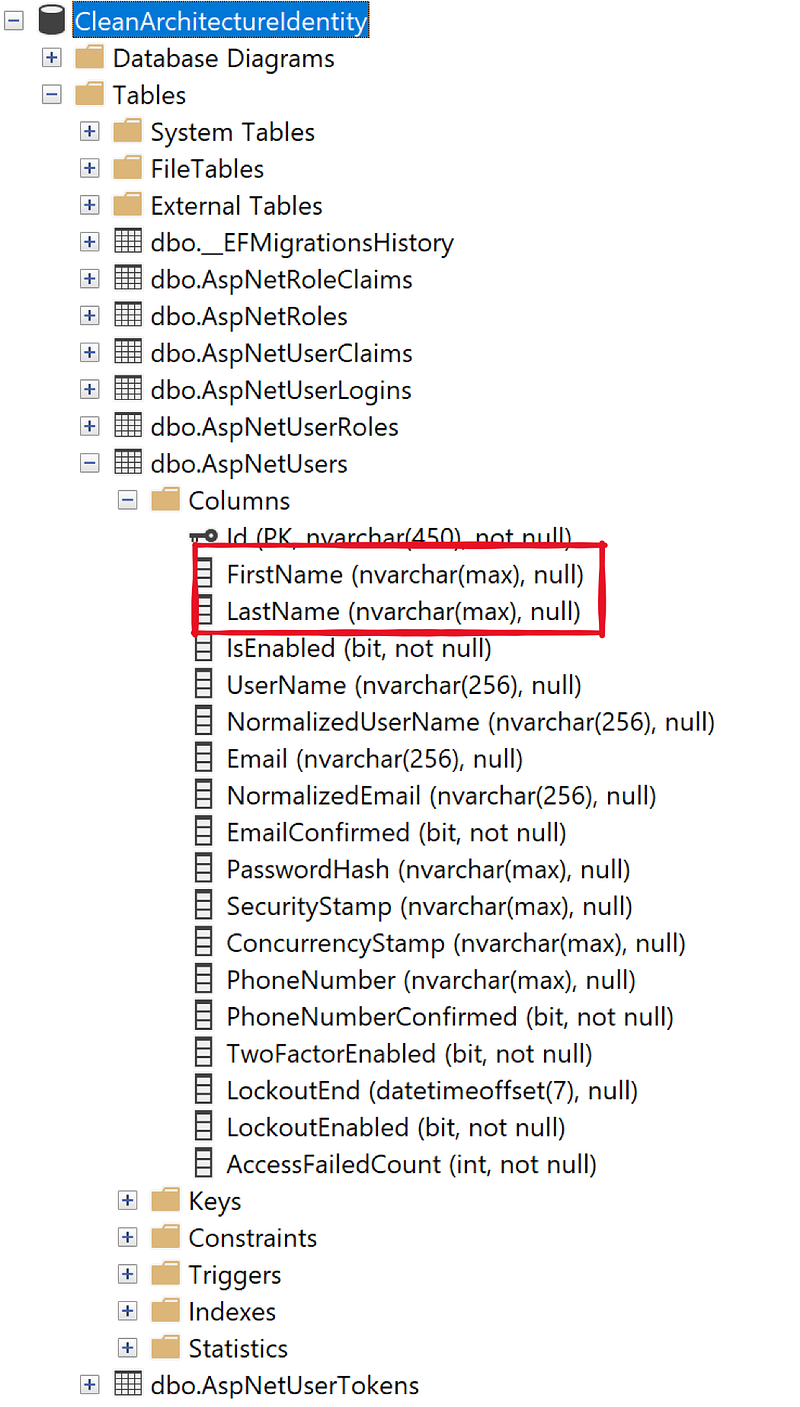
Hooray! If the connection string works, you should see the database successfully created, with the custom fields added to our AspNetUsers table.
Conclusions
We have created out DbContext and our Identity database without a web host. This is particularly helpful if you are working with Clean Architecture and developing core entities first, or if you only want to build a user/token service using ASP.NET Core Identity without knowing when it shall be used.
The sample code in this article is from a GitHub starter project., which uses Clean Architecture to organize the projects. This project features Partitioned Repository Pattern using Azure Cosmos DB to build scalable backend service, REST API, Azure Functions, React SPA, etc.. Feel free to use the whole starter project or part of it to kick start your next exciting adventure!
For more resources relevant to the project:
- GitHub repo: Clean Architecture with partitioned repository pattern using Azure Cosmos DB
- Article: Clean Architecture — ASP.NET Core API using Partitioned Repository Pattern and Azure Cosmos DB
- Article: Audit Log Using Partitioned Repository Pattern With Cosmos DB
- Article: Clean Architecture — Azure Functions Using Partitioned Repository with Cosmos DB


