avatarDr. Gregor Scheithauer

Free AI web copilot to create summaries, insights and extended knowledge, download it at here

5314

Abstract

ne and it is always exciting. I transfer the article, provide further metadata like tags or topics.</p><p id="d427">After publishing my article there is a strong feeling of joy and proudness (a writer’s high?). We did it. I let some time pass so that I have a more unbiased view of the article: the <b>review phase</b>. My goal here is to learn. I note down, what went well and what could be improved for the following articles. Feedback may come from different places. Imagine you publish your article on your personal blog or your company’s intranet, feedback may receive you in the form of comments to your article. Colleagues and friends might provide their view of your work to you in person. If you submitted your work to a publisher or a research journal they will provide you with feedback. Furthermore, I note down a success rating for each article. This could be unique views, acceptance score, reach, number of comments, or anything important for you that defines success in your writing community.</p><h2 id="a119">Pipeline management tool — a free Notion template</h2><p id="d45e">In early 2020 I jumped on the Notion train for note-taking, especially because of the database-functionality and that it allows me to build self-made little knowledge apps. Since starting using Notion I created my own (very basic) todo-app, lists for my life goals and bucket lists as well as the <b>article pipeline. </b>I will not try to convince you to use Notion and please note my disclaimer at the end of this article.</p><blockquote id="8d15"><p><a href="undefined"><b>Notion</b></a> is an application that provides components such as notes, databases, <a href="https://en.wikipedia.org/wiki/Kanban">kanban</a> boards, wikis, calendars and reminders. Users can connect these components to create their own systems for knowledge management, note taking, data management, project management, among others. These components and systems can be used individually, or in <a href="https://en.wikipedia.org/wiki/Collaborative_software">collaboration</a> with others. — Source <a href="https://en.wikipedia.org/wiki/Notion_(app)">Wikipedia</a> (retrieved 2021–03–08)</p></blockquote><figure id="ce78"><img src="https://cdn-images-1.readmedium.com/v2/resize:fit:800/1*R4JAQ44JB6D-8Ve2gmGdZg.png"><figcaption>Image by author; based on work from <a href="https://unsplash.com/@retrosupply?utm_source=medium&amp;utm_medium=referral">RetroSupply</a>; article list</figcaption></figure><p id="0180">The pipeline tool comes with <b>five different views</b>: the article idealist, article overview table, a kanban status board view, a scheduling calendar, and an article review view. Each view shows a different angle on the same articles in the pipeline. I use the <b>article idea list</b> mainly for writing down new ideas quickly during the <i>idea phase. </i>You can limit the list size to those articles that have the status <i>idea or planning</i>. The display of further metadata, such as <i>final title, summary, etc. </i>is hidden to make it more simple to enter just new ideas.</p><figure id="bfec"><img src="https://cdn-images-1.readmedium.com/v2/resize:fit:800/1*uHfHkUJaSKbEIzRgZ9Dqbg.png"><figcaption>Image by author; based on work from <a href="https://unsplash.com/@retrosupply?utm_source=medium&amp;utm_medium=referral">RetroSupply</a>; article overview table</figcaption></figure><p id="e905">The <b>article overview table</b> allows me quickly to add new information to articles, i.e., plan them out during the <i>planning phase</i>. This view also helps me a lot to <i>groom</i> the article pipeline. This includes getting rid of ideas that I will likely never follow up on, change the directions (takeaways) of some articles, or adjust the prioritization.</p><figure id="47be"><img src="https://cdn-images-1.readmedium.com/v2/resize:fit:800/1*CqXcjo__m6reYBWSJcKQdg.png"><figcaption>Image by author; based on work from <a href="https://unsplash.com/@retrosupply?utm_source=medium&amp;utm_medium=referral">RetroSupply</a>; Article page</figcaption></figure><p id="a8a5">Please note, that is always possible to open one of the entries and view as well as edit these aspects on an <b>article page</b>. I do not count it as a view, but still this is a powerful aspect of Notion. Furthermore, since Notion is a note-taking-app it is very valid to write your article draft in Notion (and more specifically on the article page) itself during the <i>writing phase</i>. One benefit for you could be that you are not working alone on this article. Notion allows for collaboration while writing in notes, like many other note-taking apps.</p><figure id="2575"><img src="https://cdn-images-1.readmedium.com/v2/resize:fit:800/1*OifEkX3cAL7R5T-WHpQCxA.png"><figcaption>Image by author; based on work from <a href="https://unsplash.com/@retrosupply?utm_source=medium&amp;utm_medium=referral">RetroSupply</a>; Article page</figcaption></figure><p id="0d13">Another way to support your pipeline management is the <b>Kanban board view </b>of your articles based on <i>article status.</i> This view allows you not only to view your pipeline based on the status, but you may also move articles between different statuses. So you might decide to promote an article from <i>idea</i> to <i>planning</i>, while for another you move i

Options

t from <i>writing</i> to <i>planning</i> because you realized the topic needs more research or more testing.</p><figure id="35ef"><img src="https://cdn-images-1.readmedium.com/v2/resize:fit:800/1*tKh8SuZoS5DaTnyCcmuEvw.png"><figcaption>Image by author; based on work from <a href="https://unsplash.com/@retrosupply?utm_source=medium&amp;utm_medium=referral">RetroSupply</a>; Article review</figcaption></figure><p id="f20c">The next view is maybe the most important since it helps me to reflect and to learn: <b>article review list</b> to support the <i>review phase</i>. The information is limited to the <i>title, what went well, what needs improvement, </i>and a <i>measure of success</i>. As mentioned above success depends on your line of business, community, or field, such as the number of readers, reach, or likes.</p><figure id="f57f"><img src="https://cdn-images-1.readmedium.com/v2/resize:fit:800/1*Er8B_c5QTBqAWMAxsEpnBw.png"><figcaption>Image by author; based on work from <a href="https://unsplash.com/@retrosupply?utm_source=medium&amp;utm_medium=referral">RetroSupply</a>; Publishing calendar</figcaption></figure><p id="79b2">The last view shows you a <b>calendar</b> with your articles based on set <i>planned publication date</i>. This helps me a lot to stick to a certain (self-set) publishing frequency.</p><h2 id="bd47">How to get you started with the article pipeline</h2><p id="0a55">So again, I put it out there for you to consider using it, and by that getting your feedback about what is not so good about it. Another learning possibility. Below you will find a link to the article pipeline tool that is more or less empty. You may access it without a Notion account.</p><div id="6a22" class="link-block"> <a href="https://www.notion.so/48ffe1c25ba249a0b514443ffe03ae6a?v=d8fb0a6f03354e15ad06aee9d2fc92b9"> <div> <div> <h2>Article Pipeline (public)</h2> <div><h3>This is a free Notion template for you to manage your article writing, i.e., note article ideas, plan them out, help…</h3></div> <div><p>www.notion.so</p></div> </div> <div> <div style="background-image: url(https://miro.readmedium.com/v2/resize:fit:320/0*_5oTmMq-jvDlU_0T)"></div> </div> </div> </a> </div><p id="6566"><b>For all Notion users</b>: on the very top on the right you will find the <b>duplicate</b> button that allows you to copy this database into your own Notion space. Once you have done that you may reduce, alter, or amend any views, properties the way you like. Again, I would love to learn what you would do in a different way.</p><blockquote id="a8c1"><p>⚠️ Please note, that I am not affiliated with Notion nor am I using any affiliation links. Also, I am not saying that Notion is the best note-taking app out there, or that you should use a cloud-based service. ^^</p></blockquote><p id="cc23">Here are <b>some resources</b> to get you started with Notion:</p><ul><li><a href="https://www.youtube.com/watch?v=oTahLEX3NXo">What is Notion</a>” by Notion on YouTube</li><li><a href="https://readmedium.com/the-writers-ultimate-guide-to-notion-6bf90d1cf45b">The writer’s ultimate guide to Notion</a>” by <a href="undefined">Owen Williams</a> on Medium</li><li><a href="https://www.youtube.com/watch?v=ONG26-2mIHU">My Favourite Note-Taking App for Students — Notion (2020)</a>” by Ali Abdaal on YouTube</li></ul><h2 id="a577">Conclusion</h2><p id="e5e9">In this article, I motivated to use a structured approach — the article pipeline — to improve your article management and writing output. Furthermore, I showed you how I implemented the article pipeline on top of Notion and explained how you could use it.</p><p id="beaa">I mainly put it out in the open to get your feedback, and hence, learn from you. So, what do you think?</p><p id="71f2"><b>Find more articles from me here</b>:</p><ol><li><a href="https://readmedium.com/article-pipeline-management-with-notion-app-template-13e83635ed1">Learn how I plan my articles for Medium</a></li><li><a href="https://readmedium.com/article-pipeline-management-with-notion-app-template-13e83635ed1">Learn how to write clean code in Python using chaining (or pipes)</a></li><li><a href="https://towardsdatascience.com/nine-years-on-linkedin-in-data-b34047c77223">Learn how to analyze your LinkedIn data using R</a></li><li><a href="https://towardsdatascience.com/data-visualization-in-python-like-in-rs-ggplot2-bc62f8debbf5">Learn how to create charts in a descriptive way in Python using grammar of graphics</a></li><li><a href="https://towardsdatascience.com/how-to-setup-logging-for-your-python-notebooks-in-under-2-minutes-2a7ac88d723d">Learn how to set up logging in your python data science code in under 2 minutes</a></li></ol><p id="b171"><b>Gregor Scheithauer</b> is a consultant, data scientist, and researcher. He is specialized in the topics of Process Mining, Business Process Management, and Analytics. You can connect with him on <a href="https://www.linkedin.com/in/gscheithauer/"><b>LinkedIn</b></a>, <a href="https://twitter.com/gscheithauer"><b>Twitter</b></a>, or here on <a href="https://gscheithauer.medium.com/"><b>Medium</b></a>. Thank you!</p></article></body>

NOTION ARTICLE TEMPLATE

How an Article Pipeline might Enhance your Writing Productivity

And how you can use a free database tool to start right now to build your own Article Pipeline — from idea generation and planning until review
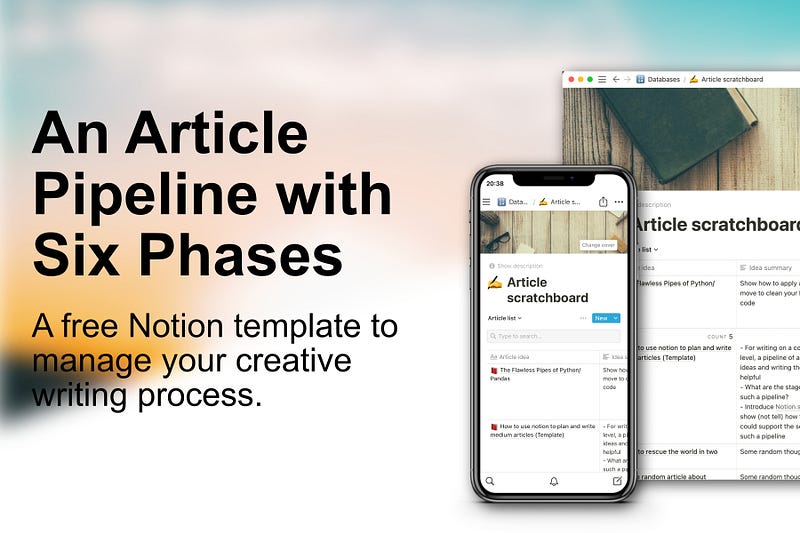
Image by author; based on work from RetroSupply and Jordan Wozniak on Unsplash, inspired by Michal Malewicz’s article

Hi, I am Gregor, a researcher, a writer, a data scientist, and a consultant. And I like all of it, but these passions compete for the same amount of available time and energy. At any given moment new ideas emerge that compete with old ideas that I am working on at the moment. Maybe you can relate to this scenario. Wouldn’t it be great to have something to put your ideas into and that allows you to work on them gradually as well as take a step back and sort your ideas? New ideas do not drown in your hectic day, old ideas are easy to follow up on.

To streamline my writing process and support my writing on several articles at any moment, I developed an article pipeline with six phases. It improves the chances that I do not forget a great article idea but also am reminded on article drafts that were once great new ideas themselves and to finish them, or consciously disregard them. But having this concept helps me only so much. Hence I decided to implement it using Notion. And in this article, I want to show you the result. Firstly, I describe my article pipeline phases. Then I present you the Notion template, and finally, I describe how you can use this template for yourself.

Article pipeline — from new ideas to retrospective

My pipeline consists of six phases that you will find in the image below. Of course, this is only a suggestion and you may of course adapt it any way you want.
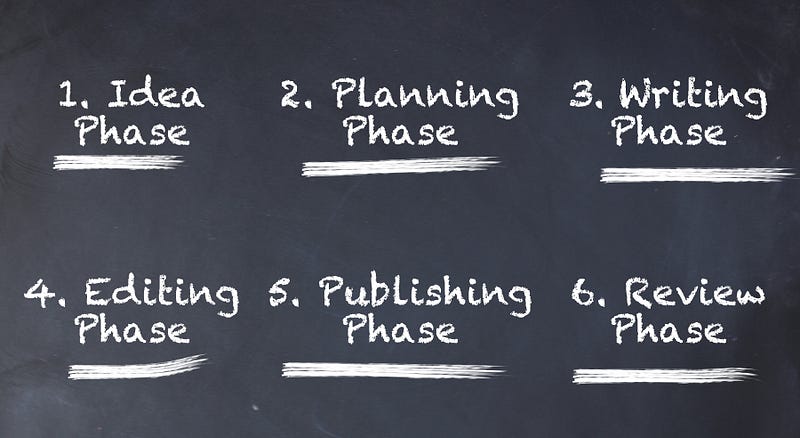
Image by author

During the idea phase, I write down my ideas for an article providing a simple title idea and sometimes a little summary so that I remember it better once I want to work further on it. For me, it works best, if it is simple to write down my ideas without the hassle to reach for a notebook or needing many clicks in my phone to store it away.

In the planning phase, I start to work out the article idea. This includes elaborating the article summary and thinking of what are the main takeaways for possible readers (or target audience). This is so important. When you have this on-point then you can write your article backward starting with your take-aways in mind. You might think of a suitable title, topic tags, and a where to publish your article. This is not set in stone at this moment. Rather, I revisit these aspects during the writing phase, where your article gets its shape. At any rate, I do my research on the article topic. But also, if I write about Data Science all my programming is done during this planning phase. The main idea is to have a clear view of what it is you want to write about.

To be very honest, I look for inspiring images for my article at the beginning of the writing phase. This somehow gets me started. But of course, that is something that is up to you. I highly recommend structuring your article. I often use MindMaps for that or a simple bullet-point-list. Apart from that writing is a creative process and it happens not in a unique way for me, so here it is hard to share something in particular with you. Only maybe to focus on writing not overthinking anything else. You can groom your article in the next phase. But feel free to post your best-practices in the comments.

During the editing phase I concentrate on readability, understandability, revisit title and possible describing article tags, spelling and grammatical correctness, and of course any rules and guidelines from your editor, publisher, and (research) community. I find spelling and grammar checks in popular word processors (e.g., MS Word) very helpful and efficient. But you might also look into automatic services for readability and spell-check-services. Also, I check every used image for quality and correct copyright information. The publishing phase is an important milestone and it is always exciting. I transfer the article, provide further metadata like tags or topics.

After publishing my article there is a strong feeling of joy and proudness (a writer’s high?). We did it. I let some time pass so that I have a more unbiased view of the article: the review phase. My goal here is to learn. I note down, what went well and what could be improved for the following articles. Feedback may come from different places. Imagine you publish your article on your personal blog or your company’s intranet, feedback may receive you in the form of comments to your article. Colleagues and friends might provide their view of your work to you in person. If you submitted your work to a publisher or a research journal they will provide you with feedback. Furthermore, I note down a success rating for each article. This could be unique views, acceptance score, reach, number of comments, or anything important for you that defines success in your writing community.

Pipeline management tool — a free Notion template

In early 2020 I jumped on the Notion train for note-taking, especially because of the database-functionality and that it allows me to build self-made little knowledge apps. Since starting using Notion I created my own (very basic) todo-app, lists for my life goals and bucket lists as well as the article pipeline. I will not try to convince you to use Notion and please note my disclaimer at the end of this article.

Notion is an application that provides components such as notes, databases, kanban boards, wikis, calendars and reminders. Users can connect these components to create their own systems for knowledge management, note taking, data management, project management, among others. These components and systems can be used individually, or in collaboration with others. — Source Wikipedia (retrieved 2021–03–08)
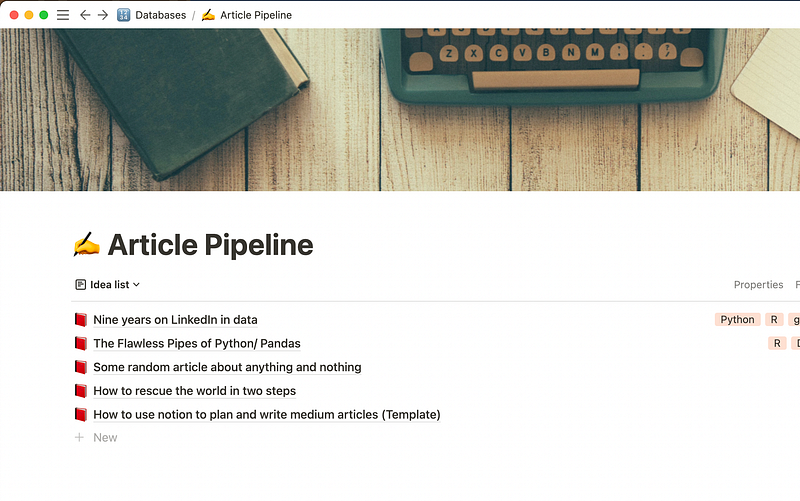
Image by author; based on work from RetroSupply; article list

The pipeline tool comes with five different views: the article idealist, article overview table, a kanban status board view, a scheduling calendar, and an article review view. Each view shows a different angle on the same articles in the pipeline. I use the article idea list mainly for writing down new ideas quickly during the idea phase. You can limit the list size to those articles that have the status idea or planning. The display of further metadata, such as final title, summary, etc. is hidden to make it more simple to enter just new ideas.
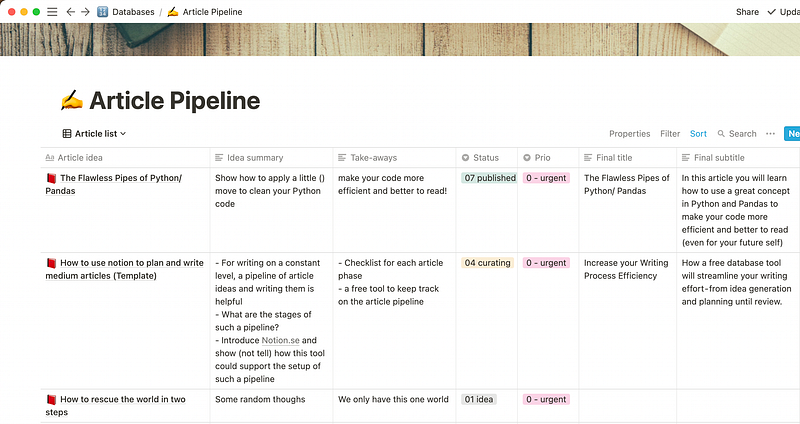
Image by author; based on work from RetroSupply; article overview table

The article overview table allows me quickly to add new information to articles, i.e., plan them out during the planning phase. This view also helps me a lot to groom the article pipeline. This includes getting rid of ideas that I will likely never follow up on, change the directions (takeaways) of some articles, or adjust the prioritization.
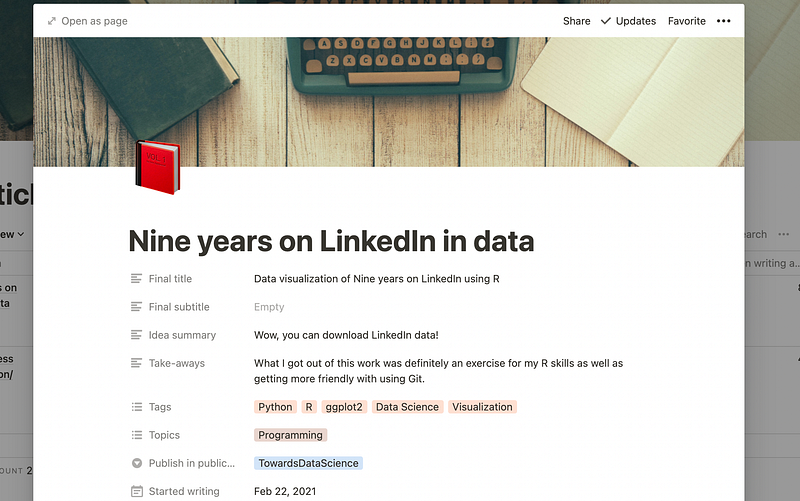
Image by author; based on work from RetroSupply; Article page

Please note, that is always possible to open one of the entries and view as well as edit these aspects on an article page. I do not count it as a view, but still this is a powerful aspect of Notion. Furthermore, since Notion is a note-taking-app it is very valid to write your article draft in Notion (and more specifically on the article page) itself during the writing phase. One benefit for you could be that you are not working alone on this article. Notion allows for collaboration while writing in notes, like many other note-taking apps.
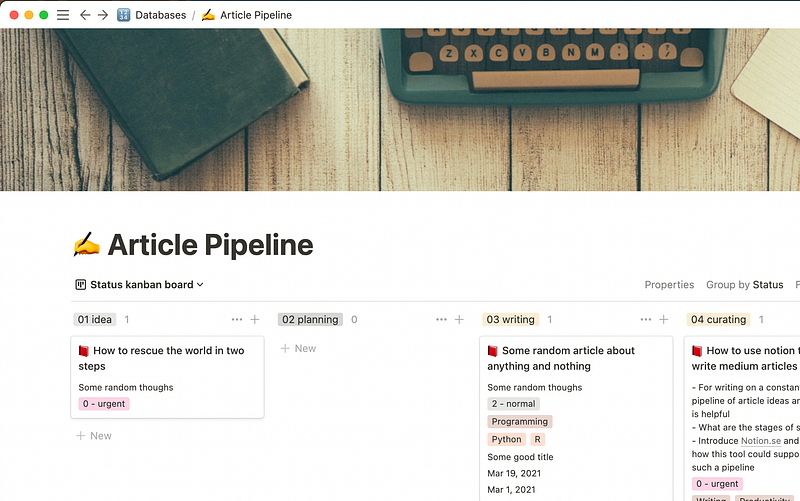
Image by author; based on work from RetroSupply; Article page

Another way to support your pipeline management is the Kanban board view of your articles based on article status. This view allows you not only to view your pipeline based on the status, but you may also move articles between different statuses. So you might decide to promote an article from idea to planning, while for another you move it from writing to planning because you realized the topic needs more research or more testing.
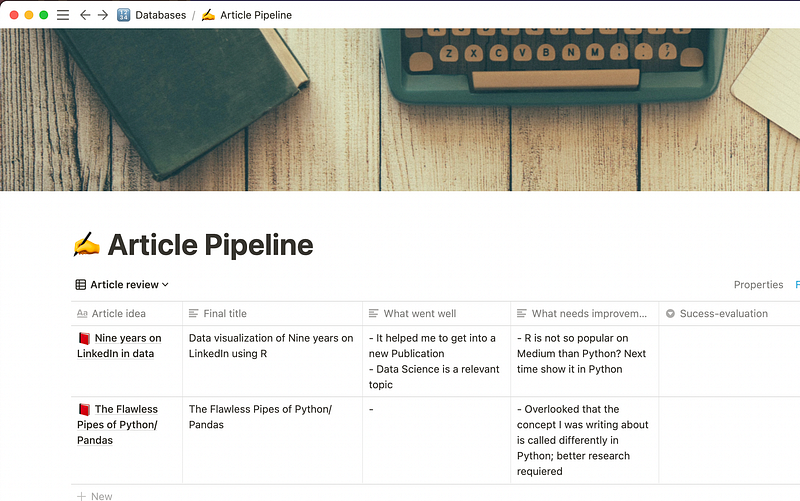
Image by author; based on work from RetroSupply; Article review

The next view is maybe the most important since it helps me to reflect and to learn: article review list to support the review phase. The information is limited to the title, what went well, what needs improvement, and a measure of success. As mentioned above success depends on your line of business, community, or field, such as the number of readers, reach, or likes.
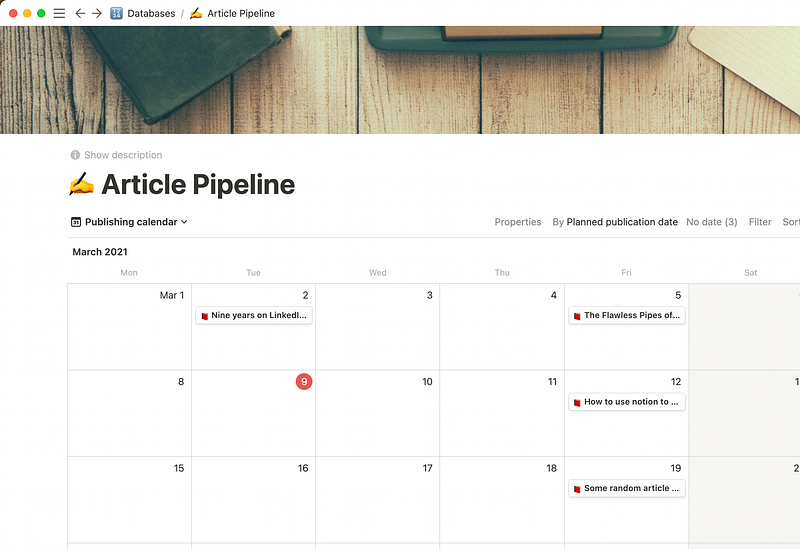
Image by author; based on work from RetroSupply; Publishing calendar

The last view shows you a calendar with your articles based on set planned publication date. This helps me a lot to stick to a certain (self-set) publishing frequency.

How to get you started with the article pipeline

So again, I put it out there for you to consider using it, and by that getting your feedback about what is not so good about it. Another learning possibility. Below you will find a link to the article pipeline tool that is more or less empty. You may access it without a Notion account.

For all Notion users: on the very top on the right you will find the duplicate button that allows you to copy this database into your own Notion space. Once you have done that you may reduce, alter, or amend any views, properties the way you like. Again, I would love to learn what you would do in a different way.

⚠️ Please note, that I am not affiliated with Notion nor am I using any affiliation links. Also, I am not saying that Notion is the best note-taking app out there, or that you should use a cloud-based service. ^^

Here are some resources to get you started with Notion:

Conclusion

In this article, I motivated to use a structured approach — the article pipeline — to improve your article management and writing output. Furthermore, I showed you how I implemented the article pipeline on top of Notion and explained how you could use it.

I mainly put it out in the open to get your feedback, and hence, learn from you. So, what do you think?

Find more articles from me here:

  1. Learn how I plan my articles for Medium
  2. Learn how to write clean code in Python using chaining (or pipes)
  3. Learn how to analyze your LinkedIn data using R
  4. Learn how to create charts in a descriptive way in Python using grammar of graphics
  5. Learn how to set up logging in your python data science code in under 2 minutes

Gregor Scheithauer is a consultant, data scientist, and researcher. He is specialized in the topics of Process Mining, Business Process Management, and Analytics. You can connect with him on LinkedIn, Twitter, or here on Medium. Thank you!

Writing
Productivity
Technology
Design
Work
Recommended from ReadMedium