
Architecture with Transit Gateway in an AWS Organization
ACM.271 There’s no one size fits all solution — design according to your business requirements
~~~~~~~~~~~~~~~~~~~~~~~~~~~~~~~~~~~~~~~~~~~~~~~~~~~~~~~~~~~
⚙️ Part of my series on Automating Cybersecurity Metrics. The Code.
🔒 Related Stories: AWS Security | Network Security
💻 Free Content on Jobs in Cybersecurity | ✉️ Sign up for the Email List
~~~~~~~~~~~~~~~~~~~~~~~~~~~~~~~~~~~~~~~~~~~~~~~~~~~~~~~~~~~
In the last post I considered options for setting up a Transit Gateway with network monitoring. If you want to know why there’s a dead squid photo for this article you’ll have to read the post. :)
In this post I’m going to outline how I’m going to set up my Transit Gateway for my organization. I may decide to change this later if it becomes too expensive for my needs, but for the moment this is my proposed architecture. The thing is, you never know how something is going to work out for your particular use case until you try it. So this is a proposed architecture which I hope to test out in the near future and may make adjustmetns as needed.
How many Transit Gateways?
I want to have one single Transit Gateway and one NAT. Where will I host this one Transit Gateway? Well, I presume this will be the only account where I need Internet access at the moment. If I use CloudFront I don’t need to open up what is behind it to the Internet directly. If I use a public API via API Gateway or some other load balanced solution I would need to expose those to the Internet for Inbound access but I’ll cross that bridge when I come to it.
Redundancy and regional outages
I’m going to test how long it takes to deploy that in a second region and have that code ready to go if I need it, but I’m not hosting any mission critical thing that can’t be down for a few hours if AWS is down as it was recently. I was working on a penetration test. I basically walked my dog and came back and it was working again. Your business model may have different requirements.
Site to Site VPN
I do need to allow inbound SSH access to some instances. I’ll have a site to site VPN configured for that. The VPC where I SSH in can be private and I’ll add a connector for the Transit Gateway to it.
Note that I’m talking about a site to site, not client VPN. The site to site VPN on AWS is IPSEC and it sends all traffic between two points in an encrypted tunnel.
Client VPN
Any time I am not on my private home network, I wouldn’t be able to connect to my instances if they are in a private network without some other way to get in. I could connect to my home network first, or I could connect to an externally exposed bastion host, which I would put in the Transit Gateway account, and from there access the private network in other accounts.
Alternatively I can take a look at the AWS client VPN solution. AWS’s client VPN is not IPSEC. It is an SSL VPN. That type of VPN doesn’t necessarily tunnel ALL traffic from your system to the Internet. It will tunnel traffic destined to the AWS Client VPN.
When you set up a VPN, your system connects first to the VPN to get on the network. From there, you are connected to the private network and can access things on the private network because your IP address is a private IP address allowed to access those resources.
I wrote about why you might want to use a VPN when accessing cloud resources here:
Dedicated Networking Account
If I want to have multiple accounts using the Transit Gateway and the NAT then it makes sense to me to put the Transit Gateway and NAT in a dedicated account and connect the other accounts to it. In fact, as you will see below, I have an account dedicated networking account in my initial AWS Organization design. I’ve set up such a transit account with PFSense for an IPSEC Client VPN in the past. We’ll have to see how this all works out with AWS Transit Gateway.
Regions
One thing I need to make sure is that all my connections are in the same region to reduce charges. AWS made inter region data transfer free of charge in 2022 for Transit Gateway.
For my secondary backup network I can choose and test my scripts in a second region to make sure they work, but not necessarily deploy them.
Organization and OUs
I proposed the following as a potential organizational structure in a prior post and I had a dedicated account for critical resources. I expect that my networking team will be deploying the Transit Gateway and NAT and I’d put that in my networking account. They would also stand up any infrastructure they require to deploy to other accounts in this account and monitor network logs in this account. Those same logs will be sent to the Logs and Monitoring account used by the security team.
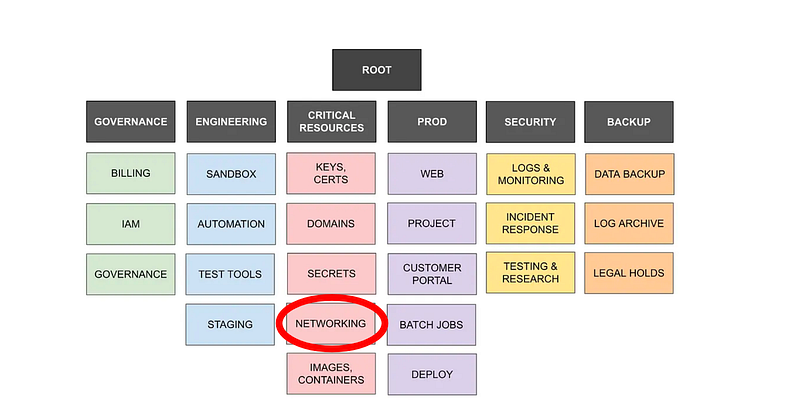
I’ll need to test setting up the Site to Site and client VPN but that also should be able to go in the networking account. The one thing I aso need to consider is any additional cost by setting things up cross-account. In order to connect different VPCs you generally have peering charges. The cost of EC2 traffic sent over peering connections incurs a fee whereas things in the same VPC would not incur this fee.
Data transferred over a peering attachment incurs the standard inter-Region data transfer charges as explained in the EC2 on-demand pricing page.
Data transfer to the Internet will not change.
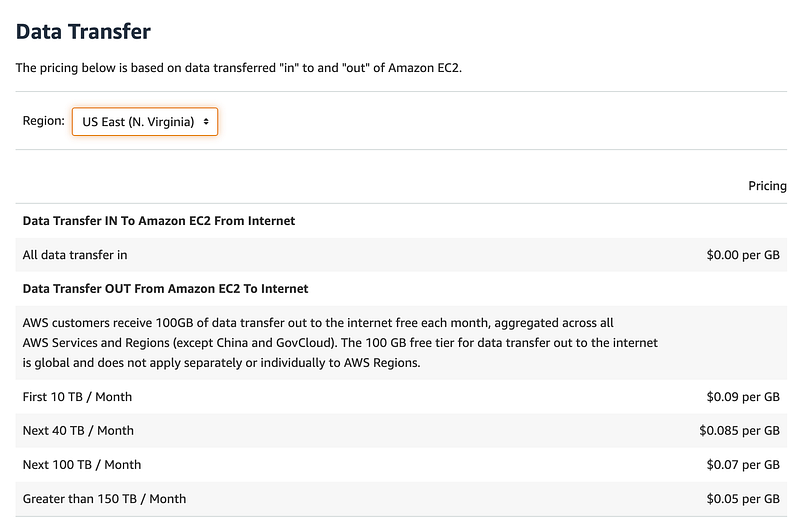
Note that there is no charge for data transferred out to CloudFront is free whereas other costs to transfer to other regions vary by region.
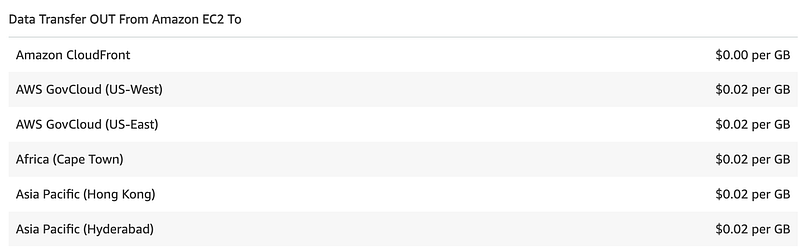
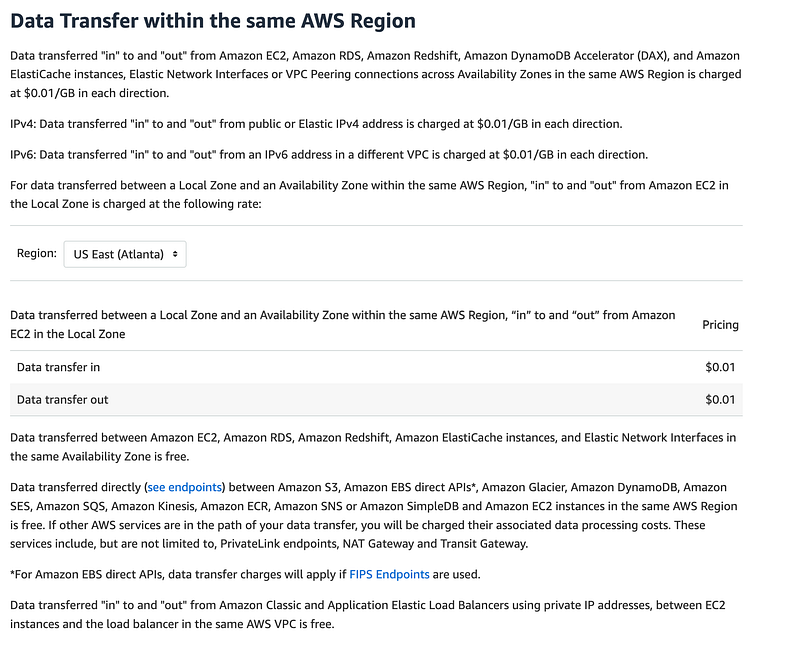
If we can keep everything in the same region we avoid the above fees. But we will still potentially incur peering charges for the VPC to VPC communications via the Transit Gateway attachment.
Essentially the cost of data transfer for peering is likely going to be $0.01 per GB if we cross availability zones.
We’re not using a local zone so those charges don’t apply.
If you are not familiar with Availability Zones I wrote about those here:
Can we keep our traffic within the same AZ for internal traffic? This comes down to understanding how AZs work in Transit Gateway:
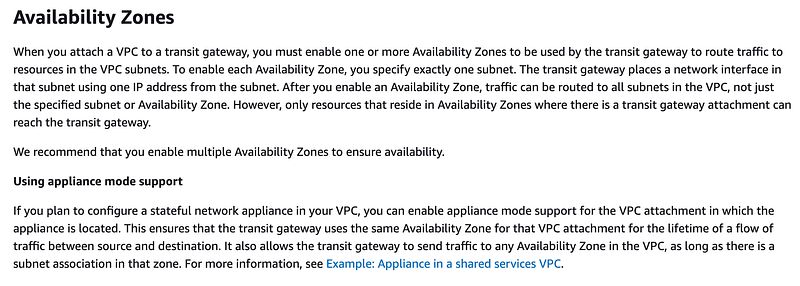
You enable AZs to be used with the Transit Gateway so you can limit to one AZ to save money.
However…You need to architect your solution to use multiple AZs to get certain EC2 service level agreement (SLA) benefits:
AWS makes two SLA commitments for Amazon EC2: (1) a Region-Level SLA that governs Amazon EC2 deployed across multiple AZs or regions, and (2) an Instance-Level SLA that governs Amazon EC2 instances individually.
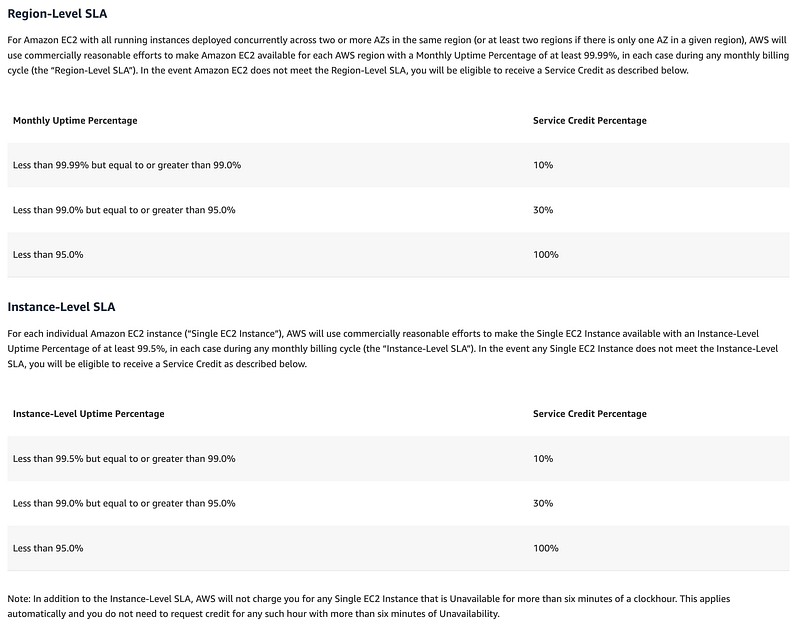
The question becomes, how much does the SLA matter to you and how likely are you to request money from AWS as a result of this SLA? That again, depends on the nature of your business and how much you stand to lose should your data or applications become inaccessible due to an EC2 outage?
This is all part of your organization-specific Disaster Recovery (DR) and Business Continuity Plan (BCP). How much you care about the above depends on how much you stand to lose if the event occurs and what you plan to do about it.
Leveraging all the above in our network architecture
We’ll want to take all of the above into cosideration when designing our network architecture. Our network design can help us optimize costs and improve performance. In addition, we need to consier the impact of outages and what we plan to do about them, should they occur. The network architecture depends on not only how to connect things, but hgow to secure things, and how to withstand outages to the degree neccessary.
Now although I want to implement all that, I’m going to start with something more simple. I’m going to test deploying a NAT in a VPC in my sandbox account for a Lambda function and see how that works out. I can evaluate any unexpected issue and cost, and I can monitor how long it takes to deploy. Of course, deployments may vary by region and what else is going on, and you run the risk of resource exhaustion if you use that model, but for my business this should be a decent solution.
Follow for updates.
Teri Radichel | © 2nd Sight Lab 2023
About Teri Radichel:
~~~~~~~~~~~~~~~~~~~~
⭐️ Author: Cybersecurity Books
⭐️ Presentations: Presentations by Teri Radichel
⭐️ Recognition: SANS Award, AWS Security Hero, IANS Faculty
⭐️ Certifications: SANS ~ GSE 240
⭐️ Education: BA Business, Master of Software Engineering, Master of Infosec
⭐️ Company: Penetration Tests, Assessments, Phone Consulting ~ 2nd Sight Lab
Need Help With Cybersecurity, Cloud, or Application Security?
~~~~~~~~~~~~~~~~~~~~~~~~~~~~~~~~~~~~~~~~~~~~~~~~~~~~~~~~~~~~~
🔒 Request a penetration test or security assessment
🔒 Schedule a consulting call
🔒 Cybersecurity Speaker for PresentationFollow for more stories like this:
~~~~~~~~~~~~~~~~~~~~~~~~~~~~~~~~~~~~~~~~~~~~~~~~~~~~~~~~~~~~~
❤️ Sign Up my Medium Email List
❤️ Twitter: @teriradichel
❤️ LinkedIn: https://www.linkedin.com/in/teriradichel
❤️ Mastodon: @teriradichel@infosec.exchange
❤️ Facebook: 2nd Sight Lab
❤️ YouTube: @2ndsightlab


