
AWS Transit Gateway with a NAT and Network Security Options
ACM.270 AWS Network Firewall, Packet Mirroring, and Open Source IDS and IPS
~~~~~~~~~~~~~~~~~~~~~~~~~~~~~~~~~~~~~~~~~~~~~~~~~~~~~~~~~~~
⚙️ Part of my series on Automating Cybersecurity Metrics. The Code.
🔒 Related Stories: AWS Security | Network Security
💻 Free Content on Jobs in Cybersecurity | ✉️ Sign up for the Email List
~~~~~~~~~~~~~~~~~~~~~~~~~~~~~~~~~~~~~~~~~~~~~~~~~~~~~~~~~~~
In the last post I started looking at the topic of Transit Gateway with a NAT.
I want to dive into that a bit more into using an AWS Transit Gateway in this post. The first example I was looking at was this implementation. In theory we can route all our traffic through one or maybe two NAT gateways to reduce costs. Or perhaps it’s one NAT gateway with the ability to deploy a second NAT gateway very quickly. We would need to evaluate the time it takes to fire up the second NAT In the case of an outage.
I wrote about IDS and IPS in the cloud and how it can help protect your network. How can an AWS Transit Gateway help us implemet an IDS or IPS solution?
AWS Network Firewall with AWS Transit Gateway and AWS NAT
We can take that above post where we centralized outbound traffic a step further and add AWS Network Firewall to the equation as explained in this post:
By linking up AWS Network Firewall at the point where traffic gets routed to other networks we have a nice point where we can inspect traffic and enforce traffic rules.
But we already have security groups and subnet NACLs and maybe you even have a Web Application Firewall enforcing geolocation filtering. Why do we need yet another firewall?
Creating traffic rules for Domains and URLs
Well, first, you don’t if you do not have the time to correctly set it up and monitor it or cannot afford it based on your business model. But here’s why it is beneficial if you do have the resources. One thing you can’t do with AWS subnets or security groups is block fully qualified domain names (FQDNs) and URLs.
Centralized Inspection Point
Remember that problem I was having with GitHub allowing traffic to any repository, not just my own repository? AWS Network Firewall may help solve that problem.
AWS Network Firewall can help you block traffic at a network layer before it gets anywhere near your critical assets and data. Block known bad traffic before it even enters the network instead of waiting until it gets all the way to your host or identity management service to block it.
With AWS Network Firewall, you can simplify your monitoring by filtering all your data crossing critical trust boundaries and inspect it at that one point (or maybe a few points) instead of trying to individually monitor logs from every single host and making sure you have all that logging enabled and configured. Presuming you are logging everything routed through the Transit Gateway headed out to the Internet you have a single place (or a few places for redundancy) to monitor for data exfiltration from private networks.
Here’s another post on the concept of centralized egress:
Stateful and Stateless Firewall Rules
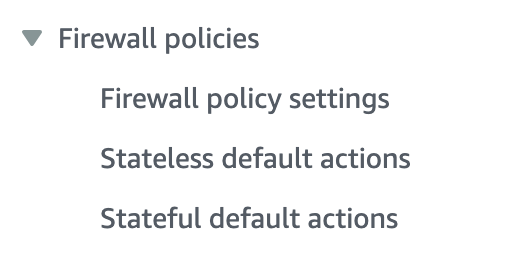
The AWS Network Firewall allows you to create stateful and stateless firewall rules. I wrote in prior posts how using each effectively can help optimize your network and slow down DDoS attacks. By the way, have you tried to set up stateless firewall rules on Azure or GCP yet? At the time of this writing, good luck with that if you are using cloud native solutions provided by the vendor.
How much does Transit Gateway with a NAT and AWS Firewall Cost?
Here’s where it gets interesting and kind of confusing.
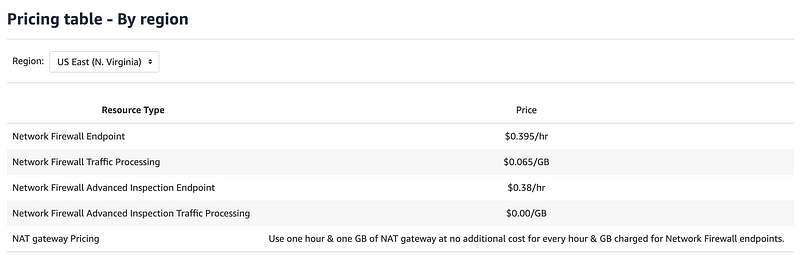
This whole page has a bunch of scenarios explaining the cost of each.
If you choose to create a NAT gateway in your AWS account along with Network Firewall, standard NAT gateway processing and per-hour usage charges are waived on a one-to-one basis with the standard Network Firewall Endpoint per-hour usage and standard Network Firewall Traffic Processing for your firewall. Network Firewall Advanced Inspection Endpoint and Network Firewall Advanced Inspection Traffic Processing is excluded from this benefit.
Once again regions are an important consideration for your overall architecture:
Your NAT Gateway and Network Firewall must be in the same region to receive this benefit. For example, charges will not be waived if you use Network Firewall in US East (Ohio) and NAT Gateway in US West (Oregon).
Here’s the simplest example:
Total charges are therefore $0.065 for 1 GB of data processed by your firewall when using NAT gateway plus $0.395 for each hour your firewall is provisioned. There are no data transfer charges in this example. However, if you send the same file to a non-AWS Internet location, EC2 data transfer charges will apply to data transferred out from EC2 to the Internet.
So if we are only keeping data on private AWS networks and not sending anything to the Internet, if I am reading that correctly, then the minimum cost for one Transit Gateway, one NAT, and a Network Firewall would be:
(.65 + .395) * 24 hours * 31 days = $774.48 per month.And, of course you want to send traffic to the Internet, don’t you? Ouch. That’s pricey for a small business.
Transit Gateway Cost
In the above example, I didn’t see the cost of the Transit Gateway. Is that extra? Here’s the cost of the Transit Gateway:

What is an AWS Transit Gateway attachment? Essentially it’ a route to the Transit Gateway that you configure in your VPC.
So what is the cost per month for your Transit Gateway? Well it depends on how much data you send doesn’t it? So the Transit Gateway itself may be an option for a small business as long as they are not sending too much data and thereby causing the cost to skyrocket.
The cost “per attachment” seems to refer to how many times something connects to the transit gateway attachment. Since we are using a Lambda function does that mean each time we run a Lambda function we get hit with that attachment fee? Whereas if we run an EC2 instance constantly and run containers on it we are paying less because it just attaches once and then we are done?
These will be things you’d need to beta test in each environment to see what it costs to run your particular architecture.
VPC Flow Logs for Transit Gateways
A more reasonable costing option would be to monitor VPC Flow Logs associated with your Transit Gateway.
The cost is going to depend on where you store the logs, what you log, how much data you send, and how long you store the data. For example, you can send VPC Flow logs to CloudWatch:
You can also send VPC Flow Logs to S3 which may be cheaper but not quite as simple to query.
Publish flow logs to Amazon S3
Flow logs can publish flow log data to Amazon S3.
docs.aws.amazon.com
AWS Traffic Mirroring (Packet Capture)
AWS has a packet capture solution called Traffic Mirroring. You can use traffic mirroring with open source tools to perform inspection without AWS Network Firewall.
Traffic Mirroring is charged per ENI.

So if you could route all traffic using an AWS Transit Gateway through a small number of hosts with a load balancer in front of them, perhaps you could lower your costs. AWS provides the following pricing example:
5 sessions x 30 days x 24 hr/day x $0.015 per session-hr = $54. That’s a lot better than over $770. Of course, you will have to calculate and add the cost of the load balancer, the EC2 instances, data transfer, and logging for all that infrastructure as well.
Here’s an example of using Suricata with AWS Traffic Mirroring:
You can also use Suricata with AWS Network Firewall:
Any way you slice it capturing packets is not exactly cheap. I wrote about the point at which you may need to capture packets here:
Packet capture is very helpful if you can store enough of and the data is not encrypted and you can can afford it…is it worth it? That is for each individual to decide based on the potential cost of a data breach and the ability to prevent a breach using packet capture.
Outboud Proxies
You could try to implement an open source outbound proxy like Squid to monitor and allow or disallow URLS and domain names. Here are a couple of articles on that:
Now mind you, if you try to do that you have to make sure you configure and set it up correctly so that Squid itself does not become the entry point into your network. Speaking from personal experience on this one! Someone on the Capital One security team pointed me to a blog post when I was on the cloud engineering team and told me to implement Squid. I did what was presented in that blog post as I was give no further instruction.
I didn’t particularly like the idea of using this open source solution for a bank that could afford something much more robust. I didn’t kow anything about Squid at the time other than what I was given and I followed the instructions. I wondered why we were using an open source tool for this critical functionality and presumed the security team had vetted the solution. Later the person in charge of cloud security contacted me and informed me that addresses from China had infiltrated the Squid proxy.
Well, I never really loved that solution in the first place nor was I a Squid proxy expert. I was just following his instructions. I begged him to remove direct access from the Internet or if we could use a more robust firewall solution with a proxy built into it instead. Another person on the security team sent a picture to the group message with a dead squid on the beach. I was relieved. And you have been warned. If you are going to use open source tools you need to know how to configure them properly and monitor them carefully.

PFSense in the cloud
Another option I’ve written about using on my home network is an open source firewall called PFSense. There’s a company named Netgate that packages up PFSense on hardware that you can purchase and use in your home network. I explained how to implement network security with PFSense in some of my other network security blog posts.
You can also use PFSense in a cloud environment. Netgate offers an AMI in the AWS Marketplace:
The cost will be dependent on the size of the instance on which you choose to run the firewall and how many instances you run.
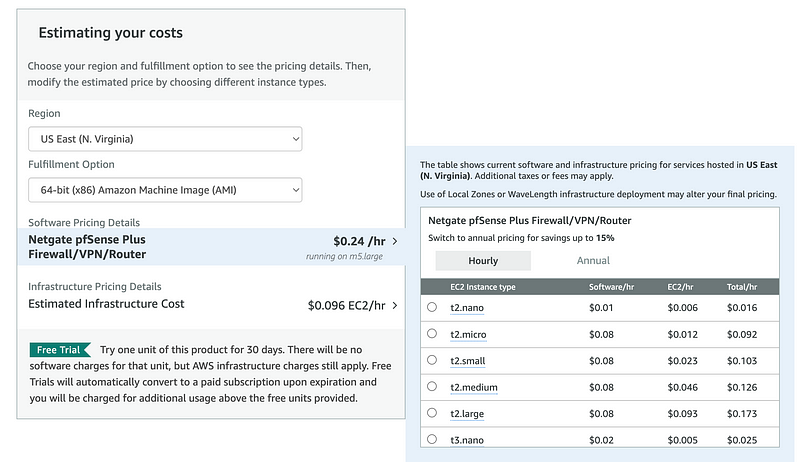
Alternatively, you can try to package up pfsense yourself and run a free version of the software — something I used to show students in my cloud security classes.
One thing you need to understand is the scalability of the solution if you try to run more than one instance. Having worked for a firewall vendor trying to move their device to the cloud, I can tell you that not all vendors implement the most scalable, cloud native solution
PFSense is not the only option. You can choose from other vendors that have been doing this for a while like Palo Alto, Sophos and Cisco among others. Some of the vendor solutions will be as or more pricey than AWS Network Firewall, however, also speaking from experience of helping with such solutions at Capital One.
Thankfully the AWS Transit Gateway has reduced the cost compared to setting up one of these firewalls for every VPC which at the time was about $2,000 per month per firewall. The old solution also created an overlay network over the top of the AWS network which generally broke things, reduced functionality and in my opinion, flat out defeated the purpose of using the cloud in the first place. The solutions now are better I’m sure but I haven’t looked at them all in depth.
So what am I going to do now that I’ve explored all these solutions?
If nothing else, I may be able to reduce the overall cost of NATs in my architecture if I consolidate my traffic destined to the Internet to egress through one single point.
I’ll set up my network templates so I can also deploy quickly to an alternate region and I’ll test how long it takes for me to deploy to this alternate region but for now I’m only testing and only going to deploy one NAT.
I have a copy of my code in GitHub as well as what will end up in AWS CodeCommit so if the AWS region where I’m storing code in AWS CodeCommit is down I can deploy to the alternate region from GitHub.
Once I get the network set up I can monitor the VPC Flow Logs and consider whether I want to implement other forms of monitoring or outbound network access restrictions that don’t cost as much as a full on Traffic Mirroring or AWS Network Firewall solution.
Anywhere I can leverage NACLs and Security Groups rules I can filter traffic at no additional charge. Filtering out bad traffic as soon as I possibly can will hopefully reduce data transfer charges as well.
I just can’t filter domain names or URLs with those solutions. They operate at a different layer in the network. I’m still pondering what I will do about that, if anything.
Follow for updates.
Teri Radichel | © 2nd Sight Lab 2023
About Teri Radichel:
~~~~~~~~~~~~~~~~~~~~
⭐️ Author: Cybersecurity Books
⭐️ Presentations: Presentations by Teri Radichel
⭐️ Recognition: SANS Award, AWS Security Hero, IANS Faculty
⭐️ Certifications: SANS ~ GSE 240
⭐️ Education: BA Business, Master of Software Engineering, Master of Infosec
⭐️ Company: Penetration Tests, Assessments, Phone Consulting ~ 2nd Sight Lab
Need Help With Cybersecurity, Cloud, or Application Security?
~~~~~~~~~~~~~~~~~~~~~~~~~~~~~~~~~~~~~~~~~~~~~~~~~~~~~~~~~~~~~
🔒 Request a penetration test or security assessment
🔒 Schedule a consulting call
🔒 Cybersecurity Speaker for PresentationFollow for more stories like this:
~~~~~~~~~~~~~~~~~~~~~~~~~~~~~~~~~~~~~~~~~~~~~~~~~~~~~~~~~~~~~
❤️ Sign Up my Medium Email List
❤️ Twitter: @teriradichel
❤️ LinkedIn: https://www.linkedin.com/in/teriradichel
❤️ Mastodon: @teriradichel@infosec.exchange
❤️ Facebook: 2nd Sight Lab
❤️ YouTube: @2ndsightlab