
IDS and IPS in the Cloud
HIDS, HIPS, NIDS, NIPS — what’s the difference, and why does it matter?
~~~~~~~~~~~~~~~~~~~~~~~~~~~~~~~~~~~~~~~~~~~~~~~~~~~~~~~~~~~
⚙️ Check out my series on Automating Cybersecurity Metrics. The Code.
🔒 Related Stories: Network Security | Cybersecurity
💻 Free Content on Jobs in Cybersecurity | ✉️ Sign up for the Email List
~~~~~~~~~~~~~~~~~~~~~~~~~~~~~~~~~~~~~~~~~~~~~~~~~~~~~~~~~~~
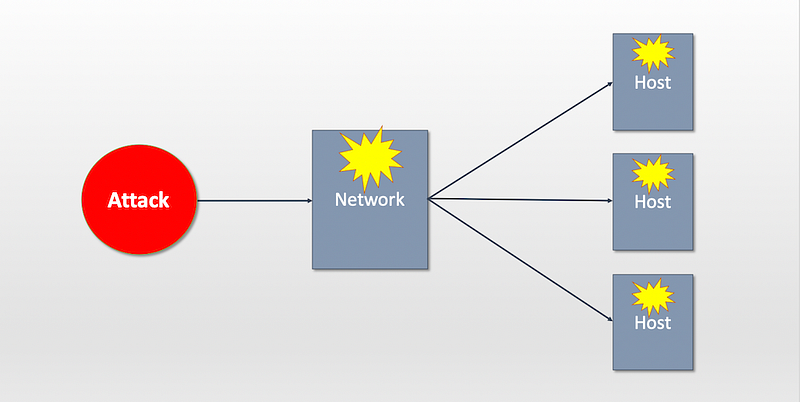
I’ve been getting several questions lately about an IDS or IPS in the cloud. Many of the questions have revolved around packet capture and network-based solutions since that has been one of the biggest challenges in cloud environments and something I wrote a security white paper about in 2017. On a recent consulting call, I incorrectly thought that was the topic of a question, but then I realized the customer was asking about host-based solutions. Additionally, when I looked at some cloud vendor pages on the topic, I only see host-based solutions. I thought this would be a good time to explain the differences, pros, and cons of these different types of IDS and IPS solutions.
First of all, what is an IDS or an IPS? Here’s a quick explanation:
Intrusion Detection System (IDS): A security solution that detects security-related events in your environment but does not block them. This type of security solution may send you an alert, such as an email or text message, or log that a security event has occurred.
Intrusion Prevention System (IPS): This type of security solution identifies a threat and blocks it so the attack cannot occur.
You may be thinking at this point, “Well, of course, I want to block the attack! Why wouldn’t I?” The problem is that many of these systems incorrectly identify a threat when it is not truly a threat. That may cause system downtime. I explain true and false positives and tuning in my book if you are not familiar with those concepts and want to know more. For the moment, understand that you have to be careful when implementing blocking systems to make sure that the threats they block are truly threats, not valid business processes. If the system catches many events that are not truly security problems that can overwhelm the security staff trying to investigate every alert. The opposite problem is worse than identifying something incorrectly: Allowing an attack. When a genuinely valid threat is not blocked, a data breach may occur.

An IPS or IDS may operate at the host level (on virtual machines) or the network level. When considering a solution, you’ll want to consider whether you want one or more of the following solutions in your cloud environment:
HIDS (Host-based Intrusion Detection System): An IDS installed on a host or virtual machine that identifies threats, but does not block them.
HIPS (Host-base Intrusion Prevention System): An IPS installed on a host or virtual machine that blocks activity it identifies as malicious.
NIDS (Network-based Intrusion Detection System): An IDS that inspects network traffic often at the packet level to identify threats but does not block it.
NIPS (Network-based Intrusion Prevention System): An IPS that inspects network traffic often at the packet level and blocks traffic containing activity it identifies as malicious.
Each of these solutions has pros and cons. You may choose to multiple or all of these types of solutions for the best protection in your environment. Remember that these solutions require tuning by security professionals who understand what the threats are in many cases for optimal security. Without going into too much detail, here’s why you might want one of each if you can.
A host-based solution has one severe risk. Malware that gains a foothold may be able to escalate privileges and turn off a host-based IPS or IDS. Although I don’t focus on incident handling (but I know people who do if you need help) in cases where I handled incidents, I have seen this happen. Malware got onto an AWS EC2 instance and turned off logging and anti-malware solutions on the host. Does that mean these solutions are useless? Not at all. It means they have a limitation, and that you should augment with additional layers of security.
One of the benefits of host-based solutions is that they can inspect data that may be encrypted as it passes over the network, making it hard for network-based solutions to inspect the traffic. A host-based solution can inspect data in system memory at the points it is unencrypted. It also may have other insights that network solutions cannot see or may miss in tricky attacks when the host reassembles all the packets. Host-based solutions are also highly beneficial in preventing hosts from talking to each other that should not be if network security fails for some reason.
A network-based solution has the advantage of not being accessible to malware that takes control of a host. The inspection of network traffic occurs before those packets ever reach the host. I talked about this idea of stopping attacks before attackers “get the ball” using a basketball analogy in an earlier post. In my book and class, I go into more detail, explaining how attacks commonly work and why network security is one of your best defenses against common threat patterns. Stopping the attacks as early as possible in the network stack can also reduce additional processing at other layers and improve system performance. Using stateless networking to block unwanted traffic that is from obviously unwanted sources can help prevent DDOS (Distributed Denial of Service attacks.)
Network solutions typically inspect network packets, but not always. Sometimes attacks occur in network packets in very tricky ways, such as tacking on additional bits of information that other systems won’t notice. That involves understanding network packet headers and having the ability to inspect the packets down to the bits and bytes using tools like Wireshark and tcpdump to view anomalies. These manipulated packets may contain commands sent to malware installed on hosts or may facilitate data exfiltration. Network-based solutions can catch these types of attacks that may be specialized attacks on DNS, ICMP, or NTP traffic, for example, and outside the view of a host-based solution.
One of the problems with network-based solutions is that they cannot inspect encrypted traffic unless they can intercept and decrypt it. In some organizations, network-based security decrypts traffic as it flows through the network. However, if an attacker uses a type of encryption where only they have the keys that used to initiate the encryption on the attacker’s side and then decrypt it on the infected host, then the network-based solution cannot decrypt the traffic. It may be able to detect and block the traffic, but some business processes may break. A company may choose not to allow that type of encryption in their environment so they can inspect all encrypted traffic.
One of the challenges in cloud security is the fact that network professionals do not have access to the networking equipment to install network-based solutions traditionally. That limits their ability to inspect traffic in a way that they are used to doing. However, other options exist. When someone told me packet capture was not possible in the cloud, I decided to write a paper about it to prove that it was, albeit in a different manner. This paper, called Packet Capture on AWS is not a production solution. It demonstrates that packet capture is possible using a network security appliance configured as a NAT with an attempt at automation. However, it also provides potentially better architectures vendors may consider for future development.
Now AWS and Azure offer packet capture services, but they are passive (meaning after the fact) versus inline (real-time). That allows companies to identify and remove threats retroactively. Inline inspection is still challenging. Other solutions inspect traffic at the network layer outside of the cloud providers altogether at the point where companies establish private network connections. The ability to implement network-based IDS and IPS in the cloud is getting better, though there is still a lot of room for improvement at the time of this writing.
Follow for updates.
Teri Radichel | © 2nd Sight Lab 2020
About Teri Radichel:
~~~~~~~~~~~~~~~~~~~~
⭐️ Author: Cybersecurity Books
⭐️ Presentations: Presentations by Teri Radichel
⭐️ Recognition: SANS Award, AWS Security Hero, IANS Faculty
⭐️ Certifications: SANS ~ GSE 240
⭐️ Education: BA Business, Master of Software Engineering, Master of Infosec
⭐️ Company: Penetration Tests, Assessments, Phone Consulting ~ 2nd Sight Lab
Need Help With Cybersecurity, Cloud, or Application Security?
~~~~~~~~~~~~~~~~~~~~~~~~~~~~~~~~~~~~~~~~~~~~~~~~~~~~~~~~~~~~~
🔒 Request a penetration test or security assessment
🔒 Schedule a consulting call
🔒 Cybersecurity Speaker for PresentationFollow for more stories like this:
~~~~~~~~~~~~~~~~~~~~~~~~~~~~~~~~~~~~~~~~~~~~~~~~~~~~~~~~~~~~~
❤️ Sign Up my Medium Email List
❤️ Twitter: @teriradichel
❤️ LinkedIn: https://www.linkedin.com/in/teriradichel
❤️ Mastodon: @teriradichel@infosec.exchange
❤️ Facebook: 2nd Sight Lab
❤️ YouTube: @2ndsightlab