
Angular Advanced UI: Combo Box with Ng-Select Typeahead Search and Rating Component in Reactive Form
Introduction
In this comprehensive blog post, we will delve into the intricacies of implementing a combo box within an Angular reactive form. The form in focus here serves a vital purpose: allowing users to rate movies effortlessly. This intuitive movie rating form is designed with simplicity and user-friendliness in mind, ensuring a seamless experience for every user.
The core functionality of this form revolves around the integration of a powerful combo box. Users are not only able to search for movies but also select them from the vast database provided by the renowned cloud API IMDB. This integration with IMDB ensures that users have access to an extensive collection of movies, making their selection process both exciting and diverse.
The first step of the process involves a user-initiated search. Users can input keywords or titles related to the movie they are looking for. The form intelligently communicates with the IMDB API, fetching real-time search results based on the user’s input. This dynamic interaction provides users with an up-to-date list of movies that match their search criteria, making the selection process highly tailored to their preferences.
Once the user has found the desired movie from the search results, the combo box allows for seamless selection. Users can simply click or tap on the movie of their choice, which populates the combo box with the selected movie’s details. This elegant selection mechanism simplifies the user experience, making it convenient for users to choose from the wide array of movies available on IMDB.
After selecting the movie, users have the opportunity to provide their rating. This interactive form element allows users to express their opinions and preferences, contributing to a dynamic and engaging user community. The form ensures that users can effortlessly rate the movie they have selected, completing the process with ease. See Figure 1 for a screenshot of the form.
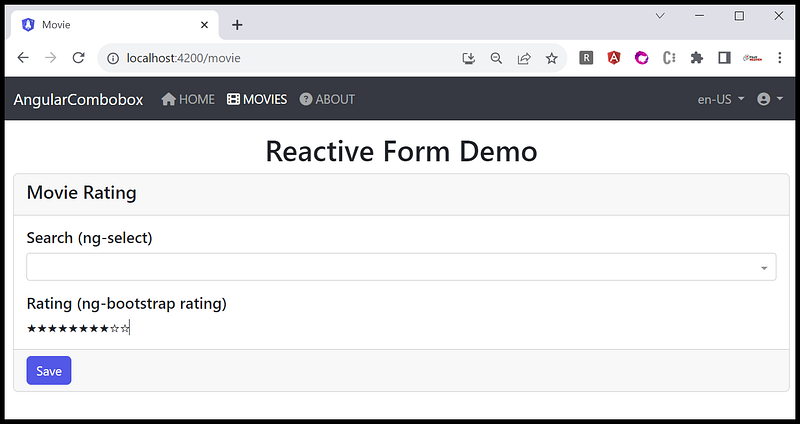
This blog will comprehensively guide you through the process of implementing this innovative combo box within an Angular reactive form. By the end of this exploration, you will have gained valuable insights into creating a seamless and user-friendly movie rating form, enhancing your skills in both Angular development and user interface design. Let’s embark on this exciting journey together!
Form Design
In this section, we will delve into the detailed design of the movie search combobox and the movie rating UI component.
What is Combo Box? Comboboxes, also known as dropdowns with an editable input field, offer several advantages in user interfaces. Here are some key benefits of using comboboxes:
- Space Efficiency: Comboboxes combine the functionality of a dropdown list and an input field, saving space on the user interface. This is especially useful in applications where screen real estate is limited.
- Error Prevention: Comboboxes can help prevent errors related to data entry. By providing a predefined list of options, users are less likely to input incorrect or inconsistent values. This can improve data accuracy and reliability.
- Search and Filter Capabilities: Comboboxes often come with search and filter capabilities, allowing users to find specific options quickly. This is particularly useful when dealing with long lists of items, improving efficiency and usability.
What is a Rating component? Arating component can refer to a part of a system or application that allows users to rate something, such as products, services, or content. For example, a star rating system on an e-commerce site where users can rate products from 1 to 5 stars. Here are some key benefits of using Rating component:
- User Feedback: It provides valuable feedback to the developers and other users about the quality or popularity of a product or service.
- Data Collection: Ratings can be analyzed to identify trends and preferences, helping businesses make data-driven decisions.
- User Engagement: Users often engage more when they can express their opinions, which can lead to increased interaction with the platform.
Movie Search Combobox Design
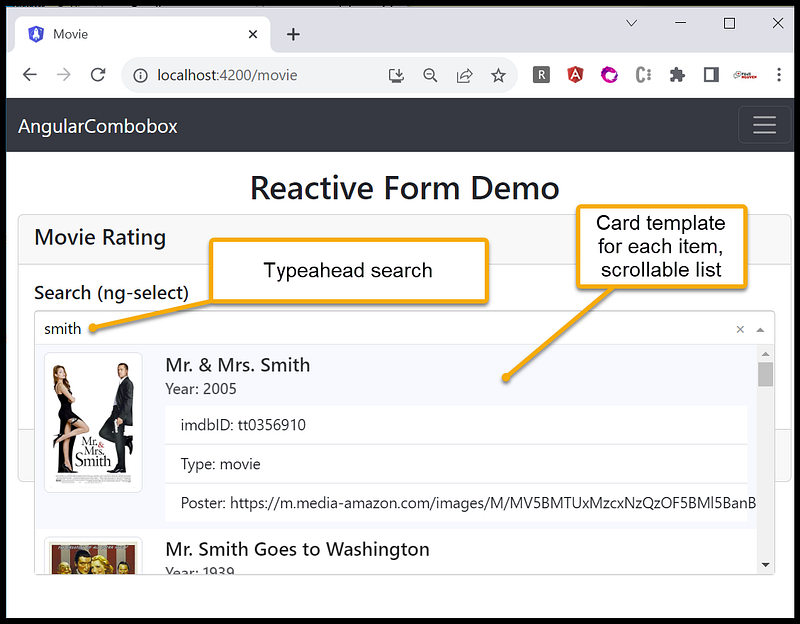
The search functionality within the application is seamlessly integrated using the ng-select component, providing users with a smooth and intuitive experience. Users are empowered to enter a keyword of their choice, with the search initiation requiring a minimum of 4 characters. Behind the scenes, a robust web API processes this input, meticulously fetching and compiling the search results. These results are then presented to users in a clear, organized manner. Each movie in the search results is thoughtfully displayed in a visually appealing card format. This design not only enhances the aesthetic appeal of the interface but also provides users with essential information about the movies at a glance, such as titles, posters, and brief descriptions.
To further elevate user experience, the search results are ingeniously presented in a scrollable and selectable dropdown list. Users can effortlessly navigate through the list by scrolling down, allowing for a comprehensive view of available movie options. The dropdown selection list is designed to be both responsive and user-friendly, ensuring that users can conveniently explore the entire range of search results. This intuitive approach enables users to make well-informed decisions by selecting the movie that perfectly aligns with their preferences and requirements. In essence, the combination of the ng-select component and the web API transforms the search process into a visually engaging and efficient endeavor, enriching the overall interaction between users and the application’s vast movie database. See Figure 2 for the design of the movie search combo box.
Movie Rating Component Design
The movie rating functionality is seamlessly implemented through the utilization of the ng-bootstrap rating component. This powerful component not only provides a visually appealing interface for users to rate movies but also ensures a smooth and interactive user experience. The ng-bootstrap rating component offers a range of customization options, allowing developers to tailor the appearance and behavior of the rating system to match the application’s design aesthetics.
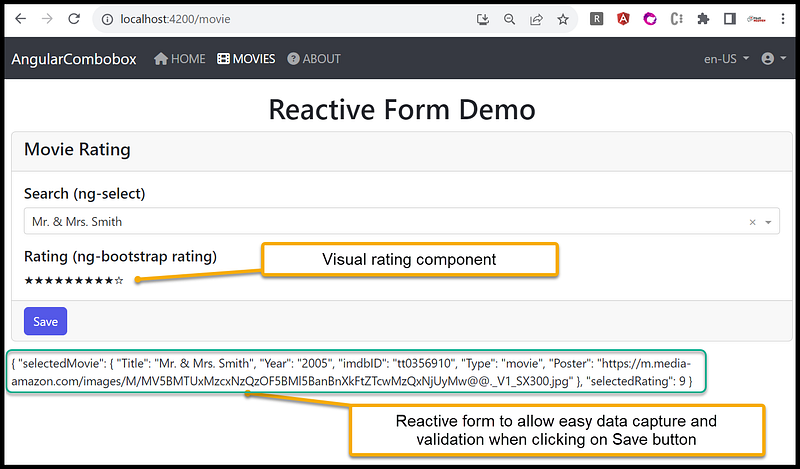
When a user selects a movie from the search combobox, the ng-bootstrap rating component dynamically activates, presenting users with an intuitive set of stars or any other custom symbols to represent different rating levels. Users can then easily interact with these elements, clicking or tapping to assign their desired rating to the selected movie. This real-time feedback mechanism enhances user engagement, enabling them to express their opinions effortlessly.
Furthermore, the ng-bootstrap rating component seamlessly integrates with the Angular Reactive Forms, ensuring that the user’s rating data is efficiently managed and validated. This integration enables developers to handle the submitted ratings securely, providing a reliable foundation for data processing and analysis. With the ng-bootstrap rating component, the movie rating feature becomes a standout aspect of the application, contributing to a delightful user experience and elevating the overall user satisfaction level. See Figure 3 for the design of the rating component.
Source Code Walk Thru
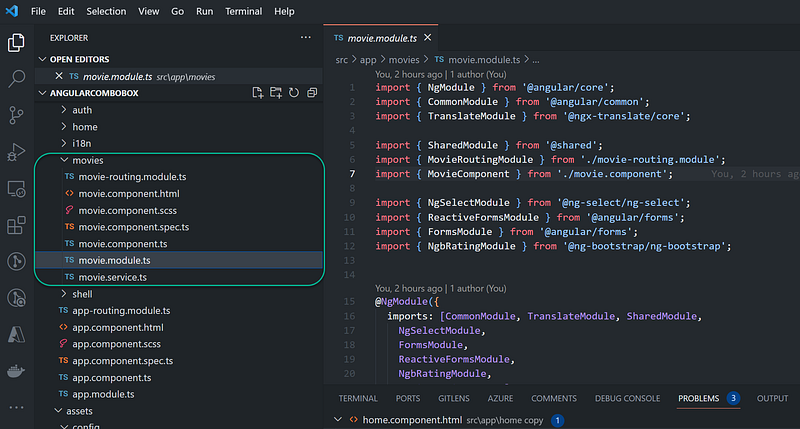
The source code for this project is accessible for download on GitHub. To get started, clone the repository to your local machine. Then, carefully follow the instructions outlined in the readme.md file to run the application locally. The specific code related to the demo can be found within the movies folder, as indicated in Figure 4. This folder contains the essential files and components pertinent to this blog.
movie.module.ts
https://github.com/workcontrolgit/AngularCombobox/blob/master/src/app/movies/movie.module.ts
import { NgModule } from '@angular/core';
import { CommonModule } from '@angular/common';
import { TranslateModule } from '@ngx-translate/core';

import { SharedModule } from '@shared';
import { MovieRoutingModule } from './movie-routing.module';
import { MovieComponent } from './movie.component';

import { NgSelectModule } from '@ng-select/ng-select';
import { ReactiveFormsModule } from '@angular/forms';
import { FormsModule } from '@angular/forms';
import { NgbRatingModule } from '@ng-bootstrap/ng-bootstrap';


@NgModule({
  imports: [CommonModule, TranslateModule, SharedModule,
    NgSelectModule,
    FormsModule,
    ReactiveFormsModule,
    NgbRatingModule,
    MovieRoutingModule],
  declarations: [MovieComponent],
})
export class MovieModule {}Imports
Section 1: Imports
import { NgModule } from '@angular/core';
import { CommonModule } from '@angular/common';
import { TranslateModule } from '@ngx-translate/core';
import { SharedModule } from '@shared';
import { MovieRoutingModule } from './movie-routing.module';
import { MovieComponent } from './movie.component';
import { NgSelectModule } from '@ng-select/ng-select';
import { ReactiveFormsModule } from '@angular/forms';
import { FormsModule } from '@angular/forms';
import { NgbRatingModule } from '@ng-bootstrap/ng-bootstrap';
In this section, various Angular modules and components are imported for use in the MovieModule. These include common modules like CommonModule, translation module from @ngx-translate/core, a shared module (SharedModule), the movie routing module (MovieRoutingModule), the MovieComponent, NgSelectModule for the ng-select component, ReactiveFormsModule for reactive forms, FormsModule for template-driven forms, and NgbRatingModule for the ng-bootstrap rating component.
Section 2: Module Configuration
@NgModule({
  imports: [
    CommonModule,
    TranslateModule,
    SharedModule,
    NgSelectModule,
    FormsModule,
    ReactiveFormsModule,
    NgbRatingModule,
    MovieRoutingModule
  ],
  declarations: [MovieComponent],
})
Here, the @NgModule decorator is used to define the MovieModule. The imports array lists all the modules that this module depends on. These modules are essential for the functioning of the MovieComponent. The declarations array lists all the components, directives, and pipes that belong to this module. In this case, it includes the MovieComponent.
CommonModule: Provides common directives like*ngIf,*ngFor, etc.TranslateModule: Enables internationalization and translation features.SharedModule: Custom shared module containing reusable components and services.NgSelectModule: Module for using the ng-select component.FormsModuleandReactiveFormsModule: Modules for handling forms in Angular.NgbRatingModule: Module for using the ng-bootstrap rating component.MovieRoutingModule: Routing module specific to theMovieComponent.
This MovieModule acts as a central point where all the necessary modules and components are brought together, allowing for efficient organization and management of the application's features related to movies.
movie.component.html
https://github.com/workcontrolgit/AngularCombobox/blob/master/src/app/movies/movie.component.html
<div class="container-fluid">
  <div class="jumbotron text-center">
    <h1>
      <span>Reactive Form Demo</span>
    </h1>
  </div>

  <form [formGroup]="frm" (ngSubmit)="onPost()">

    <div class="card mb-3">
      <div class="card-header">
        <h4>Movie Rating</h4>
      </div>
      <div class="card-body">
        <h5 class="card-title">Movie</h5>
        <ng-select [items]="movies$ | async" bindLabel="Title" [trackByFn]="trackByFn" [minTermLength]="minLengthTerm"
          [loading]="searching" typeToSearchText="Please enter {{minLengthTerm}} or more characters"
          [typeahead]="searchingText$" [(ngModel)]="selectedMovie" formControlName="selectedMovie">
          <ng-template ng-option-tmp let-item="item" let-index="index" let-search="searchTerm">
            <div class="row">
            <div class="col-sm-2">
              <img *ngIf="item.Poster !=='N/A'" class="img-thumbnail" src="{{item.Poster}}" alt="Card image cap">
            </div>
            <div class="col-sm-10">
              <h5 class="card-title">{{item.Title}}</h5>
              <h6 class="card-subtitle mb-2 text-muted">Year: {{item.Year}}</h6>
              <ul class="list-group list-group-flush">
                <li class="list-group-item">imdbID: {{item.imdbID}}</li>
                <li class="list-group-item">Type: {{item.Type}}</li>
                <li class="list-group-item">Poster: {{item.Poster}}</li>
              </ul>
            </div></div>
          </ng-template>
        </ng-select>
        <div class="valid-feedback">
          Looks good!
        </div>
        <small [hidden]="f.selectedMovie.valid || f.selectedMovie.untouched" class="text-danger" translate>
          Movie is required
        </small>
        <div class="invalid-feedback">
          Please choose a movie.
        </div>
        <h5 class="card-title mt-3">Rating</h5>
        <ngb-rating [(rate)]="defaultRate" formControlName="selectedRating"></ngb-rating>

      </div>

      <div class="card-footer">
        <button class="btn btn-primary" type="submit" [disabled]="frm.invalid">Save</button>
      </div>
    </div>


  </form>
  <div *ngIf="isSubmitted" class="message">
    {{frm.value | json}}

  </div>

</div>
This template integrates the power of ng-select for dynamic movie selection and ng-bootstrap for user-friendly movie rating. The form allows users to search and rate movies interactively, providing a seamless and intuitive user experience.
The template starts with a container fluid for a responsive layout. Inside the form, there is a card representing the Movie Rating section.
Movie Search (ng-select):
ng-selectis used for movie selection. It's bound to an asynchronous observablemovies$.- A custom template is defined for the options using the
ng-template ng-option-tmp.
Movie Rating (ng-bootstrap rating):
ngb-ratingcomponent is used for movie rating. The selected rating is bound todefaultRate.
Form Submission:
- When the form is submitted (
(ngSubmit)="onPost()"), theonPost()function is called.
Display Submitted Values:
- If
isSubmittedis true, the submitted form values are displayed in adivwith the classmessage.
movie.component.ts
https://github.com/workcontrolgit/AngularCombobox/blob/master/src/app/movies/movie.component.ts
import { Component, OnInit } from '@angular/core';
import { Logger } from '@shared';
const log = new Logger('Movie');
import { FormBuilder, FormGroup, Validators } from '@angular/forms';
import { concat, Observable, of, Subject } from 'rxjs';
import { catchError, debounceTime, distinctUntilChanged, switchMap, tap, map, filter } from 'rxjs/operators';
import { Movie } from '@app/@shared/models/movie-model';

import { MovieService } from './movie.service';


@Component({
  selector: 'app-movie',
  templateUrl: './movie.component.html',
  styleUrls: ['./movie.component.scss'],
})
export class MovieComponent implements OnInit {
  movies$?: Observable<Movie[]>;
  searching = false;
  searchingText$ = new Subject<string>();
  minLengthTerm = 4;
  selectedMovie?: Movie[];

  defaultRate = 8;

  constructor(private movieService: MovieService, private fb:FormBuilder) {}

  isSubmitted=false;
  onPost= ()=>this.isSubmitted=true;
  frm!:FormGroup;

  ngOnInit() {
      this.loadMovies();
      // this.movieService.loadMovies(this.searching, this.searchingText$, this.minLengthTerm, this.movies$);

      this.frm = this.fb.group({
        'selectedMovie':[null, Validators.required],
        'selectedRating': [this.defaultRate]
     })
  }

  trackByFn(item: Movie) {
    return item.imdbID;
  }

  loadMovies() {

    this.movies$ = concat(
      of([]), // default items
      this.searchingText$.pipe(
        filter(res => {
          return res !== null && res.length >= this.minLengthTerm
        }),
        distinctUntilChanged(),
        debounceTime(300),
        tap(() => this.searching = true),
        switchMap(term => {

          return this.movieService.getMovies(term).pipe(
            tap(() => this.searching = false),
            catchError(() => of([])) // empty list on error
          )
        })
      )
    );

  }
  // convenience getter for easy access to form fields
  get f() {
    return this.frm.controls;
  }

}
This Angular component, named MovieComponent, handles the movie-related functionalities of the application. Let's walk through the code section by section:
Section 1: Imports
import { Component, OnInit } from '@angular/core';
import { Logger } from '@shared';
import { FormBuilder, FormGroup } from '@angular/forms';
import { concat, Observable, of, Subject } from 'rxjs';
import { catchError, debounceTime, distinctUntilChanged, switchMap, tap, map, filter } from 'rxjs/operators';
import { Movie } from '@app/@shared/models/movie-model';
import { MovieService } from './movie.service';
The component imports necessary Angular modules and services, including RxJS operators for handling asynchronous operations and models related to movies.
Section 2: Component Definition
@Component({
  selector: 'app-movie',
  templateUrl: './movie.component.html',
  styleUrls: ['./movie.component.scss'],
})
export class MovieComponent implements OnInit {
The MovieComponent class is defined as an Angular component, implementing the OnInit interface to handle component initialization logic.
Section 3: Class Properties
movies$?: Observable<Movie[]>;
searching = false;
searchingText$ = new Subject<string>();
minLengthTerm = 4;
selectedMovie?: Movie[];
defaultRate = 8;
isSubmitted = false;
frm!: FormGroup;movies$: Observable holding movie data.searching: Flag indicating whether movies are currently being loaded.searchingText$: Subject for movie search input.minLengthTerm: Minimum length of characters required for the search term.selectedMovie: Holds the selected movie(s).defaultRate: Default movie rating.isSubmitted: Flag to track whether the form has been submitted.frm: Reactive form group for movie selection and rating.
Section 4: Component Constructor and Initialization
constructor(private movieService: MovieService, private fb: FormBuilder) {}

ngOnInit() {
  this.loadMovies();

  this.frm = this.fb.group({
    'selectedMovie': [],
    'selectedRating': [this.defaultRate]
  });
}- The component constructor injects
MovieServicefor movie-related data andFormBuilderfor creating the reactive form. - In the
ngOnInitlifecycle hook,loadMovies()function is called to initialize movie data, and the reactive form group (frm) is initialized with form controls for selected movie and rating.
Section 5: Functions
trackByFn(item: Movie): A function used in the template for efficient tracking of movie items by theirimdbID.loadMovies(): Loads movies based on user input, updating themovies$observable with search results.
Section 6: Form Submission Logic
onPost = () => this.isSubmitted = true;The onPost() function sets the isSubmitted flag to true when the form is submitted.
The MovieComponent component represents the core logic for movie selection, search, and rating. It uses reactive programming techniques and Angular forms to create a dynamic and responsive movie rating interface.
movie.service.ts
https://github.com/workcontrolgit/AngularCombobox/blob/master/src/app/movies/movie.service.ts
import { Injectable } from '@angular/core';
import { HttpClient } from '@angular/common/http';
import { environment } from '@env/environment';
import { Movie } from '@app/@shared/models/movie-model';
import { concat, Observable, of, Subject } from 'rxjs';
import { catchError, debounceTime, distinctUntilChanged, switchMap, tap, map, filter } from 'rxjs/operators';


@Injectable({
  providedIn: 'root',
})
export class MovieService {

  constructor(private httpClient: HttpClient) {}

  getMovies(term?: string): Observable<Movie[]> {
    return this.httpClient
      .get<any>(environment.apiBaseUrl + term)
      .pipe(map(resp => {
          return resp.Search;
      })
      );
  }
}
This TypeScript service, named MovieService, handles the retrieval of movie data from an API endpoint. Let's walk through the code section by section.
Section 1: Imports
import { Injectable } from '@angular/core';
import { HttpClient } from '@angular/common/http';
import { environment } from '@env/environment';
import { Movie } from '@app/@shared/models/movie-model';
import { Observable } from 'rxjs';
import { map } from 'rxjs/operators';
The service imports necessary modules including Angular’s HttpClient, the environment configuration, the Movie model, and RxJS operators for handling asynchronous operations.
Section 2: Service Definition
@Injectable({
  providedIn: 'root',
})
export class MovieService {
The MovieService class is defined as an Angular service and marked as providedIn 'root' to be provided at the root level.
Section 3: Constructor
constructor(private httpClient: HttpClient) {}The constructor injects the Angular HttpClient service, which is used for making HTTP requests.
Section 4: Function
getMovies(term?: string): Observable<Movie[]> {
  return this.httpClient
    .get<any>(environment.apiBaseUrl + term)
    .pipe(map(resp => {
        return resp.Search;
    }));
}
getMovies(term?: string): This function takes an optionaltermparameter, representing the search term for the movies.- The function makes an HTTP GET request to the API endpoint specified in
environment.apiBaseUrlwith the provided search term appended to the URL. - The response is then processed using the
mapoperator. Theresp.Searchproperty is extracted from the API response. Assuming that the API response contains a property namedSearchrepresenting the list of movies. - The function returns an observable of type
Movie[]representing the search results.
In summary, this MovieService provides a method getMovies() that fetches movie data from a specified API endpoint. The service utilizes Angular's HttpClient and RxJS operators to handle asynchronous data retrieval and processing, providing a clean and efficient way to interact with movie-related data in the Angular application.
Source Code and Live Demo
The complete working project source code is available on GitHub at the URL https://github.com/workcontrolgit/AngularCombobox
You can try the live demo by visiting the URL https://workcontrolgit.github.io/AngularCombobox/
Recommended Contents
- Implement Toast with Bootstrap 5 in Angular 15 or 16
- Angular 16 Reactive Form and Validation
- What are Template and Reactive forms in Angular?
- Load Angular Component into Bootstrap Modal
- How to create Bootstrap modal dialog in Angular
Summary
In this blog, we explored the implementation of a dynamic and interactive movie rating application using Angular. The core focus was on integrating powerful Angular features and third-party libraries to create a seamless user experience.
Key Highlights:
- Reactive Forms and ng-select Integration: We delved into the integration of reactive forms with the
ng-selectcomponent, enabling users to search for movies dynamically. The combination of these technologies allowed for a responsive and intuitive movie selection process. - Dynamic Data Fetching with API Integration: The blog highlighted the integration of API calls within the application. By incorporating Angular’s HttpClient module and RxJS operators, the application fetched real-time movie data from an API source, enhancing the user experience with up-to-date information.
- User-Friendly Rating System: The implementation of the
ng-bootstraprating component provided users with a straightforward and visually appealing way to rate movies. The interactive rating system added an engaging element to the application, allowing users to express their opinions effortlessly. - Code Walkthroughs: The blog provided in-depth walkthroughs of the Angular components and services involved in the application. It covered essential code snippets, explaining their functionality and how they contributed to the overall user interface.
- GitHub Repository and Deployment: The blog guided readers on how to access the source code from GitHub, enabling developers to explore, modify, and learn from the project. Additionally, it provided instructions for running the application locally, facilitating a hands-on experience for readers.
In conclusion, the blog demonstrated how the seamless integration of Angular components, reactive forms, and third-party libraries can create a feature-rich movie rating application. By leveraging these technologies, developers can craft dynamic and responsive interfaces, providing users with an enjoyable and interactive movie selection and rating experience.
Thanks for reading! Hope you found it useful. Want more? Please follow me and become a member on medium for more articles. With your support, I’ll keep creating awesome content for you. Have a great day ahead! — Fuji Nguyen


