
Load Angular Component into Bootstrap Modal | Tutorial

Introduction
In this blog post, I will provide a code walkthrough on how to utilize an Angular service to load an Angular component into the Bootstrap modal (AKA Open Dialog). This service will enable passing data into the component for display purposes.
Use Case
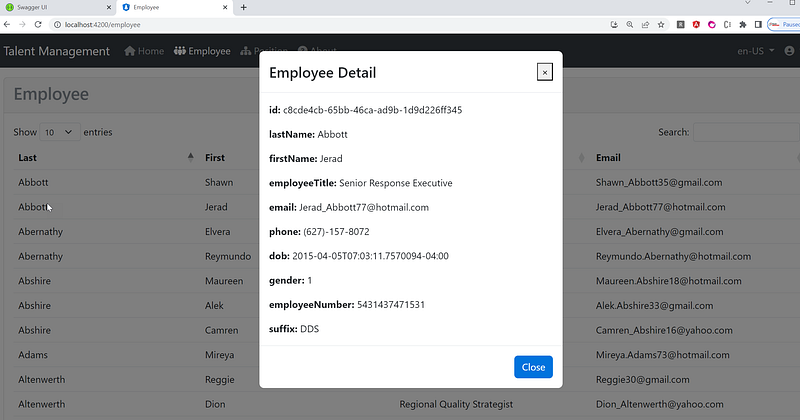
I have a table that displays a listing of Employee records. When a row is clicked, I want to show a popup that displays the details of that record. Please refer to the screenshot below for more details:
Tutorial Content
I have recently published a blog series titled Fullstack Angular 15, Bootstrap 5 & .NET 7 API: Project Demo and Tutorial. In this series, I provide a comprehensive guide along with a project demo. You have the option to download the complete full-stack source code and run it on your localhost environment.
In this blog post, I will specifically focus on a crucial piece of code that demonstrates how to call the Angular Open Dialog service and load the Employee Detail component using @ng-bootstrap/ng-bootstrap library. By following this code snippet, you’ll be able to understand the implementation details and effectively utilize the Open Dialog service in your Angular application.
@ng-bootstrap/ng-bootstrapis a library that provides Angular directives and components to easily integrate and use Bootstrap's CSS and JavaScript components in Angular applications.
Walkthrough of the Angular Open Dialog Service Source Code
In Angular, a service is a class that is responsible for providing specific functionality and data to different parts of an application. Services act as a bridge between components, allowing them to share data, perform common tasks, and encapsulate business logic.
Here is the source code for the ModalService taken from the modal.service.ts file:
import { Injectable, Injector, Type } from '@angular/core';
import { NgbModal } from '@ng-bootstrap/ng-bootstrap';

import { ErrorDialogComponent } from '@shared/errors/error-dialog.component';
import { ConfirmationDialogComponent } from '@shared/confirmation-dialog/confirmation-dialog.component';
import { EmployeeDetailComponent } from '@app/features/employee/detail/employee-detail/employee-detail.component';
import { Employee } from '@shared/interfaces/employee';

@Injectable({
  providedIn: 'root',
})
export class ModalService {
  modalService = this.injector.get(NgbModal);

  constructor(private injector: Injector) {}

  OpenEmployeeDetailDialog(title: string, employee: Employee): void {
    //var modalService = this.injector.get(NgbModal);
    const modalRef = this.modalService.open(EmployeeDetailComponent);
    modalRef.componentInstance.title = title;
    modalRef.componentInstance.employee = employee;
  }

  OpenErrorDialog(title: string, message: string, status?: string): void {
    //var modalService = this.injector.get(NgbModal);
    const modalRef = this.modalService.open(ErrorDialogComponent);
    modalRef.componentInstance.title = title;
    modalRef.componentInstance.message = message;
    modalRef.componentInstance.status = status;
  }

  OpenConfirmDialog(
    title: string,
    message: string,
    btnOkText: string = 'OK',
    btnCancelText: string = 'Cancel',
    dialogSize: 'sm' | 'lg' = 'sm'
  ): Promise<boolean> {
    const modalRef = this.modalService.open(ConfirmationDialogComponent, { size: dialogSize });
    modalRef.componentInstance.title = title;
    modalRef.componentInstance.message = message;
    modalRef.componentInstance.btnOkText = btnOkText;
    modalRef.componentInstance.btnCancelText = btnCancelText;
    return modalRef.result;
  }
}
The code you provided is an implementation of an Angular service called ModalService that utilizes the NgbModal service from the @ng-bootstrap/ng-bootstrap library to open various types of modal dialogs.
The OpenEmployeeDetailDialog method opens a modal dialog using the NgbModal.open() method and passes the EmployeeDetailComponent as the component to display in the modal. It sets the title and employee properties on the EmployeeDetailComponent instance.
The OpenErrorDialog method and OpenConfirmDialog method are constructed similar to OpenEmployeeDetailDialoghowever they have different input parameters and they are out side of the scope of this blog post.
Walkthrough of Employee Detail Component Source Code
In Angular, a component is a fundamental building block that encapsulates the functionality, data, and user interface (UI) of a specific part of a web application. Components are responsible for controlling and rendering a portion of the application’s user interface.
Here is the source code for the EmployeeDetailComponent taken from the employee-detail.component.ts file:
import { Component, Input, OnInit } from '@angular/core';
import { NgbActiveModal } from '@ng-bootstrap/ng-bootstrap';
import { Employee } from '@shared/interfaces/employee';

@Component({
  selector: 'app-employee-detail',
  templateUrl: './employee-detail.component.html',
  styleUrls: ['./employee-detail.component.scss']
})
export class EmployeeDetailComponent implements OnInit {
  @Input() title: string = 'Employee Detail';
  @Input() employee!: Employee;

  constructor(public activeModal: NgbActiveModal) {}

  ngOnInit() {
  }

}
In this code, you have an Angular component called EmployeeDetailComponent. Let's go through each part:
- The
titleproperty is declared with an@Input()decorator, allowing a custom title to be passed into the component. - The
employeeproperty is declared with an@Input()decorator and represents the employee object passed into the component. - The constructor now accepts an instance of
NgbActiveModalfrom the@ng-bootstrap/ng-bootstraplibrary.NgbActiveModalprovides methods and properties to interact with the active modal instance. - The
ngOnInit()method is implemented as part of theOnInitlifecycle hook. This is where you can perform any necessary initialization tasks when the component is initialized.
Walkthrough of Employee Listing Component Source Code
Here is the source code for the EmployeeListComponent taken from the employee-list.component.ts file:
import { Component, OnInit } from '@angular/core';

import { Employee } from '@shared/interfaces/employee';
import { ApiHttpService } from '@app/services/api/api-http.service';
import { ApiEndpointsService } from '@app/services/api/api-endpoints.service';
import { DataTablesResponse } from '@shared/interfaces/data-tables-response';
import { ModalService } from '@app/services/modal/modal.service';

import { Logger } from '@app/core';


const log = new Logger('Employee');

@Component({
  selector: 'app-employee-list',
  templateUrl: './employee-list.component.html',
  styleUrls: ['./employee-list.component.scss'],
})
export class EmployeeListComponent implements OnInit {
  dtOptions: DataTables.Settings = {};
  employees: Employee[] = [];
  message = '';

  constructor(
    private apiHttpService: ApiHttpService,
    private apiEndpointsService: ApiEndpointsService,
    private modalService: ModalService,
    ) {}

  wholeRowClick(employee: Employee): void {

    let modalTitle = 'Employee Detail';

    this.openModal(modalTitle, employee);

    log.debug('Whole row clicked.', employee);
  }

  ngOnInit() {

    this.dtOptions = {
      pagingType: 'full_numbers',
      pageLength: 10,
      serverSide: true,
      processing: true,
      ajax: (dataTablesParameters: any, callback) => {
        // Call WebAPI to get employees
        this.apiHttpService
          .post(this.apiEndpointsService.postEmployeesPagedEndpoint(), dataTablesParameters)
          .subscribe((resp: DataTablesResponse) => {
            this.employees = resp.data;
            callback({
              recordsTotal: resp.recordsTotal,
              recordsFiltered: resp.recordsFiltered,
              data: [],
            });
          });
      },
      // Set column title and data field
      columns: [
        {
          title: 'Last',
          data: 'lastName',
        },
        {
          title: 'First',
          data: 'firstName',
        },
        {
          title: 'Title',
          data: 'employeeTitle',
        },
        {
          title: 'Email',
          data: 'email',
        },
      ],
    };
  }

  openModal(title: string, employee: Employee) {
    this.modalService.OpenEmployeeDetailDialog(title, employee);
  }
}
The wholeRowClick method is triggered when a row in the DataTables table is clicked. It opens the modal by calling the openModal method which takes in two parameters: title and employee. It then calls the OpenEmployeeDetailDialog method of the ModalService instance (modalService) to open the employee detail dialog with the specified title and employee data.
The OpenEmployeeDetailDialog method is a custom method defined in the ModalService class, which handles the logic for opening the modal dialog and passing the data to the EmployeeDetailComponent for display.
By calling this.modalService.OpenEmployeeDetailDialog(title, employee), the openModal method triggers the modal service to open the employee detail dialog with the provided title and employee object.
Source Code
Recommended Contents
- What are Services in Angular? ⛅
- What is standalone component in Angular? ⛳
- Upgrading Angular 15 to 16: A Full-stack Web Development Project using Angular and .NetCore WebAPI ♥
- Load Angular Component into Bootstrap Modal | Tutorial ⛽
- Implement Toast with Bootstrap 5 in Angular 15 or 16 | Tutorial ☕
- Fullstack Angular 15, Bootstrap 5 & NET 7 API: Project Demo and Tutorial ♥
- Seven Object-Oriented Programming Jokes ☺
Summary

The tutorial demonstrates how to create a dynamic modal in Angular using Bootstrap. It walks through the process of setting up the necessary components, services, and templates to achieve the desired functionality.
The tutorial begins by introducing the concept of modals and their usefulness in displaying additional information or user interactions. It highlights the importance of using Angular services to load Angular components dynamically within a modal.
The first part of the tutorial focuses on the ModalService, which is responsible for managing the opening and closing of modals. It provides methods for opening different types of modals, such as the employee detail modal, error modal, and confirmation modal. The ModalService utilizes the NgbModal from the @ng-bootstrap/ng-bootstrap library for modal functionality.
Next, the tutorial dives into the EmployeeListComponent, which demonstrates the usage of the ModalService to open the employee detail modal. The EmployeeListComponent retrieves employee data from an API endpoint using the ApiHttpService and ApiEndpointsService. It configures the DataTables library to display the employee records and handles the click event on a row to trigger the opening of the employee detail modal.
The EmployeeDetailComponent is also showcased, which receives the employee data as an input and displays it in the modal. It utilizes the NgbActiveModal to interact with the active modal instance.
Throughout the tutorial, the code is provided and explained in detail, giving a step-by-step guide on how to implement the dynamic modal functionality using Angular and Bootstrap.
Thanks for reading! Hope you found it useful. Want more? Please follow me and become a member on medium for more articles. With your support, I’ll keep creating awesome content for you. Have a great day ahead! — Fuji Nguyen


