
Learning Android Development
Android Matrix ScaleType Explained
Making a custom scaling transformation on Android Image

Understanding Android Image ScaleTypes is essential for any Android Developer. The basic ones are all explained below, except for Matrix
In a normal situation, there’s no need of using Matrix ScaleType. Nonetheless, for something more interesting as below, we will need Matrix ScaleType.
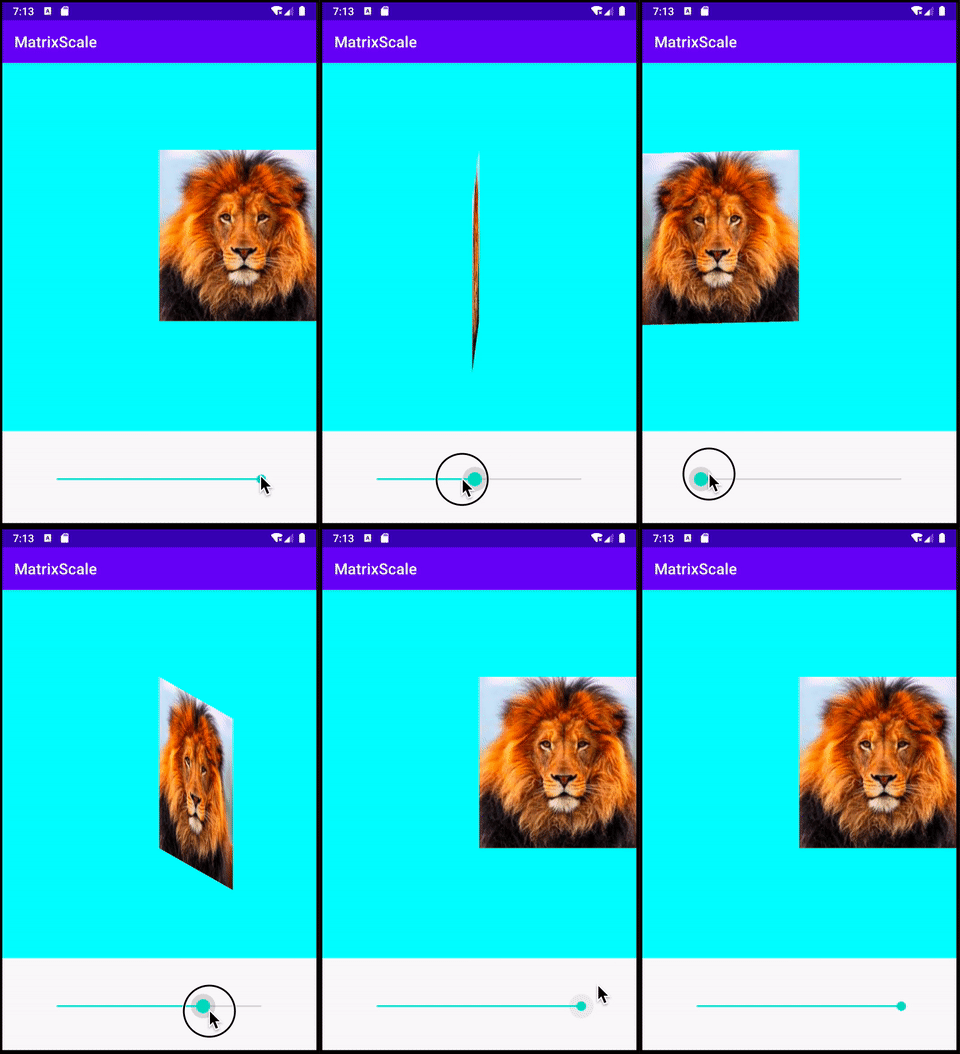
The Matrix ScaleType
To set up a matrix scale type, it is just as simple as below.
<androidx.appcompat.widget.AppCompatImageView
    android:id="@+id/image_picture"
    android:layout_width="match_parent"
    android:layout_height="match_parent"
    android:src="@drawable/lion"
    android:scaleType="matrix" />
But if you did nothing beyond that, matrix scale type scales nothing other than showing the original image with the original size.
What happens internally is just setting an identity matrix as the scaling matrix
val matrix = Matrix()
image_picture.imageMatrix = matrix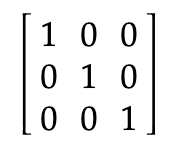
With this matrix value, when apply on any coordinate, the coordinate value is retained. Hence no scaling is applied

The meaning of each item in the matrix
What is the meaning of each item in the matrix? In general, they are as below.
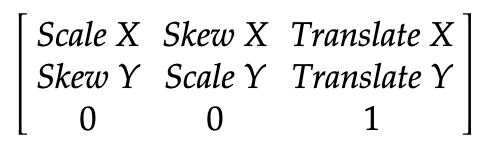
To know how these are derived, you can find in this excellent article, and this pdf lecture.
To further elaborate them, I’m giving some simple examples as below
Scaling
This is used to enlarge or shrink the images. Below are the possible scale value
- Set the scale item to > 1 to enlarge it
- Set the scale item between 0 and 1, to shrink it
- Set the scale item to < 0, to set up the mirror image
E.g. to scale the image to 2x of the original size, we just need to set the Scale item to 2.
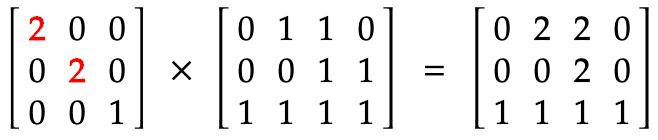
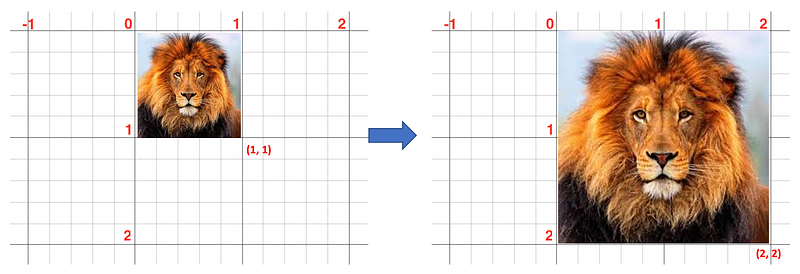
There’s a helper function in Matrix class, which is setScale(scaleX, scaleY)
Translating
This is used to move the image to another position.
- A positive value is moving right or down
- A negative value is moving left or up
E.g. to translate the image to 1 coordinate right, and 1 coordinate down
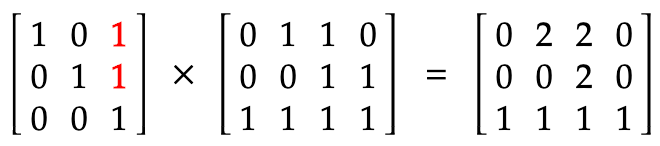
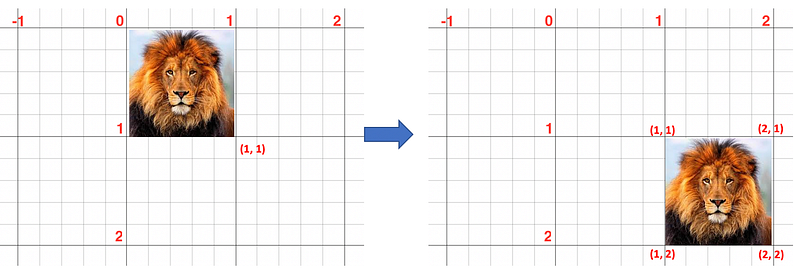
There’s a helper function in Matrix class, which is setTranslate(x, y)
Skewing
This is used to skew the image.
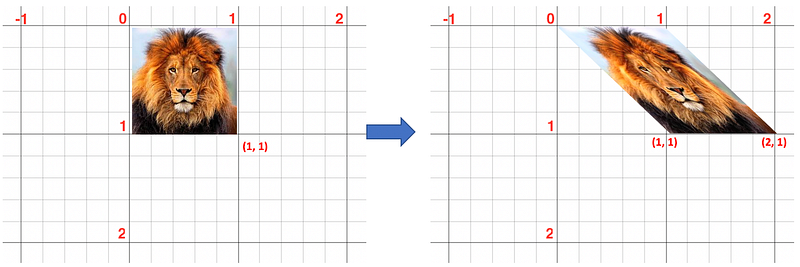
- SkewX is to skill horizontally rightward
- SkewY is to skill vertically downward
Essentially how much skew value to set is based on the math tan(degree) value.
e.g. Skew Right 45 degree (tan(45) = 1 )
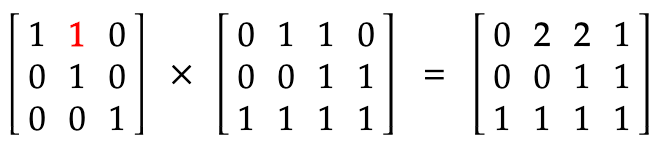
e.g. Skew Down 45 degree (tan(45) = 1 )
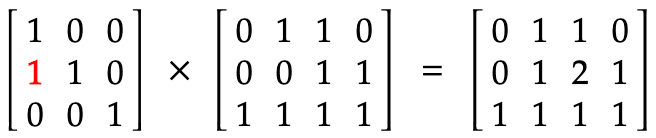
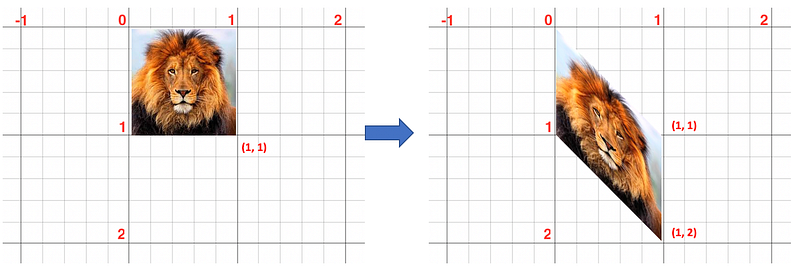
There’s a helper function in Matrix class, which is setSkew(skewX, skewY)
Rotating
Rotation is a special scaling using the matrix item of scaling and skewing together. Given a degree it will be set according to the sin(degree) and cos(degree) as shown below
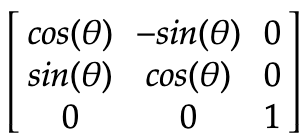
E.g. a 45-degree rotation will produce the below
Note
cos(45) = 0.7andsin(45) = 0.7

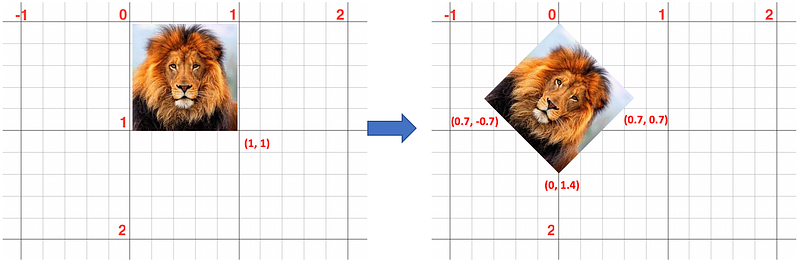
There’s a helper function in Matrix class, which is setRotate(degree)
Set Post and Pre helper function
If you search out the Matrix helper functions, all of them have set, pre and pos, e.g. setTranslate, preTranslate and postTranslate. What do they mean?
If there’s only one matrix transformation happening, 3 of them behave equally. The simplest is to apply set, since it set to the matrix exactly per what the value provided.
However, if you apply two matrixes together. e.g. scale and then translate, or translate and scale, then the pre and post will result differently when you operate on your second matrix.
Post Helper Function
E.g. let translate and perform a postScale, it will be like below
val matrix1 = Matrix()
matrix1.setTranslate(1f, 1f)
matrix1.postScale(2f, 2f)
What happens to the matrix is as below
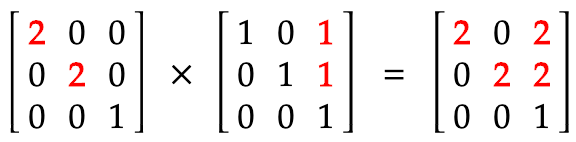
When we perform on the coordinates, they are as shown as below
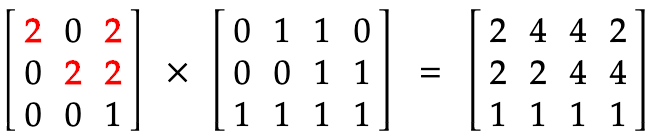
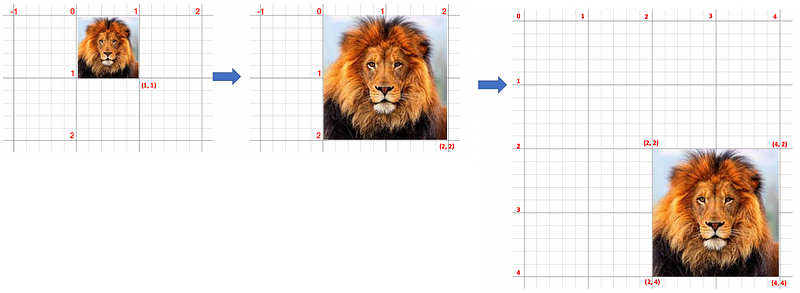
As shown in the diagram above, the scaling happens first then followed by the translation. Even the translation happens just (1, 1), but due to its post scaling of (2, 2), the translation becomes (2, 2).
Pre Helper Function
E.g. let translate and perform a preScale, it will be like below
val matrix1 = Matrix()
matrix1.setTranslate(1f, 1f)
matrix1.preScale(2f, 2f)
What happens to the matrix is as below
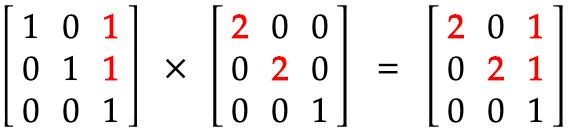
When we perform on the coordinates, they are as shown as below
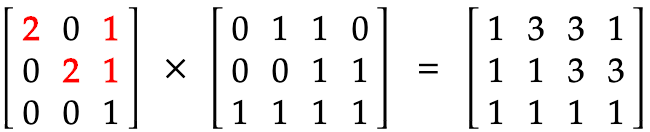
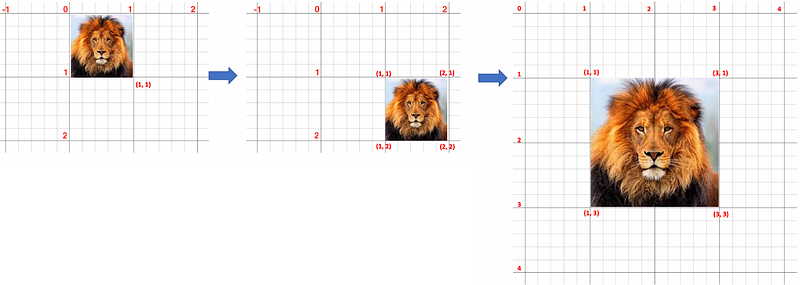
As shown in the diagram above, the translation happens first then followed by the scaling. Hence the scaling happens at the (1, 1) coordinate.
You can get the example app code to experiment with it.
Also to explore Matrix ScaleType for StartCrop and EndCrop, check out below


