
And…Now I can’t log into the other M7i-Flex instances I was working in either via RDP…Steps I took to troubleshoot…No joy: Fixed in subsequent post
Self-signed snakeoil certificate used by default on Ubuntu by xrdp
~~~~~~~~~~~~~~~~~~~~~~~~~~~~~~~~~~~~~~~~~~~~~~~~~~~~~~~
⚙️ Check out my series on Automating Cybersecurity Metrics | Code.
🔒 Related Stories: Bugs | AWS Security | Secure Code
💻 Free Content on Jobs in Cybersecurity | ✉️ Sign up for the Email List
~~~~~~~~~~~~~~~~~~~~~~~~~~~~~~~~~~~~~~~~~~~~~~~~~~~~~~~
I’ve been writing about my struggles to regain access to hosts I’ve set up or shut down via the xrdp service.
Update ~ Fixed the connection issue in this post (still looking into certificates):
I was just working in one host recently and it disconnected. So I stopped it and left and for dinner and came back to work on it again.
Now it’s doing the same thing as the other host I created an image of it from:
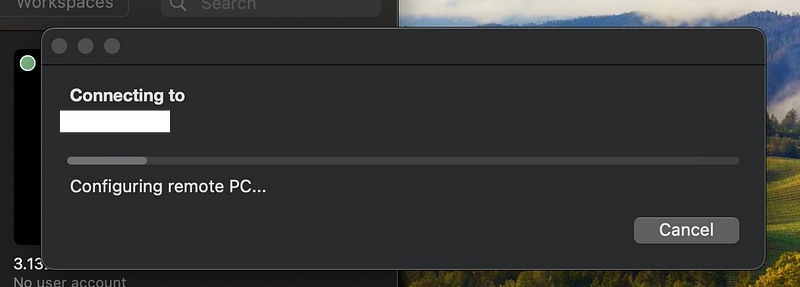
It simply hangs and I cannot connect.
This is making it very difficult for me to get my work done.
I haven’t change the instance configuration so I would expect it to just work.
The other problem I mentioned in an earlier post is that VPC Flow Logs aren’t showing up for a particular VPC. Even after correcting the issue with the role — and I’m not sure how it got that way in the first place — the logs aren’t showing up.
Well, I finally figured out how to get the flow logs fixed as I wrote about in an earlier post. So I can see that my connection attempts are making it to the server.
Since I can’t work at all now I have to figure this out.
I figure out that the logs I need are in:
/var/log/xrdp.log
There I can see this error. So is this the problem and why is my permission suddenly denied?

Not to mention I am wondering about the implications of a “default key” if you leave your instance wide open to the Internet.
And it’s using an RSA key. I wrote about not using RSA keys here and I guess I didn’t realize that this service would be using RSA but ah yes, I mentioned that RDP uses RSA in my earlier post.
It’s not clear from the research whether RDP is also vulnerable but speculation would suggest maybe it is. More research or explanation of what it is not, technically, is required. In any case it would be safer to restrict this to an ECC key as I wrote about, per the NIST guidance.
OK well, is that the culprit in this case?
What is the identity the service uses to access the key? Clearly it’s not root, thankfully. The key is owned by root and only root has permission to access it. Did something change?
Well, this is interesting:

What are these snakeoil keys? That doesn’t sound too good, now does it?
Well here’s an explanation:
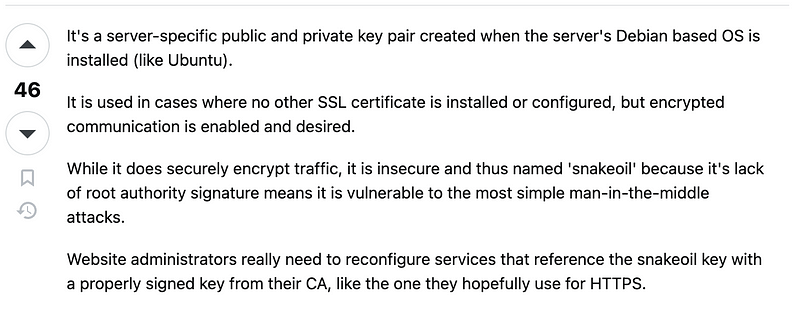
So why is xrdp pointing to these keys? Does it always do that? Or did something get changed?
Anyway researching this further I found these posts:
https://www.linux.org/threads/xrdp-using-sslv2-ugh.44140/
So xrdp runs with the xrdp user.
So the xrdp user needs access to those files — if you want to use the default certificates.
The post above claims the following:
The cert is fine. It’s world-readable, as it should be as it contains no secrets.
The key does contain a secret and so it needs to be readable by xrdp. If you do the
chmod 640 ...and thechown :xrdpas @metalefty suggests, you should end up with:-
So you could make the xrdp service the owner but perhaps it would be better to add the user to the group since I don’t know what else needs access to those keys (and is that what changed?)
Here are the pertinent bits:
OK, I did and will read the doc, but tell me I need also to execute the 3 mentioned commands as well chmod 644 /etc/xrdp/cert.pem chmod 640 /etc/xrdp/key.pem chown :xrdp /etc/xrdp/key.pem
I don’t know about Kali Linux, but on Debian, it’s not necessary. The SSL private key is owned by the “ssl-cert” group. The “xrdp” user is the user that runs the “xrdp” binary, and has to have access to the key if you want a TLS connexion. So either you add the “xrdp” user to the “ssl-cert” group (
sudo adduser xrdp ssl-cert), or you change the group owning the key to the "xrdp" group (chown :xrdp /etc/xrdp/key.pem), which the "xrdp" user is part of.
The 2 other commands (
chmod 644 /etc/xrdp/cert.pemandchmod 640 /etc/xrdp/key.pem) seem unnecessary, since the 2 files already have 644 (cert) and 640 (key) permissions (on Debian at least). If you want to make sure, you can runsudo stat -L -c %a /etc/xrdp/key.pemandsudo stat -L -c %a /etc/xrdp/cert.pemcommands.
So that may solve the immediate problem. Let’s try it.
So I do that and now I get a new error when I try to connect with xrdp:
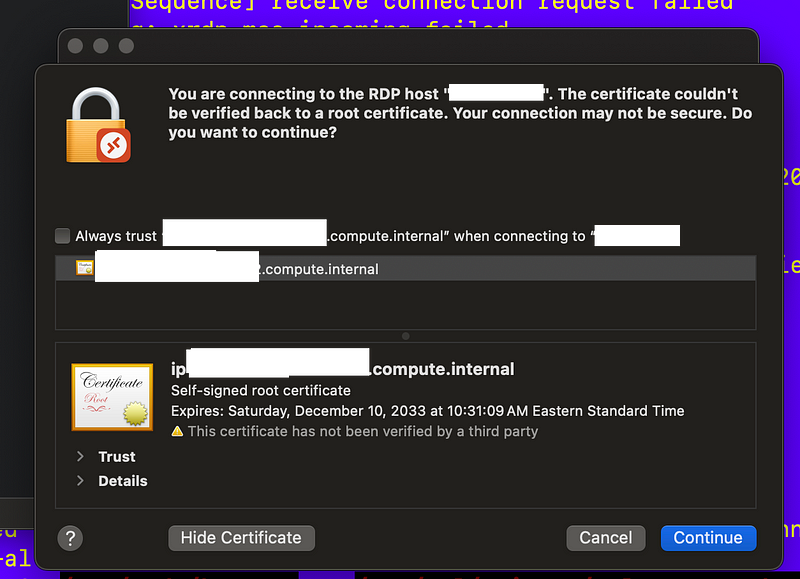
Not sure I like that but I restart xrdp and try it.
Still no go.
Besides that I’m digging into all the options in the ini files and I have questions…
I completely uninstall xrdp.
sudo apt-get remove --purge xrdp -yAnd reinstall it.
sudo apt install xrdpNow I’m starting over and one thing I read in the ini was a way to force RDP rather than TLS connections. I change negotiate to rpd so it will use rpd only and no TLS to make connections.
I also added the xrdp user to the group that can read the certificates as explained above. I don’t get that insecure popup warning anymore but I do see errors in the logs, and then it says I’m connected, but it’s not working.
Ugh. What is this:
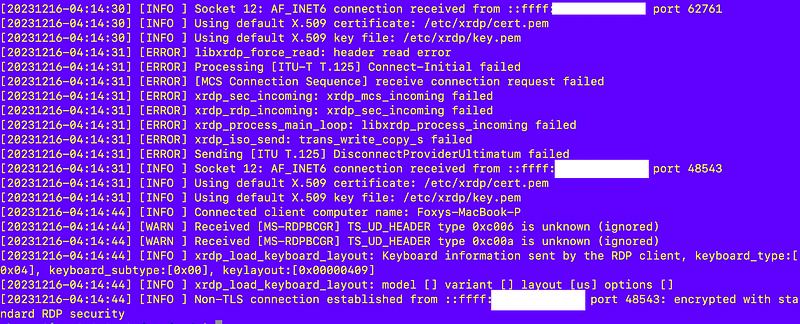
So I can see from the last line a connection is established but the client won’t show the GUI. Additionally, I can see the traffic on port 3389 in VPC flow logs after having resolved that issue.
So now what?
After digging around around I found this issue about xrdp and snap from about a year ago.
Doesn’t appear that I installed xrdp using snap after taking a look at that.
At this point I give up. I copy my files up to s3 that I need off this instance and starting over.
Wait.
You’re kidding right?

Don’t tell me xrpd someone changed to only listen on IPv6.
UGHhhhhhhh.
Follow for updates.
Teri Radichel | © 2nd Sight Lab 2023
About Teri Radichel:
~~~~~~~~~~~~~~~~~~~~
⭐️ Author: Cybersecurity Books
⭐️ Presentations: Presentations by Teri Radichel
⭐️ Recognition: SANS Award, AWS Security Hero, IANS Faculty
⭐️ Certifications: SANS ~ GSE 240
⭐️ Education: BA Business, Master of Software Engineering, Master of Infosec
⭐️ Company: Penetration Tests, Assessments, Phone Consulting ~ 2nd Sight Lab
Need Help With Cybersecurity, Cloud, or Application Security?
~~~~~~~~~~~~~~~~~~~~~~~~~~~~~~~~~~~~~~~~~~~~~~~~~~~~~~~~~~~~~
🔒 Request a penetration test or security assessment
🔒 Schedule a consulting call
🔒 Cybersecurity Speaker for PresentationFollow for more stories like this:
~~~~~~~~~~~~~~~~~~~~~~~~~~~~~~~~~~~~~~~~~~~~~~~~~~~~~~~~~~~~~
❤️ Sign Up my Medium Email List
❤️ Twitter: @teriradichel
❤️ LinkedIn: https://www.linkedin.com/in/teriradichel
❤️ Mastodon: @teriradichel@infosec.exchange
❤️ Facebook: 2nd Sight Lab
❤️ YouTube: @2ndsightlab


