
xrdp only listening on IPv6: Fixed (Again)
Figured out why xrdp is not working on Ubuntu, but not why it’s only listening on IPv6 or what changed — who is testing this besides me?
~~~~~~~~~~~~~~~~~~~~~~~~~~~~~~~~~~~~~~~~~~~~~~~~~~~~~~~
⚙️ Check out my series on Automating Cybersecurity Metrics | Code.
🔒 Related Stories: Bugs | AWS Security | Secure Code
💻 Free Content on Jobs in Cybersecurity | ✉️ Sign up for the Email List
~~~~~~~~~~~~~~~~~~~~~~~~~~~~~~~~~~~~~~~~~~~~~~~~~~~~~~~
OK after much trial and tribulation (probably too much but I didn’t look at this because I knew xrpd was running) …
I figured out that xrdp is only listing on port 3389 for tcp6 (IPv6).

I found an old issue related to this but I’m using a much newer version of ubuntu and a more up to date version of xrdp.
Just when I was all happy that Ubuntu updates are no longer trying to force IPv6 now this.
So now I need to try to figure out how to fix that… tomorrow.
I don’t want to have to rebuild xrdp from source or something to fix this. This is not what I should be working on right now.
It sounds like, from the above post, the problem had something to do with Ubuntu changing not xrdp. So is this an Ubuntu change or problem? Because as far as I know xrdp and the xfce4 did not change — but I did get either Ubuntu or AWS updates. Not sure which or both or what caused this.
Hopefully this is not going to take me all day to resolve tomorrow.
Update: I disabled IPv6 on Ubuntu:
sudo vi /etc/default/grub

#Change this line
GRUB_CMDLINE_LINUX="ipv6.disable=1"

sudo update-grub

#restart but on AWS don't recommend the method in that post.
#stop the instance in the EC2 console and start.
#I haven't had much succss with reboot from console - not sure it's doing anything.Now I see something listing on IPv4.

That’s great but all I get now is a black screen.
Ran lsof.
sudo lsof | grep xrdpFound another interesting log:

cat /var/log/xrdp-sesman.logAha:

Testing…
Because I always forget this:
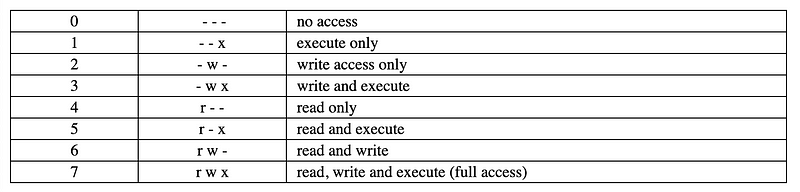
Let’s see if this works:
cd /etc/xrdp
sudo chown root *
sudo chgrp -R xrdp *
sudo chmod 755 *
YES!!!
Note that initially I didn’t give my user permission to execute the files but apparently the xrdp group isn’t the one executing the file it’s the user logging in.
Now about those certificates…hmmm.
Update: well this worked. I went to eat brunch. Came back, and now this:

Seriously? What is going on.
This worked when xrdp was already running. I shut down the host, went to eat, came back, started the host, and it’s failing again.
More troubleshooting…
Followed the steps to restore default configuration and log files:
sudo apt-get remove --purge xrdp -yReinstall:
sudo apt-get install xrdpEdit ini file to only allow rdp:
sudo vi /etc/xrdp/xrdp.ini
Restart xrdp:
sudo systemctl restart xrdpNow it works again.
So the one thing I noticed is this permission change. What’s in that file? Don’t know root doesn’t have permission. Let’s fix that.

A bunch of hex characters. Now why does xrdp need to change the configuration of itself? An ini is a configuration file.
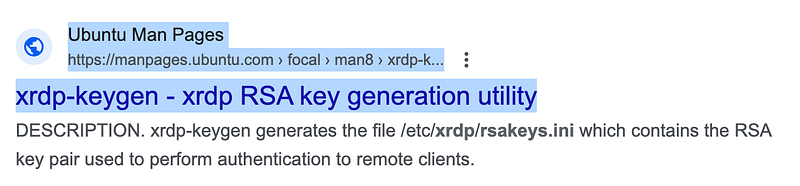
What if we change the permissions around like this?
cd /etc/xrdp
sudo chown root rsakeys.ini
sudo chgrp xrdp rsakeys.ini
sudo chmod 640 rsakeys.ini
Test my RDP connection again…still works.
Stop and start the EC2 instance again.
Still can connect. Alright let’s see how long this lasts…and I still want to dig into all those crypto keys and files a bit more later.
Follow for updates.
Teri Radichel | © 2nd Sight Lab 2023
About Teri Radichel:
~~~~~~~~~~~~~~~~~~~~
⭐️ Author: Cybersecurity Books
⭐️ Presentations: Presentations by Teri Radichel
⭐️ Recognition: SANS Award, AWS Security Hero, IANS Faculty
⭐️ Certifications: SANS ~ GSE 240
⭐️ Education: BA Business, Master of Software Engineering, Master of Infosec
⭐️ Company: Penetration Tests, Assessments, Phone Consulting ~ 2nd Sight Lab
Need Help With Cybersecurity, Cloud, or Application Security?
~~~~~~~~~~~~~~~~~~~~~~~~~~~~~~~~~~~~~~~~~~~~~~~~~~~~~~~~~~~~~
🔒 Request a penetration test or security assessment
🔒 Schedule a consulting call
🔒 Cybersecurity Speaker for PresentationFollow for more stories like this:
~~~~~~~~~~~~~~~~~~~~~~~~~~~~~~~~~~~~~~~~~~~~~~~~~~~~~~~~~~~~~
❤️ Sign Up my Medium Email List
❤️ Twitter: @teriradichel
❤️ LinkedIn: https://www.linkedin.com/in/teriradichel
❤️ Mastodon: @teriradichel@infosec.exchange
❤️ Facebook: 2nd Sight Lab
❤️ YouTube: @2ndsightlab


