
Amazon EventBridge Archive-Replay: An Experience Report

To keep up with the evolution of serverless, we should be ready to embrace change.
Two dates that have serverless significance to me are,
- July 10, 2019 — LEGO.com was switched to run on serverless.
- July 11, 2019 — EventBridge was announced at Serverless Days, London.
Sensing the role EventBridge could play in the world of serverless microservices, the engineering team behind LEGO.com at the LEGO Group took a bold step to pilot it soon after. It became a sleeper hit! Since then, I’ve been sharing our experience via several articles and conference talks.
It’s almost three years now. EventBridge has evolved with several new features. In our industry, those who move with the evolution of technology are the most successful ones.
Serverless development requires continuous inspiration!
The Trial Of Archive And Replay
When the new archive and replay events feature was announced in November 2020, it fulfilled the most requested feature of EventBridge at that time, a way to store events.
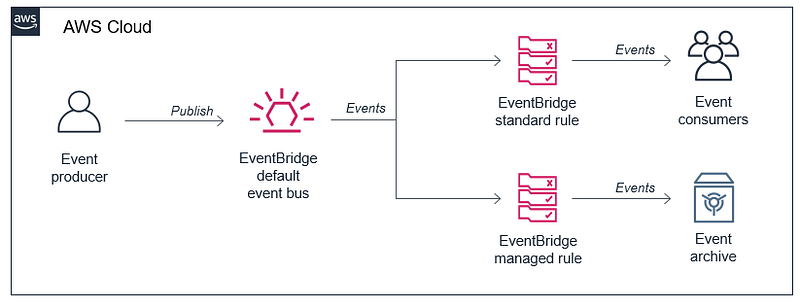
I took a close look, and I saw possibilities of how it could help individual microservices to manage failures when they operate within an event-driven serverless ecosystem.
While discussing with engineers, we came up with a use case to implement an event-driven circuit-breaker in one of our microservices. Archive and replay of events was at the center of this idea. I have captured the details in the article below.
Initial excitement
As I echoed in my article on refactoring in serverless, developing new ideas always excites engineers, especially when they use a new feature to solve a real-world problem.
The solution was broken down into different parts. Different engineers picked up the pieces, and everyone was progressing well with the implementation. A few issues came up along the way, mainly due to the confusion of event filter patterns, and were resolved quickly.
Excitement turned sour
Soon they brought all the parts together as a complete end-to-end solution. The QA engineer started to compile different integration test scenarios to cover every aspect of the solution. After the initial excitement, things became a bit worrying. I began to hear the following at stand-ups.
- Not sure if the events are getting replayed.
- We are not seeing the replayed events hitting the target service.
- Is there a way to inspect the events in the archive to prove our suspicion is correct?
- The archive does not report the event count properly.
- We are checking the filter pattern again.
- We think it is not serving the purpose!
As the frustration mounted, they requested I sit with them and examine the end-to-end implementation, hoping to find a breakthrough to their misery and possibly solve the mystery.
The Undocumented Archive Behavior!
A few of us gathered in a meeting room. Everyone was quiet. It almost felt as if we were trying to solve one of the greatest serverless mysteries!
One engineer volunteered to share the screen and connected it to the big monitor. Multiple browser windows opened. Several AWS console windows got duplicated onto multiple tabs. So we began our hunt.
- Step 1: Mimic the third-party downtime!: Edited the service status entry in a DynamoDB table to set it to false, meaning the endpoint is down.
- Step 2: Submit an order: Using Postman, a new user session was created and the order was submitted to the Loyalty API. A successful acknowledgment was received.
- Step 3: Event checks: All the expected events, including the order retry one, were published from the microservices. Order processing state machine started and remained in progress waiting, for the order to reach the third-party service.
- Step 4: Check event archive: The event archive was active and reported over 50 events that included the ones from the previous tests.
- Step 5: Mimic the third-party uptime: Reverted the change we did in Step 1.
- Step 6: The replay trigger: Step 5 action triggered a lambda function via DynamoDB streams. It called event replay on the archive with a timeframe.
- Step 7: Watching the event replay: Expected an event for that pending order to get replayed from the archive, enter the bus, and reach the target service.
Nothing happened. No replay event entered the bus.
Why?
Engineers were looking at me for clues. I was looking at them puzzled!
The overlooked step and the big question of Why
Though we were doing the above steps manually, those actions were completed within a couple of minutes. The event replay timeframe was around the same interval.
One thing we overlooked in Step 4 was not noting down the event count before the test. With old events already present in the archive, we didn’t know whether the count included the new event or not.
After a brief discussion, we noted the event count and re-did those steps.
We waited for the event count in the archive to increase by one. We waited, and we waited… and waited. After nearly five minutes, we noticed the event count go up by one!
To prove the point, we repeated the steps and observed the same pattern of a long delay.
All those words (that I cannot document here) one would expect to come out of engineers’ mouths in such circumstances heard. After a brief pause, in unison, we all shouted,
Why?
Wish we knew before
Panic set in as this feature had already missed its release target. We quickly scanned through the AWS docs on archive and replay, searching for answers. Disappointingly, no favorable answer was found.
I saw anger and frustration on the faces of engineers who worked so hard to implement this functionality.
I promised them that I would find an answer. Within minutes I wrote an email to the EventBridge team with all the details.
The next day, I received the following response I wish every engineer working with EventBridge archive knew!
… yes, there is a delay in getting events from the event bus to the archive. The reason for the delay results from the architecture of archives. In the background, EventBridge uses S3 for archive storage. This gives high durability and is cost effective from a long-term storage perspective. However, S3 PUT and GET requests make it costly to store each event individually and so EventBridge batches events before storing them in S3. This batching results in the increased latency of up to 5 minutes for events to appear in an archive…
The workaround to the rescue!
Now that we know the reason for the delay, engineers thought through various options to make it work. Among the suggestions put forward, the best workaround was to delay the replay from the archive by 5 minutes.
We had to adjust the replay part of the architecture as discussed in the previous article. When the service status event indicates it is time to invoke the replay, instead of calling the StartReplay API, it will start a simple StepFunction flow with a wait state of five minutes. Once the timer is expired, the replay call will be made.
Though not the perfect solution we were looking for, it solves the problem without causing too much disruption to the original design.
After publishing this article, EventBridge team have updated the AWS docs with a note to highlight the behavior and a recommendation to delay the replay by ten minutes.
I Like Archive-Replay. It Has More Potential
Catch-all archives
Unlike how the EventBridge archive is promoted, I am not a big fan of having a single archive with a catch-all filter pattern and keeping events there indefinitely. While there can be use cases, the complexities it brings with multiple publishers and consumers are difficult to manage.
Lean and single-purpose archives
When we work with serverless microservices, we have defined service boundaries. Things that happen within a service’s space are its responsibility. If it needs to store some events for a particular reason, then it has the freedom to set up a catch-specific filter pattern and archive just those events.
There can be many benefits for lean and single-purpose archives.
- Targeted filter pattern per archive
- Ability to set different retention periods as needed for the archives
replay-namealigned with the archive name for a better target rule- Control on who is allowed to replay from which archive
Having said that, both generic and single-purpose archives can coexist. An analogy I can think of is the sea during a low-tide period. Alongside the ocean, we have many smaller ponds that come to exist and disappear.
Microservices teams benefit from lean archives
It is becoming increasingly common for smaller autonomous teams to own and operate their cloud accounts. Several custom event buses spread across multiple accounts can be seen in a department that has several product squads.
As these teams own microservices that communicate via APIs and events, they don’t manage events from other domains. They employ choreography and distributed orchestration to accomplish cross-service tasks. A single all-encompassing event bus may not be a feature in such scenarios.
A lean archive may store a few to millions of events and retain them for long as necessary, but it belongs to a single owner.
My Archive-Replay Wishlist
My feature wish-list for the EventBridge team.
Update AWS docs — Important
State it clearly in the archive section of the WS docs that due to batching of events by Amazon EventBridge, there could be a delay of up to five minutes for events to appear in the archive.
Delete events on replay
The existing feature allows deletion of an archive, but there is no way to remove events from the archive on-demand. We can set a retention period (TTL) in days for events in the archive, which is the only option to delete them at present.
An option to remove events from the archive as they get replayed would help maintain it fresh with events that are yet to be replayed. It will be of use for microservices that own archives for specific event types for a particular reason.
Either delete on replay or delete the events in that timeframe once the replay is completed.
Delete events based on a time window
It is an on-demand deletion where events within a timeframe get removed from the archive via an API call. Applications that prefer to take control of the deletion can make use of this option instead of the above.
If a replay is currently underway in the archive, then EventBridge can return an error with the reason.
Event replay rate limit
In low-volume event-driven use cases, the downstream services and APIs may not have measures to deal with an influx of requests. If such a system is recovering from downtime, opening the archive floodgate to reprocess the backlog could stress the application beyond its capacity.
Having an option to set the event replay rate would allow smoothening the flow of events back to the bus and the downstream targets.
Low latency archive
The current archive-replay feature is offered at no extra cost. As the EventBridge team explained, while handling billions of events, writing individually to S3 is a cost concern. Hence the batching.
If so, how about offering a low latency archive option? Use cases that require every event to reach the archive as it hits the target rule can opt for this option. Knowing that it is an advanced feature, I may be willing to pay a little extra.
Replay count of an event
When events get replayed from an archive, AWS adds the attribute replay-name to differentiate a replay event from the original. It helps with filter patterns to route the events to the right targets.
For applications that use an archive as a catch-all bucket and utilized by multiple consumers, the event replay requirement for each service could vary. When there is an overlap in the replay timeframes, few events may get replayed more than once. To better equip the targets interested in the replay events but not repetitions, it would help with a new attribute replay-count.
Delete events based on their replay count
It is a stretch, I know. If there are other ways of deleting events from the archive, there may not be a burning need for this option.
Replay events based on their replay count
As mentioned above, if there is a way to know the replay count of an event, then it would help to have a filter mechanism at replay to send only those events that satisfy the condition onto the bus.
For example, if an archive is receiving events intermittently, a scheduled replay trigger could request to release just the new events, i.e., events with their replay-count as zero.
Events visibility in the archive
At present, the EventBridge archive does not provide access to its content.
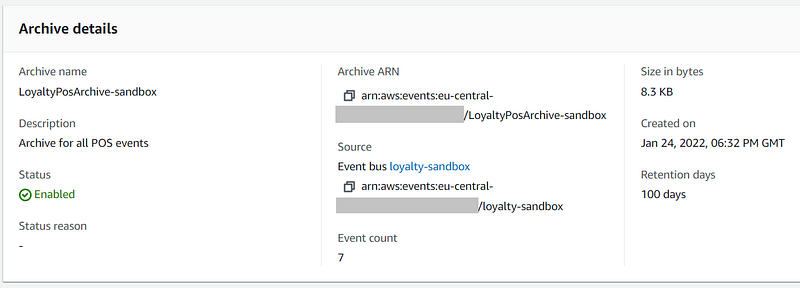
At times, especially during debugging, there is no option to check if a particular event or a set of them is in the archive or not. At least a way to know if a given event id exists in the archive within a timeframe would help.
Conclusion
My initial intention for this article was to show the impact of missing some vital information in a product’s documentation. I then used it to gather some thoughts on possible future requirements for the EventBridge archive and replay.
After receiving confirmation from the EventBridge team on the delay, our team decided on the workaround I mentioned earlier. Later, the same recommendation was also received from the EventBridge team.
If you are an EventBridge user and if this article inspired you with new ideas or new requirements for your use cases, then please get in touch with the EventBridge team via Nick Smit or Siva Palli. They will appreciate your feedback and are more than willing to have a call with you to understand your needs.
Please find the list of all my articles and upcoming talks here. Thanks!


