avatarSheen Brisals

Free AI web copilot to create summaries, insights and extended knowledge, download it at here

6721

Abstract

low between the Order Processing and the Vendor Mediator services. The diagram below expands on how Vendor Mediator handles an incoming request.</p><figure id="6ea2"><img src="https://cdn-images-1.readmedium.com/v2/resize:fit:800/1*OBzb_bhPgv8hxXhfSeKC8w.png"><figcaption>Expanded view of event data processing flow. Source Author</figcaption></figure><p id="18c2">Items marked as 1 and 2 are the same as what we saw in <a href="https://readmedium.com/how-to-build-better-orchestrations-with-aws-step-functions-task-tokens-and-amazon-eventbridge-19a68eeda461">Part 1</a>. Let’s briefly go through the other steps.</p><ol><li>Order processing dispatches an event with the data payload.</li><li>Event filter rule triggers processing target in Vendor Mediator service.</li><li>The event, along with its payload, is stored in a DynamoDB table.</li><li>Vendor status check. It checks if the circuit is closed or not by querying the SaaS status table.</li><li>If the <b>circuit is open</b> (i.e., status = Down), it sends an event with a status value of <code>retry</code> . It is an important event that indicates the need for archiving, as we will see shortly.</li><li>If the <b>circuit is closed</b> (i.e., status = Up), it invokes the SaaS endpoint. If it is a success, then a <code>submitted</code> event is sent. If a client error, then it’s a failure, and an <code>error</code> status event goes out. If it encounters a server error, or a connection timeout, then a <code>retry</code> event is sent.</li><li>One of the subscribers of these status events is the Order Processing service.</li></ol><p id="100e" type="7">The logic flow shown above in the Vendor Mediator service would fit perfectly as a state machine. With the Step Functions AWS SDK integration, we can reduce the need of lambda functions!</p><h2 id="ab90">Vendor Mediator status event</h2><p id="6197">Here is the core of the data submission status event I mentioned above.</p><div id="c73e"><pre><span class="hljs-punctuation">{</span> <span class="hljs-attr">"detail"</span><span class="hljs-punctuation">:</span> <span class="hljs-punctuation">{</span> <span class="hljs-attr">"metadata"</span><span class="hljs-punctuation">:</span> <span class="hljs-punctuation">{</span> <span class="hljs-attr">"domain"</span><span class="hljs-punctuation">:</span> <span class="hljs-string">"LEGO-LOYALTY"</span><span class="hljs-punctuation">,</span> <span class="hljs-attr">"service"</span><span class="hljs-punctuation">:</span> <span class="hljs-string">"service-loyalty-vendor-mediator"</span><span class="hljs-punctuation">,</span> <span class="hljs-attr">"category"</span><span class="hljs-punctuation">:</span> <span class="hljs-string">"task-status"</span><span class="hljs-punctuation">,</span> <span class="hljs-attr">"type"</span><span class="hljs-punctuation">:</span> <span class="hljs-string">"voucher"</span><span class="hljs-punctuation">,</span> <span class="hljs-attr">"status"</span><span class="hljs-punctuation">:</span> <span class="hljs-string">"retry"</span> <span class="hljs-punctuation">}</span><span class="hljs-punctuation">,</span> <span class="hljs-attr">"data"</span><span class="hljs-punctuation">:</span> <span class="hljs-punctuation">{</span> <span class="hljs-attr">"loyalty_request_id"</span><span class="hljs-punctuation">:</span> <span class="hljs-string">"AbLhmB7wnOsiBFAq6Cicj2acx8iQ"</span><span class="hljs-punctuation">,</span> <span class="hljs-attr">"loyalty_reference"</span><span class="hljs-punctuation">:</span> <span class="hljs-string">"P6IF7YcwQd"</span><span class="hljs-punctuation">,</span> <span class="hljs-attr">"merchant_reference"</span><span class="hljs-punctuation">:</span> <span class="hljs-string">"xz5CzHM1wZOm"</span><span class="hljs-punctuation">,</span> <span class="hljs-attr">"loyalty_order_reference"</span><span class="hljs-punctuation">:</span> <span class="hljs-string">"M101-S76-OP10-T65"</span> <span class="hljs-punctuation">}</span> <span class="hljs-punctuation">}</span> <span class="hljs-punctuation">}</span></pre></div><p id="06d3">The two important elements of this event are-</p><ol><li><code>status</code> — Possible values are <code>submitted</code> ,<code>error</code> , and <code>retry</code> .</li><li><code>data</code> — It contains the keys to identify the original event data from the Vendor Mediator’s cache table. The status event does not contain the original data payload.</li></ol><p id="d511"><code>loyalty_request_id</code> attribute contains the task token. When the Order Processing service receives an event with the status <code>retry</code> , it will extend the callback task token timeout for that particular execution flow.</p><h1 id="9914">Archiving The Retry Events</h1><p id="45d8">This part is simple, as shown below. In addition to the general consumers of the status events, there is an event filter rule that identifies the <code>retry</code> events and sends them to <code>LoyaltyVoucherArchive</code>.</p><figure id="4986"><img src="https://cdn-images-1.readmedium.com/v2/resize:fit:800/1*9_h6kVn4jEJc4mqiDFFgDg.png"><figcaption>Event archive view. Source Author</figcaption></figure><h2 id="3a81">Event archive creation</h2><p id="5133">Setting up an event archive is easy. Supply a name and the filter pattern, and it’s ready.</p><div id="2771"><pre><span class="hljs-attribute">Resources</span><span class="hljs-punctuation">:</span> <span class="hljs-attribute">VoucherArchive</span><span class="hljs-punctuation">:</span> <span class="hljs-attribute">Type</span><span class="hljs-punctuation">:</span> <span class="hljs-string">AWS::Events::Archive</span> <span class="hljs-attribute">Properties</span><span class="hljs-punctuation">:</span> <span class="hljs-attribute">ArchiveName</span><span class="hljs-punctuation">:</span> <span class="hljs-string">LoyaltyVoucherArchive</span> <span class="hljs-attribute">Description</span><span class="hljs-punctuation">:</span> <span class="hljs-string">Archive for vouchers to be resubmitted</span> <span class="hljs-attribute">EventPattern</span><span class="hljs-punctuation">:</span> <span class="hljs-attribute"><YourEventFilter> RetentionDays</span><span class="hljs-punctuation">:</span> <span class="hljs-string">10</span> <span class="hljs-attribute">SourceArn</span><span class="hljs-punctuation">:</span> <span class="hljs-string">'arn:aws:...:event-bus/loyalty-bus'</span></pre></div><p id="c69d">The event filter in this case is,</p><div id="97cc"><pre>{ <span class="hljs-string">"detail"</span>: { <span class="hljs-string">"metadata"</span>: {

Options

  <span class="hljs-string">"domain"</span>: [
    <span class="hljs-string">"LEGO-LOYALTY"</span>
  ],
  <span class="hljs-string">"service"</span>: [
    <span class="hljs-string">"service-loyalty-vendor-mediator"</span>
  ],
  <span class="hljs-string">"category"</span>: [
    <span class="hljs-string">"task-status"</span>
  ],
  <span class="hljs-string">"type"</span>: [
    <span class="hljs-string">"voucher"</span>
  ],
  <span class="hljs-string">"status"</span>: [
    <span class="hljs-string">"retry"</span>
  ]
}

} }</pre></div><p id="4020">Here it is from the AWS console.</p><figure id="b5b6"><img src="https://cdn-images-1.readmedium.com/v2/resize:fit:800/1*WnWM0QS7FV9ylCMiPM-kPg.png"><figcaption>AWS event archive console. Source Author</figcaption></figure><h2 id="faa0">AWS managed rule</h2><p id="dc04">While creating an archive with a filter pattern, AWS configures an event routing rule behind the scene. It’s a managed rule, and we can’t directly change it.</p><figure id="34e5"><img src="https://cdn-images-1.readmedium.com/v2/resize:fit:800/1*ztmaUH6df9IbcxgR6uNGUg.png"><figcaption>AWS managed rule. Source Author</figcaption></figure><p id="33d1">When events are replayed from an archive, AWS adds the attribute <code>replay-name</code> to differentiate a replay event from the original. As highlighted in the picture, the managed rule adds an extra condition to prevent an endless event routing cycle.</p><p id="1f67">Though I showed one archive, in reality, the Vendor Mediator service maintains three archives to align with the three parts of the SaaS application that I mentioned under the Status Monitor section above.</p><p id="d12e" type="7">One of the strengths of serverless is ‘granularity’. When it comes to archiving events, where possible, think of the subsets of events that need archiving, rather than going for a ‘catch-all’ and ‘archive-everything’ pattern.</p><p id="2902" type="7">Having separate archives allows us to vary the retention days. For example, there could be temporary cache events that are short-lived, and critical business events that stay longer.</p><p id="4722" type="7">While replaying, we can easily vary the replay time frame per archive, and have specific target rules, etc. to make it efficient and easily manageable.</p><h1 id="45e4">Replaying The Archived Events</h1><p id="f86e">The replay of archived events happens when the status of the SaaS application becomes ‘up’ from being ‘down’. In circuit-breaker terminology, the circuit has become ‘closed’.</p><p id="1b86">Here is the event replay path depicted as a stretched view.</p><figure id="4375"><img src="https://cdn-images-1.readmedium.com/v2/resize:fit:800/1*3WvdnEcDP1_3b5VmWjFB3A.png"><figcaption>Replaying event from archive. Source Author</figcaption></figure><ol><li>SaaS status events published by the SaaS Status Monitoring service arrive at the bus.</li><li>When the rule identifies that the status has changed from ‘down’ to ‘up’, it triggers the replay.</li><li>The replayed events identified by the <code>replay-name</code> are buffered into an SQS queue. SQS with its different characteristics, allows controlling the flow of these events.</li><li>The queue handler lambda function retrieves the initial data event from the table, sends it back to the bus.</li></ol><h2 id="9183">Replay logic</h2><ul><li>As shown earlier, the SaaS status event contains the time interval of the service being down. The replay trigger function uses it to set the <code>EventStartTime</code> and the <code>EventEndTime</code> of the <a href="https://docs.aws.amazon.com/eventbridge/latest/APIReference/API_StartReplay.html"><code>StartRep</code>lay</a> <a href="https://docs.aws.amazon.com/eventbridge/latest/APIReference/API_StartReplay.html">API</a>.</li><li>It uses a <code>ReplayName</code> that aligns with the archive name. For example, replay names of <code>LoyaltyVoucherArchive</code> will be of the format <code>LoyaltyVoucherReplay_YYYYMMDDHHMMSS</code> .</li><li>The above format helps to be specific while setting up the event filter pattern for replay events (item 3 in the diagram). Instead of using the <code>"replay-name": {[ "exists": true ]}</code> pattern, it can be more specific as shown below.</li></ul><div id="756d"><pre>{ <span class="hljs-string">"detail"</span>: { <span class="hljs-string">"metadata"</span>: { <span class="hljs-string">"domain"</span>: [ <span class="hljs-string">"LEGO-LOYALTY"</span> ], <span class="hljs-string">"service"</span>: [ <span class="hljs-string">"service-loyalty-vendor-mediator"</span> ], <span class="hljs-string">"type"</span>: [ <span class="hljs-string">"voucher"</span> ], <span class="hljs-string">"status"</span>: [ <span class="hljs-string">"retry"</span> ] } }, <span class="hljs-string">"replay-name"</span>: [ { <span class="hljs-string">"prefix"</span>: <span class="hljs-string">"LoyaltyVoucherReplay"</span> } ] }</pre></div><h1 id="c6cc">Trade-offs & Facts</h1><ul><li><b>Ordering of events</b> is not a requirement in this use case.</li><li><b>Idempotent </b>replay event handler (item 4 in the above diagram). It checks the submission status in the <code>DataCache</code> table before invoking the SaaS application.</li><li>The request submission flow depicted earlier updates the submission status (as <code>submitted</code> ,<code>error</code> , or <code>retry</code>) in the <code>DataCache</code> table.</li><li>The <b>archive and replay</b> with EventBridge eliminate the usual approach of periodically scanning or querying the <code>DataCache</code> table for status and resubmitting.</li><li><b>Original data payload event is not archived</b>. Instead, a separate event with the keys to identifying the data from the table is used.</li><li>The replay trigger function stores the latest replay interval in a table. This is not shown in the diagram.</li><li><b>DLQs</b> (Dead Letter Queues) are omitted from the diagrams for clarity.</li><li>During the up-time of the SaaS platform, a sweeper lambda function replays any stranded events from the archive at specific intervals.</li></ul><h1 id="25b6">Conclusion</h1><p id="02ac">There are several ways we can make a serverless application resilient and fault-tolerant. Understanding the requirements is key to making the right architectural decision and design choices.</p><p id="fa18">Not every pattern nor solution is going to fit every use case. Having the understanding and knowledge to identify the optimal approach is essential to succeed in serverless.</p></article></body>

Amazon EventBridge: Archive & Replay Events In Tandem With A Circuit-Breaker

In my previous article, “How To Build Better Orchestrations With AWS Step Functions, Task Tokens, And Amazon EventBridge”, I explained the Loyalty Service platform. In that, the focus was mainly on the Order Processing and Vendor Mediator microservices. These two services, though decoupled, communicate via events and work in harmony!
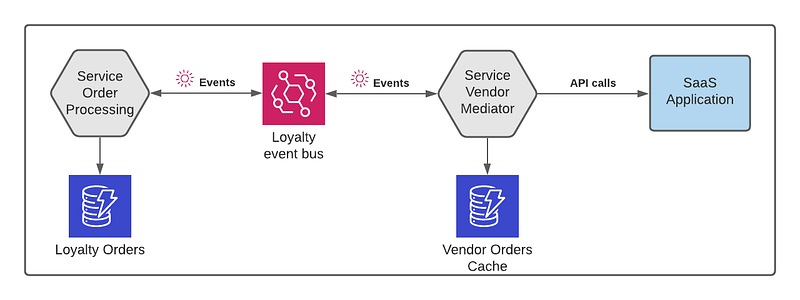
Event-driven service interaction. Source Author

The Vendor Mediator service is responsible for handling updates to a third-party SaaS application. Among the design goals of the Vendor Mediator service were failure isolation, managing platform downtime, and error retries.

In this article, we will see,

  • How do we monitor the health of the SaaS platform
  • How do we handle requests when the platform is down
  • How do we make sure every request gets submitted

Below is an oversimplified view of the solution. When the status is down, it holds onto the requests. When it turns good, it resubmits the requests.

How we achieve this forms part of the discussion in this article.
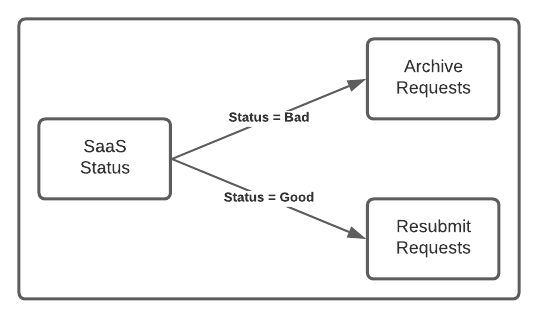
Abstract view of archive replay. Source Author

SaaS Status Monitoring

The following diagram shows a minimalist approach to monitoring the status of a third-party application and propagating it.
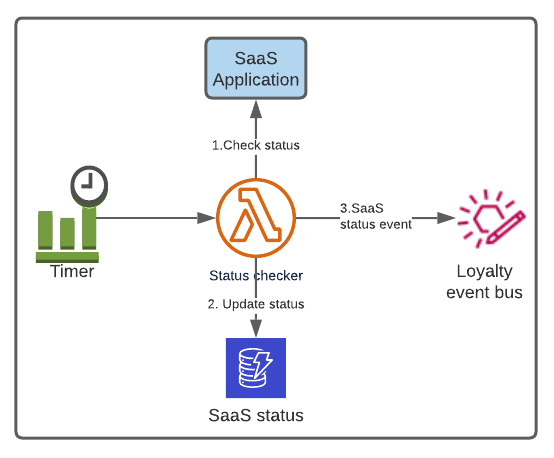
Application status monitoring. Source Author
  • A lambda function gets invoked at scheduled intervals.
  • The lambda function invokes the status endpoint of the SaaS application.
  • It updates the status in a DynamoDB table.
  • When there is a change of state, it publishes an event on the bus.

Though I showed a single flow, the Vendor Mediator service checks three separate parts of the SaaS platform and maintains three status attributes with a different threshold for each.

Here is a sample SaaS status event. The type attribute tells the name of the part of the SaaS platform.

{
  "detail": {
    "metadata": {
      "domain": "LEGO-LOYALTY",
      "service": "service-loyalty-vendor-mediator",
      "category": "task-status",
      "type": "SAAS_STATUS",
      "status": "down"
    },
    "data": {
      "changed_at": "2021-11-10T13:15:30Z",
      "prev_status": "up",
      "prev_change_at": "2021-11-01T18:35:10Z"
    }
  }
}

Alternate design approach

Here is one of many different ways of doing it! This one is more event-driven, single-purpose, and also uses SSM to keep the status value.
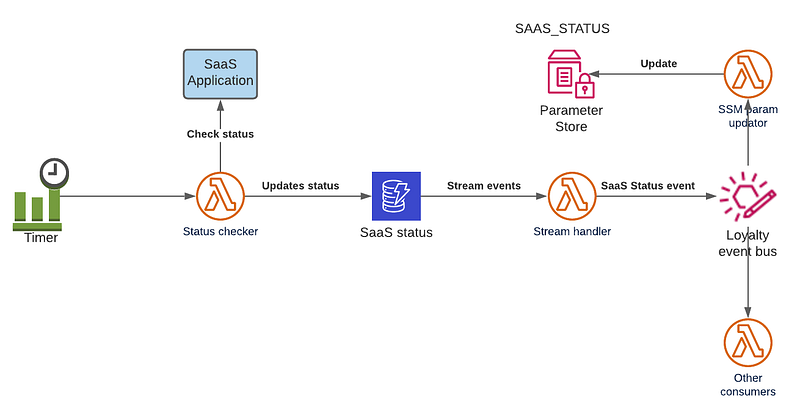
Application status monitoring extended architecture. Source Author

Circuit Breaking

The circuit-breaker pattern is prominent in software engineering. There are several flavors of its implementation in serverless. Below is one from Jeremy Daly’s blog on serverless patterns.

In this one, a function that invokes the external endpoint takes care of the status check, threshold, etc. This one is useful when we deal with client-facing scenarios.
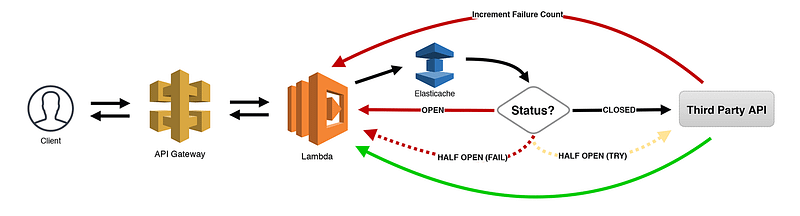
Source: Serverless Patterns blog by Jeremy Daly

The Vendor Mediator is a data submission service to a third party. As it invokes three different parts of the SaaS platform, it maintains the status for each. That’s one reason why the monitoring of status is carried out separately by a dedicated service.

A lambda function that submits a request to the SaaS application checks the respective status in the table before proceeding. More details on it are in the next section.

Data Submission Flow

The Previous article gave an overview of the event flow between the Order Processing and the Vendor Mediator services. The diagram below expands on how Vendor Mediator handles an incoming request.
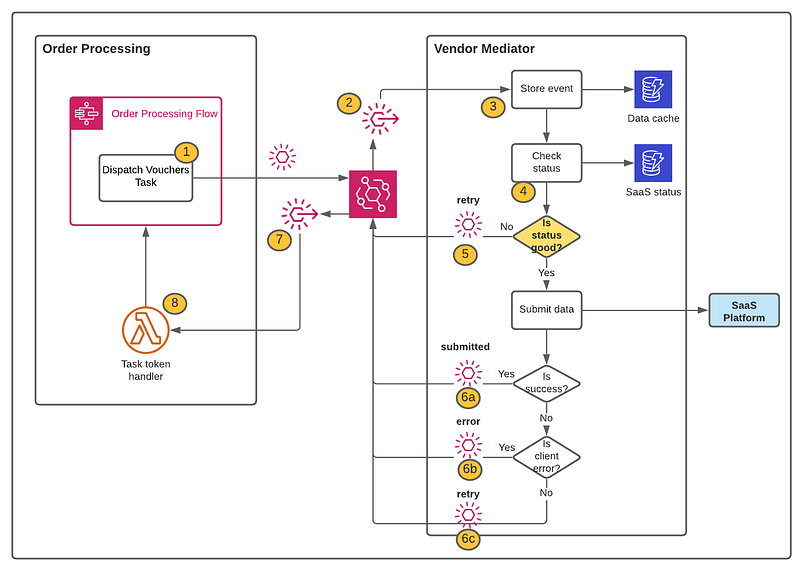
Expanded view of event data processing flow. Source Author

Items marked as 1 and 2 are the same as what we saw in Part 1. Let’s briefly go through the other steps.

  1. Order processing dispatches an event with the data payload.
  2. Event filter rule triggers processing target in Vendor Mediator service.
  3. The event, along with its payload, is stored in a DynamoDB table.
  4. Vendor status check. It checks if the circuit is closed or not by querying the SaaS status table.
  5. If the circuit is open (i.e., status = Down), it sends an event with a status value of retry . It is an important event that indicates the need for archiving, as we will see shortly.
  6. If the circuit is closed (i.e., status = Up), it invokes the SaaS endpoint. If it is a success, then a submitted event is sent. If a client error, then it’s a failure, and an error status event goes out. If it encounters a server error, or a connection timeout, then a retry event is sent.
  7. One of the subscribers of these status events is the Order Processing service.

The logic flow shown above in the Vendor Mediator service would fit perfectly as a state machine. With the Step Functions AWS SDK integration, we can reduce the need of lambda functions!

Vendor Mediator status event

Here is the core of the data submission status event I mentioned above.

{
  "detail": {
    "metadata": {
      "domain": "LEGO-LOYALTY",
      "service": "service-loyalty-vendor-mediator",
      "category": "task-status",
      "type": "voucher",
      "status": "retry"
    },
    "data": {
      "loyalty_request_id": "AbLhmB7wnOsiBFAq6Cicj2acx8iQ",
      "loyalty_reference": "P6IF7YcwQd",
      "merchant_reference": "xz5CzHM1wZOm",
      "loyalty_order_reference": "M101-S76-OP10-T65"
    }
  }
}

The two important elements of this event are-

  1. status — Possible values are submitted ,error , and retry .
  2. data — It contains the keys to identify the original event data from the Vendor Mediator’s cache table. The status event does not contain the original data payload.

loyalty_request_id attribute contains the task token. When the Order Processing service receives an event with the status retry , it will extend the callback task token timeout for that particular execution flow.

Archiving The Retry Events

This part is simple, as shown below. In addition to the general consumers of the status events, there is an event filter rule that identifies the retry events and sends them to LoyaltyVoucherArchive.
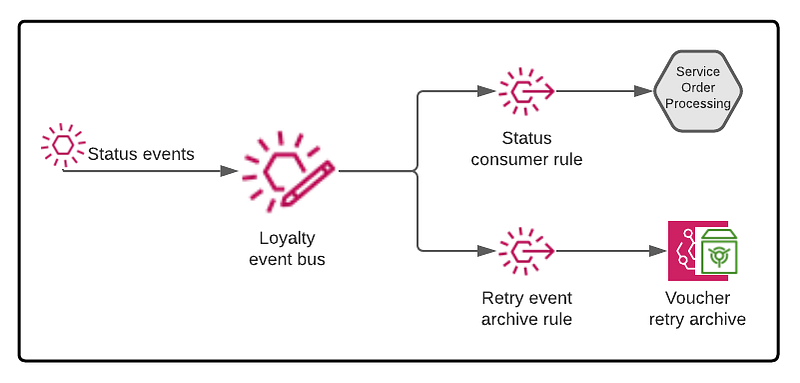
Event archive view. Source Author

Event archive creation

Setting up an event archive is easy. Supply a name and the filter pattern, and it’s ready.

Resources:
  VoucherArchive:
    Type: AWS::Events::Archive
    Properties:
      ArchiveName: LoyaltyVoucherArchive
      Description: Archive for vouchers to be resubmitted
      EventPattern:
        <YourEventFilter>
      RetentionDays: 10
      SourceArn: 'arn:aws:...:event-bus/loyalty-bus'

The event filter in this case is,

{
  "detail": {
    "metadata": {
      "domain": [
        "LEGO-LOYALTY"
      ],
      "service": [
        "service-loyalty-vendor-mediator"
      ],
      "category": [
        "task-status"
      ],
      "type": [
        "voucher"
      ],
      "status": [
        "retry"
      ]
    }
  }
}

Here it is from the AWS console.
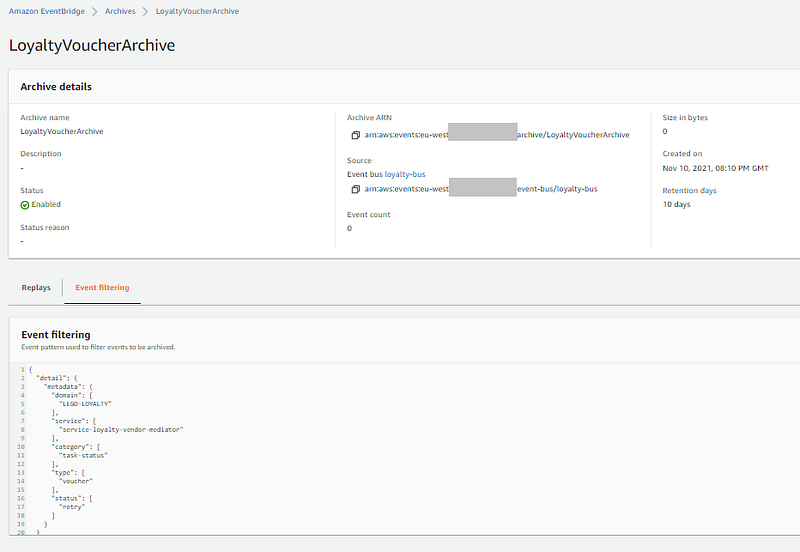
AWS event archive console. Source Author

AWS managed rule

While creating an archive with a filter pattern, AWS configures an event routing rule behind the scene. It’s a managed rule, and we can’t directly change it.
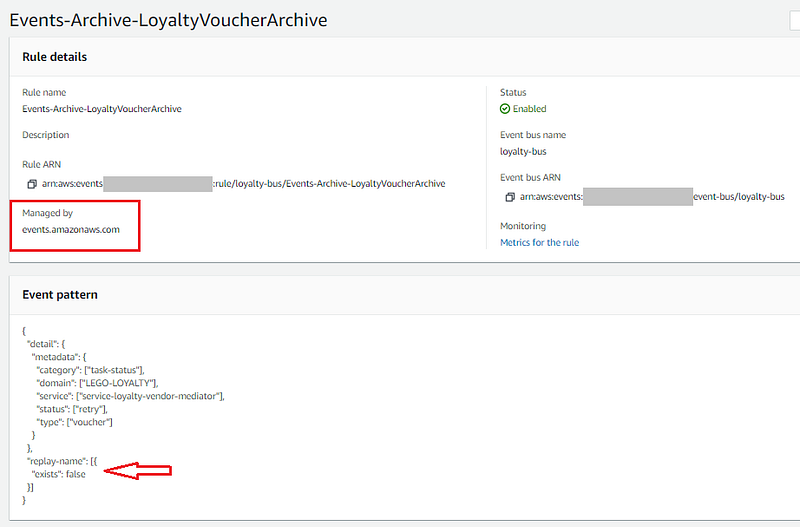
AWS managed rule. Source Author

When events are replayed from an archive, AWS adds the attribute replay-name to differentiate a replay event from the original. As highlighted in the picture, the managed rule adds an extra condition to prevent an endless event routing cycle.

Though I showed one archive, in reality, the Vendor Mediator service maintains three archives to align with the three parts of the SaaS application that I mentioned under the Status Monitor section above.

One of the strengths of serverless is ‘granularity’. When it comes to archiving events, where possible, think of the subsets of events that need archiving, rather than going for a ‘catch-all’ and ‘archive-everything’ pattern.

Having separate archives allows us to vary the retention days. For example, there could be temporary cache events that are short-lived, and critical business events that stay longer.

While replaying, we can easily vary the replay time frame per archive, and have specific target rules, etc. to make it efficient and easily manageable.

Replaying The Archived Events

The replay of archived events happens when the status of the SaaS application becomes ‘up’ from being ‘down’. In circuit-breaker terminology, the circuit has become ‘closed’.

Here is the event replay path depicted as a stretched view.
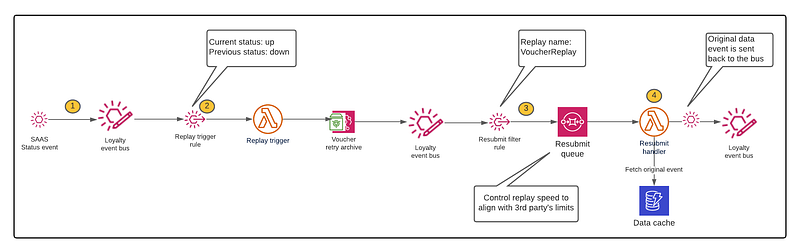
Replaying event from archive. Source Author
  1. SaaS status events published by the SaaS Status Monitoring service arrive at the bus.
  2. When the rule identifies that the status has changed from ‘down’ to ‘up’, it triggers the replay.
  3. The replayed events identified by the replay-name are buffered into an SQS queue. SQS with its different characteristics, allows controlling the flow of these events.
  4. The queue handler lambda function retrieves the initial data event from the table, sends it back to the bus.

Replay logic

  • As shown earlier, the SaaS status event contains the time interval of the service being down. The replay trigger function uses it to set the EventStartTime and the EventEndTime of the StartReplay API.
  • It uses a ReplayName that aligns with the archive name. For example, replay names of LoyaltyVoucherArchive will be of the format LoyaltyVoucherReplay_YYYYMMDDHHMMSS .
  • The above format helps to be specific while setting up the event filter pattern for replay events (item 3 in the diagram). Instead of using the "replay-name": {[ "exists": true ]} pattern, it can be more specific as shown below.
{
  "detail": {
    "metadata": {
      "domain": [
        "LEGO-LOYALTY"
      ],
      "service": [
        "service-loyalty-vendor-mediator"
      ],
      "type": [
        "voucher"
      ],
      "status": [
        "retry"
      ]
    }
  },
  "replay-name": [
    {
      "prefix": "LoyaltyVoucherReplay"
    }
  ]
}

Trade-offs & Facts

  • Ordering of events is not a requirement in this use case.
  • Idempotent replay event handler (item 4 in the above diagram). It checks the submission status in the DataCache table before invoking the SaaS application.
  • The request submission flow depicted earlier updates the submission status (as submitted ,error , or retry) in the DataCache table.
  • The archive and replay with EventBridge eliminate the usual approach of periodically scanning or querying the DataCache table for status and resubmitting.
  • Original data payload event is not archived. Instead, a separate event with the keys to identifying the data from the table is used.
  • The replay trigger function stores the latest replay interval in a table. This is not shown in the diagram.
  • DLQs (Dead Letter Queues) are omitted from the diagrams for clarity.
  • During the up-time of the SaaS platform, a sweeper lambda function replays any stranded events from the archive at specific intervals.

Conclusion

There are several ways we can make a serverless application resilient and fault-tolerant. Understanding the requirements is key to making the right architectural decision and design choices.

Not every pattern nor solution is going to fit every use case. Having the understanding and knowledge to identify the optimal approach is essential to succeed in serverless.

Serverless Computing
Amazon Web Services
Event Driven Architecture
Lambda Function
Circuit Breaker
Recommended from ReadMedium