
How To Build Better Orchestrations With AWS Step Functions, Task Tokens, And Amazon EventBridge!

Working with Serverless often makes us feel like being part of a musical. There is orchestration, choreography, and in fact, serverless has its own musical and a folk song too!
Several patterns help us with serverless adoption. AWS Step Functions is often used to perform orchestration. Amazon EventBridge is helpful to choreograph multiple microservices, as discussed in my re:Invent talk below.
https://www.youtube.com/watch?v=HcbnrJdNBRI
These are not rules but general practices. There will be variations and exceptions depending on individual use cases.
Loyalty Service Platform
Shown below is a high-level view of a Loyalty Service platform. It has a set of APIs, several set-piece microservices, and an external SaaS application.
These microservices are loosely coupled and communicate via custom events routed by EventBridge.
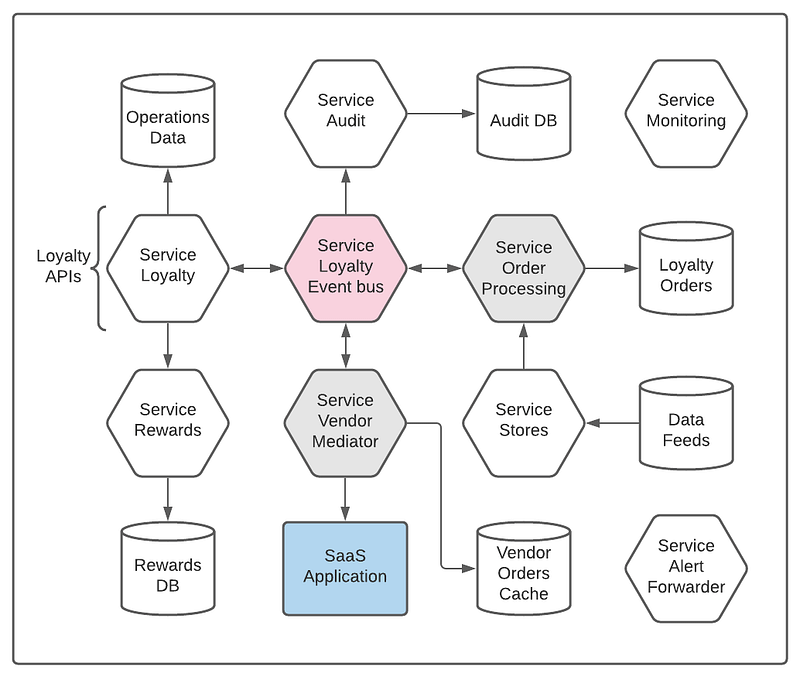
For our discussion, we will focus on the Order Processing and Vendor Mediator services. These two services, though decoupled, collaborate in unison to fulfill the tasks.
Order Processing Service
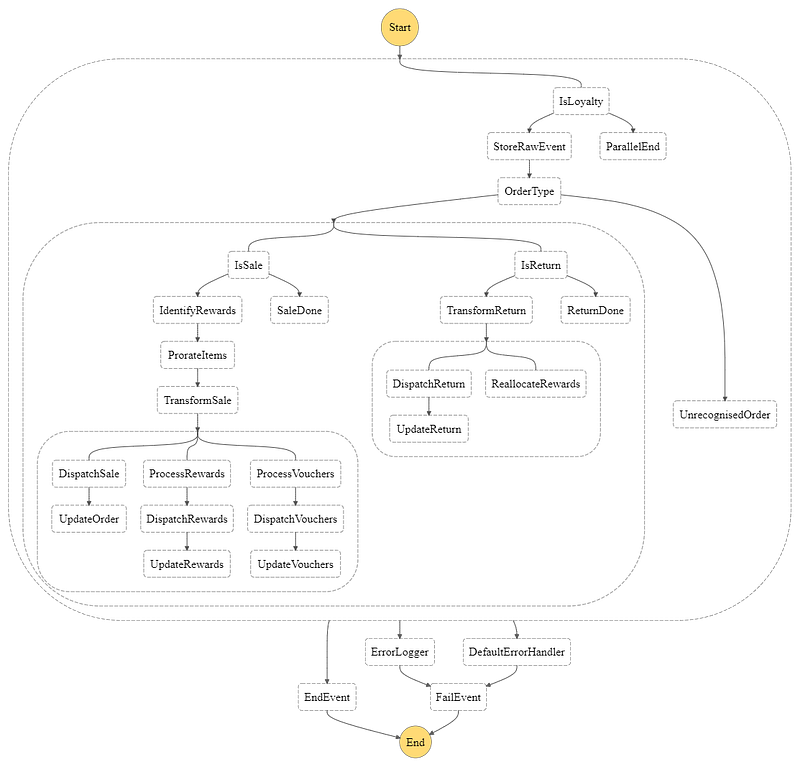
This service handles every order placed by a loyal customer. Typically, a loyalty order goes through the following steps.
- Order recognition — sale, return, etc.
- Order validation
- Order data storage
- Proportioning the discounts
- Data transformation
- Crediting points for purchases
- Deducting points for returns
- Voucher redemption
- Instant-reward redemption
- Status updates
The following picture shows the draft version of the order processing flow.
Vendor Mediator Service
Vendor Mediator is a dedicated service to handle all updates to a third-party SaaS application. We designed it in such a way that all interactions between this and other services is via events.
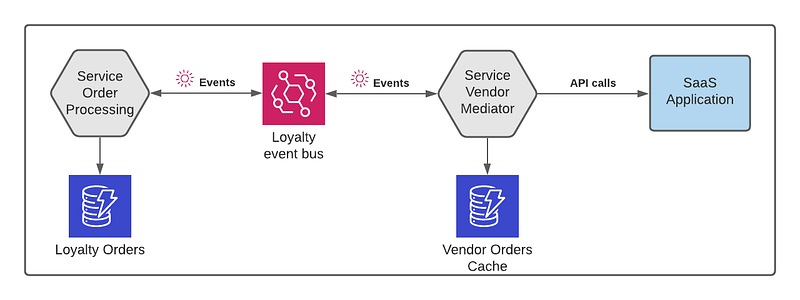
A typical order processing flow invokes several endpoints on the vendor application. Keeping it as a separate service helps us in many ways.
- Failure isolation
- Managing API quota and throttling
- Handling connection timeouts in one place
- Taking care of vendor platform downtime
- Circuit-breakers and retries as necessary
The Challenge
The order processing state machine shown above contains parallel flows for account update, voucher redemption, etc. Each action requires invoking a specific endpoint on the SaaS application.
However, the Order Processing service must know the status of each invocation carried out by the Vendor Mediator on its behalf. There are tasks in the state machine that rely on this status to progress further.
How do we make sure multiple tasks on the state machine execution wait until a response is received from the Vendor Mediator?
That’s the challenge!
The Solution: Callback Task Tokens
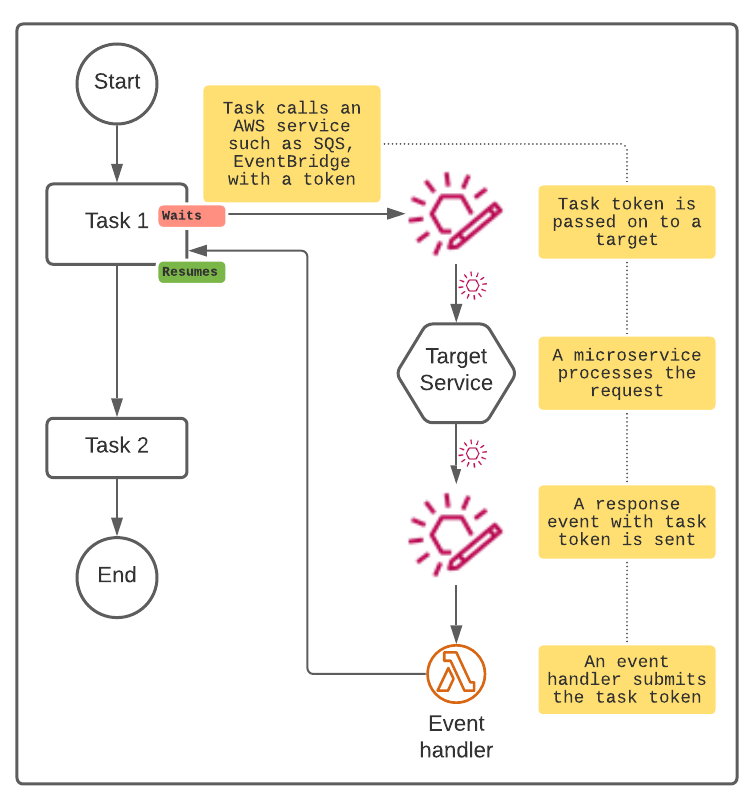
In short, a callback task token helps to pause a workflow and resume when called back with the same token.
- A Step Function’s task sends out a token to another service and waits
- When the token is submitted back, the workflow resumes
The concept is very simple, as depicted below.
Things to remember!
- The task that issues a token will wait indefinitely until the token is submitted back or until the execution gets terminated after a year
- To avoid the above situation, use the built-in heartbeat timeout option (
HeartbeatSecondsfield) to terminate it after a set time - In the case of parallel flows, each branch can pause and resume independently, as shown below. Note that each task will have its unique token
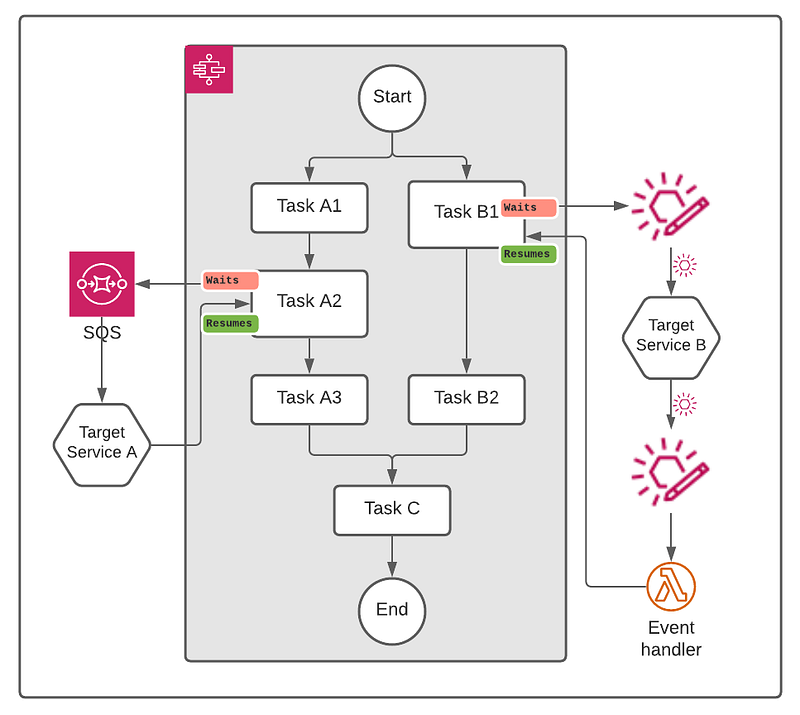
Callback with task tokens fitted perfectly in our case which lead to a cleaner implementation of the orchestration.
Illustration: Voucher Processing Flow
As depicted below, the voucher submission flow demonstrates the concept and shows the life cycle of a task token.
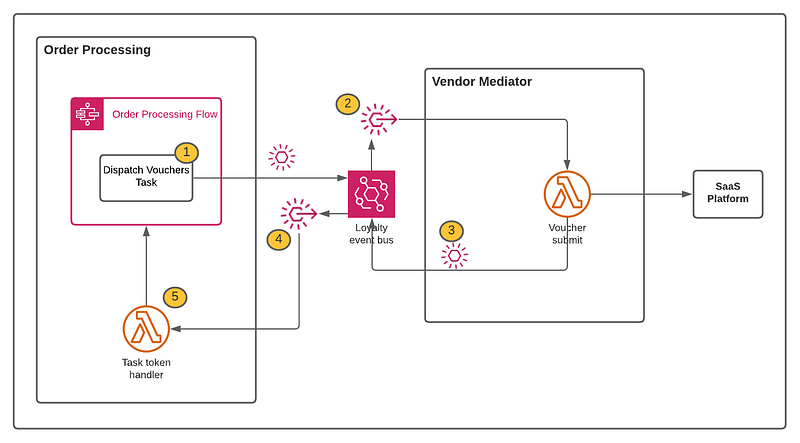
I will expand on the numbered items further below, but here is a summary.
- Dispatch voucher task sends a token and pauses the flow
- The Event filter rule invokes a lambda function in the Vendor Mediator service
- After updating the SaaS application, the Vendor Mediator service puts a success event on the bus
- Event filter rule invokes a token handler lambda function in the Order Processing service
- Token handler lambda function sends the task token to the state machine to resume the flow
Let’s now go through these steps in detail.
1. Dispatch Voucher Task
The Dispatch Voucher task in the Step Function sends a custom event directly to EventBridge.
Here is the definition of that step.
{
  "StartAt": "Dispatch Voucher",
  "States": {
    "Dispatch Voucher": {
      "Type": "Task",
      "Resource": "arn:aws:states:::events:putEvents.waitForTaskToken",
      "HeartbeatSeconds": 6000,
      "Parameters": {
        "Entries": [
          {
            "Detail": {
              "metadata": {
                "domain": "LEGO-LOYALTY",
                "service": "service-loyalty-order-process",
                "category": "task-status",
                "type": "voucher",
                "status": "processed"
              },
              "data": {
                "loyalty_request_id.$": "$$.Task.Token",
                "loyalty_reference.$": "$.loyalty_reference",
                "merchant_reference.$": "$.merchant_reference",
                "loyalty_order_reference.$": "$.loyalty_order_reference",
                "vouchers": [
                  {
                    "voucher_code.$": "$.voucher_code"
                  }
                ]
              }
            },
            "DetailType": "event",
            "EventBusName": "the-custom-event-bus-arn",
            "Source": "service-loyalty-order-process"
          }
        ]
      },
      "Next": "Update Voucher Status"
    }
  }
}
As highlighted in the script, any attribute can carry the value of a task token. It doesn’t need to be the default TaskToken attribute that the boilerplate script generates, as below.
"TaskToken.$": "$$.Task.Token"If you want to carry the task token value in more than one attribute, then that’s fine too.
2. Event Filter Rule To Invoke Voucher Submission Lambda
A simple event filter pattern to make sure the event is from the right source and has the correct data may look like the one below.
{
  "detail": {
    "metadata": {
      "domain": [
        "LEGO-LOYALTY"
      ],
      "service": [
        "service-loyalty-order-process"
      ],
      "category": ["task-status"],
      "type": [
        "voucher"
      ],
      "status": [
        "processed"
      ]
    }
  }
}
Note: For simplicity, I’ve shown a lambda function as the target, but in reality, it could be any service, including another state machine owned by the Vendor Mediator service!
3. Vendor Mediator’s Task Completion Response Event
Once a voucher is submitted to the SaaS application, the Vendor Mediator service puts the following response event on to bus.
Note that the loyalty_request_id attribute carries the token.
{
  "detail-type": "event",
  "source": "service-loyalty-vendor-mediator",
  "detail": {
    "metadata": {
      "domain": "LEGO-LOYALTY",
      "service": "service-loyalty-vendor-mediator",
      "category": "task-status",
      "type": "voucher",
      "status": "submitted"
    },
    "data": {
      "loyalty_request_id": "AbLhmB7wnOsiBFAq6Cicj2acx8iQ",
      "loyalty_reference": "P6IF7YcwQd",
      "merchant_reference": "xz5CzHM1wZOm",
      "loyalty_order_reference": "M101-S76-OP10-T65",
      "vouchers": [
        {
          "voucher_code": "1v8LlBkl"
        }
      ]
    }
  }
}
To give an idea, a Step Function generated task token will resemble the one below.
"AAAAKgAAAAIAAAAAAAAAbLhmB7wnOsiBFAq6Cicj2acx8iQe6GDUOd2u+29UMH4y9cqbSO+xNGwwgtfDF/p6kLNHVJVaqjx0GFsstYNoaAdFr4Bmq74ghKhPLny/v2RaYefvylVmOr5wIRHxJy+G8t82NNp2+VEfdhCSYqRWbFj7aLccbCfPZOnn5BeSN224XMVtP6IF7YcwQd+zqD/ypW+rLh4iayZjKLbyxNyXxY+EdM36dZzZ/jFbuneNX27nq5WmrP6HKPaKdCT9A1aWv1V1zFct8K+iAzKzo9W8PknfSlNz5dZF1KBfHtAFPILGePDwzQoY5MEN3RhodChiEtw6HggXOsSQhtCTqP3bUq5uYhpTRinmmksgNV62uFv2Xk+uFTSumLtigXh56Z1v8LlBklmY/ACy5qRkNfahIpTZFLQypdiuayQFnY8Cok8U6COeKR+x6zl7DZxuXk8rfc81AH97QTPzk4Lp+wHdpSsSbvFWvLQGvpdh70Gn9hC45MPw73/gykpCMzs3w1Nbq0NWUAP126i5U4mGOnwQIUKZe4hSXL+Tplxnnxz5CzHM1wZOm+VLVSP88ae/FhFyjloBESjbXenK1bWyy3SpS="4. Task Token Event Filter In Order Processing Service
The filter pattern below is for the task token handler to send the token back to the state machine.
It also makes sure the loyalty_request_id attribute that contains the task token is also present.
{
  "detail": {
    "metadata": {
      "domain": [
        "LEGO-LOYALTY"
      ],
      "service": [
        "service-loyalty-vendor-mediator"
      ],
      "category": [
        "task-status"
      ],
      "type": [
        "voucher",
        "reward",
        "sale",
        "return"
      ],
      "status": [
        "submitted",
        "error"
      ]
    },
    "data": {
      "loyalty_request_id": [
        {
          "exists": true
        }
      ]
    }
  }
}
Depending on how you devise your handler, the filter pattern will be different. In the above case, it is targeting for the events from one service, service-loyalty-vendor-mediator.
You may have a single function handling events from multiple services or go granular and single-purpose with one per service, type, status, etc. The options are aplenty!
5. Sending The Token Back To The Step Function
This is the last part of the event communication cycle.
The event handler lambda function that we discussed in the previous section fetches the token from the event payload and calls the Step Function to resume the flow. That’s it!
...const taskToken = event.data.loyalty_request_id;
const output = JSON.stringify(event);// Check event.metadata.status as necessary
const params = {
output: output,
taskToken: taskToken
};
const result = await sfn.sendTaskSuccess(params).promise()
...The above snippet shows the basic steps. As you can imagine, a prod-quality implementation will have further checks.
Also note that, in the sample code above, the incoming event data is sent back as the output to the state machine. It could be different depending on your use case.
If there is a need to notify error to the state machine, then there is SendTaskFailure available for that purpose.
That’s a quick demonstration of how callback with task tokens help us build orchestrations that eliminate cross-service resource access and develop decoupled microservices.
Conclusion
As in musical, serverless applications also have many parts and players. Not all get played at the same time. The Vendor Mediator is one such service that does its part when asked. The events and tokens here play the interludes!
One of the benefits of serverless is granularity. It allows us to develop and operate smaller services. With microservices, orchestrating business logic across multiple services has been a challenge. With the combination of Step Function’s task tokens along with EventBridge, we now have the power to go beyond boundaries and build distributed orchestrations.
That’s the joy of Goin’ Serverless!


