
Aligning Template File Names With Resource Names
ACM.365 How using consistent file names can simplify code
~~~~~~~~~~~~~~~~~~~~~~~~~~~~~~~~~~~~~~~~~~~~~~~~~~~~~~~
⚙️ Check out my series on Automating Cybersecurity Metrics | Code.
🔒 Related Stories: AWS Security | Secure Code | Cybersecurity
💻 Free Content on Jobs in Cybersecurity | ✉️ Sign up for the Email List
~~~~~~~~~~~~~~~~~~~~~~~~~~~~~~~~~~~~~~~~~~~~~~~~~~~~~~~
I’m working through reorganizing my code in preparation for a script that deploys an environment on AWS. In the last post, I explained why I’m not just using OU names for environments (which I would rather do.)
In this post I’m going to move a template into my new directory structure and explain how I want to change the file naming conventions with resource names to further simplify my stack deployment function calls.
Consistent template and function file names
Most of my resources are using a single template with a name matching the resource. For example, all my KMS keys use a template called key.yaml. There’s also a single template from all my key aliases.
The way I restructured my directory, there is a folder called kms which aligns with the CloudFormation type. See this post for the directory structure derived from AWS CloudFormation documentation.
Why AWS moved their CloudFormation names away from aligning with the actual type names doesn’t make any sense to me and creates confusion. This is not a marketing page, it is a page for developers.
If we take a look at the KMS CloudFormation documentation it has these resources:
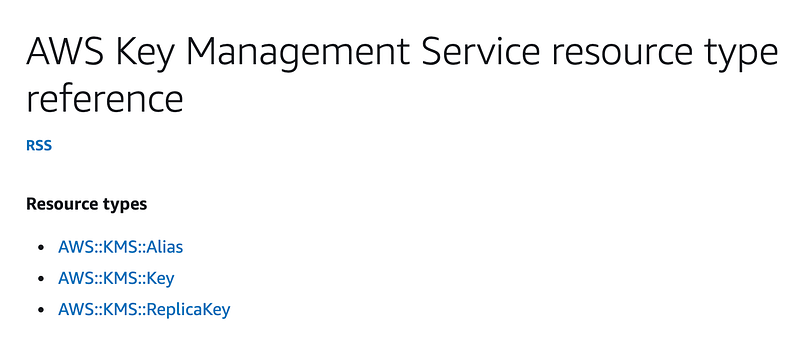
I created a folder for each resource category matching the value between the two double colons above because thankfully the link behind the names on the page align with that.
Within that category folder I am going to create a folder for each resource type. I may end up with more than one template for a resource type. For the most part, policies are the resources where I end up creating multiple resources with different templates. Almost all other resources are deployed with a single template in accordance with my microtemplates strategy.
So for KMS keys I can add an alias and a key folder matching the resource names above. (I haven’t created any ReplicaKeys yet).
I can add a yaml file matching the name of the resource type (which is pretty much what I did in the existing file structure.) So I have a key.yaml file and an alias.yaml file.
Recall that I also had a key_functions.sh file and an alias_functions.sh file which had the functions you can call to create a key or alias and any supporting functions for those resources. I am going to rename those files functions.sh and put them in the associated resource type folder. That way, if a script needs to deploy a particular resource the included file with the related functions always has the same name.
As with all the things I’m doing going forward, all lowercase, no symbols.
So here’s my directory structure:
/resources
  /kms
    /alias
      alias.yaml
      functions.sh
    /key
      key.yaml
      functions.sh
How does a common template name and structure simplify code?
Recall that I have a common shared_functions.sh file with a function that deploys a CloudFormation stack.
I’m going to create a folder called deploy in the root of this version of my code. I’m going to create a folder called shared in that directory. I’m going to move my shared_functions.sh file into that directory and rename it functions.sh. So now my directory structure looks like this:
/resources
  /kms
    /alias
      alias.yaml
      functions.sh
    /key
      key.yaml
      functions.sh
/deploy
  /shared
    functions.sh
By using a common template format I can pass the resource category and type into my stack deployment function and calculate the correct template path each time, or optionally override it when necessary. But most of the time I should not have to pass in a template.
The template doesn’t need to be passed in unless it is being overridden.
In the last post I explained that I’m expecting the profile to be set before calling this function and we are using the role for the prefix of the stack name instead as that’s more reliable for attribution.
If that works for most templates we would only need to pass in:
- resourcename
- category
- type
- parameters
- [optional] template
My code is going to rely on all scripts being run from the root of this codebase, so I can calculate the template if it is an empty string.
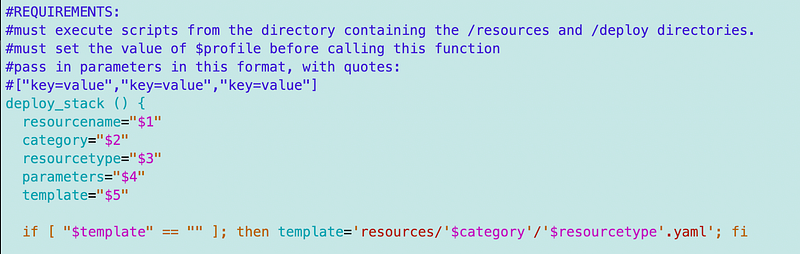
Note the template parameter might not be set at all. There’s a difference between an empty string and not being set at all and to get around that I’ve been setting parameters with “$param” in quotes. That turns a value that’s not set at all into an empty string. but we can also check for values that are not set at all. I’m going to revisit my checks on parameter values in the next post.
Follow for updates.
Teri Radichel | © 2nd Sight Lab 2023
About Teri Radichel:
~~~~~~~~~~~~~~~~~~~~
⭐️ Author: Cybersecurity Books
⭐️ Presentations: Presentations by Teri Radichel
⭐️ Recognition: SANS Award, AWS Security Hero, IANS Faculty
⭐️ Certifications: SANS ~ GSE 240
⭐️ Education: BA Business, Master of Software Engineering, Master of Infosec
⭐️ Company: Penetration Tests, Assessments, Phone Consulting ~ 2nd Sight Lab
Need Help With Cybersecurity, Cloud, or Application Security?
~~~~~~~~~~~~~~~~~~~~~~~~~~~~~~~~~~~~~~~~~~~~~~~~~~~~~~~~~~~~~
🔒 Request a penetration test or security assessment
🔒 Schedule a consulting call
🔒 Cybersecurity Speaker for PresentationFollow for more stories like this:
~~~~~~~~~~~~~~~~~~~~~~~~~~~~~~~~~~~~~~~~~~~~~~~~~~~~~~~~~~~~~
❤️ Sign Up my Medium Email List
❤️ Twitter: @teriradichel
❤️ LinkedIn: https://www.linkedin.com/in/teriradichel
❤️ Mastodon: @teriradichel@infosec.exchange
❤️ Facebook: 2nd Sight Lab
❤️ YouTube: @2ndsightlab