Technology
Adventures in Tech: One User’s Journey
From floppy disks to coding board games in Python
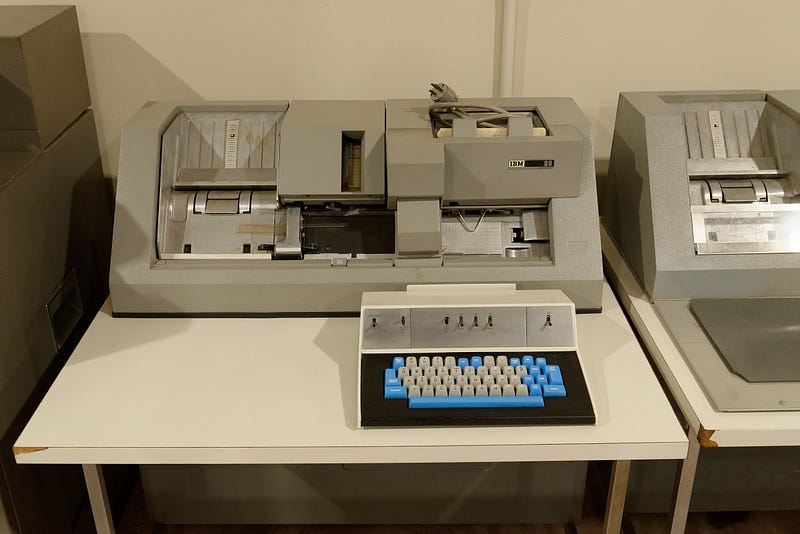
My first contact with computers came in 1971 while attending the local junior college. I took Introduction to Fortran and Introduction to COBOL. But I never actually touched a computer in either class. All interaction with the computer was done through punched cards via a key-punch machine like the one pictured above — one line of code per card.
You handed our stack of cards to a technician who fed them to the computer. Because of the queue, it took several days to get feedback — your code either ran with the expected outcome or not. Some feedback.
My experience at the local university was not much better. We did have access to terminals and time-sharing, but the terminals were few and the students were many. I wanted a computer of my own.
I bought my first computer from a DAK electronics catalog. It had the Intel 8086 processor, 4 megabytes of RAM, two five-and-a-half inch floppy drives — no hard drive at all. Hard drives at the time were a shade under $1,000 a megabyte. I remember seeing a 10-megabyte hard drive for $7,000 — what a bargain!
As storage space has increased, it has also become infinitely more affordable. The average cost per gigabyte has, over the last 30 years, gone from way over $100,000 to just a few cents.
A 5MB hard disk drive from Apple cost $3,500 in 1981. That’s $700,000 per gigabyte.
Nowadays, we will pay around $18 for 1TB of hard disk space — Amazing Facts and Figures
The computer revolutionized the writing process. My first word-processing program was Word Perfect. I had to build a simple menu with batch files to access it because the operating system was MSDOS.
I used to hate to write because good writing meant countless revisions. Revisions meant rewriting the same thing all over again by hand — the perfect opportunity to introduce new errors. Word processing with copy and paste made rewriting a breeze and my writing improved accordingly.
Can you imagine writing your articles long hand and then mailing them to Medium to be published in a printed magazine?
Quicken, the forerunner of Quick Books was first released in 1981. I was an early adopter. Quicken and SuperCalc became my go-to accounting programs for business accounting. SuperCalc was a spreadsheet that was first released in the early ’80s. The first editions did not even have mouse support. Come to think of it my first computer did not have a mouse to support.
That first computer came just in time for my return to university in pursuit of a teaching credential. It was a terrific tool for a student — a lesson I would put to use when I began teaching 5th-grade students.
At the start of my teaching career. I inherited one lone Apple II computer. One of the 9,000 Apple donated to California classrooms.
What do you do with one computer and thirty-two students? It certainly would not serve as a writing machine. About that time I was introduced to the Apple IIgs. The Apple IIgs came with a color monitor, a mouse, and a sound card. The gs stood for graphics and sound.
Western Digital 65C816 CPU at 2.8 MHz and 256K RAM. The IIgs was launched in 1986, it had Apple IIgs DOS operating system. It had a real 16-bit CPU, the 65C816, which ran at 2.8 MHz and had 24-bit addressing, allowing up to 8 MB of RAM to be added. In addition, it added a 4096-color palette and two graphics modes with resolutions of 320200 and 640400 pixels — History-Computer.
The release of Apple IIgs (1986) was sandwiched between the first generation grey-scale Macs (1984) and the first color Mac, the Macintosh II (1987). Early adopters were dumping the Apple IIgs for cheap in favor of the latest and greatest full-color Mac.
The Apple IIgs originally sold for $1,495 with an RGB monitor, that price did not include the 3.5-inch floppy or the 5.5-inch drive — a necessity to run programs Apple software. Hard drives were still prohibitively expensive as noted above. A 5MB hard drive for $3,500, yikes!!
Around 1990, when I started buying the Apple IIgs computers for my classroom. I was paying $100 or less for the entire package — plus loads of software. When I accumulated 15 of them I built five rolling workstations that accommodated three computers each and rearranged my classroom accordingly.
A cool feature of the Apple IIgs was its ease of networking. They could be linked with phone-net connectors and daisy-chained to a basic Mac. I used a Mac as my classroom file server. No more saving work on floppies, just pull up your writing from the server from any computer in the classroom.
Another remarkable feature — the entire operating system fit on a single 3.5-inch (1.44 MB) floppy drive. If a computer was acting up, I could simply trash the old system and slide the new system directly off the floppy — it was that easy.
In the early ’90s, I saw an ad in the San Francisco Chronicle promoting Apple auctions of refurbished computers. I was intrigued. I was not even sure what refurbished meant. But to Apple refurbished meant a computer sold new that was returned because of a defect. Apple made them like new and auctioned them off as refurbished with a 90-day guarantee.
I started buying the all-in-one Macintosh Performa 5200CD. When these machines were first released in 1995 they sold new for $1,900. At Bay Area auctions, I could buy them refurbished for $500 to $750 apiece. They even came with a 10Base-T Ethernet port. I’d try to buy 10 computers maxing out my credit cards. My goal was to keep a couple and sell the remainder to teachers in our school district to cover my costs.
We used to have this cool email feature (Send to ALL) that would reach every teacher in the district. It was a terrific marketing tool for selling my computers. I was reselling them to teachers for $999. Unfortunately, the emails also went to the admin computers. That was the end of the “ALL” send feature of our email system. I got a lecture from the superintendent berating me over the misuse of the district email for commercial gain.
What commercial gain? I was providing computers for my classroom on my dime — and I was offering a great deal to district teachers.
All’s well that ends well. I already had my 15 Performas so I was out of the computer-selling business anyway. In all, I took five trips to the Bay area to attend auctions. It was well worth the hassle. Besides the auctions were pretty exciting.
On one trip while leafing through the San Jose Mercury I came across ads for computer components. I began adding up the cost of the components and got the bug to build my own. This meant a shift from the Apple world to the PC side of things.
I was doing some volunteer work for Computers for Classrooms. I met a remarkable woman there, Pat Furr. Pat went back to school when she retired from the corporate world at 60 years of age. She got a computer science degree and founded Computers for Classrooms which became the largest computer recycler in Northern California.
I asked Pat if she would keep an eye on me as I built my first computer. She was delighted to help. I’ve been building my own ever since.
During the school year of 1997–98, I saw a school district job posting for a technology instructor for a new middle school opening the following year in our district. I already knew the principal so I went to pitch an idea to him. I’d met Jeff Sloan when he purchased several Macs from me for his school. He had a reputation as a maverick in the district so I presented him with an outrageous idea.
I would build 35 computers for the lab, and provide a file server that would provide every student and teacher a directory to save their work and access it from any computer on campus — Mac or PC. And I would write my own curriculum for the technology classes as there were no state standards.
He wanted me to teach basic computer literacy to give his students the tools to succeed in higher education. Perfect. No problem, but I wanted to add a video editing class as well. He liked that and named the new class Movie Magic.
He wanted me to build a prototype. Once he was satisfied he wanted to know the cost.
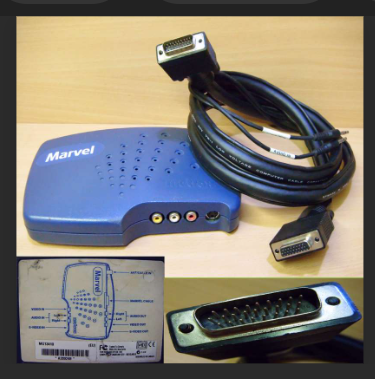
He liked the prototype and he liked the price even more. I think they came in at around $750-$800 apiece. That included a keyboard, mouse, 15" monitor, motherboard, CPU, RAM, floppy drive, CD ROM drive, sound card, ethernet card, hard drive, and a Matrox Marvel video digitizer card with a breakout box. And of course, a power supply and case.
I needed the Matrox Marvel because digital video cameras were still super expensive while analog video cameras were relatively cheap. The Marvel digitized analog video, plus it came with Avid Cinema video editing software. Avid Cinema was a terrific program and simple enough that middle schoolers could learn how to use it and be creative right away.
That summer I built thirty-five computers in my 5th-grade classroom with the help of a couple of teachers who were eager to learn how to build computers. Thirty-five motherboards, thirty-five Intel CPUs, and seventy sticks of RAM — we never had a bad part.
The promised server wasn’t pure whimsy. I’d been experimenting with Linux for a while. I knew Linux could serve both Macs and PCs because when I started adding PCs to my lineup I needed a server solution that could talk to both. I had already built one school-wide server at my elementary school. The software was free and Linux would run on the most balky Windows hardware.
I spend the last six years of my teaching career in middle school. It was the best job I ever had working for a terrific principal. As I mentioned earlier, Jeff Sloan was a maverick. He was an amazing fundraiser. He had one event a year, a magazine drive, and it funded almost everything his teachers wanted to do.
But Jeff was not one to rest on his laurels. He came into my classroom one afternoon and asked me a question. “Why don’t we do all our school photography and give the national portrait chain the boot?”
I checked it out and asked Jeff to let me head it up. A new fundraiser was born.
The advent of digital photography made this industry disruption possible. That and the tech tools available made it easy to organize the Fall and Spring photo shoots and meet all the office needs like a student directory and student ID cards in the first weeks of school. Although Microsoft Access and Excel were my prime organizing tools I also wrote scripts to create and name six hundred folders by student name enclosed in directories named for their elective class teachers. These folders were used to sort and store all the photos.
Jeff Sloan had already moved the yearbook class out of English and into technology, so within a year my students were taking every single photo on campus. Yes, after the initial spring session, my eighth-grade yearbook students became the school’s official photographers. We used parent volunteers for the first spring shoot, but after that, Jeff Sloan insisted our students take all the photos.
The photo program was extremely popular with our school’s parents. We offered lower prices, an assortment of packages, a variety of poses, and easy retakes. My students were empowered. Given a real-world task, they rose to the occasion.
Unfortunately, the district’s superintendent took a stubborn stance against our initiative. He had some buddies in Rotary who were in management at the local Life Touch (national portrait chain) processing facility. They leaned on him and he caved.
With our parent support, he could not shut down our program directly though he tried. Instead, he went after Jeff Sloan personally, and there he succeeded.
Sickened by the district’s machinations, I left education soon after Jeff was dismissed. I left the best job I ever had working for the finest boss. After Jeff left the school was never the same again.
Outside of giving up a great job, my only regret was that I never mastered Python in time to offer a programming class to my students. Now I code board games in Python for fun. It’s a great hobby and endlessly challenging.
Thanks for reading!


.jpg)