avatarHARSHITA GARG

Free AI web copilot to create summaries, insights and extended knowledge, download it at here

8342

Abstract

js-number">1417</span> <span class="hljs-number">28</span>.<span class="hljs-number">3</span>%</pre></div><p id="87ba">Example of some of the tweets classified as positive:</p><div id="9103"><pre><span class="hljs-symbol">2 </span> The economy is roaring back. Kids are returning <span class="hljs-keyword">to</span> school. Things are looking up. <span class="hljs-keyword">Get</span> vaccinated <span class="hljs-keyword">and</span> <span class="hljs-keyword">let</span><span class="hljs-comment">'s keep it going.</span> <span class="hljs-symbol">3 </span> Help slow the spread of <span class="hljs-keyword">and</span> identify at risk cases sooner by selfreporting your symptoms daily, even <span class="hljs-keyword">if</span> you feel well . Download the app <span class="hljs-symbol">7 </span> Cholesterol drug cuts coronavirus infection by <span class="hljs-number">70</span>, researchers find <span class="hljs-symbol">10 </span> Coronavirus weekly needtoknow Long COVID, delta variant, ivermectin drug more <span class="hljs-symbol">11 </span> Meet Pokaa the Golden Labrador, the sniffer dog in France with <span class="hljs-number">100</span> success rate in detecting coronavirus in under <span class="hljs-number">10</span> minutes, <span class="hljs-number">48</span> hours quicker than a PCR lab test</pre></div><p id="1327">Sample of some of the tweets classified as negative:</p><div id="edf7"><pre><span class="hljs-symbol">1 </span> <span class="hljs-number">150</span> children dying EVERY WEEK from Covid <span class="hljs-number">19</span> in Indonesia Devastating Children are <span class="hljs-keyword">not</span> safe from <span class="hljs-symbol">6 </span> It seems we<span class="hljs-comment">'ve entered a point where ended and now they are just making shit up about the Common Cold or whatever to keep us locked down and sheltered from our freedoms.</span> <span class="hljs-symbol">9 </span> Ive cared <span class="hljs-keyword">for</span> children whose entire families have been devastated by sometimes the childhad no parent at their bedside bc the parents were critically ill <span class="hljs-symbol">13 </span> has been extraordinarily hard <span class="hljs-keyword">on</span> in particular small businesses. <span class="hljs-keyword">Read</span> <span class="hljs-keyword">to</span> learn more about the local impact <span class="hljs-keyword">and</span> what future needs are <span class="hljs-symbol">14 </span> Was there anyone <span class="hljs-keyword">on</span> this planet that believed the Delta Variant sidestepped Japan Did anyone <span class="hljs-keyword">on</span> this planet think they were safe from Delta coronavirus <span class="hljs-keyword">if</span> the were in Japan The Delta variant has circumnavigated the globe, pretty sure CVdelta is everywhere</pre></div><p id="9b1d">Next, we can plot a bar graph to understand the distribution of sentiments amongst the tweets.</p><div id="b959"><pre><span class="hljs-selector-id">#create</span> <span class="hljs-selector-tag">a</span> bar graph by sentiment import matplotlib<span class="hljs-selector-class">.pyplot</span> as plt labels = tweets_df<span class="hljs-selector-class">.groupby</span>(<span class="hljs-string">'Sentiment'</span>)<span class="hljs-selector-class">.count</span>()<span class="hljs-selector-class">.index</span><span class="hljs-selector-class">.values</span> values = tweets_df<span class="hljs-selector-class">.groupby</span>(<span class="hljs-string">'Sentiment'</span>)<span class="hljs-selector-class">.size</span>()<span class="hljs-selector-class">.values</span> plt<span class="hljs-selector-class">.bar</span>(labels, values)</pre></div><figure id="f1d6"><img src="https://cdn-images-1.readmedium.com/v2/resize:fit:800/1*2-46q2HsGmiraSK_zR7WzQ.png"><figcaption></figcaption></figure><p id="d5a2">A pie chart would also be a good representation to display various sentiments amongst the data. This is done as follows:</p><div id="bf0b"><pre>labels = [<span class="hljs-string">'Positive ['</span>+<span class="hljs-built_in">format</span>(pos_per, <span class="hljs-string">'.1f'</span>)+<span class="hljs-string">'%]'</span>, <span class="hljs-string">'Neutral ['</span>+<span class="hljs-built_in">format</span>(neu_per,<span class="hljs-string">'.1f'</span>)+<span class="hljs-string">'%]'</span>, <span class="hljs-string">'Negative ['</span>+<span class="hljs-built_in">format</span>(neg_per,<span class="hljs-string">'.1f'</span>)+<span class="hljs-string">'%]'</span>] sizes = [<span class="hljs-built_in">len</span>(tweet_pos), <span class="hljs-built_in">len</span>(tweet_neu), <span class="hljs-built_in">len</span>(tweet_neg)]</pre></div><div id="fd37"><pre>colors = <span class="hljs-selector-attr">[<span class="hljs-string">'green'</span>, <span class="hljs-string">'blue'</span>, <span class="hljs-string">'red'</span>]</span> patches, texts = plt<span class="hljs-selector-class">.pie</span>(sizes, labels = labels, colors = colors,shadow = True, startangle = <span class="hljs-number">90</span>) plt<span class="hljs-selector-class">.legend</span>(labels) plt<span class="hljs-selector-class">.title</span>(<span class="hljs-string">"Sentiment Analysis of Tweets"</span>) plt<span class="hljs-selector-class">.axis</span>(<span class="hljs-string">'equal'</span>) plt<span class="hljs-selector-class">.show</span>()</pre></div><figure id="8bca"><img src="https://cdn-images-1.readmedium.com/v2/resize:fit:800/1*IdLP5zqj5FFHxum54taZVw.png"><figcaption></figcaption></figure><h2 id="a327">3. Creating Word clouds</h2><p id="9122">In order to understand which words have been used most in the tweets, we can create a word cloud. <b>WordCloud</b> function from the library <b>wordcloud</b> has been used for the same. I defined a function for creating a word-cloud and the same function has been called to create clouds for positive tweets as well as negative tweets.</p><div id="979e"><pre><span class="hljs-selector-tag">from</span> wordcloud import WordCloud, STOPWORDS <span class="hljs-selector-id">#function</span> <span class="hljs-selector-tag">to</span> create word cloud def create_wordcloud(text): stopwords = <span class="hljs-built_in">set</span>(STOPWORDS) wc = <span class="hljs-built_in">WordCloud</span>(background_color = <span class="hljs-string">"white"</span>, max_words = <span class="hljs-number">3000</span>, stopwords = stopwords, repeat = True) wc.<span class="hljs-built_in">generate</span>(<span class="hljs-built_in">str</span>(text)) plt.<span class="hljs-built_in">imshow</span>(wc, interpolation=<span class="hljs-string">'bilinear'</span>) plt.<span class="hljs-built_in">axis</span>(<span class="hljs-string">"off"</span>) plt.<span class="hljs-built_in">show</span>()</pre></div><div id="6279"><pre><span class="hljs-selector-id">#word</span> cloud <span class="hljs-keyword">for</span> positive sentiments <span class="hljs-function"><span class="hljs-title">create_wordcloud</span><span class="hljs-params">(tweet_pos[<span class="hljs-string">"Cleaned_Text"</span>].values)</span></span></pre></div><div id="2ddd"><pre><span class="hljs-selector-id">#wordcloud</span> <span class="hljs-keyword">for</span> negative sentimenst <span class="hljs-function"><span class="hljs-title">create_wordcloud</span><span class="hljs-params">(tweet_neg[<span class="hljs-string">"Cleaned_Text"</span>].values)</span></span></pre></div><figure id="681e"><img src="https://cdn-images-1.readmedium.com/v2/resize:fit:800/1*6KW8RCZuQVivJKjRV7EMig.png"><figcaption>Word Cloud for positive tweets</figcaption></figure><figure id="67ee"><img src="https://cdn-images-1.readmedium.com/v2/resize:fit:800/1*-Kpn7oX0zRJD005iel1x4Q.png"><figcaption>Word cloud for negative tweets</figcaption></figure><p id="3afb">We can see from the word clouds of positive and negative tweets that most popular words for positive tweets are Covid, vaccine, scientific, published, reports etc. Some common words for negative tweets are condemnation, executed, murder, torture etc.</p><p id="093f">WordCloud function plots the popular words in the corpus by their frequencies. More is the frequency of a word in the corpus, bigger is the size of the word in the cloud. We can change this behavior by passing a dictionary and generati

Options

ng the cloud using pre-calculated frequencies. For this, we use the function ‘<b>generate_from_frequencies</b>’ in the above code in place of ‘<b>generate</b>’.</p><p id="2c99">We can also be creative with the shape of word clouds. They don’t have to be boring rectangles. We can create clouds in many different shapes and experiment with the color schemes and backgrounds too.</p><h2 id="678c">4. Find the Most popular words in the tweets and their frequencies</h2><p id="ee2c">To find popular words in the text data, we have to perform vectorization. For this, we first start with <b>tokenization</b>, where every word is converted to a single entity called token. Next, we remove<b> stop words</b>. Stop words are the common words used in the English language like ‘is’, ‘on’, ‘the’ etc. Next, we perform <b>lemmatization</b>. Lemmatization is the process of grouping words together so that they can be analyzed as single item. For example, words like joined, joint, joining are all grouped as a single word- join.</p><div id="8b31"><pre><span class="hljs-comment">#Apply tokenization</span> def tokenization(<span class="hljs-keyword">text</span>): <span class="hljs-keyword">text</span> = re.<span class="hljs-built_in">split</span>(<span class="hljs-string">'\W+'</span>, <span class="hljs-keyword">text</span>) <span class="hljs-literal">return</span> <span class="hljs-keyword">text</span></pre></div><div id="6732"><pre>tweets_df<span class="hljs-selector-attr">[<span class="hljs-string">'tokenized'</span>]</span> = tweets_df<span class="hljs-selector-attr">[<span class="hljs-string">'Cleaned_Text'</span>]</span><span class="hljs-selector-class">.apply</span>(lambda x: <span class="hljs-built_in">tokenization</span>(x<span class="hljs-selector-class">.lower</span>()))</pre></div><div id="9b29"><pre><span class="hljs-comment">#Removing Stop words</span> stopword = nltk.corpus.stopwords.<span class="hljs-keyword">words</span>(<span class="hljs-string">'english'</span>) def remove_stopwords(<span class="hljs-keyword">text</span>): <span class="hljs-keyword">text</span> = [<span class="hljs-built_in">word</span> <span class="hljs-keyword">for</span> <span class="hljs-built_in">word</span> <span class="hljs-keyword">in</span> <span class="hljs-keyword">text</span> <span class="hljs-keyword">if</span> <span class="hljs-built_in">word</span> <span class="hljs-keyword">not</span> <span class="hljs-keyword">in</span> stopword] <span class="hljs-literal">return</span> <span class="hljs-keyword">text</span></pre></div><div id="68b6"><pre>tweets_df<span class="hljs-selector-attr">[<span class="hljs-string">'nonstop'</span>]</span> = tweets_df<span class="hljs-selector-attr">[<span class="hljs-string">'tokenized'</span>]</span><span class="hljs-selector-class">.apply</span>(lambda x:<span class="hljs-built_in">remove_stopwords</span>(x))</pre></div><div id="5c7c"><pre><span class="hljs-comment">#Stemmer</span> ps = nltk.PorterStemmer() def stemming(<span class="hljs-built_in">text</span>): <span class="hljs-built_in">text</span> = [ps.stem(<span class="hljs-built_in">word</span>) <span class="hljs-keyword">for</span> <span class="hljs-built_in">word</span> <span class="hljs-keyword">in</span> <span class="hljs-built_in">text</span>] <span class="hljs-built_in"> return</span> <span class="hljs-built_in">text</span></pre></div><div id="2baa"><pre>tweets_df<span class="hljs-selector-attr">[<span class="hljs-string">'stemmed'</span>]</span> = tweets_df<span class="hljs-selector-attr">[<span class="hljs-string">'nonstop'</span>]</span><span class="hljs-selector-class">.apply</span>(lambda x: <span class="hljs-built_in">stemming</span>(x))</pre></div><div id="a18f"><pre><span class="hljs-selector-id">#join</span> <span class="hljs-attribute">all</span> the words to make a final text field tweets_df<span class="hljs-selector-attr">[<span class="hljs-string">'final'</span>]</span> = tweets_df<span class="hljs-selector-attr">[<span class="hljs-string">'stemmed'</span>]</span><span class="hljs-selector-class">.apply</span>(lambda x: <span class="hljs-string">' '</span><span class="hljs-selector-class">.join</span>(x)) tweets_df<span class="hljs-selector-class">.head</span>()</pre></div><p id="bd58">Next we perform <b>vectorization</b> of texts, which is a methodology to map words in the vocabulary to a corresponding vector of real numbers. Every tweet in the dataset is treated as a document and every word in the tweets is treated as a feature. The texts are then converted to a document feature matrix. If a word is present in the tweet, it is represented by the number of times it occurs in that tweet, 0 otherwise.</p><div id="88b1"><pre><span class="hljs-selector-id">#applying</span> count vectorizer from sklearn<span class="hljs-selector-class">.feature_extraction</span><span class="hljs-selector-class">.text</span> import CountVectorizer countVectorizer = <span class="hljs-built_in">CountVectorizer</span>() countVector = countVectorizer<span class="hljs-selector-class">.fit_transform</span>(tweets_df<span class="hljs-selector-attr">[<span class="hljs-string">'final'</span>]</span>) <span class="hljs-function"><span class="hljs-title">print</span><span class="hljs-params">(<span class="hljs-string">'{} Number of tweets have {} words'</span>.format(countVector.shape[<span class="hljs-number">0</span>], countVector.shape[<span class="hljs-number">1</span>])</span></span>)</pre></div><div id="07c1"><pre><span class="hljs-symbol">5000 </span>Number of tweets have <span class="hljs-number">8505</span> words</pre></div><div id="3b98"><pre>count_vect_df = pd.DataFrame(countVector.<span class="hljs-keyword">to</span><span class="hljs-built_in">array</span>(), columns = countVectorizer.get_feature_names()) count_vect_df</pre></div><p id="1d15">With the help of count vector thus created, we can now find the most popular words in the tweets. Top 10 words from the dataset can be displayed as below</p><div id="cc2b"><pre><span class="hljs-selector-id">#most</span> frequently used words <span class="hljs-keyword">in</span> the tweets counts = pd<span class="hljs-selector-class">.DataFrame</span>(count_vect_df<span class="hljs-selector-class">.sum</span>()) count_df = counts<span class="hljs-selector-class">.sort_values</span>(<span class="hljs-number">0</span>, ascending = False)<span class="hljs-selector-class">.head</span>(<span class="hljs-number">10</span>) count_df</pre></div><figure id="1b97"><img src="https://cdn-images-1.readmedium.com/v2/resize:fit:800/1*elOHMlmwJcvG5N5rM6Wd0Q.png"><figcaption>Top 20 words for all the tweets</figcaption></figure><p id="8f98">We can also create a bar graph of the frequencies of the most popular words to understand their distribution.</p><div id="a0f0"><pre><span class="hljs-comment">#create a bar graph of most frequently used words</span> <span class="hljs-attr">ind</span> = count_df.index <span class="hljs-attr">val</span> = [item for sublist in count_df.values for item in sublist]</pre></div><div id="a0f3"><pre>plt.bar<span class="hljs-comment">(ind, val)</span> plt.xticks<span class="hljs-comment">(rotation = 90)</span> plt.title<span class="hljs-comment">('Top 20 Most frequently used words in the tweets')</span></pre></div><figure id="610c"><img src="https://cdn-images-1.readmedium.com/v2/resize:fit:800/1*FwJmygLMuaNwYFW4P0QE1w.png"><figcaption></figcaption></figure><p id="9e22">We can do similar analysis on the data frames of positive and negative tweets to understand the frequency distribution of all the popular words in them.</p><h2 id="0fb8">Conclusion</h2><p id="5865">This concludes the twitter sentiment analysis — part II. There are many more analysis techniques that you can apply on the twitter data like topic modelling(divide the tweets into different topics. An example of topic modelling in R can be found <a href="https://readmedium.com/scraping-and-analyzing-tweets-in-r-62582e2f4543"><b>here</b></a>). Other techniques are geospatial analysis, text similarity and knowledge graphs. The possibilities are endless.</p><p id="6752">If this tutorial was worth your time, please feel free to clap and <a href="https://hgarg01.medium.com/">follow</a>. Say Hi on <a href="https://www.linkedin.com/in/harshita-garg-512777194/">linkedin</a> if you like.</p></article></body>

A Complete Guide to twitter Sentiment Analysis — Part II

A follow-along tutorial to guide you through the in-depth twitter sentiment analysis using Python

Sentiment Analysis is the method to measure attitude and emotions of a speaker/writer based on computational treatment of text data. Sentiment analysis could be very useful for businesses to understand the social sentiment of their brand, product or service while monitoring online conversations.

This article is part 2 of the 2-part series that guides you through the complete process of sentiment analysis of Twitter data using Python.

In the last part we saw how to scrape the tweets using a library called Tweepy in Python. We scraped tweets on the topic ‘covid’. We also did some hashtag analysis, basic text cleaning and calculated average length of texts and average word counts of the tweets. Part I of this tutorial can be found here. In this tutorial let’s learn to perform sentiment analysis of the tweets.

1. Sentiment Analysis

Sentiment analysis could be performed in Python using 2 methods — i) Calculating polarity and subjectivity using the library Textblob. ii) Using senimentIntensityAnalyzer from the library vader. A brief comparison of both the libraries can be found here.

I decided to use the Vader library because it works well with the social media data. The SentimentIntensityAnalyzer function relies on a dictionary that maps lexical features to emotion intensities known as sentiment scores. The sentiment score of a text can be obtained by summing up the intensity of each word in the text.

This function analyzes the text and returns the score in the form of a dictionary with the following components :negative, neutral, positive and compound. Based on the scores assigned to each component, we can define the overall sentiment of the text to be positive, negative or neutral. This is done in the following code:

import nltk
nltk.download('vader_lexicon')
from nltk.sentiment.vader import SentimentIntensityAnalyzer
for index, row in tweets_df['Text'].iteritems():
    score = SentimentIntensityAnalyzer().polarity_scores(row)
    if score['neg'] > score['pos']:
        tweets_df.loc[index, "Sentiment"] = "negative"
    elif score['pos'] > score['neg']:
        tweets_df.loc[index, "Sentiment"] = "positive"
    else:
        tweets_df.loc[index, "Sentiment"] = "neutral"
        
    tweets_df.loc[index, 'neg'] = score['neg']
    tweets_df.loc[index, 'neu'] = score['neu']
    tweets_df.loc[index, 'pos'] = score['pos']
    tweets_df.loc[index, 'compound'] = score['compound']
    
tweets_df.head(10)

2. Visualize the sentiment Counts

Once the sentiments are identified, we can create 3 lists for different sentiments. We can then calculate the overall percentage of each sentiment in the dataset.

#create new data frames for all sentiments
tweet_neg = tweets_df[tweets_df["Sentiment"] == "negative"]
tweet_neu = tweets_df[tweets_df["Sentiment"] == "neutral"]
tweet_pos = tweets_df[tweets_df["Sentiment"] == "positive"]
#function for calculating the percentage of all the sentiments
def calc_percentage(x,y):
    return x/y * 100
pos_per = calc_percentage(len(tweet_pos), len(tweets_df))
neg_per = calc_percentage(len(tweet_neg), len(tweets_df))
neu_per = calc_percentage(len(tweet_neu), len(tweets_df))
print("positive: {} {}%".format(len(tweet_pos),  format(pos_per, '.1f')))
print("negative: {} {}%".format(len(tweet_neg), format(neg_per, '.1f')))
print("neutral: {} {}%".format(len(tweet_neu), format(neu_per, '.1f')))format(calc_percentage(len(tweet_neu), len(tweets_df)), '.1f')))

The output obtained from the code above:

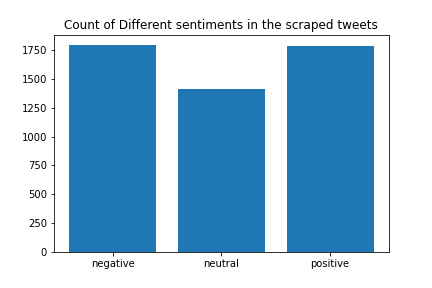
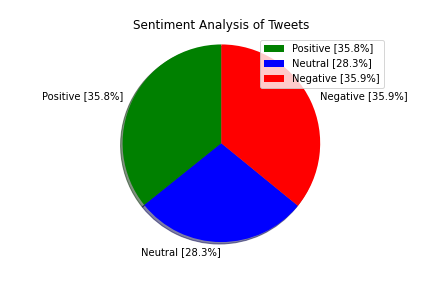
positive: 1788 35.8%
negative: 1795 35.9%
neutral: 1417 28.3%

Example of some of the tweets classified as positive:

2    The economy is roaring back. Kids are returning to school. Things are looking up. Get vaccinated and let's keep it going.
3    Help slow the spread   of  and identify at risk cases sooner   by selfreporting your symptoms daily, even if you feel well . Download the   app
7    Cholesterol drug cuts coronavirus infection by 70, researchers find
10    Coronavirus weekly   needtoknow Long COVID, delta variant, ivermectin drug  more
11    Meet Pokaa the Golden Labrador, the sniffer dog in France with 100  success rate in detecting coronavirus in under 10 minutes, 48 hours quicker than a PCR lab test

Sample of some of the tweets classified as negative:

1    150 children dying EVERY WEEK from Covid 19 in Indonesia  Devastating  Children are not safe from
6    It seems we've entered a point where  ended and now they are just making shit up about the Common Cold or whatever to keep us locked down and sheltered from our freedoms.
9    Ive cared for children whose entire families have been devastated by sometimes the childhad no parent at their bedside bc the parents were critically ill
13    has been extraordinarily hard on   in particular small businesses. Read to learn more about the local impact and what future needs are
14   Was there anyone on this planet that believed the Delta Variant sidestepped Japan Did anyone on this planet think they were safe from Delta coronavirus if the were in Japan  The Delta variant has circumnavigated the globe, pretty sure CVdelta is everywhere

Next, we can plot a bar graph to understand the distribution of sentiments amongst the tweets.

#create a bar graph by sentiment
import matplotlib.pyplot as plt
labels = tweets_df.groupby('Sentiment').count().index.values
values = tweets_df.groupby('Sentiment').size().values
plt.bar(labels, values)
A pie chart would also be a good representation to display various sentiments amongst the data. This is done as follows:

labels = ['Positive ['+format(pos_per, '.1f')+'%]', 'Neutral ['+format(neu_per,'.1f')+'%]', 'Negative ['+format(neg_per,'.1f')+'%]']
sizes = [len(tweet_pos), len(tweet_neu), len(tweet_neg)]
colors = ['green', 'blue', 'red']
patches, texts = plt.pie(sizes, labels = labels, colors = colors,shadow = True, startangle = 90)
plt.legend(labels)
plt.title("Sentiment Analysis of Tweets")
plt.axis('equal')
plt.show()
3. Creating Word clouds

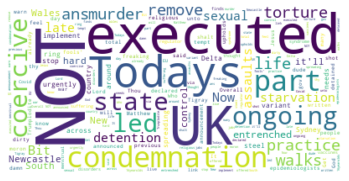
In order to understand which words have been used most in the tweets, we can create a word cloud. WordCloud function from the library wordcloud has been used for the same. I defined a function for creating a word-cloud and the same function has been called to create clouds for positive tweets as well as negative tweets.

from wordcloud import WordCloud, STOPWORDS
#function to create word cloud
def create_wordcloud(text):
    stopwords = set(STOPWORDS)
    wc = WordCloud(background_color = "white", max_words = 3000, stopwords = stopwords, repeat = True)
    wc.generate(str(text))
    plt.imshow(wc, interpolation='bilinear')
    plt.axis("off")
    plt.show()
#word cloud for positive sentiments
create_wordcloud(tweet_pos["Cleaned_Text"].values)
#wordcloud for negative sentimenst
create_wordcloud(tweet_neg["Cleaned_Text"].values)
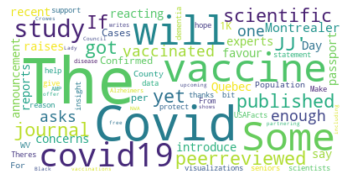
Word Cloud for positive tweets
Word cloud for negative tweets

We can see from the word clouds of positive and negative tweets that most popular words for positive tweets are Covid, vaccine, scientific, published, reports etc. Some common words for negative tweets are condemnation, executed, murder, torture etc.

WordCloud function plots the popular words in the corpus by their frequencies. More is the frequency of a word in the corpus, bigger is the size of the word in the cloud. We can change this behavior by passing a dictionary and generating the cloud using pre-calculated frequencies. For this, we use the function ‘generate_from_frequencies’ in the above code in place of ‘generate’.

We can also be creative with the shape of word clouds. They don’t have to be boring rectangles. We can create clouds in many different shapes and experiment with the color schemes and backgrounds too.

4. Find the Most popular words in the tweets and their frequencies

To find popular words in the text data, we have to perform vectorization. For this, we first start with tokenization, where every word is converted to a single entity called token. Next, we remove stop words. Stop words are the common words used in the English language like ‘is’, ‘on’, ‘the’ etc. Next, we perform lemmatization. Lemmatization is the process of grouping words together so that they can be analyzed as single item. For example, words like joined, joint, joining are all grouped as a single word- join.

#Apply tokenization
def tokenization(text):
    text = re.split('\W+', text)
    return text
tweets_df['tokenized'] = tweets_df['Cleaned_Text'].apply(lambda x: tokenization(x.lower()))
#Removing Stop words
stopword = nltk.corpus.stopwords.words('english')
def remove_stopwords(text):
    text = [word for word in text if word not in stopword]
    return text
tweets_df['nonstop'] = tweets_df['tokenized'].apply(lambda x:remove_stopwords(x))
#Stemmer
ps = nltk.PorterStemmer()
def stemming(text):
    text = [ps.stem(word) for word in text]
    return text
tweets_df['stemmed'] = tweets_df['nonstop'].apply(lambda x: stemming(x))
#join all the words to make a final text field
tweets_df['final'] = tweets_df['stemmed'].apply(lambda x: ' '.join(x))
tweets_df.head()

Next we perform vectorization of texts, which is a methodology to map words in the vocabulary to a corresponding vector of real numbers. Every tweet in the dataset is treated as a document and every word in the tweets is treated as a feature. The texts are then converted to a document feature matrix. If a word is present in the tweet, it is represented by the number of times it occurs in that tweet, 0 otherwise.

#applying count vectorizer
from sklearn.feature_extraction.text import CountVectorizer
countVectorizer = CountVectorizer()
countVector = countVectorizer.fit_transform(tweets_df['final'])
print('{} Number of tweets have {} words'.format(countVector.shape[0], countVector.shape[1]))
5000 Number of tweets have 8505 words
count_vect_df = pd.DataFrame(countVector.toarray(), columns = countVectorizer.get_feature_names())
count_vect_df

With the help of count vector thus created, we can now find the most popular words in the tweets. Top 10 words from the dataset can be displayed as below

#most frequently used words in the tweets
counts = pd.DataFrame(count_vect_df.sum())
count_df = counts.sort_values(0, ascending = False).head(10)
count_df
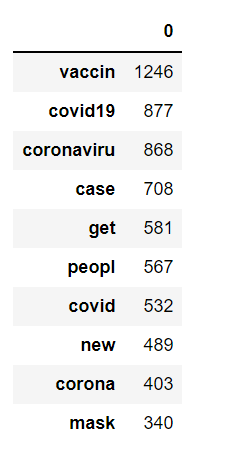
Top 20 words for all the tweets

We can also create a bar graph of the frequencies of the most popular words to understand their distribution.

#create a bar graph of most frequently used words
ind = count_df.index
val = [item for sublist in count_df.values for item in sublist]
plt.bar(ind, val)
plt.xticks(rotation = 90)
plt.title('Top 20 Most frequently used words in the tweets')
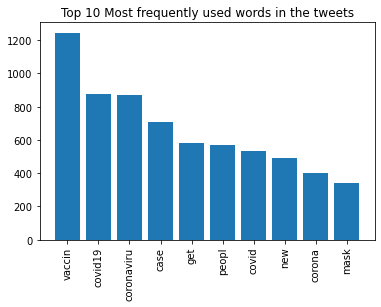
We can do similar analysis on the data frames of positive and negative tweets to understand the frequency distribution of all the popular words in them.

Conclusion

This concludes the twitter sentiment analysis — part II. There are many more analysis techniques that you can apply on the twitter data like topic modelling(divide the tweets into different topics. An example of topic modelling in R can be found here). Other techniques are geospatial analysis, text similarity and knowledge graphs. The possibilities are endless.

If this tutorial was worth your time, please feel free to clap and follow. Say Hi on linkedin if you like.

Artificial Intelligence
Data Science
Data Analysis
Python
Sentiment Analysis
Recommended from ReadMedium