
A Complete Guide To Gatsby + React
An introduction to Gatsby that is a robust and fast static site generator

What is The Great Gatsby?
It is a novel written by American author, F. Scott Fitzgerald, in 1925. The book follows a cast of characters living in the fictional towns of West Egg and East Egg on prosperous Long Island in the summer of 1922. Many literary critics consider it one of the greatest novels ever written.
Today we are talking about another Gatsby, a free and open source framework based on React that helps developers build blazing fast websites and applications.
When starting a new React app, you may consider React team’s recommendation:
- If you’re learning React or creating a new single-page app, use Create React App.
- If you’re building a server-rendered website with Node.js, try Next.js.
- If you’re building a static content-oriented website, try Gatsby.
- If you’re building a component library or integrating with an existing codebase, try Neutrino, Nx, Parcel, or Razzle.
What is static content? It is content that can be delivered to an end user without additional processing, i.e. a server delivers the same files to users. Static websites do not need much from servers. They are easier to be cached and need less computing power. It is one of the simplest and most efficient ways to transmit content over the Internet. The benefits of static websites are speed, search engine optimization (SEO), and security.
Gatsby is a robust and fast static site generator, which uses React to render static content on the web. In this article, we are going to explain how Gatsby works.
Install and Run Gatsby
Gatsby CLI tool provides a set of commands to create and develop Gatsby sites. It can be installed by the following command:
$ npm install -g gatsby-cliThe installation made gatsby command available globally:
$ gatsby --help
Usage: gatsby <command> [options]Commands:
gatsby develop Start development server. Watches files, rebuilds, and hot reloads if something changes
gatsby build Build a Gatsby project.
gatsby serve Serve previously built Gatsby site.
gatsby info Get environment information for debugging and issue reporting
gatsby clean Wipe the local gatsby environment including built assets and cache
gatsby repl Get a node repl with context of Gatsby environment, see
(https://www.gatsbyjs.com/docs/gatsby-repl/)
gatsby recipes [recipe] [EXPERIMENTAL] Run a recipe
gatsby new [rootPath] [starter] Create new Gatsby project.
gatsby telemetry Enable or disable Gatsby anonymous analytics collection.
gatsby plugin [cmd] Useful commands relating to Gatsby plugins
gatsby options [cmd] [key] [value] View or set your gatsby-cli configuration settings.Options:
--verbose Turn on verbose output [boolean] [default: false]
--no-color, --no-colors Turn off the color in output [boolean] [default: false]
--json Turn on the JSON logger [boolean] [default: false]
-h, --help Show help [boolean]
-v, --version Show the version of the Gatsby CLI and the Gatsby package in the current project
Let’s use gatsby command to initialize a Gatsby project, named my-gatsby:
$ gatsby new my-gatsbyGo to the folder, my-gatsby, and start the development server:
$ cd my-gatsby
$ gatsby develop
On a browser window, type the URL http://localhost:8000. It shows the default Gatsby website:
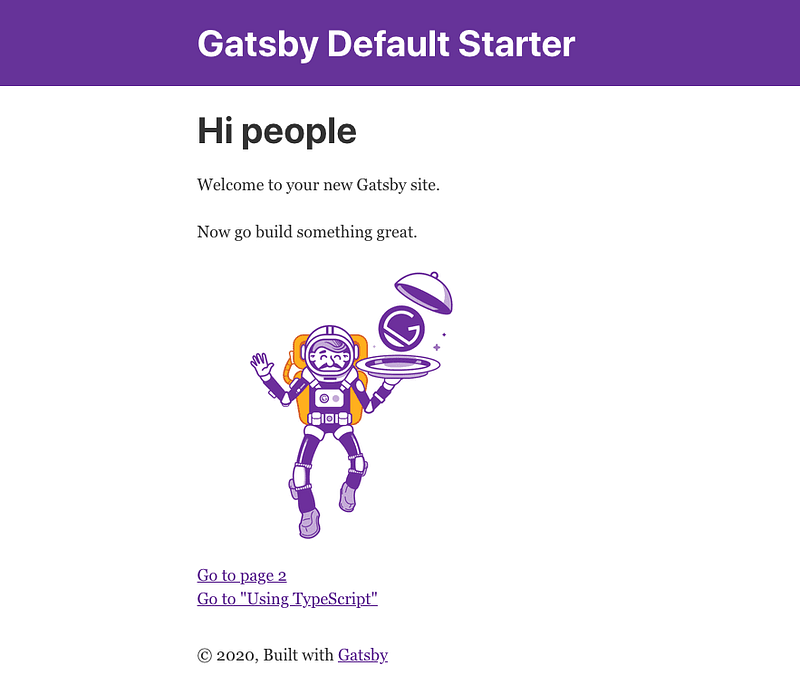
Here is src/pages/index.js, which specifies text and image in the above webpage.
Link (line 2) is a built-in component, which is for linking between pages within the site. Line 17 is a link to the page, /page-2, and line 18 is link to the page, /using-typescript.
Layout (line 4), Image (line 5) , SEO (line 6) are user-defined components, which arrange the text and image, and provide meta data for SEO.
Gatsby Folder Structure

The above is the out-of-box folder structure of gatsby.
.cache,node_modules,andpublicare automatically generated folders.srcis the source folder. It contains project-specific code..gitignorespecifies untracked files for Git..prettierignoreand.prettierrccontains code formatting rules forPrettier.gatsby-browser.jsis where Gatsby expects to find any usage of the Gatsby browser APIs. It is used for customization or extension of default Gatsby settings affecting the browser.gatsby-config.jsis the main configuration file for a Gatsby website. It specifiespathPrefix,siteMetadata, plugins, flags, polyfill, mapping, proxy, and developMiddleware.gatsby-node.jsis where Gatsby expects to find any usage of the Gatsby node APIs. It is used for customization or extension of default Gatsby settings affecting pieces of the site build process.gatsby-ssr.jsis where Gatsby expects to find any usage of the Gatsby server-side rendering APIs. It is used for customization of default Gatsby settings affecting server-side rendering.package.jsonholds various NPM related metadata for the project.
Here is the content of package.json.
Lines 7 - 20 are dependencies, which include React and Gatsby packages, as well as Gatsby plugins.
Lines 29 - 38 list available scripts. Gatsby CLI commands can be executed by npm commands as well.
Gatsby Src Folder
src is the folder for project-specific source code. It is composed of a few sub-folders, such as pages, components, and images.
src/pages
src/pages contains page components that are automatically rendered by the paths, based on their file names. This is a straight-forward routing rule.
$ ls src/pages
404.js index.js page-2.js using-typescript.tsx404.jsis used to generate404.htmlfile in production mode.index.jsis the index file, which is the default page to be loaded with the URL,/.page-2.jsis the page to be loaded with the URL,/page-2.using-typescript.tsxis the page to be loaded with the URL,/using-typescript.
404 is a HTTP status code, which indicates that the requested file is not available. Gatsby recommends to build 404.js for error handling, in case that files are moved, deleted, or simply have wrong paths.
If you type https://jenniferfubook.github.io/gatsby-site/unknown in the browser’s address bar, you will see the following UI for the unknown page:
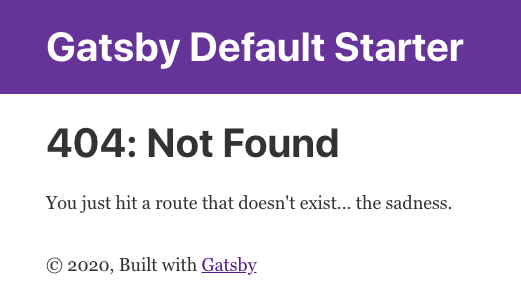
Here is src/pages/404.js file:
TypeScript is a JavaScript superset. It extends JavaScript to include type definitions that allow codebases to be statically checked. Out of box, Gatsby supports TypeScript through the plugin, gatsby-plugin-typescript. There is no need to configure this plugin for using TypeScript. However, if you want to manage TypeScript’s options, configure this plugin in gatsby-config.js.
Here is src/pages/using-typescript.tsx file, which is automatically rendered by Gatsby for the routing URL, /using-typescript.
Lines 8 - 12 define the type, DataProps.
Line 14 types UsingTypescript as React.FC<PageProps<DataProps>>.
Lines 28 - 34 retrieves site.buildTime with GraphQL. The retrieved value, data.site.buildTime, is rendered at line 20.
src/components
src/components contains page building blocks as user-defined reusable components.
$ ls src/components
header.js image.js layout.css layout.js seo.jsheader.jsdefines theHeadercomponent, using html tags, such asheader,h1, anddiv.image.jsdefines theImagecomponent that loadsgatsby-astronaut.png.layout.jsbuilds on top ofHeaderand html tags. It defines theLayoutcomponent with standardized header and footer.layout.cssis the CSS file oflayout.js.seo.jscreates theSEOcomponent that has SEO information embedded in the document header. It uses react-helmet, a document head manager for React.
The following is src/components/header.js file. It uses inline styling. Alternatively, we can define an external CSS file, and import it into any JavaScript/TypeScript file, similar to layout.js and layout.css.
src/images
src/images contains image files that are used by the project.
$ ls src/images
gatsby-astronaut.png gatsby-icon.png
Data Layer
Gatsby’s data layer is powered by GraphQL, which was invented at Facebook. GraphQL is a Query Language (QL), which works similarly as SQL. It presents a revolutionary way to think about APIs. Instead of working with rigid server-defined endpoints, we can send queries that describes the data format to be retrieved, in a single request. Data in Gatsby sites can come from anywhere: Markdown, JSON, APIs, databases, content management systems, local files, etc. At build time, Gatsby creates an internal GraphQL server hosting all of these data.
In src/pages/using-typescript.tsx file, we have seen the GraphQL usage for data.site.buildTime:
graphql (line 1) can be used to query data in src/pages/<files>. If the query is in src/components/<files>, the React hook, useStaticQuery, can be used combining with graphql.
Here is src/components/seo.js file:
Lines 14 and 15 apply useStaticQuery with graphql.
You may wonder where the content of siteMetadata (lines 18 - 22) comes from.
It is defined in gatsby-config.js file:
Lines 3 - 7 specify the siteMetadata object, which assigns the values of title, description, and author.
You may wonder how to write GraphQL queries.
When we run gatsby develop, the output contains the following information:
View GraphiQL, an in-browser IDE, to explore your site's data and schema
⠀
  http://localhost:8000/___graphql
Go to the link, we see the wonderland of Gatsby. It displays all data from the internal GraphQL server. These data are collected at build time.
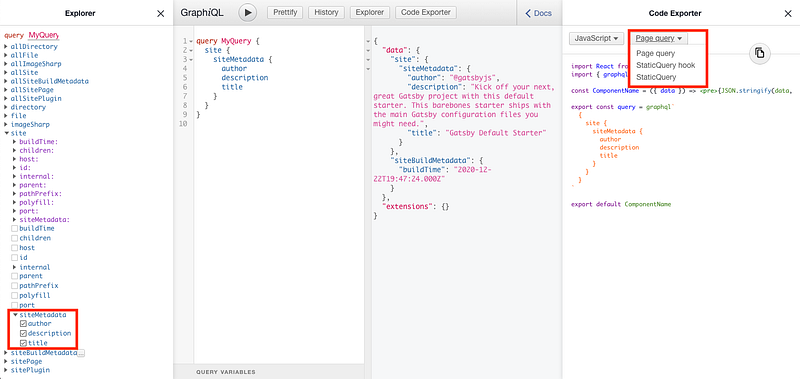
At the left most pane, we have selected items in siteMetadata. The second left pane shows the generated GraphQL query. The third left pane displays the actual values of the query result. The right most pane presents example code, with the choices of Page query, StaticQuery hook, and StaticQuery.
Gatsby Plugins
Like most static site generators, Gatsby applies plugins to either extend its functionality or modify existing functionality. At this moment, there are 2519 published plugins.
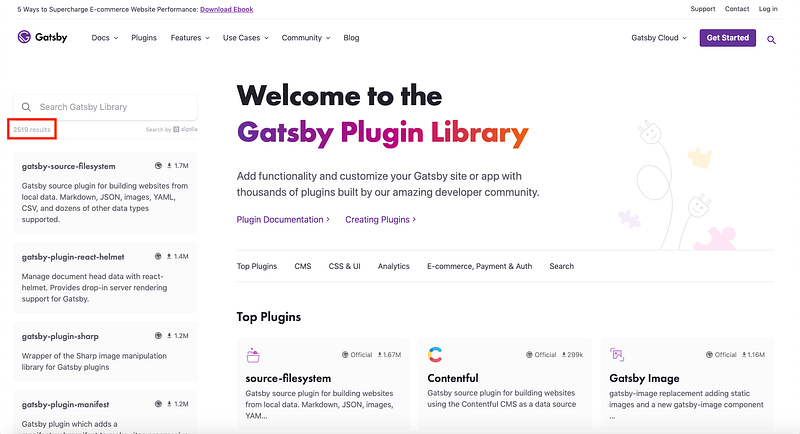
Users are encouraged to build or perhaps publish their own plugins. There is detailed guidance on how to create a Gatsby plugin. Any project-specific, unpublished plugins should be placed in /plugins folder.
Deploy Gatsby Site
For the Gatsby project, we make a build:
$ gatsby buildIt generates the compiled code in /public folder. It can be launched by the following Gatsby command:
$ gatsby serveThis page becomes available at http://localhost:9000/.
If we exit gatsy serve, the website is no longer active.
How can this website be up and running all the time?
The simplest way is to publish it to a CDN (content delivery network, or content distribution network), which is a geographically distributed network of proxy servers and their data centers.
Deploy to Surge
Surge is a CLI client for the surge.sh hosted service, which publishes web apps to a CDN with a single command and no setup required.
We download Surge globally and login to it.
$ npm install --global surge# Then create a (free) account with them$ surge loginThen publish the public folder.
$ surge public/Running as ******project: public/
domain: adjoining-rings.surge.sh
upload: [================] 100% eta: 0.0s (91 files, 2646769 bytes)
CDN: [====================] 100%encryption: *.surge.sh, surge.sh (124 days)
IP: 138.197.235.123Success! - Published to adjoining-rings.surge.shType adjoining-rings.surge.sh in the browser’s address bar, and this page is up and running all the time.
Deploy to Github
gh-pages can publish a Gatsby app to GitHub Pages. The demo site has been set up as a Github repo, with the name, /gatsby-site.
The following command installs gh-pages.
$ npm install gh-pages --save-devIn gatsby-config.js, pathPrefix needs to be set to the repo name.
Add a deploy script to package.json for convenience:
"scripts": {
  "deploy": "gatsby build --prefix-paths && gh-pages -d public"
}
Execute npm run deploy, it makes a new build and copy all contents of the public folder to the repository’s gh-pages branch.
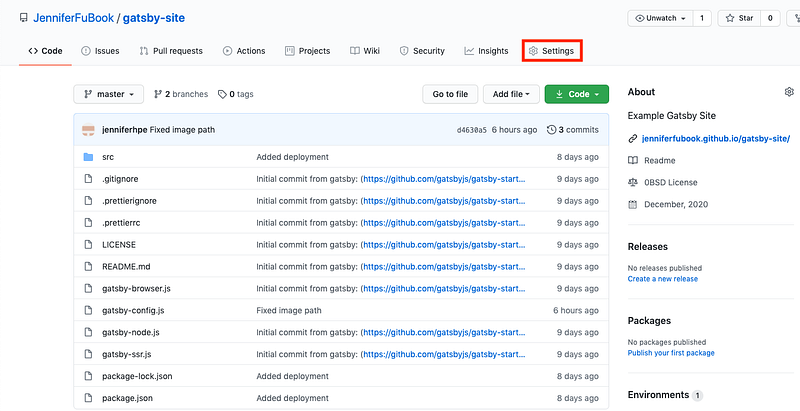
As we have described in another article, select Settings from the GitHub page:
On the Settings page, scroll down to the GitHub Pages section. Make sure that your repository’s settings has the gh-pages branch set as the source to be deployed from.
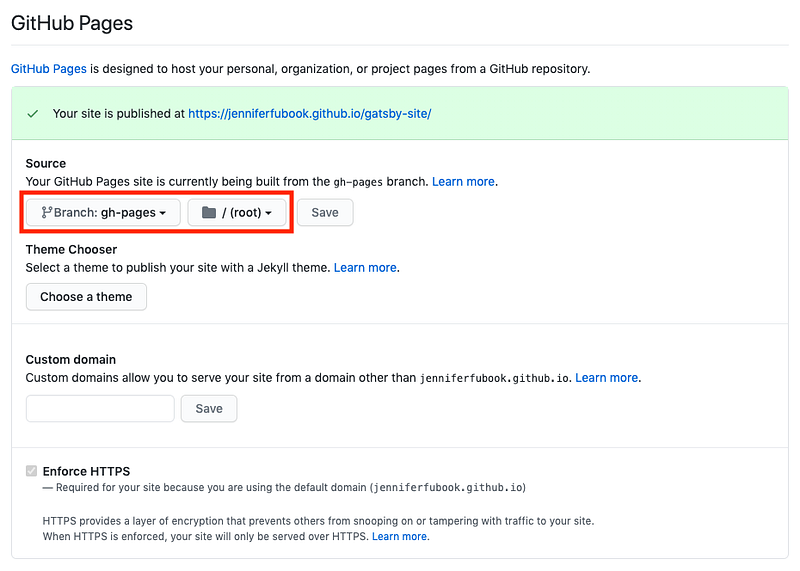
gh-pages sets up all these automatically. The static website can be accessed here.
A Real Gatsby Site
We went through the major features of Gatsby. Now we showcase Michael Foster’s Gatsby website.
His website is built with Gatsby and Sanity Studio. sanity.io is an open source real-time content editing environment that is connected to the Sanity backend.
Type the URL in your browser: https://ranchtoplate.com/.

Are you ready to try out beef, or Gatsby?
Conclusion
Gatsby is a robust and fast static site generator. It takes cares of speed, SEO, and security for you. It is considered one of the greatest ways to create a React project.
Gatsby lives up to the expectation, as a novel, as well as a React framework.
Thanks for reading. I hope this was helpful. You can see my other Medium publications here.


