
3 Big Updates in Google Data Studio
How Google makes its’ Business Intelligence Tool even better

Since the last update of Data Studio is now already a bit ago (end of May), Google now comes with three large and interesting new features around the corner. Let’s have a look.
New Data Panel
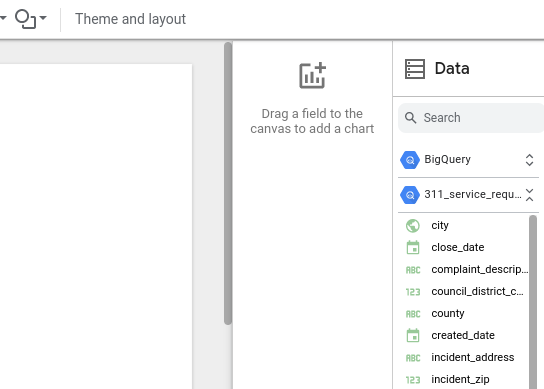
With the update, it is now easier for the user to get to all necessary data for creating the report. In this regard, when a report is edited, a new Data panel can be found in the properties panel. This data panel then lists all of the data sources that have been added to the report. In order to gain access to all fields and parameters in the data source, just expand that specific data source. Also, one can now just use the drag fields from the data panel to a chart or canvas in order to feature that data in the report [1].
Better Integration with BigQuery
Furthermore, one can now visualize a BigQuery table or custom query in Data Studio by using the Explore options in the BigQuery console. Therefore, just simply select a table or run a query, afterwards click Explore with Data Studio [1]. Google has also recently improved the integration by making the data available in shorter intervals (click here for more).
Linking API is now available
Last but not least: the update also made the Data Studio Linking API now generally available for everyone. The Linking API provides the user a reliable interface to configure and forward users directly to a Data Studio report via an URL. When these users follow a Linking API URL, they experience a streamlined workflow and can now quickly view and interact with their data [1].
Again, interesting innovations and improvements that Google presents here in Data Studio, making the solution competitive with other (paid) solutions. Perhaps the following article is also interesting for you: Google Data Studio vs. Qlik — a Comparison.
I can’t wait to see what comes next. The possibility of triggering alarms when certain target values are reached is also listed in the official list of requirements. I, personally, would find this very useful, however, I hope that especially the possibility to run Python code in Google Data Studio will come sometime in the near future. We will see!
Sources and Further Readings
[1] Google, Release notes (2022) What’s new in Data Studio?
[2] Google, IssueTracker (2022)