
How To Fill In Voluntary Product Accessibility Template (VPAT®)
VPAT® reports help to meet government regulations and win government contracts
Accessibility (a11y) is the practice of making applications that are usable for people whose abilities are limited in some way. The applications can be Web applications, electronic documents, software, and/or authoring tools. The limitation can be physical or mental, such as vision, hearing, speech, mobility, and/or cognitive ability. It can also come from the device’s capability, such as mobile devices.
Implementing accessible applications brings the following advantages:
- It empowers everyone to be inclusive.
- It makes products look more competitive against competitors.
- It meets government regulations, and helps to win government contracts.
We have written 10 Steps to Building Web Applications With Accessibility (a11y), which applies to items 1 and 2.
In this article, we are going to focus on item 3 to meet government regulations. We will use a Web application as an example, although the same concept can be applied to other application types.
What is VPAT®?
Voluntary Product Accessibility Template (VPAT®) is a document that explains how information and communication technology (ICT) products such as software, hardware, electronic content, and support documentation meet or conform to the Revised 508 Standards for IT accessibility.
VPAT® helps Federal agency contracting officials and government buyers to assess ICT for accessibility when doing market research and evaluating proposals. It is recommended that vendors generate a VPAT®.
The Revised Section 508 edition of the VPAT includes the following standards/guidelines:
- Web Content Accessibility Guidelines (WCAG) 2.x
- Revised Section 508 standards published January 18, 2017 and corrected January 22, 2018
A VPAT® report is for a specific product revision. If multiple revisions are sharing the same information, they can be combined into one report. Otherwise, every product revision should have its own report.
Where to Get a VPAT® Template?
In order to fill in the VPAT® report, we need to get a VPAT® template. Here is a list of templates that can be downloaded from the government website:
- VPAT 2.4 Rev EU (March 2022) (March 16, 2022): the European Union’s Accessibility requirements suitable for public procurement of ICT products and services in Europe
- VPAT 2.4Rev 508 (March 2022) (March 16, 2022): the U.S. Federal accessibility standard
- VPAT 2.4Rev WCAG (March 2022) (March 16, 2022): WCAG 2.1 or ISO/IEC 40500 (equivalent to WCAG 2.0) and WCAG2.1, W3C/WAI’s recently updated Web Content Accessibility Guidelines
- VPAT 2.4Rev INT (March 2022) (March 16, 2022): Incorporates all three of the above standards
Pick up one of the templates. For our example, we will use VPAT® 2.4Rev 508 (March 2022) (March 16, 2022): the U.S. Federal accessibility standard.
VPAT® 2.4Rev 508
The first part of the document explains how to fill in the form, and the second part is the actual form, which is composed of the following sections:
- Information Section
- Table 1: Success Criteria, Level A
- Table 2: Success Criteria, Level AA
- Table 3: Success Criteria, Level AAA
- Revised Section 508 Report — Chapter 3
- Revised Section 508 Report — Chapter 4
- Revised Section 508 Report — Chapter 5
- Revised Section 508 Report — Chapter 6
- Legal Disclaimer (Company)
The process to fill in each section is tedious, but it is vital to show that the particular product meets government regulations. We are going to visit each section.
Information Section
The Information section is at the beginning of document. It includes the company name, product name, revision, report date, etc.
Assume the company name is ABC, and the product is a Web application, named BubbleLand. The following is an example of the information section:
ABC Accessibility Conformance Report
Revised Section 508 Edition
(Based on VPAT® Version 2.4Rev)
Name of Product/Version: BubbleLand Edition Version IV, Version V
Report Date: August 27, 2022
Product Description: BubbleLand is a Web application that manages individual’s social life.
Contact Information: [email protected]
Evaluation Methods Used: Conformance to the listed accessibility standards has been evaluated by ABC staff primarily using manual testing approaches. Some Chrome accessibility extensions are used to assist the testing.
Table 1: Success Criteria, Level A
WCAG 2.0 Guidelines are organized by the criterion number, such as 1.1.1, 1.2.1, 1.2.2, 1.2.3, 1.2.4. 1.2.5, etc. The following is the first page of the guidelines:
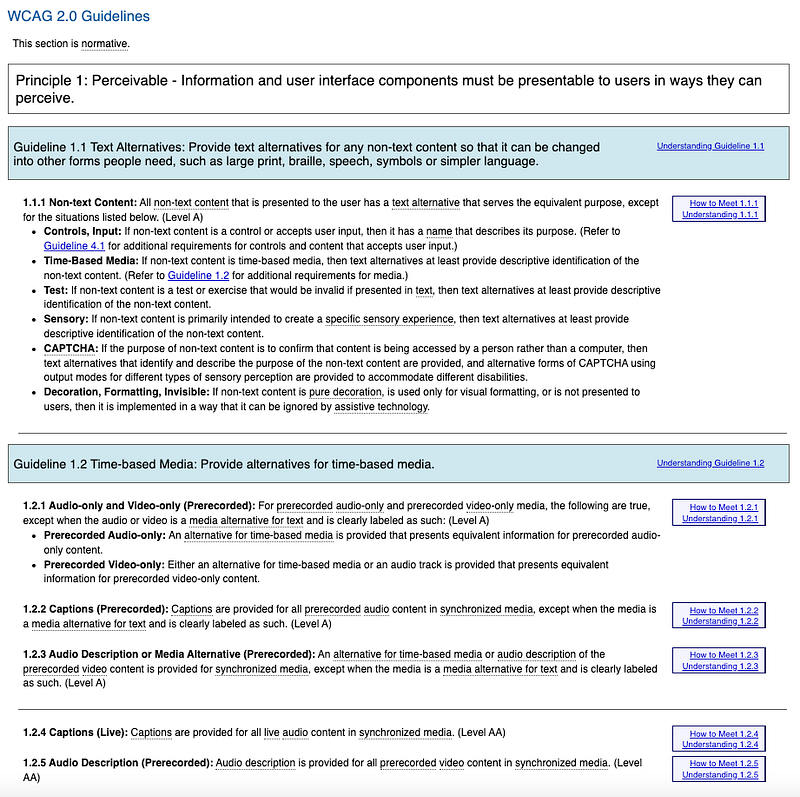
Each criterion is classified to be one of the following level of conformance:
- Level A: It is the minimum level of conformance, where the Web page satisfies all the Level A Success Criteria.
- Level AA: It is the higher level of conformance, where the Web page satisfies all the Level A and Level AA Success Criteria.
- Level AAA: It is the highest level of conformance, where the Web page satisfies all the Level A, Level AA and Level AAA Success Criteria.
Table 1 lists all the Level A Success Criteria. The following is the first page of all 5 pages, where the Level A Criteria of 1.1.1, 1.2.1, 1.2.2, 1.2.3, and 1.3.1 are shown.
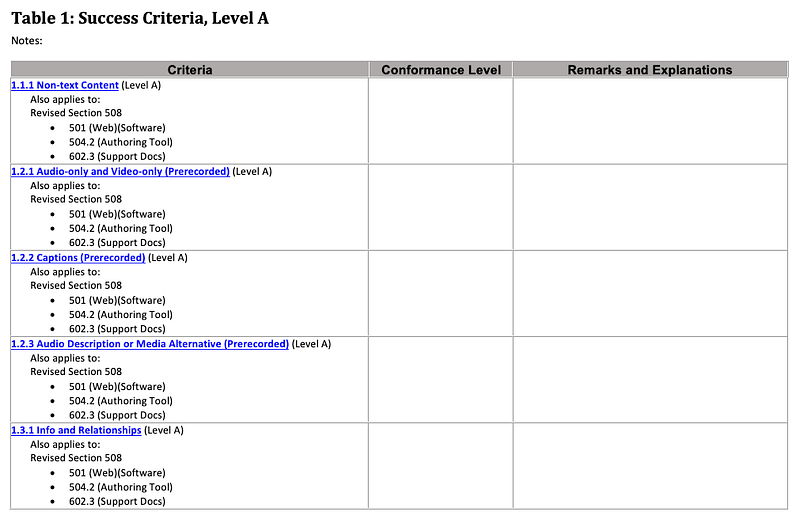
Why is 1.2.4 not shown?
Because 1.2.4 is a Level AA Criteria.
One of the following terms should be used to fill in the conformance level column.
- Supports: The functionality of the product has at least one method that meets the criterion without known defects or meets with equivalent facilitation.
- Partially Supports: Some functionality of the product does not meet the criterion.
- Does Not Support: The majority of product functionality does not meet the criterion.
- Not Applicable: The criterion is not relevant to the product.
- Not Evaluated: The product has not been evaluated against the criterion. This can be used only in WCAG 2.0 Level AAA.
Be aware that Supports only requires at least one method that meets the criterion. That makes it possible that most columns be filled in with Supports. Otherwise, regardless of how much testing effort is tried, there are always some missing cases, guaranteed.
For each criterion, there is a box with two links:
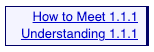
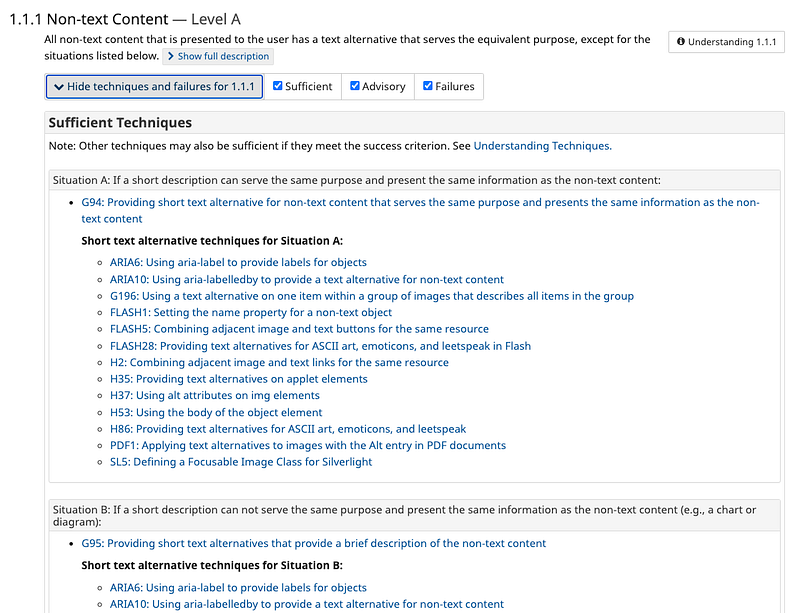
Open the first link, and it shows the full description of the criterion:
Open the second link, and it shows more details:
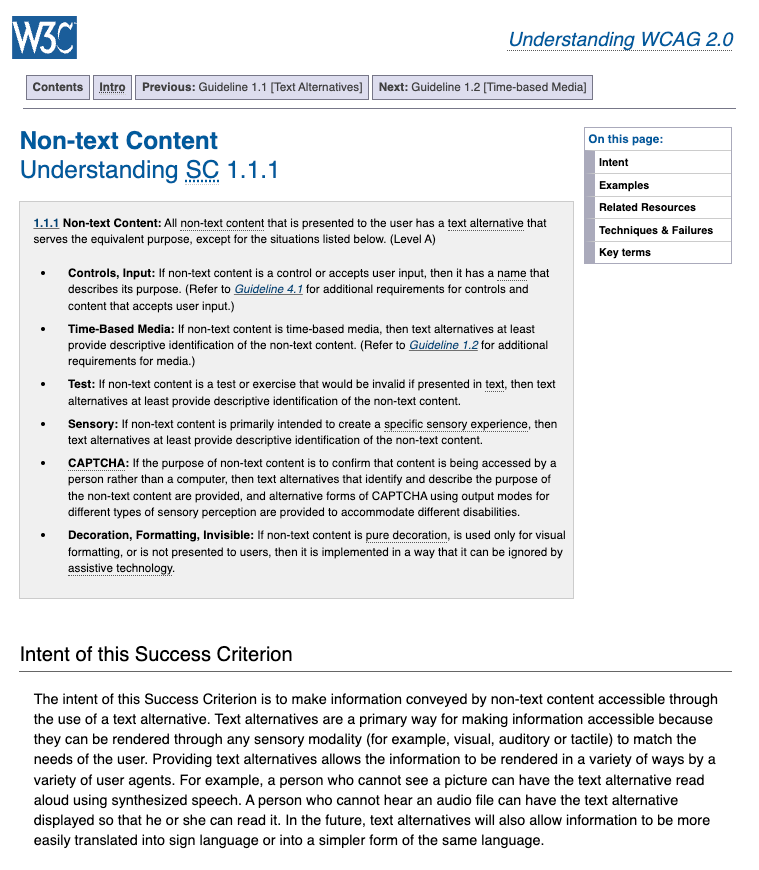
These contents help us to provide remarks and explanations. Therefore, for criterion 1.1.1, we can claim BubbleLand supports controls and inputs with a name that describes its purpose. For decoration, formatting, and invisible content, it is implemented in a way that can be ignored by assistive technology.
It makes sense, right?
For some Not Applicable criteria, we can claim that BubbleLand does not have prerecorded audio-only or video-only content.
Here is an example of filled in page 1:
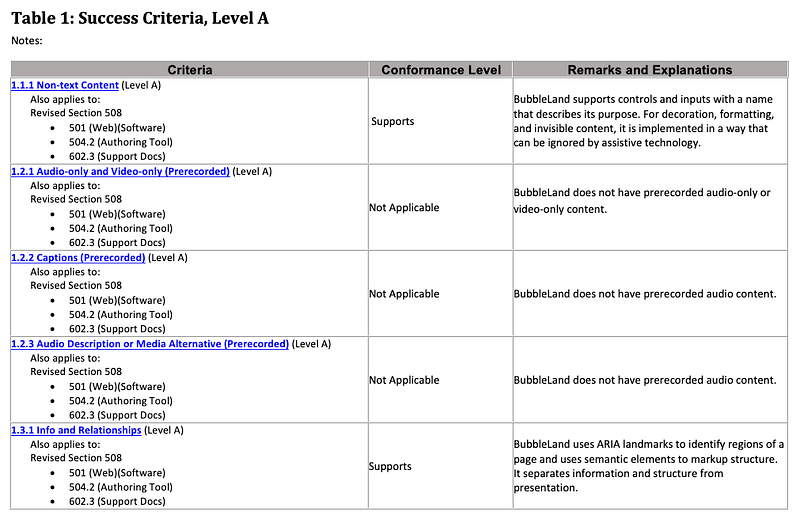
Table 2: Success Criteria, Level AA
Table 2 lists all the Level AA Success Criteria. The following is the first page of all 3 pages, where the Level AA Criteria of 1.2.4, 1.2.5, 1.4.3, 1.4.4, and 1.4.5 are shown.
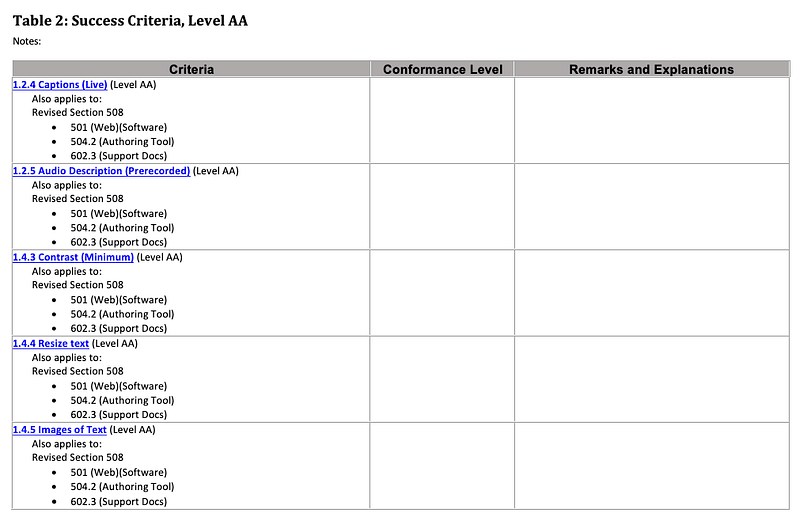
Same as Table 1, each of Table 2's criterion has a box with two links:
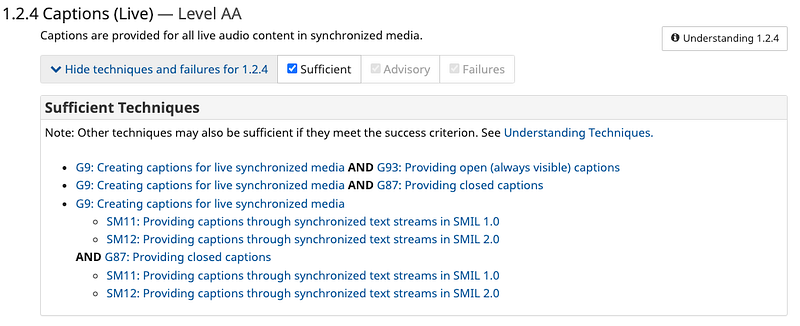
Open the first link, and it shows the full description of the criterion:
Open the second link, and it shows more details:
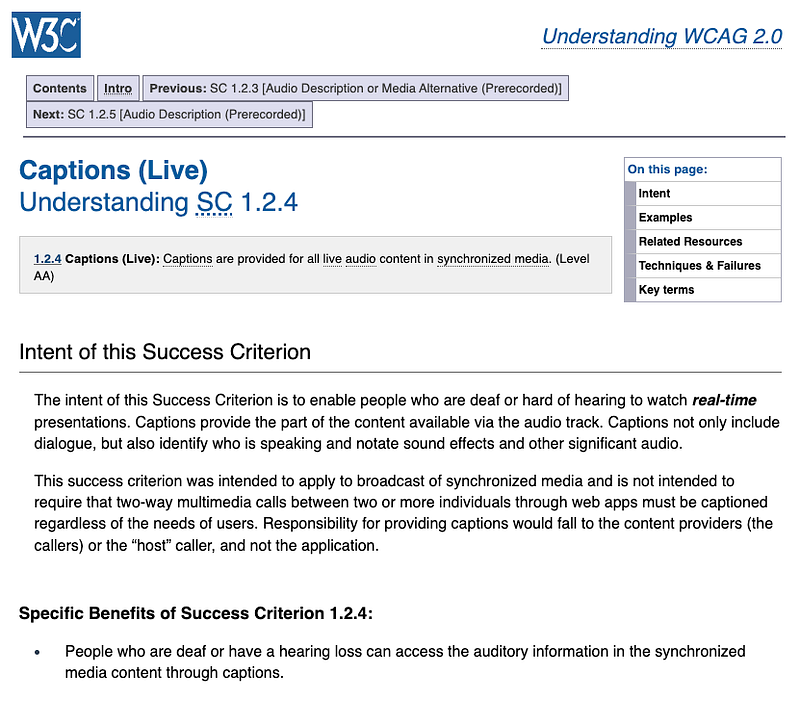
For criterion 1.2.4, we can simply say that it is Not Applicable, because BubbleLand has no multimedia.
Here is an example of filled in page 1:
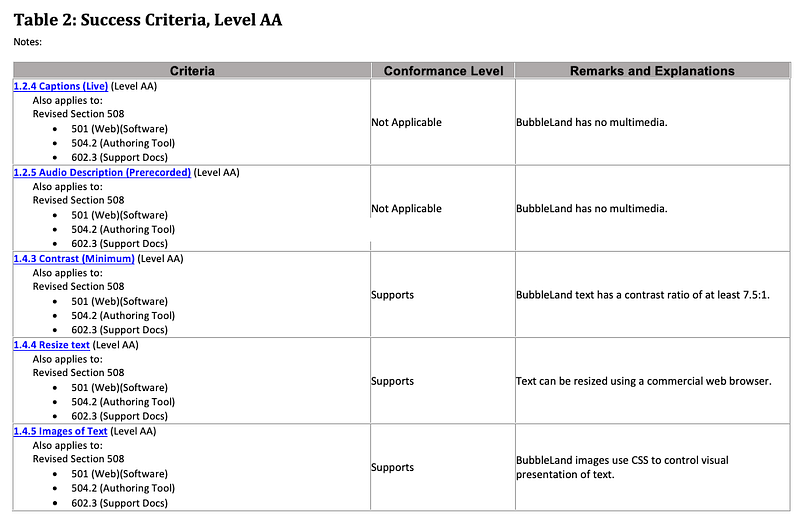
For the criteria on the rest of table, we can claim some supports come from assistive technologies in commercial web browsers. For example, the font sizes can be enlarged or reduced by browsers. Will the following statement makes these criteria easier to pass?
BubbleLand supports assistive technology available in commercial web browsers such as Google Chrome, which would return results in visual and textual formats. The display can be edited using such commercial web browser.
Table 3: Success Criteria, Level AAA
Table 3 lists all the Level AAA Success Criteria. The following is the first page of all 2 pages, where the Level AAA Criteria of 1.2.6, 1.2.7, 1.2.8, 1.2.9, 1.4.6, 1.4.7, 1.4.8, 1.4.9, 2.1.3, 2.2.3, 2.2.4, 2.2.5, 2.3.2, and 2.4.8 are shown.
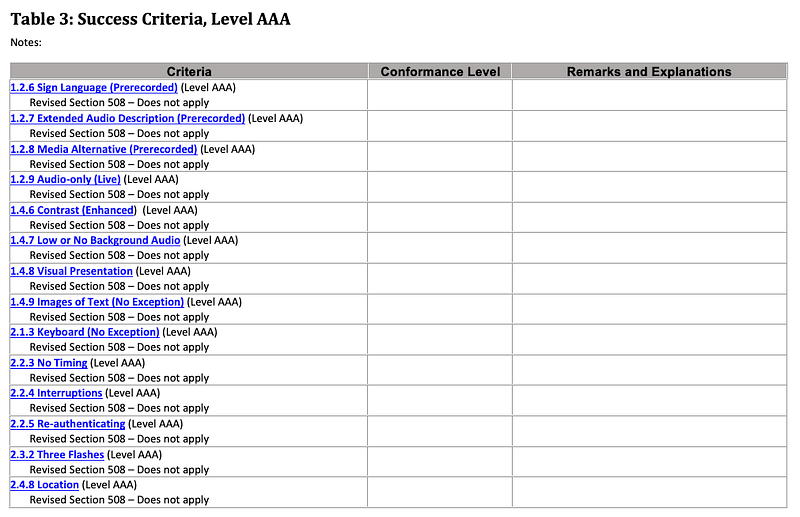
Fill in Table 3 if your product has excellent accessibility support.
However, there is a choice of Not Evaluated.
Not Evaluated: The product has not been evaluated against the criterion. This can be used only in WCAG 2.0 Level AAA.
This is an easy way out!

Revised Section 508 Report — Chapter 3
Revised Section 508 Report requires access to the product developed, procured, maintained, or used by federal agencies. It ensures access for people with physical, sensory, or cognitive disabilities.
Chapter 3 lists Functional Performance Criteria with criteria of 302.1, 302.2, 302.3, 302.4, 302.5, 302.6, 302.7, 302.8, and 302.9.
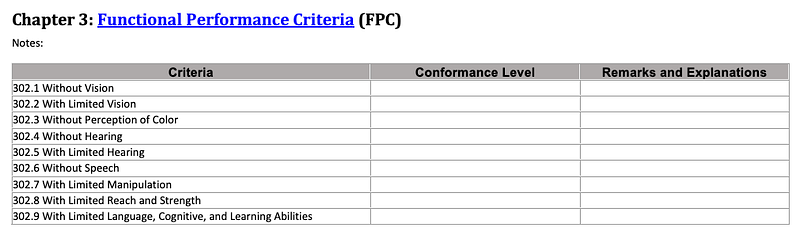
The detailed requirements are listed here, and the following is an example of filled in Chapter 3:
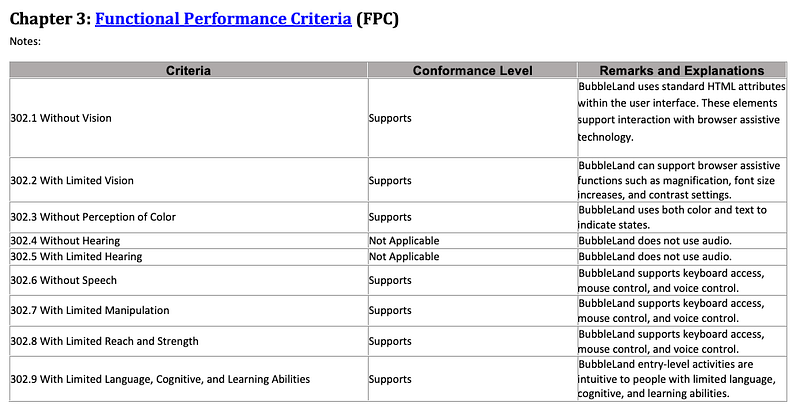
Revised Section 508 Report — Chapter 4
Chapter 4 lists Hardware Criteria. The following is the first page of all 3 pages, where criteria of 402.2.1, 402.2.2, 402.2.3, 402.2.4, 402.2.5, 402.3.1, 402.3.2, 402.4, 402.5, 403.1, 404.1, 405.1, 406.1, 407.2, 407.3.1, 407.3.2, and 407.3.3 need to be filled in.
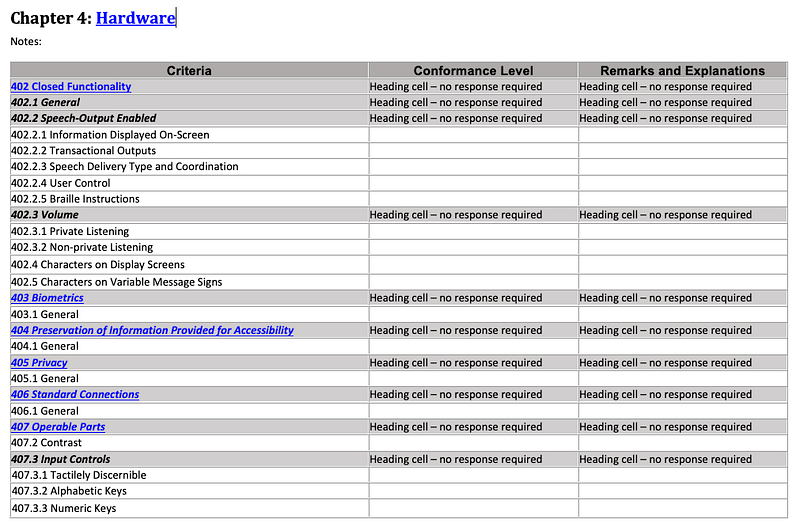
The detailed requirements are listed here. Since BubbleLand is not a hardware product, we got another easy way out.

Revised Section 508 Report — Chapter 5
Chapter 5 lists Software Criteria. The following is the first page of all 2 pages, where criteria of 502.2.1, 502.2.2, 502.3.1, 502.3.2, 502.3.3, 502.3.4, 502.3.5, 502.3.6, 502.3.7, 502.3.8, 502.3.9, 502.3.10, 502.3.11, 502.3.12, 502.3.13, 502.3.14, 502.4, and 503.2 need to be filled in.
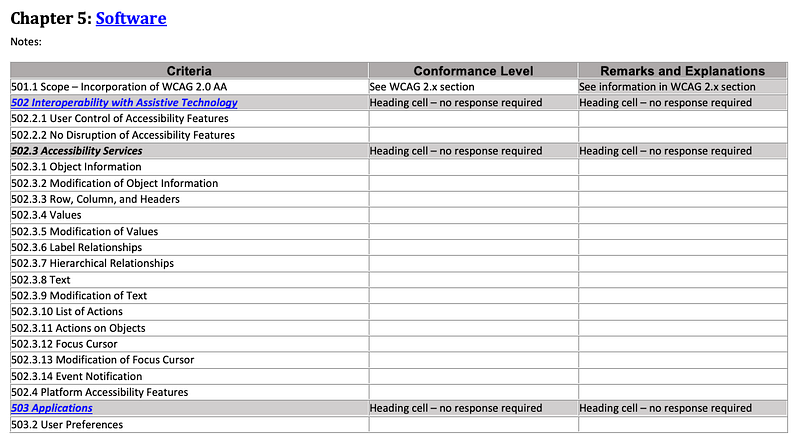
The detailed requirements are listed here, and the following is an example of filled in page 1:
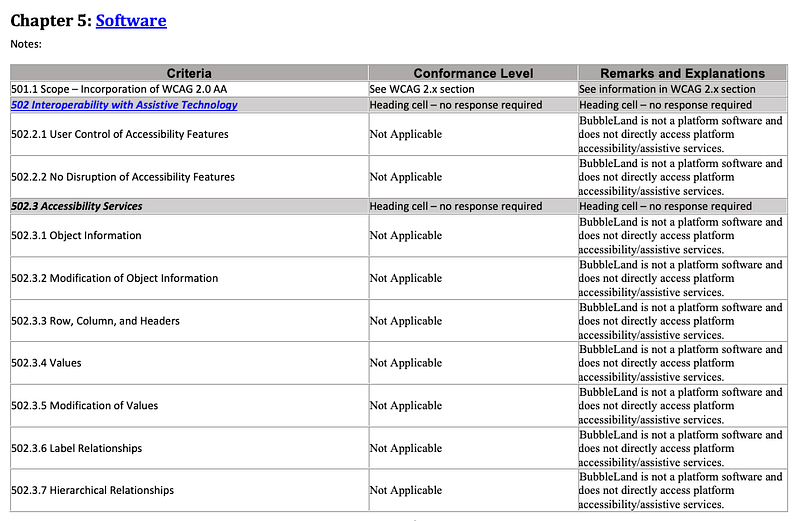
You may wonder why we did not specify Not Applicable in the Notes. It is because some rows in the rest of table have Supports.
Revised Section 508 Report — Chapter 6
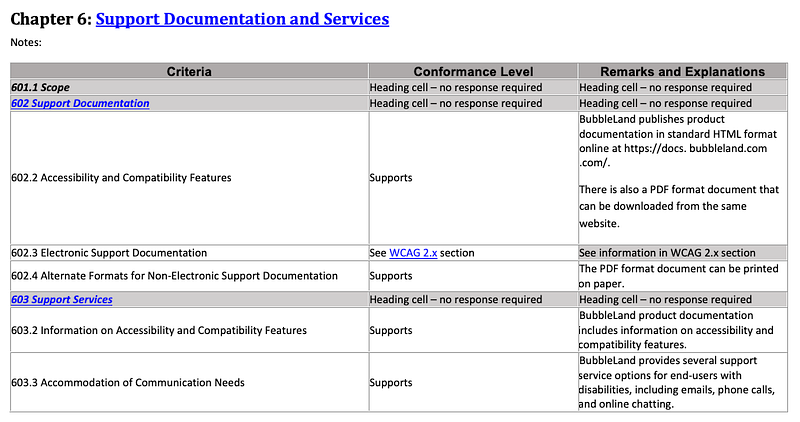
Chapter 6 lists Support Documentation and Services Criteria. The criteria of 602.2, 602.3, 602.4, 603.2, and 603.3 need to be filled in.
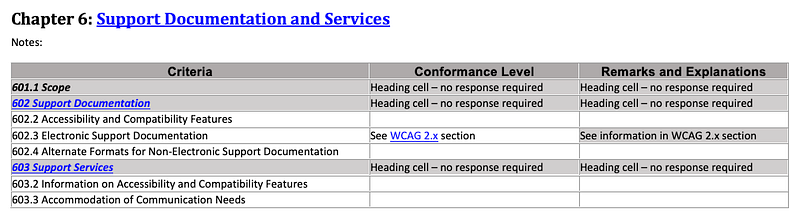
The detailed requirements are listed here, and the following is an example of filled in Chapter 6:
Legal Disclaimer (Company)
This section is for us to include company’s legal disclaimer, if needed. One thing we can put here is the information about browser supportability:
BubbleLand supports the following browsers on mobile devices, Windows and MacOS desktops:
- Google Chrome (latest 5 major versions)
- Firefox (latest 5 major versions)
- Opera (latest 5 major versions)
- Safari (latest 5 major versions)
- Microsoft Edge (latest 5 major versions)
And, it does not officially support Internet Explorer.
Conclusion
We have shown examples of how to fill in VPAT® 2.4Rev 508. Hopefully, these examples help you to fill in the VPAT® template, and help your product meet government regulations and win government contracts.
FYI, this article described “What’s New in WCAG 2.1 & WCAG 2.2”.
Thanks for reading.
Thanks, Hung Chang, S Sreeram, Siddhartha Chinthapally, and Rajasekhar Gandavarapu, for working with me on Domino products.
Want to Connect? If you are interested, check out my directory of web development articles.More content at PlainEnglish.io. Sign up for our free weekly newsletter. Follow us on Twitter, LinkedIn, YouTube, and Discord.


