
What’s New in WCAG 2.1 & WCAG 2.2
Updated guidance on how to meet government regulations and win government contracts

Web Content Accessibility Guidelines (WCAG) defines how to make Web content more accessible to people with disabilities. Accessibility involves a wide range of disabilities, including visual, auditory, physical, speech, cognitive, language, learning, and neurological disabilities.
WCAG 2.x is an important part of VPAT®, and it has the following timeline:
- WCAG 2.0 was published on December 11, 2008.
- WCAG 2.1 was published on June 5, 2018, and an update was published on September 21, 2023.
- WCAG 2.2 was published on October 5, 2023.
We have described WCAG 2.0 in a previous article about How To Fill In Voluntary Product Accessibility Template (VPAT®). In this article, we are going to describe the new requirements in WCAG 2.1 & WCAG 2.2.
WCAG 2.1
WCAG 2.1 added 17 success criteria to improve accessibility guidance for three major groups:
- Users with cognitive or learning disabilities
- Users with low vision
- Users with disabilities on mobile devices
Here are links to the new success criteria:
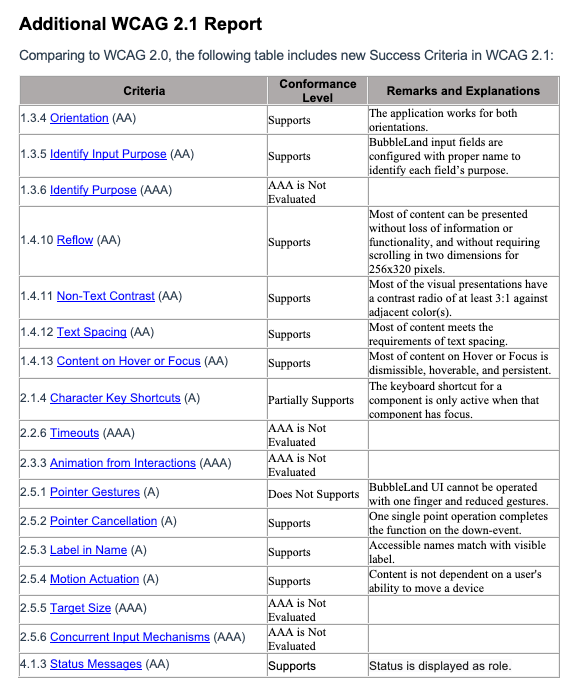
- 1.3.4 Orientation (AA)
- 1.3.5 Identify Input Purpose (AA)
- 1.3.6 Identify Purpose (AAA)
- 1.4.10 Reflow (AA)
- 1.4.11 Non-Text Contrast (AA)
- 1.4.12 Text Spacing (AA)
- 1.4.13 Content on Hover or Focus (AA)
- 2.1.4 Character Key Shortcuts (A)
- 2.2.6 Timeouts (AAA)
- 2.3.3 Animation from Interactions (AAA)
- 2.5.1 Pointer Gestures (A)
- 2.5.2 Pointer Cancellation (A)
- 2.5.3 Label in Name (A)
- 2.5.4 Motion Actuation (A)
- 2.5.5 Target Size (AAA)
- 2.5.6 Concurrent Input Mechanisms (AAA)
- 4.1.3 Status Messages (AA)
There are two options to include WCAG 2.1:
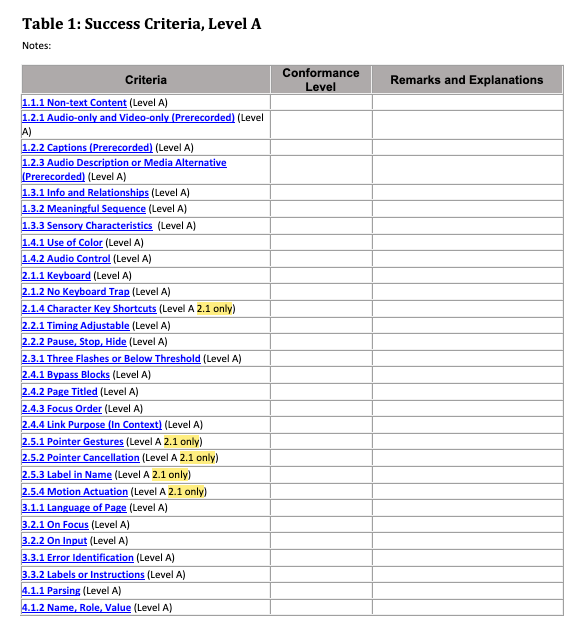
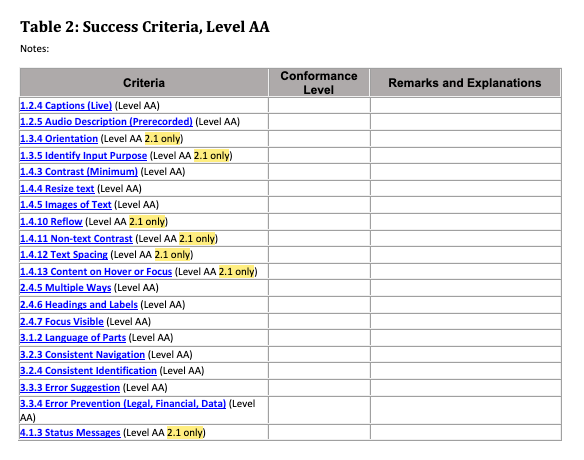
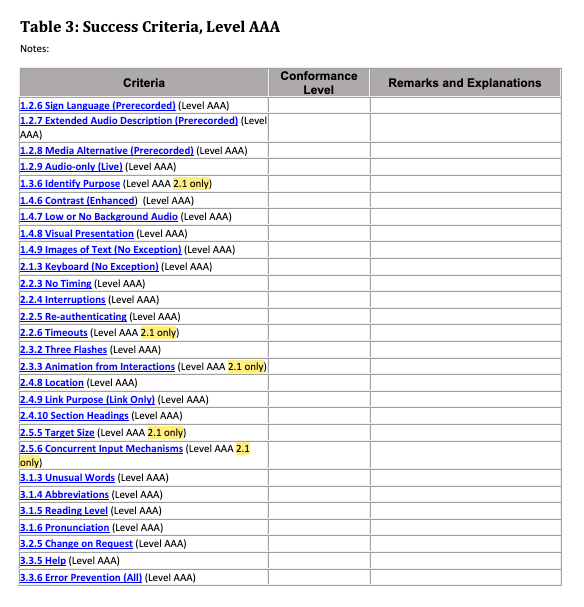
- Download VPAT 2.4Rev WCAG (March 2022). It has 3 tables that include WCAG 2.0 and WCAG 2.1 guidelines for Level A, Level AA and Level AAA, where WCAG 2.1 criteria are marked
'2.1 only'within the row.
- Include a separate table for WCAG 2.1. Here is an example using the imaginary Web application, BubbleLand:
WCAG 2.2
WCAG 2.2 removed 1 success criterion and added 9 success criteria to improve accessibility guidance for three major groups:
- Users with cognitive or learning disabilities
- Users with low vision
- Users with disabilities on mobile devices
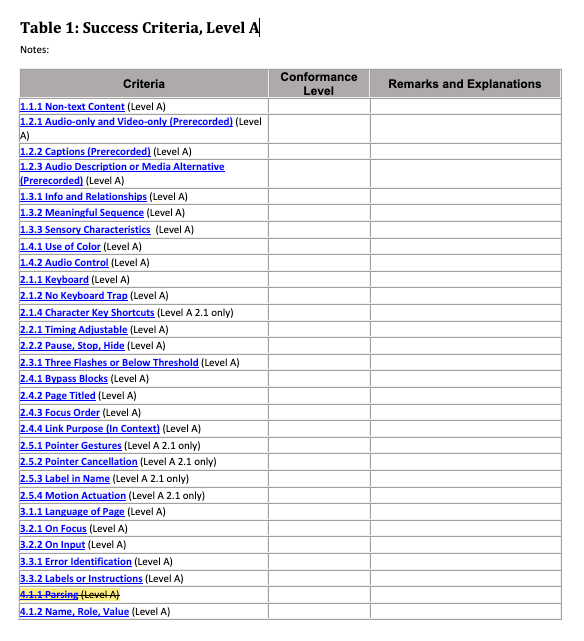
Here is the removed success criterion, 4.1.1 Parsing:
This criterion was originally adopted to address problems that assistive technology had directly parsing HTML. Assistive technology no longer has any need to directly parse HTML. Consequently, these problems either no longer exist or are addressed by other criteria. This criterion no longer has utility and is removed.
The following is the Table 1 with removed 4.1.1.
Here are links to the new success criteria:
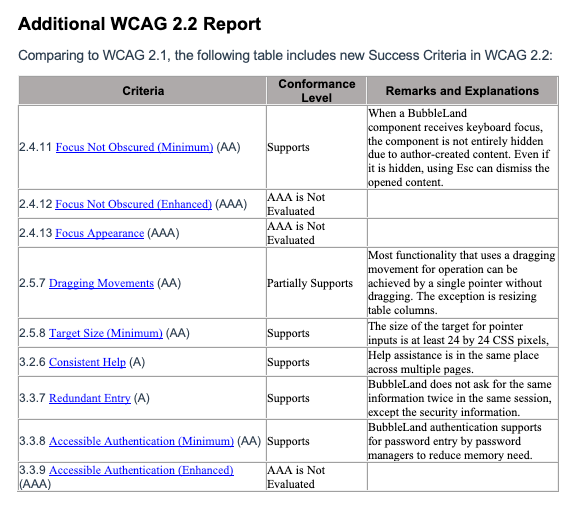
- 2.4.11 Focus Not Obscured (Minimum) (AA)
- 2.4.12 Focus Not Obscured (Enhanced) (AAA)
- 2.4.13 Focus Appearance (AAA)
- 2.5.7 Dragging Movements (AA)
- 2.5.8 Target Size (Minimum) (AA)
- 3.2.6 Consistent Help (A)
- 3.3.7 Redundant Entry (A)
- 3.3.8 Accessible Authentication (Minimum) (AA)
- 3.3.9 Accessible Authentication (Enhanced) (AAA)
Since it is still fairy new, the VPAT document hasn’t updated with these changes yet.
We can include a separate table for WCAG 2.2. Here is an example using the imaginary Web application, BubbleLand:
Conclusion
In a previous article, we have shown examples of how to fill in VPAT® 2.4Rev 508. In this article, we have described how to input additional information for WCAG 2.1 & WCAG 2.2. Hopefully, it helps you to fill in the VPAT® template, and help your product meet government regulations and win government contracts.
Thanks for reading.
Want to Connect?

If you are interested, check out my directory of web development articles.
PlainEnglish.io 🚀
Thank you for being a part of the In Plain English community! Before you go:
- Be sure to clap and follow the writer️
- Learn how you can also write for In Plain English️
- Follow us: X | LinkedIn | YouTube | Discord | Newsletter
- Visit our other platforms: Stackademic | CoFeed | Venture


