avatarNikhil Vemu

Free AI web copilot to create summaries, insights and extended knowledge, download it at here

3748

Abstract

the track’s thumbnail and the playlist name.</p><figure id="a1a9"><img src="https://cdn-images-1.readmedium.com/v2/resize:fit:800/1*_YucLTUe0orSWavqalling.jpeg"><figcaption>Left: iOS 16.3.1 | Right; iOS 16.4</figcaption></figure><p id="004f">This looks good, right?</p><div id="ae13" class="link-block"> <a href="https://readmedium.com/7-lesser-known-apple-music-tricks-youll-want-to-keep-using-11fe5e616b71"> <div> <div> <h2>7 Lesser-Known Apple Music Tricks You’ll Want To Keep Using</h2> <div><h3>It’s time to get more groovy</h3></div> <div><p>medium.com</p></div> </div> <div> <div style="background-image: url(https://miro.readmedium.com/v2/resize:fit:320/0*STXmZYCoI4TLDFnK)"></div> </div> </div> </a> </div><h1 id="5c5d">#5. Music waveform gets an update 🎶</h1><p id="38c8">While a song’s playing,</p><h2 id="73e9">before,</h2><p id="8d14">you found a waveform with four bars (looked as if placed on a flat surface) dancing to the beat of the song.</p><figure id="8b34"><img src="https://cdn-images-1.readmedium.com/v2/resize:fit:800/1*_ZO9O3glp86Vic2szY5PeQ.jpeg"><figcaption></figcaption></figure><h2 id="0f9e">But now,</h2><p id="0bc8">you’ll see five such vertical bars hinged at their centres dancing to the song’s beat.</p><figure id="d923"><img src="https://cdn-images-1.readmedium.com/v2/resize:fit:800/1*h7mFcbyOMyYfM2x8XOTMvg.jpeg"><figcaption></figcaption></figure><h1 id="5eff">#6. Ability to filter Apple Card transactions 💲</h1><p id="643f">It’s been a while since Apple introduced the Apple Account Card.</p><div id="f922" class="link-block"> <a href="https://readmedium.com/new-apple-account-card-now-available-how-to-activate-it-dc93bbe28dcb"> <div> <div> <h2>New Apple Account Card Now Available — How to Activate it!</h2> <div><h3>A new card for more comfortable purchases</h3></div> <div><p>medium.com</p></div> </div> <div> <div style="background-image: url(https://miro.readmedium.com/v2/resize:fit:320/1*DHVYsEBSA32jLIGFEkGrSA.jpeg)"></div> </div> </div> </a> </div><p id="b6e5">But it’s ridiculous Apple hasn’t included a way to filter your transactions till lately. It’s a basic feature all other payment apps already offer. Anyways,</p><p id="87c3">Starting iOS 16.4, you can filter your Apple Card transactions in Wallet by</p><ul><li>All,</li><li>Payments,</li><li>Refunds and Adjustments,</li><li>and Purchases.</li></ul><figure id="900e"><img src="https://cdn-images-1.readmedium.com/v2/resize:fit:800/1*Ur6ew8h7YBEzNcbDscBzyQ.jpeg"><figcaption>Credit: <a href="https://youtu.be/9eXkdll41cY">Brandon Butch</a></figcaption></figure><h1 id="5eb6">#7. Compatible Cards in Apple Pay 💳</h1><figure id="55bb"><img src="https://cdn-images-1.readmedium.com/v2/resize:fit:800/1*7xwIAVZAhId0b-W6HvTYLw.jpeg"><figcaption>Credit: <a href="https://youtu.be/DiZ_Bg6Q0PM">Zollotech</a></figcaption></figure><p id="a9d2">Another update for Wallet — Compatible Cards.</p><p id="237e">This will check for any cards linked to Safari Autofill, but not to Apple Pay — and will auto-link them to Apple Pay, if they’re compatible.</p><div id="aade"><pre>Note: This <span class="hljs-keyword">is</span> toggled <span class="hljs-keyword">on</span> <span class="hljs-keyword">by</span>-<span class="hljs-keyword">default</span> <span class="hljs-keyword">in</span> <span class="hljs-string">'Settings ⚙️ < Wallet & Apple Pay'</span> <span class="hljs-keyword">after</span> you <spa

Options

n class="hljs-keyword">update</span> <span class="hljs-keyword">to</span> iOS <span class="hljs-number">16.4</span>.</pre></div><h1 id="1a32">Bonus Features</h1><h2 id="6316">#8. Useful Satellite Connectivity Update 🛰️</h2><p id="42df">Satellite Connectivity (and Crash Detection) of the iPhone 14 series is a feature Apple wishes you’d never have to use (not demo).</p><p id="7e9c">But in case you’re using it in the future, you’ll see more granular timing (the specific hour or minute) for the next satellite availability.</p><h2 id="f943">Wording</h2><div id="a7ad"><pre>Next satellite available in </pre></div><div id="4767"><pre><span class="hljs-selector-attr">[x]</span> <span class="hljs-built_in">Hour</span>(s) and <span class="hljs-selector-attr">[x]</span> <span class="hljs-built_in">Minute</span>(s). • <span class="hljs-selector-attr">[x]</span> <span class="hljs-built_in">Hour</span>(s). • <span class="hljs-selector-attr">[x]</span> <span class="hljs-built_in">Minute</span>(s). • Less Than <span class="hljs-number">1</span> Minute.</pre></div><p id="524c">This will engage people in emergency — so they can be sure the feature is actually working.</p><p id="b2f5">Before, all they could see was “Available Soon” or rarely “Available in X amount of time” that wasn’t precise.</p><h2 id="1cc6">#9. Extended 5G Support 🗼</h2><p id="b27d">Apple extends 5G support for Turkey, Macau, and for Google Fi users in supported countries.</p><h2 id="8524">Wait, this isn’t all of iOS 16.4.</h2><h2 id="9037">Find 12 more of its amazing features in this article ⬇️</h2><div id="fa6b" class="link-block"> <a href="https://readmedium.com/the-ios-16-4-update-would-be-way-better-than-weve-expected-10-amazing-features-c7612cf4b97b"> <div> <div> <h2>The iOS 16.4 Update Would be Way Better Than We’ve Expected — 10+ Amazing Features!</h2> <div><h3>My disappointments with iOS 16.3 just vanished</h3></div> <div><p>medium.com</p></div> </div> <div> <div style="background-image: url(https://miro.readmedium.com/v2/resize:fit:320/0*HFtUSFLceMLRyrdN)"></div> </div> </div> </a> </div><h2 id="727a">Isn’t iOS 16 awesome?</h2><h2 id="d118">205+ new features of iOS 16: A Compilation (Always Updated):</h2><div id="c951" class="link-block"> <a href="https://nikhilvemu.medium.com/list/bfb16160e680"> <div> <div> <h2>All iOS 16 Features</h2> <div><h3>198</h3></div> <div><p>nikhilvemu.medium.com</p></div> </div> <div> <div style="background-image: url(https://miro.readmedium.com/v2/resize:fit:320/0*79db135c5e4c82f006ec4f40b08b2284bc25d68a.jpeg)"></div> </div> </div> </a> </div><p id="de5d"><i>Join <b>250+</b> others to <a href="https://nikhilvemu.medium.com/subscribe"><b>get notified</b></a> whenever I publish a new story.</i></p><div id="c839" class="link-block"> <a href="https://nikhilvemu.medium.com/membership"> <div> <div> <h2>Join Medium with my referral link — Nikhil Vemu</h2> <div><h3>Read every story from Nikhil Vemu (and thousands of other writers on Medium). Your membership fee directly supports…</h3></div> <div><p>nikhilvemu.medium.com</p></div> </div> <div> <div style="background-image: url(https://miro.readmedium.com/v2/resize:fit:320/0*mBIp7BmNza2bZ74G)"></div> </div> </div> </a> </div></article></body>

7 More iOS 16.4 Features I Didn’t Expect

I never expected every iOS 16 update to be so HUGE

All the unattributed images below are by the author.
Photo by Jannis Lucas on Unsplash

#1. Face ID graphic gets bolder and rounder

Your iPhone conducts Face ID when you’re accessing critical and private things (like hidden or recently deleted photos) — just to make sure it’s you who’s accessing it.

Previously, its graphic got thinner lines and a squared look.
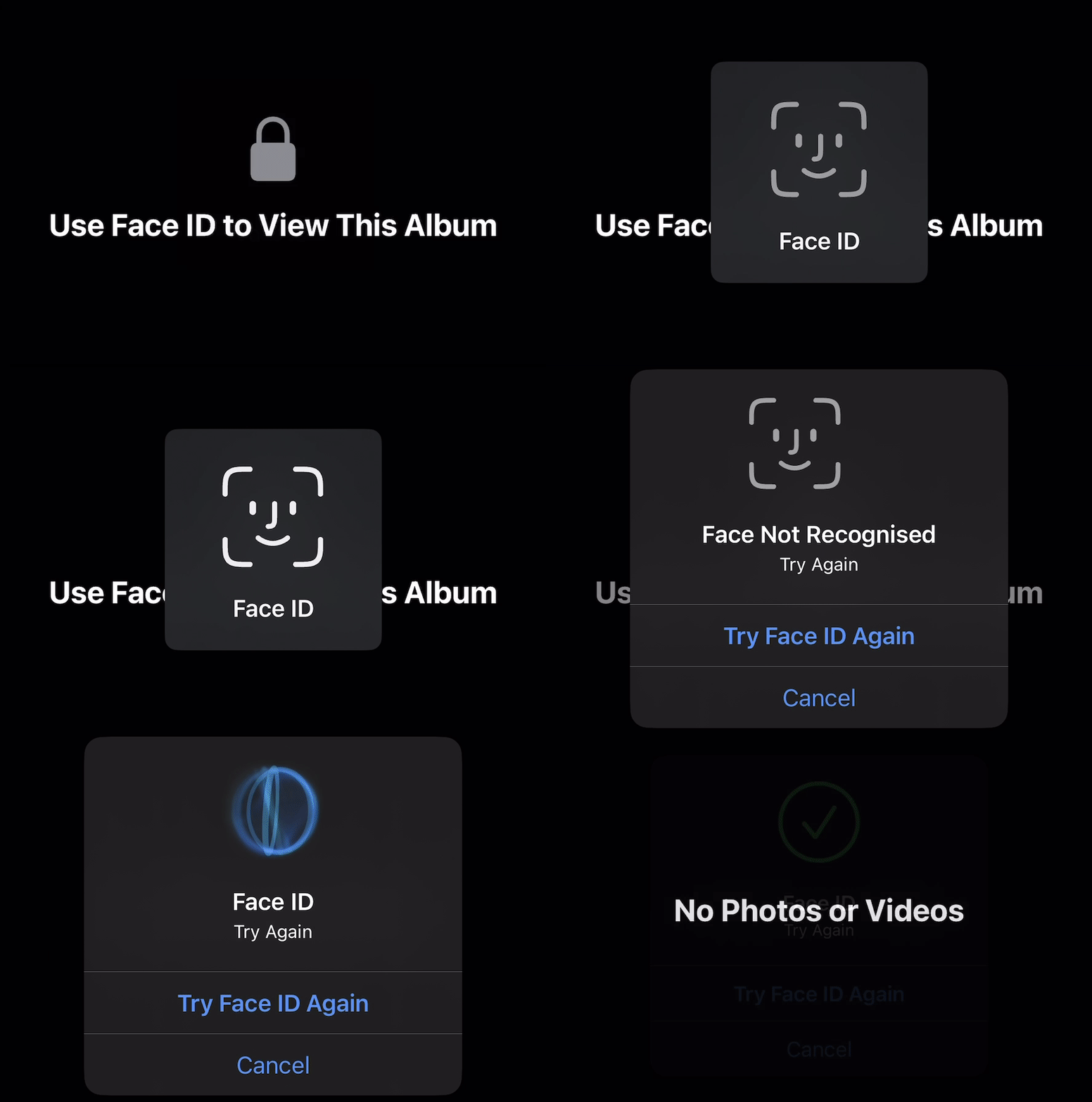
But now, you’ll see visibly bolder lines and a rounder look.
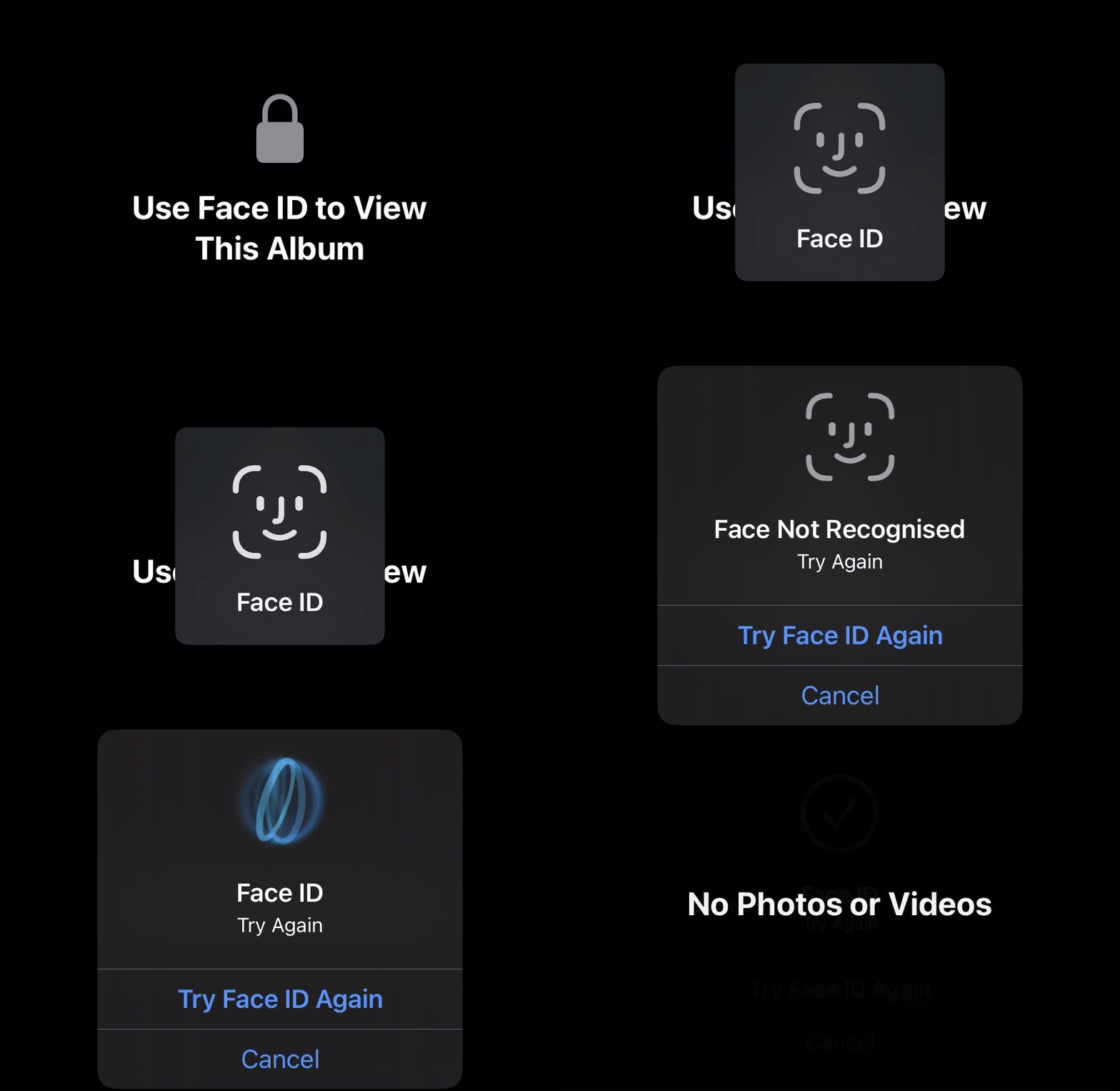
Perceptible? Only if observed explicitly.

#2. Apple Support link pops up when iPhone’s disabled 📵

Did you know?

Your iPhone gets disabled for

  • 1 min after 6 failed passcode attempts,
  • 5 mins after the 7th attempt,
  • 15 mins after the 8th attempt,
  • 1 hr after the 10th attempt.

From iOS 16.4, if you ever land up to a disabled iPhone, you’ll now see a link displayed that contains all the info you need to reset your device, in case you’ve forgot its passcode.
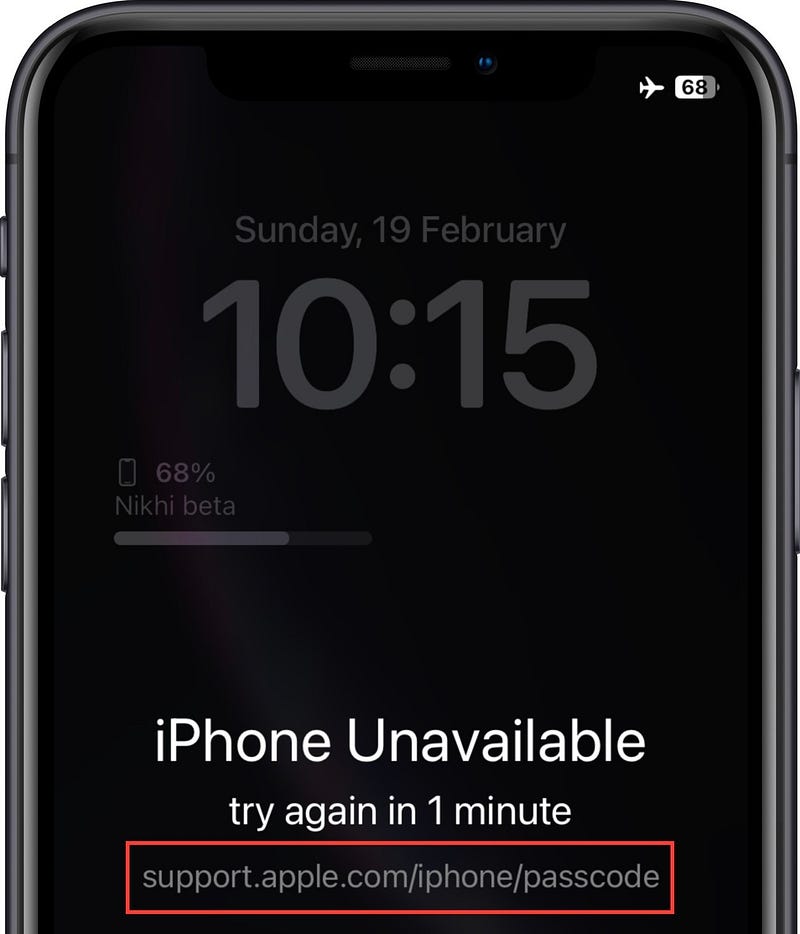
But if you think you can recollect the passcode, put your iPhone aside and use the lockdown period to do it.

#3. Higher Move Goal badges in Activity 🏃‍♂️💨

Apple’s helping you push your new year fitness resolutions higher.

You’ll now see Activity badges that count Move Goals over 3000 too. There are new badges for 3250, 3500, 3750, and 4000 Move Goals in iOS 16.4.
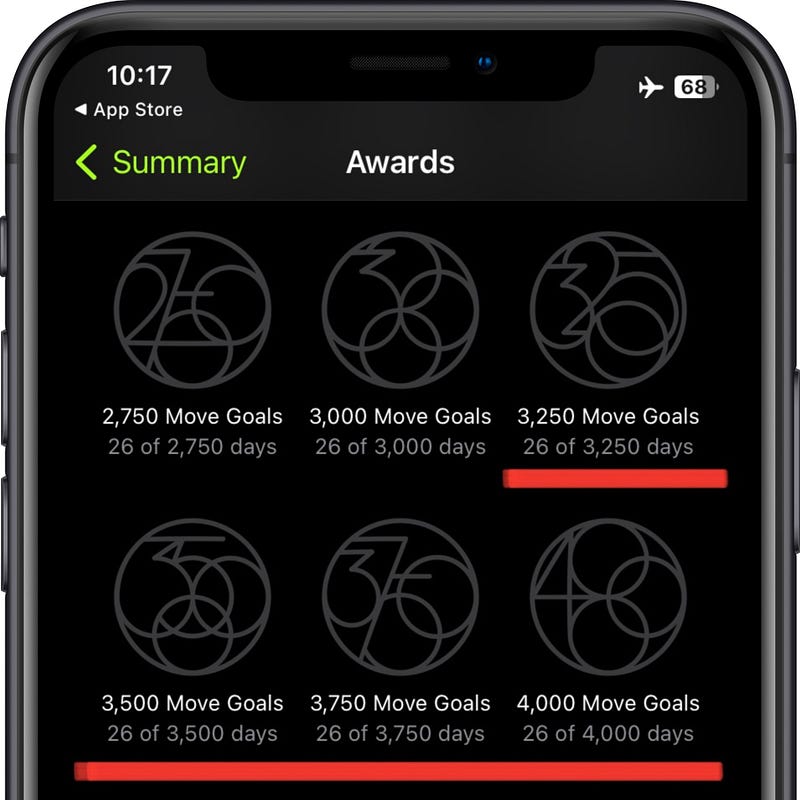
But OMG! This will take about a decade to achieve.

#4. ‘Added to Playlist’ Graphic gets littler

Previously, when you added a track to a playlist, the acknowledgement graphic took up big chunk on the screen.

This won’t be the case now.

Instead, you’ll now see a little graphic at the bottom with the track’s thumbnail and the playlist name.
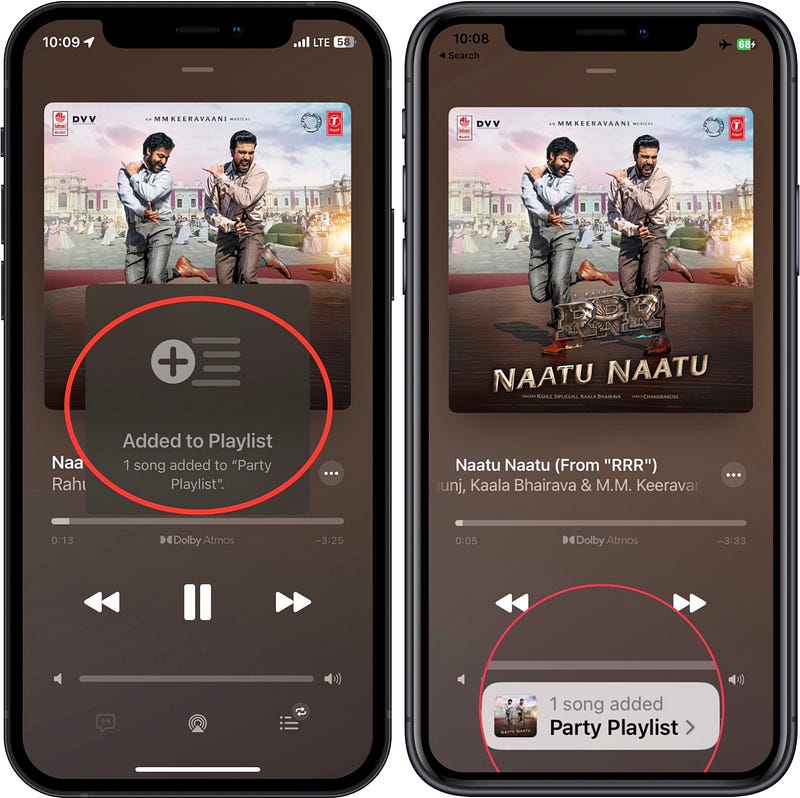
Left: iOS 16.3.1 | Right; iOS 16.4

This looks good, right?

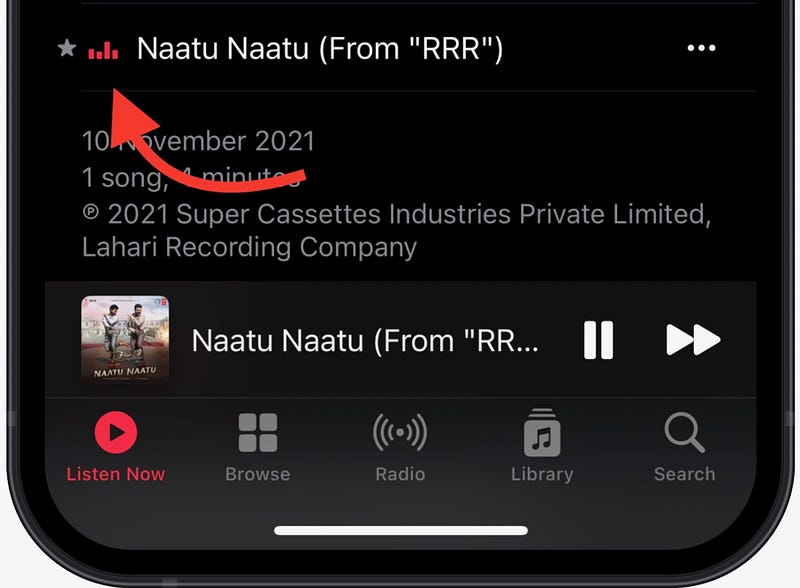
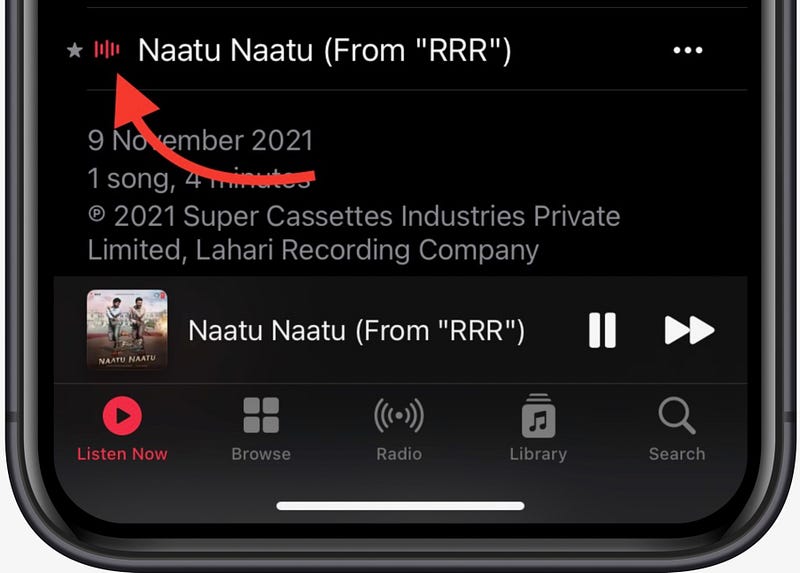
#5. Music waveform gets an update 🎶

While a song’s playing,

before,

you found a waveform with four bars (looked as if placed on a flat surface) dancing to the beat of the song.
But now,

you’ll see five such vertical bars hinged at their centres dancing to the song’s beat.
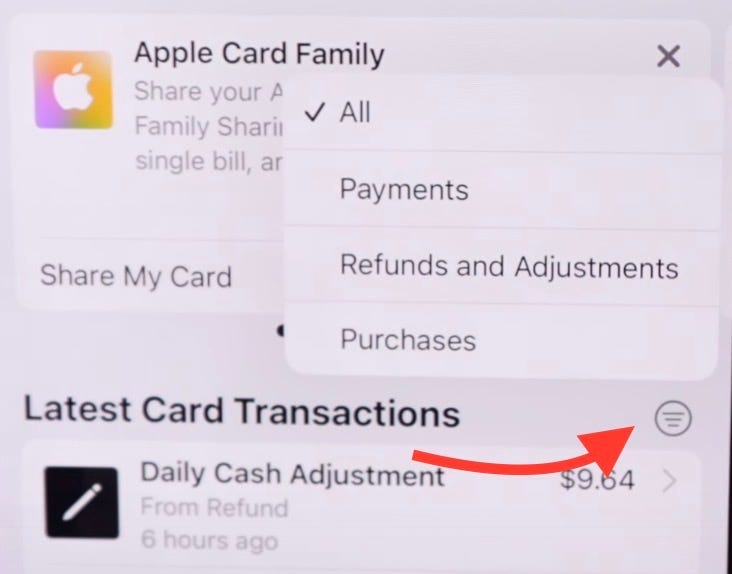
#6. Ability to filter Apple Card transactions 💲

It’s been a while since Apple introduced the Apple Account Card.

But it’s ridiculous Apple hasn’t included a way to filter your transactions till lately. It’s a basic feature all other payment apps already offer. Anyways,

Starting iOS 16.4, you can filter your Apple Card transactions in Wallet by

  • All,
  • Payments,
  • Refunds and Adjustments,
  • and Purchases.
Credit: Brandon Butch

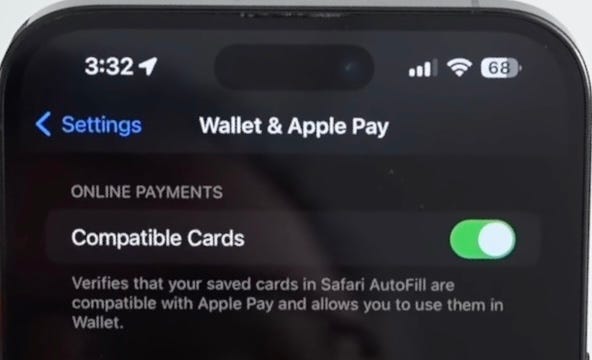
#7. Compatible Cards in Apple Pay 💳

Credit: Zollotech

Another update for Wallet — Compatible Cards.

This will check for any cards linked to Safari Autofill, but not to Apple Pay — and will auto-link them to Apple Pay, if they’re compatible.

Note: This is toggled on by-default in 'Settings ⚙️ < Wallet & Apple Pay' after you update to iOS 16.4.

Bonus Features

#8. Useful Satellite Connectivity Update 🛰️

Satellite Connectivity (and Crash Detection) of the iPhone 14 series is a feature Apple wishes you’d never have to use (not demo).

But in case you’re using it in the future, you’ll see more granular timing (the specific hour or minute) for the next satellite availability.

Wording

Next satellite available in 
[x] Hour(s) and [x] Minute(s).
• [x] Hour(s).
• [x] Minute(s).
• Less Than 1 Minute.

This will engage people in emergency — so they can be sure the feature is actually working.

Before, all they could see was “Available Soon” or rarely “Available in X amount of time” that wasn’t precise.

#9. Extended 5G Support 🗼

Apple extends 5G support for Turkey, Macau, and for Google Fi users in supported countries.

Wait, this isn’t all of iOS 16.4.

Find 12 more of its amazing features in this article ⬇️

Isn’t iOS 16 awesome?

205+ new features of iOS 16: A Compilation (Always Updated):

Join 250+ others to get notified whenever I publish a new story.

Technology
Apple
iOS
Ios 16
iPhone
Recommended from ReadMedium