avatarFaze

Free AI web copilot to create summaries, insights and extended knowledge, download it at here

6344

Abstract

lass="hljs-keyword">Get</span>-EventLog -logname security -InstanceId <span class="hljs-number">4720</span> | <span class="hljs-keyword">Select</span>-<span class="hljs-type">Object</span> *</pre></div><figure id="9247"><img src="https://cdn-images-1.readmedium.com/v2/resize:fit:800/1*1ogBlqZ-7dNeDpNg7baIUw.png"><figcaption></figcaption></figure><p id="fab0">Our initial assumption was accurate. Now, let’s list the privileges held by the <b><i>‘apt’ </i></b>user. Since we already know this user belongs to the Administrator group, we can confirm this by enumerating the admin group.</p><div id="0989"><pre>net localgroup Administrators</pre></div><figure id="31eb"><img src="https://cdn-images-1.readmedium.com/v2/resize:fit:800/1*n8AmAAO-wgl9guGrSdE1PQ.png"><figcaption></figcaption></figure><p id="2be9">However, the privileges held by the user <b><i>‘apt’</i></b> remain uncertain. To determine their access level, we will employ the Sysinternals tool called <b><i>‘<a href="https://learn.microsoft.com/en-us/sysinternals/downloads/accesschk">accesschk</a>,’</i></b> which will assist us in identifying the extent of access granted to the ‘apt’ user. Go to the respective folder and this file with the below command attribute.</p><div id="f085"><pre>.\accesschk64<span class="hljs-selector-class">.exe</span> apt -<span class="hljs-selector-tag">a</span> *</pre></div><figure id="9f6f"><img src="https://cdn-images-1.readmedium.com/v2/resize:fit:800/1*kHHnzdbij_wQaZXIosY8sg.png"><figcaption></figcaption></figure><p id="7afb">Indeed, it’s confirmed that the user ‘apt’ possesses full privileges within the operating system. Our next step is to identify any active sessions associated with this user. To acquire this information, we can leverage system commands, Sysinternals tools, or even examine event logs. For now, we’ll opt for the Sysinternals tool ‘<a href="https://learn.microsoft.com/en-us/sysinternals/downloads/psloggedon">PsLoggedon</a>,’ which will help us determine any active login sessions.</p><figure id="7a36"><img src="https://cdn-images-1.readmedium.com/v2/resize:fit:800/1*SFoW2OOgM7DZZyVHPuDfSw.png"><figcaption></figcaption></figure><p id="e60d">This observation reveals that the user ‘apt’ has logged into the victim machine through system shares. To determine the origin of this connection, we can utilize the ‘net’ command to gather more information.</p><div id="d661"><pre>net session</pre></div><figure id="9ac1"><img src="https://cdn-images-1.readmedium.com/v2/resize:fit:800/1*JApyNvTUPHprvRSnyaJE6A.png"><figcaption></figcaption></figure><p id="0b6d">The observation indicates that the attacker’s machine is identified as <b><i>192.168.0.104</i></b>, and the connection to the victim’s machine remains active, suggesting that the attacker is currently on that system.</p><h1 id="0006">Process and Service Information</h1><p id="3547">Now, let’s extract valuable information from processes and services, as critical data is often concealed there. To gather process information, we have two PowerShell cmdlets at our disposal: ‘Get-Process’ and ‘Get-WmiObject Win32_Process.’ I recommend using ‘WmiObject’ because it provides more comprehensive data compared to the first cmdlet. We will retrieve a list of processes running at the time of the investigation.</p><div id="54a8"><pre><span class="hljs-keyword">Get</span>-WmiObject -<span class="hljs-keyword">Class</span> Win32_Process | <span class="hljs-keyword">select</span> ProcessName, ProcessId,CommandLine</pre></div><figure id="ea4e"><img src="https://cdn-images-1.readmedium.com/v2/resize:fit:800/1*okLiTkQMzF-ji_193xAgCg.png"><figcaption></figcaption></figure><p id="b190">Numerous processes are running, making it challenging to identify anomalies. However, given that user <b><i>VictimA</i></b> has been compromised, we should focus on processes initiated by this user.</p><div id="cca5"><pre>Get-WmiObject -Class Win32_Process | <span class="hljs-built_in">where</span> { <span class="hljs-variable">$_</span>.GetOwner().User -eq <span class="hljs-string">"VictimA"</span> } | <span class="hljs-keyword">select</span> ProcessId, Name, CommandLine</pre></div><figure id="4972"><img src="https://cdn-images-1.readmedium.com/v2/resize:fit:800/1*sh5NIGAVwx9SSsyg5ED1bg.png"><figcaption></figcaption></figure><p id="66f7">We noticed that some processes initiated by user <b><i>VictimA</i></b> appear suspicious based on their command lines. Let’s investigate the parent-child relationships for these processes using its Process ID.</p><div id="3dd1"><pre><span class="hljs-keyword">Get</span>-WmiObject -<span class="hljs-keyword">Class</span> Win32_Process | <span class="hljs-keyword">where</span> processid -<span class="hljs-keyword">In</span> <span class="hljs-number">7036</span>,<span class="hljs-number">5892</span>,<span class="hljs-number">5776</span>,<span class="hljs-number">9112</span>,<span class="hljs-number">7912</span>,<span class="hljs-number">460</span>,<span class="hljs-number">8864</span> | <span class="hljs-keyword">select</span> ParentProcessId,ProcessId, Name, CommandLine</pre></div><figure id="1b1a"><img src="https://cdn-images-1.readmedium.com/v2/resize:fit:800/1*5CeYdOtVvcy4bDPKdmxXbA.png"><figcaption></figcaption></figure><p id="ddaa">It has been observed that the <b><i>‘ad.bat’</i></b> file executed a PowerShell command. The purpose of this command was to download a PowerShell script and run it, specifying an IP address and port number as attributes. This suggests that the PowerShell script was designed to establish a reverse connection as part of an attack. The reference image is given from Process Explorer.</p><figure id="aaaa"><img src="https://cdn-images-1.readmedium.com/v2/resize:fit:800/1*fNdvmFTnbrtYE9MBTCAvdQ.png"><figcaption></figcaption></figure><p id="c8d3">Now that we have collected a significant amount of information about the suspicious processes, let’s shift our focus to the services, where we might find valuable insights. We will gather a list of all actively running services.</p><div id="6cfd"><pre>Get-WmiObject -<span class="hljs-keyword">class</span> <span class="hljs-title class_">Win32_service</span> |<span class="hljs-title">where</span> <span class="hljs-title">State</span> -<span class="hljs-title">eq</span> '<span class="hljs-title">Running</span>'| <span class="hljs

Options

-title">select</span> <span class="hljs-title">name</span>,<span class="hljs-type">processid</span>,<span class="hljs-type">status</span>,<span class="hljs-type">started</span>,<span class="hljs-type">state</span>,<span class="hljs-type">pathname</span></pre></div><figure id="1a9a"><img src="https://cdn-images-1.readmedium.com/v2/resize:fit:800/1*WVIZinER8JAbBjd-6vzfgg.png"><figcaption></figcaption></figure><p id="7bd7">No suspicious findings so far, but I’d like to take a closer look at the running services associated with the Process IDs we identified during our process investigation.</p><div id="2ff9"><pre>Get-WmiObject -<span class="hljs-keyword">class</span> <span class="hljs-title class_">Win32_service</span> |<span class="hljs-title">where</span> <span class="hljs-title">State</span> -<span class="hljs-title">eq</span> '<span class="hljs-title">Running</span>' |<span class="hljs-title">where</span> <span class="hljs-title">processid</span> -<span class="hljs-title">In</span> 7036,<span class="hljs-type">5892</span>,<span class="hljs-type">5776</span>,<span class="hljs-type">9112</span>,<span class="hljs-type">7912</span>,<span class="hljs-type">460</span>,<span class="hljs-type">8864|</span> <span class="hljs-title">select</span> <span class="hljs-title">name</span>,<span class="hljs-type">processid</span>,<span class="hljs-type">status</span>,<span class="hljs-type">started</span>,<span class="hljs-type">state</span>,<span class="hljs-type">pathname</span></pre></div><figure id="4c35"><img src="https://cdn-images-1.readmedium.com/v2/resize:fit:800/1*6CV3yOovqZM7JUBwaHnxYA.png"><figcaption></figcaption></figure><p id="49a9">Nothing suspicious was observed!!</p><h1 id="7870">Network Information</h1><p id="f2ac">As we’re aware of the reverse connection, our next step is to confirm its presence or establishment. To achieve this, we will utilize the <b><i>‘netstat</i></b>’ utility. Our first action is to retrieve a list of all connections.</p><figure id="786e"><img src="https://cdn-images-1.readmedium.com/v2/resize:fit:800/1*Ap9HOX5ljV59a3JvaZHSVQ.png"><figcaption></figcaption></figure><p id="11b0">Now, we’ll inspect the established connections and identify their owners. In our particular instance, we noted a connection on port 4444, and it’s associated with PowerShell, which is indicated by the PID 7912. This confirmation implies that a Command and Control session has been established on <b><i>192.168.0.108</i></b>.</p><figure id="0027"><img src="https://cdn-images-1.readmedium.com/v2/resize:fit:800/1*z-wRQ1UG_jCLSdxaYQPCdw.png"><figcaption></figcaption></figure><p id="b7dd">We’ll now examine the nature of communication between the compromised machine and the C2C server, which typically functions as a Master-Slave relationship. To inspect this interaction, we’ll employ Wireshark</p><figure id="5026"><img src="https://cdn-images-1.readmedium.com/v2/resize:fit:800/1*a_g9T6ZW98cMgq_iPdOznA.png"><figcaption></figcaption></figure><h1 id="c47c">Autorun and schedule task information</h1><p id="ab11">As we approached the final phase of our live forensics on the Windows machine, our attention was drawn to the C2C (Command and Control) connection, where the server was attempting to add a .bat file to the registry to establish persistence on the system. Before delving into the registry path, we conducted a preliminary check to see if any applications were located in the startup locations. Unfortunately, we did not discover any malicious applications in these areas.</p><figure id="bf7a"><img src="https://cdn-images-1.readmedium.com/v2/resize:fit:800/1*1_Ng1FqB8eP4KK8XE_jOxA.png"><figcaption></figcaption></figure><p id="43dd">At this point, our attention is directed towards the startup commands within the registry. We’ve noticed that a registry key has been added, and the associated file is named “sd.bat.”</p><div id="93c4"><pre>gwmi <span class="hljs-title class_">Win32</span>_StartupCommand</pre></div><figure id="2a07"><img src="https://cdn-images-1.readmedium.com/v2/resize:fit:800/1*6C5wTI9ysapfJD6q5WY_OA.png"><figcaption></figcaption></figure><p id="3a9e">We’ll make an effort to gather more detailed information regarding this specific startup location to gain deeper insights into the activity. This confirms that the activity recorded in network forensics has been successfully executed, and persistence has been maintained.</p><div id="f52f"><pre>gwmi Win32_StartupCommand | <span class="hljs-keyword">where</span> name -eq <span class="hljs-string">"APT"</span> | <span class="hljs-keyword">select</span> *</pre></div><figure id="8544"><img src="https://cdn-images-1.readmedium.com/v2/resize:fit:800/1*lfQO-8KyGLRyWen8Hg44-g.png"><figcaption></figcaption></figure><p id="bdef">We will now check if any other persistence activity has been observed via scheduled tasks. Unfortunately, no suspicious activity has been found.</p><div id="0fac"><pre><span class="hljs-keyword">Get</span><span class="hljs-operator">-</span>ScheduledTask <span class="hljs-operator">|</span> <span class="hljs-keyword">where</span> state <span class="hljs-operator">-</span>eq <span class="hljs-string">'Ready'</span></pre></div><figure id="cfb5"><img src="https://cdn-images-1.readmedium.com/v2/resize:fit:800/1*EihxglbQgcwtDh4rC5VPbQ.png"><figcaption></figcaption></figure><h1 id="51e5">Indicator of Attack</h1><p id="f3aa">- New user APT has been created — <b>Initial Access (T1078.003)</b>

  • User APT added to the admin group — <b>Privilege Escalation (T1098)</b>
  • The user ‘APT’ has logged into the victim’s machine using network services from the IP address 192.168.0.104 — <b>Lateral Movement (T1021.002)</b>
  • PowerShell commands were executed from a batch file, with the aim of downloading a PowerShell script and running it, providing an IP address and port number as inputs. This indicates the establishment of a reverse shell. — <b>Execution (T1059)</b>
  • I noticed a batch file added to HKU<user>\SOFTWARE\Microsoft\Windows\CurrentVersion\Run, indicating that this file will be executed upon user VictimA’s login. — <b>Persistence (T1547.001)</b></p><h1 id="afc0">Conclusion</h1><p id="3dda">The process we’ve discussed in this blog is not exhaustive, and there are other artifacts that can also be observed. We’ll aim to cover those in the next blog.</p></article></body>

7 Famous Catastrophes That People Tried to Conceal

Secrets that didn’t age well with time.
Do you remember how it was when the Titanic sank? No one had any idea what to do or what was going on in the chaos of the disaster.

Or when the Hindenburg caught on fire?

This list of disasters that people tried to cover are some of the most famous and fascinating history stories, and they’re all true!

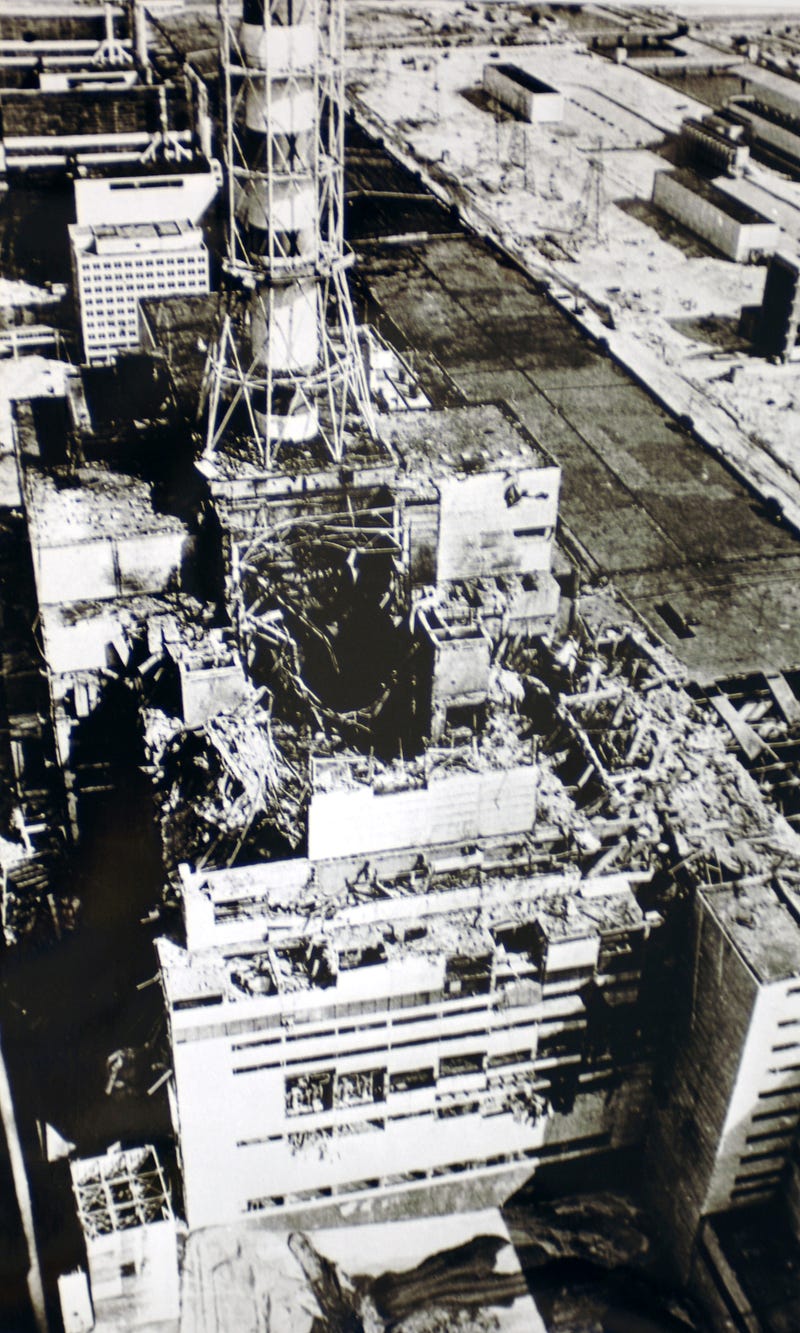
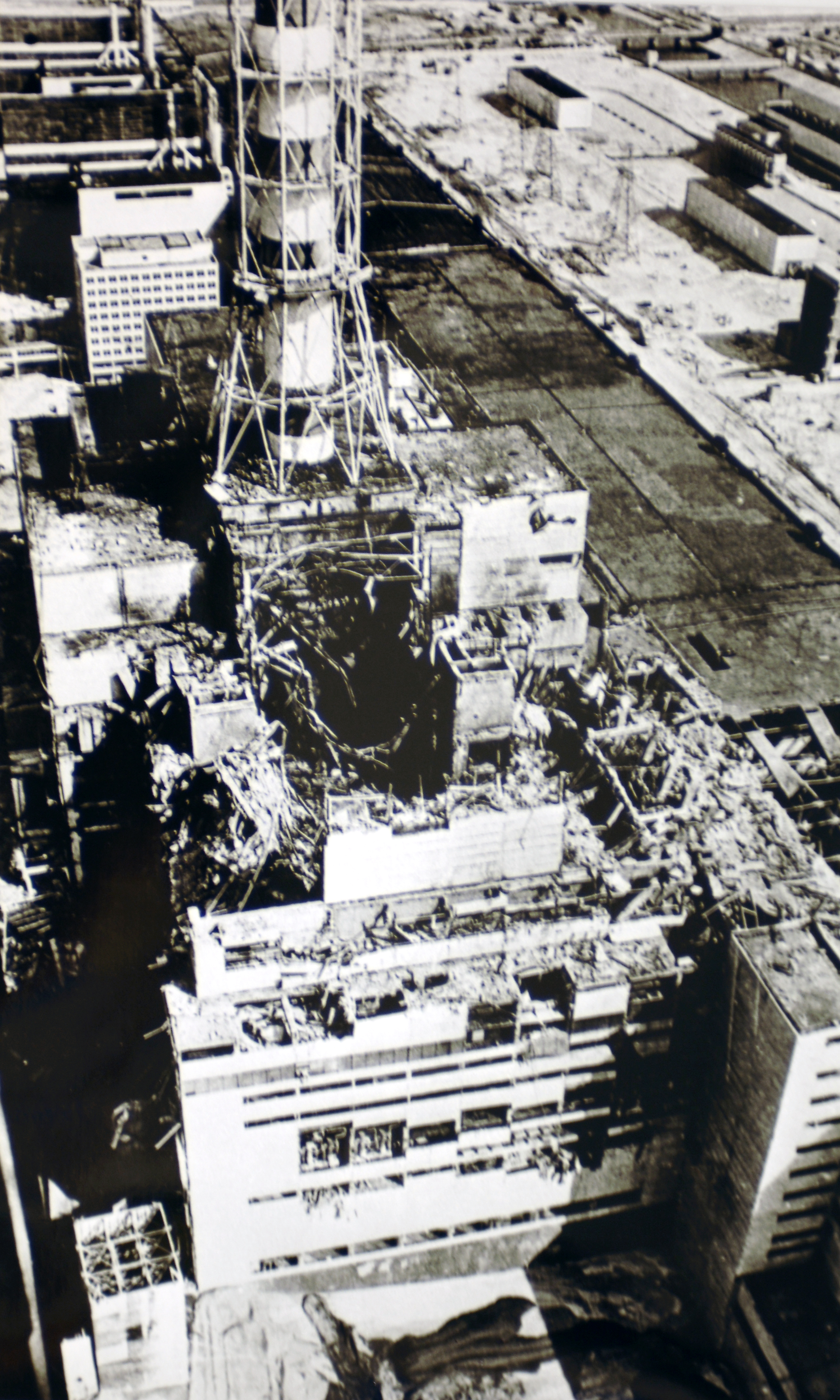
7- The Chernobyl Nuclear Disaster — Test Went Wrong
Source: Wikipedia

The Chornobyl Nuclear Disaster is the most well-known example of a disaster people attempted to cover up.

After a test went wrong, the reactor core exploded, releasing a radioactive cloud into the atmosphere.

This was not made public for several days; by that time, many people had already been exposed to high doses of radiation.

The Challenger Space Shuttle disaster is also an example of a disaster that people tried to cover up. The Challenger’s main O-ring seals failed due to low temperatures, and this caused the shuttle’s fuel tank to explode 73 seconds after launch.

NASA management knew about the problem before it happened but chose not to tell anyone because they wanted their program to go smoothly without any delays or setbacks.

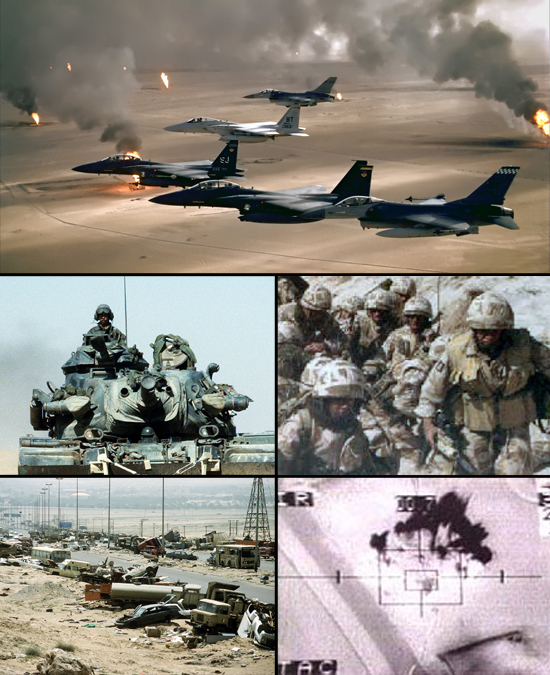
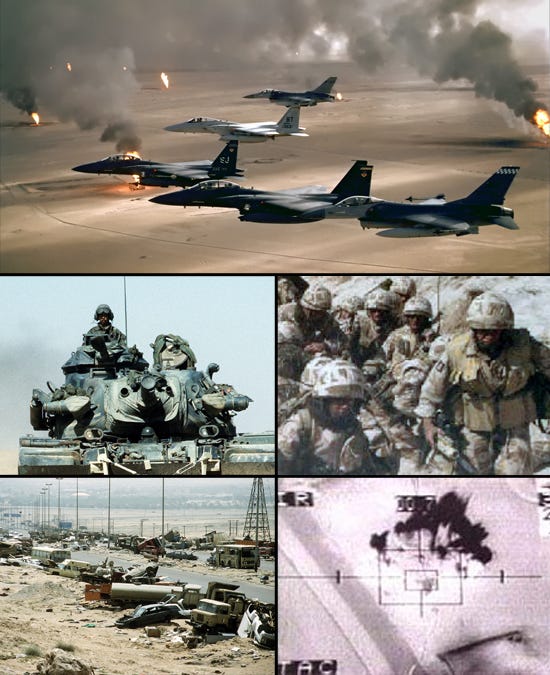
6- The Gulf War — The War Between Iraq And Kuwait
Source: Wikipedia

It’s not uncommon for people to try and cover up a disaster. The Gulf War is a perfect example of countries not wanting the world to know how much they messed up.

The Gulf War was a war between Iraq and Kuwait in which Iraq attempted to take over Kuwait. It lasted from 1990–1991, but Saddam Hussein still had control of Kuwait when it ended in 1991.

The government used weapons of mass destruction on their population to get them out of the way. Some countries denied such attacks, with one French minister claiming that he would eat his hat if such attacks happened.

The government then sent out soldiers dressed as civilians so Iraqi soldiers wouldn’t shoot at them; those troops then invaded Iraq with the help of United States Marines who had been disguised as workmen on an oil rig.

There was talk about invading Kuwait before Iraq took it over. Still, no country wanted to get involved until after they took over Kuwait because there would be too many complications if two countries attacked each other simultaneously.

Many other crises during this time, like riots against refugees and terrorist attacks.

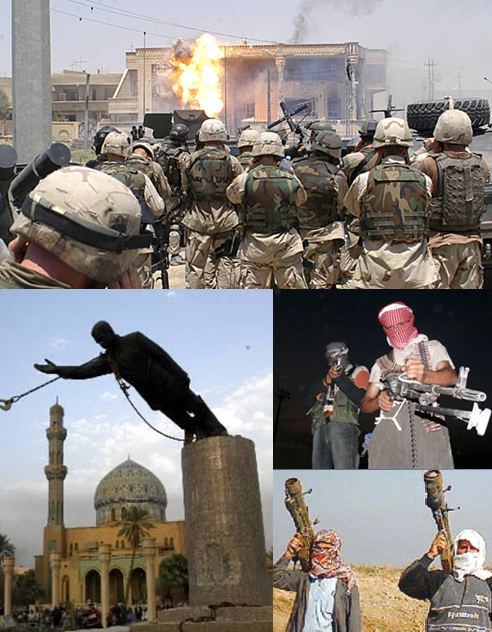
5- The Iraq War — Invasion
Source: Wikipedia

The Iraq War is one of the most famous disaster cases that people tried to cover up. In 2003, with the support of the United States and other allies, a coalition invaded Iraq to depose Saddam Hussein.

The invasion was supposed to be quick and easy, but it turned out that there were many complications and few benefits.

The war leads to over 100,000 Iraqi deaths and $1 trillion in costs for American taxpayers. America’s image worldwide took a huge hit, as well as its economy.

It’s estimated that more than 1 million Iraqis died because of the US-led invasion of Vietnam and Afghanistan, but they didn’t learn from History.

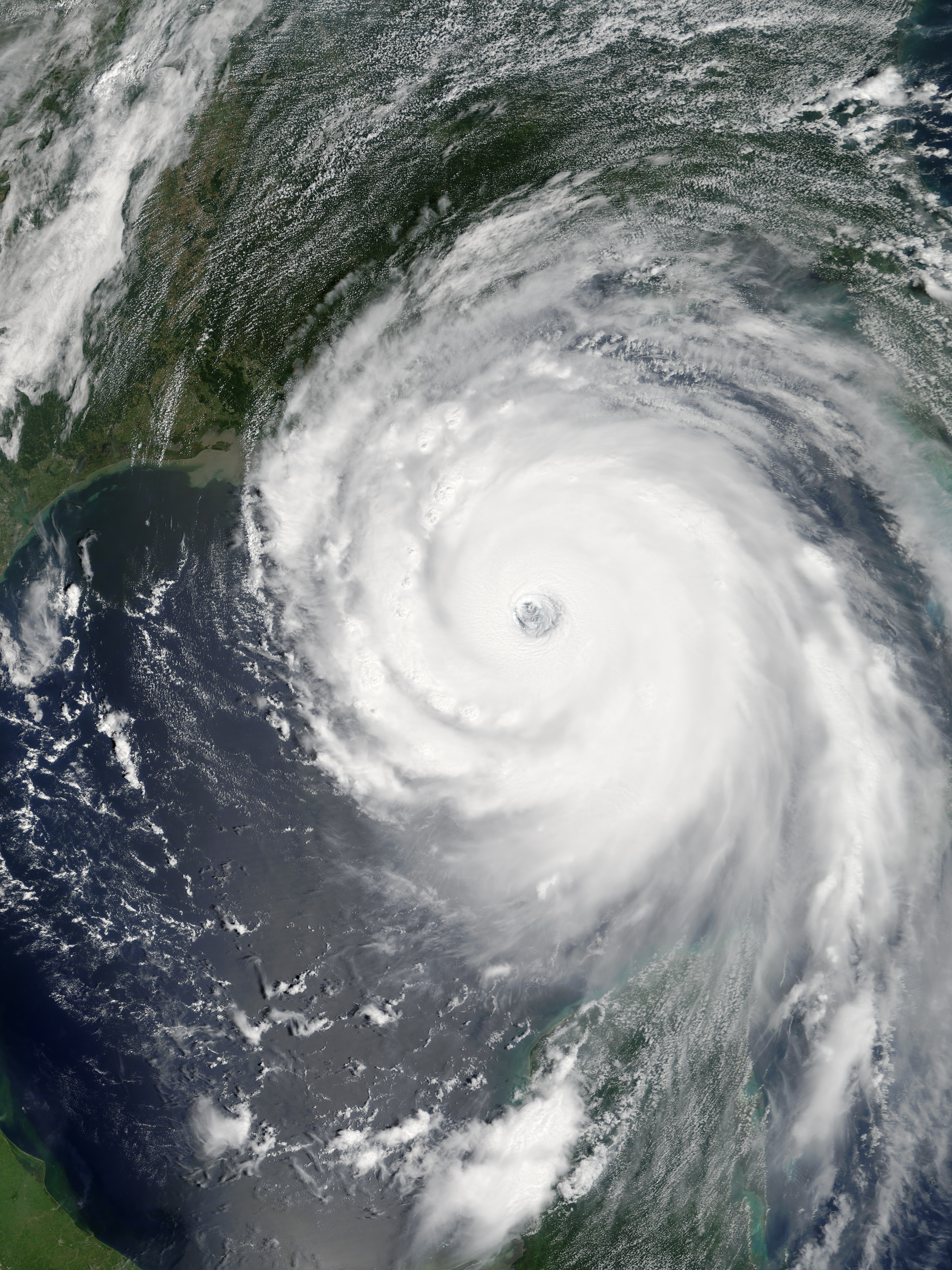
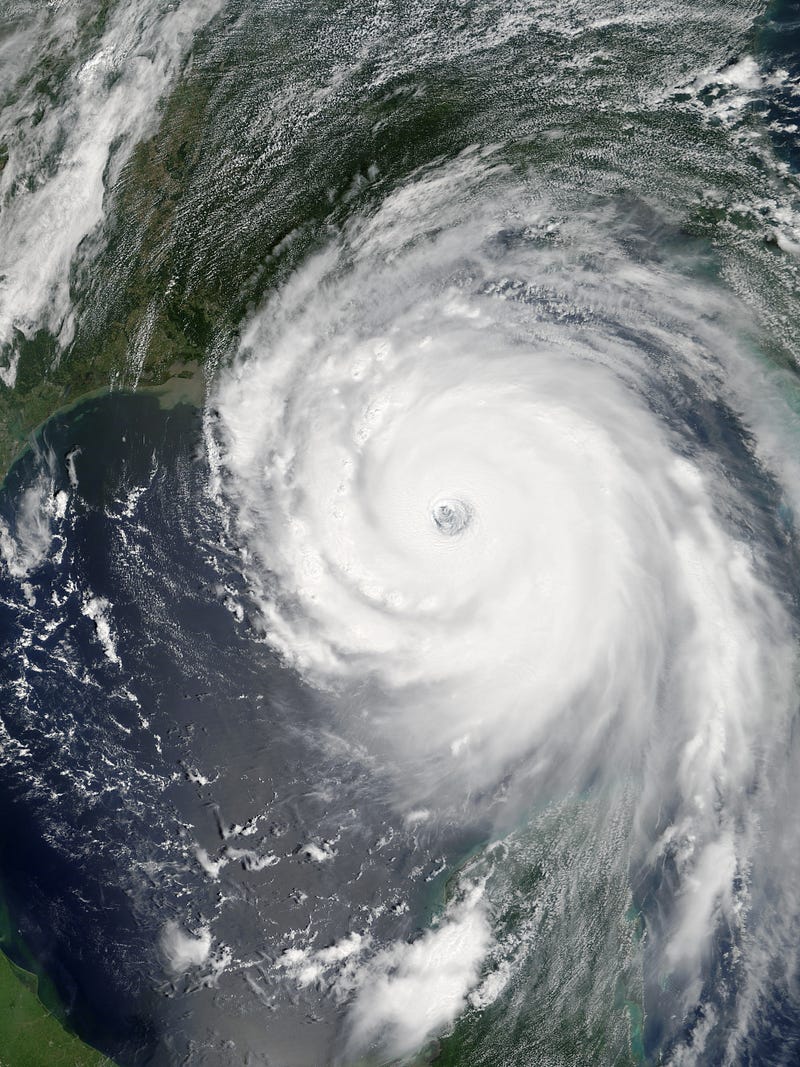
4- Hurricane Katrina — Economic And Natural Disaster
Source: Wikipedia

This disaster was, without a doubt, the most publicized in recent History. It’s reported that Hurricane Katrina displaced around 1 million people, many of whom ended up living in shelters.

The storm wreaked havoc on New Orleans’ levees, flooding 80% of the city and wiping out most of the city’s homes and businesses.

Hurricane Katrina is primarily considered to have been an economic disaster and a natural one because it took out so much infrastructure in one swoop.

The storm also caused severe political ramifications for George W. Bush’s presidency. He was criticized for his response time and lack of attention given to the disaster until days after it had already happened.

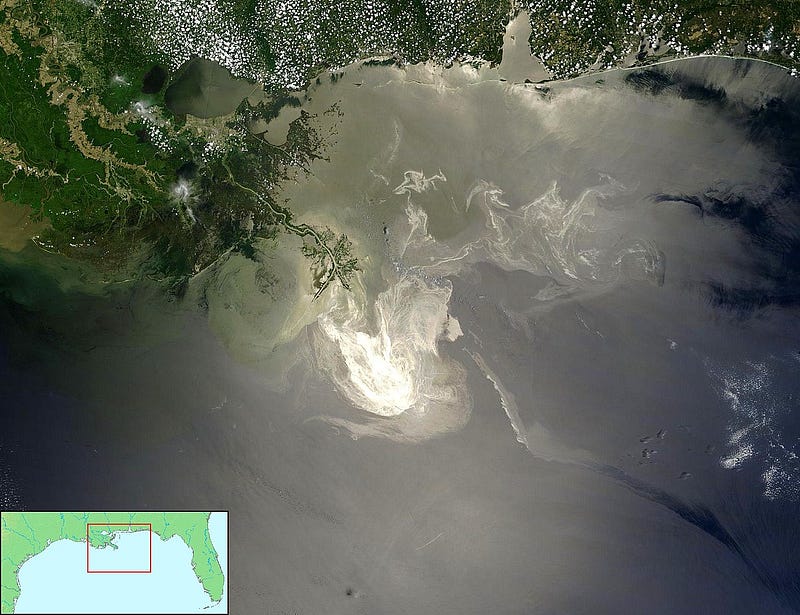
3- The Deepwater Horizon Oil Spill — Marine Oil Spill
Source: Wikipedia

The Deepwater Horizon oil spill was the largest marine oil spill in the petroleum industry’s History.

The explosion, which killed 11 people and injured 16 others, resulted in the death of 11 workers and caused extensive environmental damage. BP is facing a 65 billion dollar penalty for mishandling the disaster.

They also have been charged with federal crimes and could face up to 20 years imprisonment if convicted on all charges.

This would be one of the most devastating events in American History if found guilty.

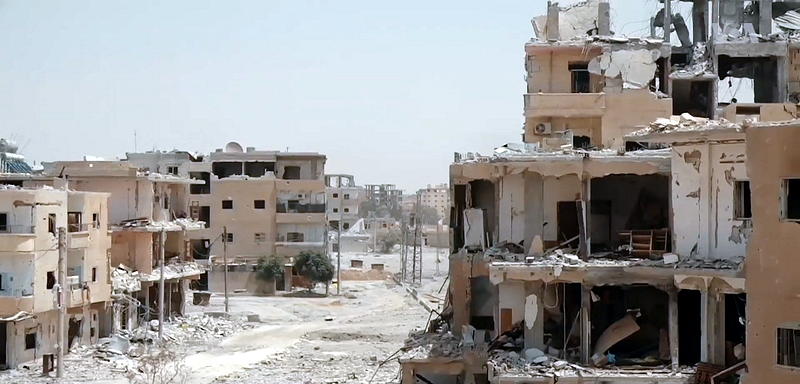
2- The Syrian Civil War — A Humanitarian Disaster
Source: Wikipedia

The Syrian Civil War, without a doubt, is one of the worst humanitarian disasters in recent History, yet it’s also one of the most underreported.

The conflict has killed at least 200,000 people and displaced more than 10 million refugees. Millions are without necessities such as food or clean water.

The military dictatorship of Bashar al-Assad and various rebel groups have been fighting for control since 2011, with no end in sight.

In 2013, a sarin gas attack by Assad on civilians nearly led to U.S. intervention in the war before Russia stepped in to help broker a deal that was supposed to rid Syria of its chemical weapons stockpiles.

However, another chemical weapon attack occurred this April in Khan Shaykhun that prompted President Trump to order airstrikes against an airbase used by Assad forces.

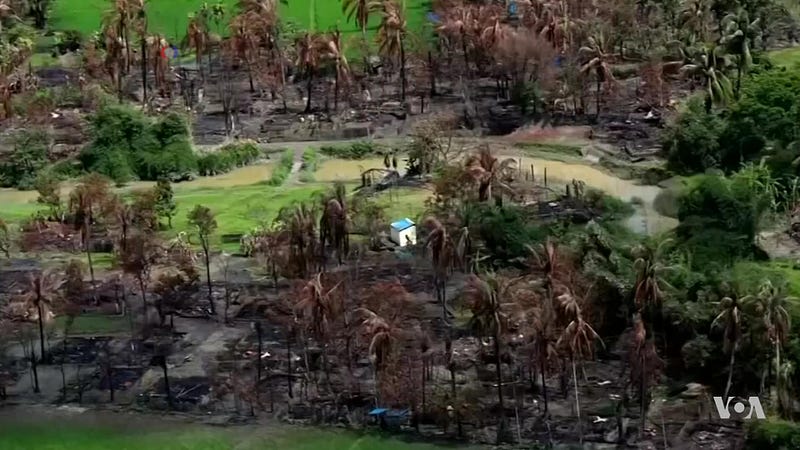
1- The Rohingya Crisis — Myanmar’s Border With Bangladesh
Source: Wikipedia

In Myanmar, the Rohingya are a Muslim minority living in the Rakhine state.

They are denied citizenship and many other fundamental human rights and have been subject to violence from the government and ethnic nationalists in recent years.

In August 2017, a Rohingya insurgent group attacked dozens of police posts near Myanmar’s border with Bangladesh, killing 12 members of security forces.

The military response has been brutal: according to UN officials, the army has committed crimes against humanity targeting civilians since late August.

Points to ponder

The people that tried to cover up these disasters were fooling themselves.

It doesn’t take too long for the truth to be revealed, and it’s always better in the long run.

Even if someone can get away with it for a while, they will eventually be exposed. It’s always best to come clean as soon as possible.

More from the author:

History
Culture
Life
Crime
Entertainment
Recommended from ReadMedium