
7 BEST Mac Apps Every Creator Needs To Use in 2023
The oases in a creator’s life
Get a Setapp subscription using my affiliate link. (Try it free for 30 days!)
The pricing of few apps is indicated in ₹ (Indian Rupees) as I couldn't find their pricing in $ anywhere.View their USD equivalent by clicking on them (this doesn't consider Purchase Power Parity).#1. GetIpsum
($1.99 for lifetime)

Every template creator needs this.
You might’ve seen this text somewhere —
“Lorem ipsum dolor sit amet, consectetur adipiscing elit, sed do eiusmod tempor incididunt ut labore et dolore magna aliqua. Ut enim ad minim veniam, quis nostrud exercitation ullamco laboris nisi ut aliquip ex ea commodo consequat. Duis aute irure dolor in reprehenderit in voluptate velit esse cillum dolore eu fugiat nulla pariatur. Excepteur sint occaecat cupidatat non proident, sunt in culpa qui officia deserunt mollit anim id est laborum.”
Atleast the first 2–5 words, right?
It’s a placeholder (dummy) text being using since 1500s by the printing industry that indicates people can replace it with their own content on the page.
GetIpsum is a simple app that generates for you such placeholder text. To use it in your next template,
- Head over to the place where you want to insert “Lorem ipsum…”,
- Toggle GetIpsum from the menu bar or by a hotkey,
- Select the amount of placeholder text to fill (starting from a word to multiple paragraphs).
And you’ve got the placeholder text filled!
Additional features of GetIpsum
- Supports 10 colour themes,
- Choose plain or HTML output,
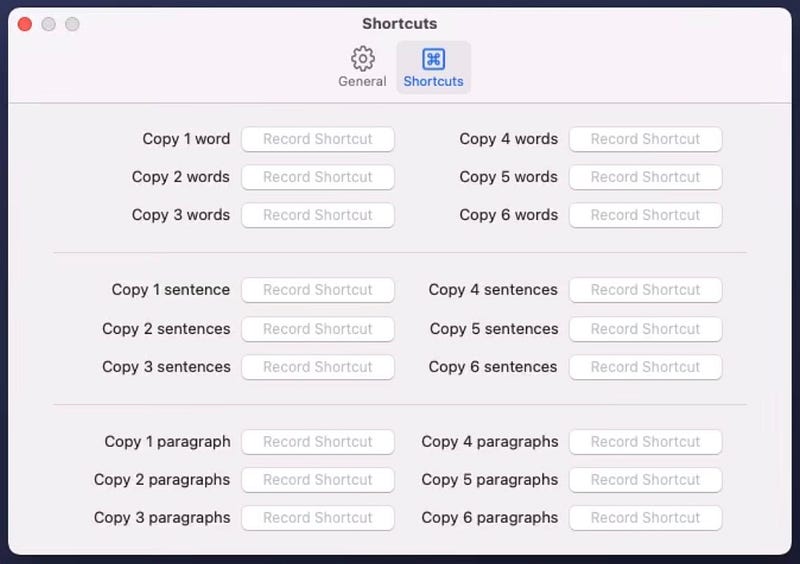
- Record hotkeys to fill placeholder words, sentences, and paragraphs. Like this.
#2. Mockview
(Free | For watermark removal, ₹59/month or ₹689/year)
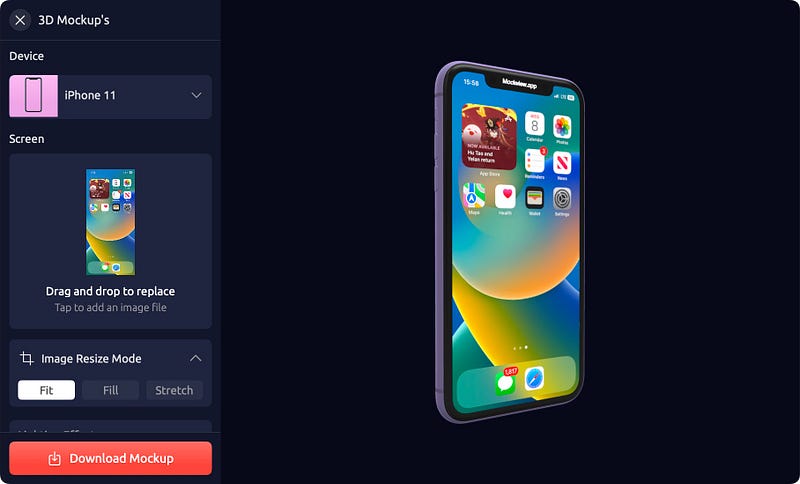
If you’ve been reading my articles for a while, you know I don’t post screenshots the way I took them. I prefer mockups that add cool-ness to it.
My favourite app for mockups, till lately, was Mockuuups Studio. It let me create mockups for iPhones, Macs, and Apple Watches (as far as I’m concerned). However, with it,
- I couldn’t create a video mockup,
- I couldn’t use my own background image,
- I couldn’t create 3D mockups.
It’s when I was searching for another cool mockup app that fills MS’s voids, I stumbled upon Mockview — that does everything I mentioned above.
It’s a great new addition to my app inventory, and am not deleting it anytime soon.
#3. KeyLimePie
(Free | For watermark removal, ₹449 one-off)
KeyLimePie is a must-download app for video tutorial creators.
It makes it easy for your viewers to understand the hotkeys you’re using. As everytime you use one, it’s visually shown on the screen for a moment.

Hold the keys, and it appears longer (you can also move it across the screen as if it’s a window).
You can also have a running tab of hotkeys displayed as a stack, optionally along with their keycodes.
So if you’re recording a demo with KeyLimePie installed, this will be what people will see (example).
For some useful Mac hotkeys,
#4. Sip
($20/device/year | Available on Setapp)
If you’re a designer or developer who often plays with colours, this is your god app.
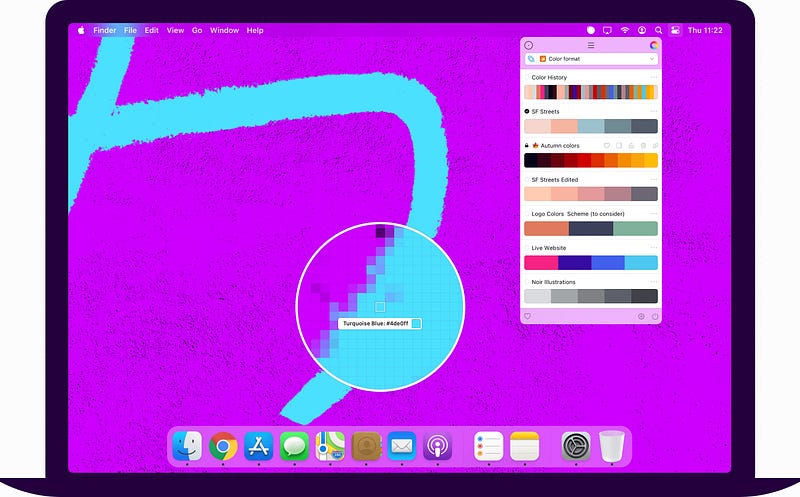
Sip is an all-in-one colour picker that not only lets you collect, organise, and edit colours — but also
- lets you create multiple palettes and share them with colleagues,
- rearranges palettes based on the app you’re currently in,
- pops up colour dock from the edge of the screen, so you’d find it easy to pick the next colour.
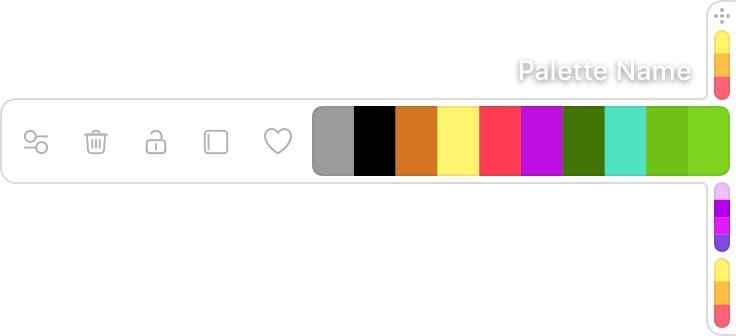
- helps you adhere to accessibility standards by alerting of low contrasts.
Huff, I’ve just scraped its surface. There’s a lot more.
Maybe it’s time to ditch other colour picker apps.
#5. Drafts
(Free | For pro, $1.99/month or $19.99/year)
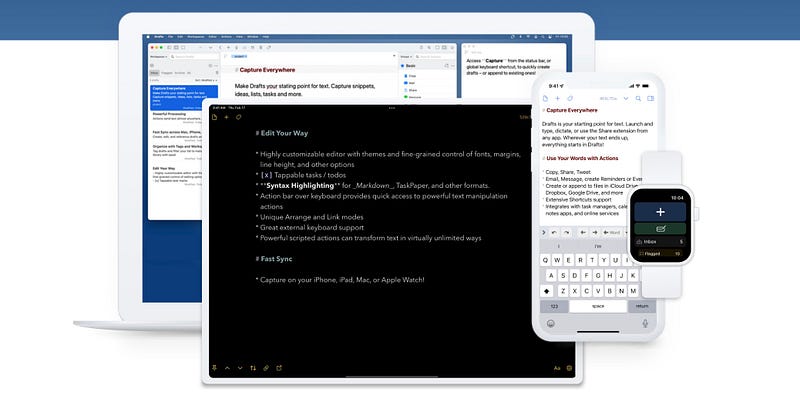
Drafts is simple-looking, yet a highly functional note-taking app.
It syncs with all your devices so you could jot down new ideas wherever you are (Unlike Apple Notes that doesn’t support Apple Watch).
You could also
- Add tags for easy identification,
- Format text,
- Dictate notes,
- Integrate it with popular services like Dropbox, Twitter, Google Drive, WordPress, Reminders etc. to send, store, or post ideas.
- Set widgets on Home Screen for accessibility.
- Use floating note window on macOS.
Maybe this is the only note-taking app you’ll ever need.
Try some iOS keyboard hacks to make typing more efficient →
#6. MindNode
(Free | For pro, $2.49/month or $19.99/year | Available on Setapp)
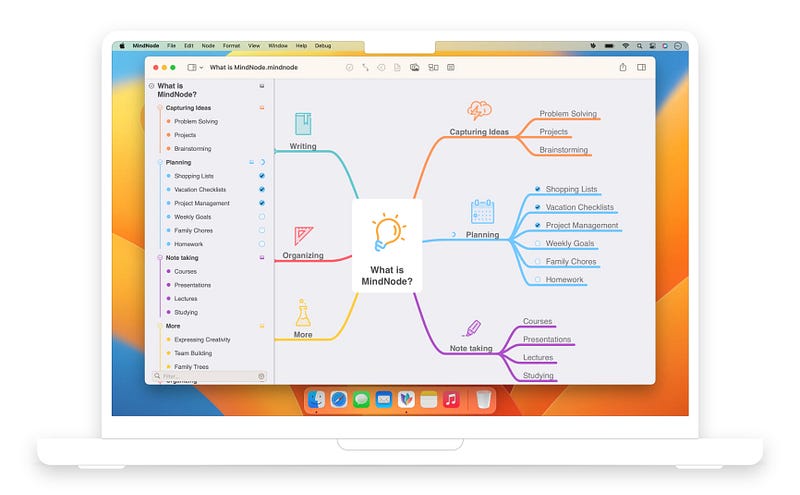
Unlike Drafts (that’s a text idea-capturing app), MindNode lets you capture ideas as mind maps.
Not only does it let you create visual idea representations, but it also lets you
- place stickers, visual tags to highlight ideas,
- Add notes to an idea for additional details,
- Spotlight one single branch to target one goal at a time,
- Check off goals once they’re completed,
- Quick entry new ideas in Mac’s menu bar and iOS’s Today View.
- Set Lock and Home Screen widgets on iPhone
#7. Timing
(Multiple pricing options here | Available on Setapp)

As a creator, it’s important you pay yourself well — i.e., focus on the thing you’re working on, and not divert to unimportant things.
Having a timesheet that shows the time you’ve spent on each app always helps measure your productivity for the day, right?
Why not get ‘Timing’ then?
It keeps creating and updating your timesheets in the background so you don’t have to. It supports accurate time-tracking on most popular apps.
It also lets you
- Assign productivity scores to projects and track your stats over time.
- Track time spent on docs — with the file’s full path or URL.
- Assign calendar events right in Timing and record time spent in a meeting.
- Sync screen time from all your devices.
If you’re a team, you could even share your timesheets with each other.
Productivity at its peak, right?
For more a’macOS’zing apps, read these
Finally,
If you love exploring new Mac apps (like me), consider subscribing for Setapp. You’ll get access to a curated collection of 240+ amazing apps for just $9.99 a month, which rather cost hundreds of dollars if purchased individually.
Use my affiliate link to start your Setapp journey! (It’s free for 30 days)
If you enjoyed this story, join 250+ others to get notified whenever I publish a new story.
This post contains affiliate links.


