
6 Major Features of Node.js 19
Details of Node.js 19 new features, including experimental node watch mode and HTTP(S)/1.1 KeepAlive by default

Node.js major release is rolled out every six months. The new release becomes the Current release for six months, which gives library authors time to add support for them.
After six months, odd-numbered releases, such as 19, become unsupported, and even-numbered releases, such as 18, move to the Active LTS (long-term support) status and are ready for general use.
LTS release typically guarantees that critical bugs will be fixed for a total of 30 months. Production applications should only use Active LTS or Maintenance LTS releases.
Node.js 19 was released on October 18, 2022. It becomes the Current release. It comes with 6 major features:
- Experimental node watch mode
- HTTP(S)/1.1 KeepAlive by default
- Stable WebCrypto
- Custom ESM resolution adjustments
- Dropped DTrace/SystemTap/ETW support
- V8 JavaScript engine is updated to V8 10.7
Let’s explore what they are and how to use them.
Use NVM to explore node
In a previous article, we provided instructions on using NVM (Node Version Manager) to manage Node.js and NPM versions.
Run the command to install node 19.0.0:
On any window, run the command to use node 19:
Now we’re ready to explore:
Experimental node watch mode
In A Hands-on Guide for a Server-Side Rendering React 18 App, we have built a production Create React App by executing npm run build.
We created server/index.js:
The server was running with nodemon, a tool that helps to develop Node.js applications by automatically restarting the application when file changes are detected. The command is nodemon server.
With node.js 19, we no longer need to install the additional tool. Instead, we can execute node --watch to automatically restart the application when file changes are detected.
HTTP(S)/1.1 KeepAlive by default
Node.js 19 sets keepAlive to true by default. This means that any outgoing HTTP(s) connection will automatically use HTTP 1.1 keepAlive. The default keepAlive duration is 5 seconds.
Change the above server/index.js to:
Execute the server code using node.js 16:
- At line 18, it shows
http.globalAgentsetskeepAlivefalse. - At line 40, it shows
https.globalAgentsetskeepAlivefalse.
Execute the server code using node.js 19:
- At line 14, it shows
http.globalAgentsetskeepAlivetrue. - At line 16, it shows the default
keepAliveduration is 5 seconds (5000 ms). - At line 42, it shows
https.globalAgentsetskeepAlivetrue. - At line 44, it shows the default
keepAliveduration is 5 seconds (5000 ms).
Enable keepAlive will deliver better throughput as connections are reused by default.
Additionally, the agent is able to parse the response keepAlive that the servers might send. This header instructs the client on how much longer to stay connected.
On the other side, the HTTP server will automatically disconnect idle clients when close() is invoked. It is accomplished by http(s).Server.close calling closeIdleConnections internally.
With these changes, HTTP(S)/1.1 requests may experience a better throughput/performance by default.
Stable WebCrypto
The WebCrypto API is an interface to build systems using cryptography. With node.js 19, the WebCrypto API is stable (with the exception of these algorithms: Ed25519, Ed448, X25519, and X448).
We can use globalThis.crypto or require('node:crypto').webcrypto to access this module. The following server/index.js use subtle as an example, where the SubtleCrypto interface provides a number of low-level cryptographic functions:
- At lines 5–9, An HMAC key is generated. HMAC is a specific type message authentication code (MAC) that involves a cryptographic hash function and a secret cryptographic key. The generated key can be used to simultaneously verify the data integrity and authenticity of a message.
- At lines 13–14, a message,
I love cupcakes, is encoded. - At lines 18–20, a message digest is created with
keyandmessage. A message digest is a cryptographic hash function that contains a string of digits created by a one-way hashing formula.
The following console information shows the values of key, message, and digest:
Custom ESM resolution adjustments
Node.js has removed the --experimental-specifier-resolution flag, because its functionality can be achieved via custom loaders.
Clone the example repository:
git clone https://github.com/nodejs/loaders-test.gitGo to the example directory:
% cd loaders-test/commonjs-extension-resolution-loaderInstall the packages:
% yarn installHere is loaders-test/commonjs-extension-resolution-loader/test/basic-fixtures/index.js:
- Line 1 is unused.
- At line 3,
valueInFileis imported from'./file'without specifying the file extension. Without a custom loader, node’s ESM specifier resolution does not automatically resolve file extensions, such as./file.jsor./file.mjs.
Here is loaders-test/commonjs-extension-resolution-loader/test/basic-fixtures/file.js:
export const valueInFile = 'hello from file.js';- At line 4,
valueInFolderIndexis imported from'./folder'without specifying the index file name. Without a custom loader, node’s ESM specifier resolution does not have the ability to import directories that include an index file, such as./folder/index.jsor./folder/index.mjs.
Here is loaders-test/commonjs-extension-resolution-loader/test/basic-fixtures/folder/index.js:
export const valueInFolderIndex = 'hello from folder/index.js';We have mentioned in another article that there are two ways to execute ESM code:
- Set
"type": "module"in thepackage.json. - Change
index.jstoindex.mjs, and runnode index.mjs.
Regardless, the following two commands will fail.
% node test/basic-fixtures/index
% node test/basic-fixtures/index.js
However, all these issues can be resolved by the custom loader, loaders-test/commonjs-extension-resolution-loader/loader.js:
With the loader, the above failed commands work well:
With custom loaders, there is no need for the --experimental-specifier-resolution flag.
Dropped DTrace/SystemTap/ETW Support
For the following two reasons, Node.js has dropped the support for DTrace/SystemTap/ETW:
- There are no clear indicators anyone is using DTrace, SystemTap, or ETW.
- The complexity to maintain supporting these tools has proved not worth the effort.
V8 JavaScript engine is updated to V8 10.7
Node.js 19 has updated V8 JavaScript engine to V8 10.7, which includes a new function, Intl.NumberFormat, for language-sensitive number formatting.
Intl.NumberFormat(locales, options)locales is an optional parameter, which is a BCP 47 language tag, or an array of such strings. Here is the BCP 47 language tag list:
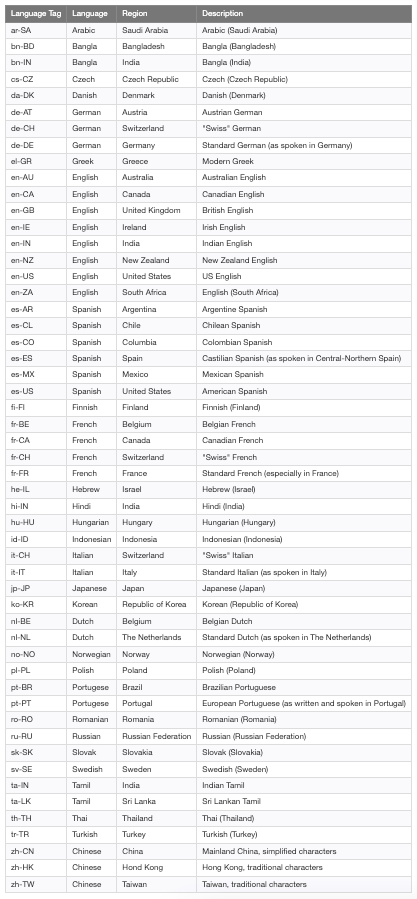
options is also an optional parameter, which is an object with some or all of these properties: compactDisplay, currency, currencyDisplay, currencySign, localeMatcher, notation, numberingSystem, signDisplay, style, unit, unitDisplay, useGrouping, roundingMode, roundingPriority, roundingIncrement, trailingZeroDisplay, minimumIntegerDigits, minimumFractionDigits, maximumFractionDigits, minimumSignificantDigits, and maximumSignificantDigits.
Among them, style chooses the formatting style, with the following supported values:
"decimal"for plain number formatting (default)."currency"for currency formatting."percent"for percent formatting."unit"for unit formatting.
If style is set to 'currency', the currency property is required. currency takes ISO 4217 currency code that is listed in this table. By default, minimumFractionDigits and maximumFractionDigits are both set to 2.
Let’s take a look at this example:
- At line 3,
'de-DE'is for German.'EUR'is for Euro. The printed value is123.456,79 €, with default of 2 fraction digits. - At line 4,
'ja-JP'is for Japanese.'JPY'is for Japanese Yen. The printed value is¥123,457, as the Japanese Yen does not use a minor unit. - At line 5,
'ar-SA'is for Arabic.'EGP'is for Egyptian Pound. The printed value is ١٢٣٬٤٥٦٫٧٩ ج.م., with default of 2 fraction digits. - At line 6,
'zh-CN'is for Chinese.'CNY'is for Chinese Yuan. The printed value is¥123,456.79, with default of 2 fraction digits.
Conclusion
Node.js 19 has a number of new features and improvements, including experimental node watch mode and HTTP(S)/1.1 KeepAlive by default, along with V8 JavaScript engine 10.7 feature. It is the Current release until node.js 20 is released.
If you want to check out features of other releases, take a look at the following articles:
- 7 Major Features of Node.js 21
- 6 Major Features of Node.js 20
- 5 Major Features of Node.js 18
- 3 Major Features of Node.js 17
- A Quick Look at the Node.js 16 Features
- What’s New in Node.js 15
Here is a list of npm features:
- 5 Features in npm 10
- Exploring New Features in npm 9
- A Quick Glance at npm 8 Features and Predictions for npm 9 — A Close Look at ES Modules (ESM)
- The Step-by-Step Guide to Understanding and Adopting npm 7
Thanks for reading.
Want to Connect?If you are interested, check out my directory of web development articles.


