
5 Ways You Misuse SQL Date Functions. And How To Be Better.
From hard coding dynamic variables to timezone mistakes, it’s time you master the subtle art of filtering SQL queries by date.
One of the first rules that was drilled into me during my first week at work was: “Whenever you query a table ALWAYS use a date filter.”
Even though this direction might seem like overkill on a smaller table not bigger than a few hundred megabytes, when you scale to terabytes or petabytes it becomes a requirement.
Since embracing that rule I’ve developed an appreciation for the power of date functions, filters and the way they can distill insights and reduce wide-scale resource consumption.
Along the way, I’ve developed my own set of best practices. I intend to share those with you to correct or prevent misguided approaches when it comes to filtering a data source by date.

1. Stop Hard Coding
Before we dive into more nuances of date filtering, I want to say up front:
Stop. Hard. Coding. Date variables.
Really this rule applies to nearly every variable you define programmatically. You should never hard code something you expect to change. That’s the difference between a static and dynamic variable.
One area that I’ve seen hard coding, and something I’ve admittedly been guilty of, is hard coding the beginning of a date range.
Now, on the surface, this makes sense. If your data begins on a certain date and that’s the absolute starting point, then there’s little chance it will change.
SELECT * FROM `ornate-reef-332816.mint.transactions`
WHERE date = "2021-01-25"
However, this leads to the development of bad habits.
Instead, if you must fetch all data for the lifespan of the data connection then use MIN(), like:
SELECT * FROM (
SELECT MIN(date) AS min_date, date FROM `ornate-reef-332816.mint.transactions`
GROUP BY date
)
WHERE date = min_date
2. Forgetting A Timezone
When you need to write a query quickly it’s tempting to use a function without parameters. I mean, I’m even guilty of doing this in Python.
Since functions like CURRENT_DATE() and CURRENT_DATETIME() don’t require a parameter, it’s easy to use them in queries without specifying a geolocation.
Using either of these functions without a time zone will force them to default to UTC.
SELECT CURRENT_DATETIME() AS datetime_utc,
CURRENT_DATE() AS date_utc
Depending on the context of your data, this can cause issues. For instance, if, like me, you’re on the east coast, UTC is four hours ahead of EST/EDT.
SELECT CURRENT_DATETIME() AS datetime_utc,
CURRENT_DATE() AS date_utc,
CURRENT_DATETIME("America/New_York") AS datetime_est,
CURRENT_DATE("America/New_York") AS date_est
It takes three more seconds to write your time zone, like “America/New_York” or “America/Los_Angeles”, but it’s worth it.
Pardon the interruption: For more Python, SQL and cloud computing walkthroughs, follow Pipeline: Your Data Engineering Resource.
To receive my latest writing, you can follow me as well.
3. Rewriting Your Variable Instead of Defining It
Until I started my job I never defined variables in SQL.
Now, I consider defining a date range at the beginning of a SQL script to be a necessary step and best practice.
The reason I suggest this is very practical.
With the more complex SQL scripts you write, you’re more than likely going to have multiple date filters, especially if you need to establish multiple CTEs.
Instead of repeatedly having to write something like…
WITH transactions AS (
SELECT * FROM `ornate-reef-332816.mint.transactions`
WHERE DATE(dtUpdated) = DATE_SUB(CURRENT_DATE("America/New_York"), INTERVAL 1 DAY)
),
accounts AS (
  SELECT * FROM `ornate-reef-332816.mint.accounts`
  WHERE DATE(lastUpdatedDate) = DATE_SUB(CURRENT_DATE("America/New_York"), INTERVAL 1 DAY)
)

SELECT * FROM accounts
LEFT JOIN transactions ON transactions.accountId = accounts.id
You can define this variable globally once and reference it throughout your script.
DECLARE start_date DATE DEFAULT DATE_SUB(CURRENT_DATE("America/New_York"), INTERVAL 1 DAY)

WITH transactions AS (
SELECT * FROM `ornate-reef-332816.mint.transactions`
WHERE DATE(dtUpdated) = start_date
),
accounts AS (
  SELECT * FROM `ornate-reef-332816.mint.accounts`
  WHERE DATE(lastUpdatedDate) = start_date
)

SELECT * FROM accounts
LEFT JOIN transactions ON transactions.accountId = accounts.id
This becomes useful when you need to backfill data for a particular date range.
4. Using Current_Datetime Instead of Current_Date
The difference between CURRENT_DATETIME() and CURRENT_DATE() is a subtle but important distinction.
CURRENT_DATETIME, as the name suggests, returns the current timestamp for your location (assuming you listened to me and remembered to include a time zone).
CURRENT_DATE(), on the other hand, returns a DATE object instead of a timestamp.
SELECT DATE_SUB(CURRENT_DATETIME(), INTERVAL 1 DAY) AS yest_datetime, DATE_SUB(CURRENT_DATE(), INTERVAL 1 DAY)
For batch processing, CURRENT_DATETIME() can be risky because, if you want to look back 24 hours, for example, you’re looking back at a particular (and probably random) timestamp, instead of simply looking back to the previous date.
If the CURRENT_DATETIME() when your process runs is noon and you need to retrieve data for the CURRENT_DATETIME — 1, you’re not going to get everything for the previous day.
You’re just going to get everything as far back as noon, or, in the case of the following example, 8 p.m. the previous day.
SELECT DATE_SUB(CURRENT_DATETIME("America/New_York"), INTERVAL 1 DAY) AS yest_datetime, DATE_SUB(CURRENT_DATE("America/New_York"), INTERVAL 1 DAY) AS yest
Subtle. But potentially problematic.
5. Improperly Parsing/Formatting
While you might think a SQL date has limited formatting options, you’d be surprised how specific you need to be not just when defining a filter, but also when parsing returned values.
This is especially important when trying to match a more unconventional format returned by your data.
Let’s say I wanted to get data for the current year, like this:
SELECT date FROM `ornate-reef-332816.mint.transactions` transactions
WHERE EXTRACT(YEAR FROM date) = EXTRACT(YEAR FROM CURRENT_DATE("America/New_York"))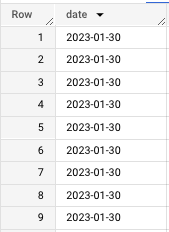
And, to make it more complex, I want to combine it with an existing lookup table to give me records for the current month (in addition to the year) AND convert that month from a numeric to STRING value.
I’m going to have an issue because the EXTRACT(MONTH FROM start_date) line only returns a single digit value when my lookup table requires a leading zero, as the below queries indicate.
SELECT month_str
FROM (
SELECT DISTINCT EXTRACT(MONTH FROM date) AS month_str FROM `ornate-reef-332816.mint.transactions`
)
ORDER BY month_str DESC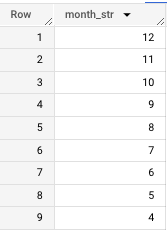
SELECT month_num FROM `ornate-reef-332816.billing_sample.lookup_month`
ORDER BY month_num DESC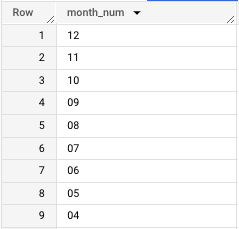
How do I add a leading zero?
This is where the FORMAT_DATE() function can be really useful.
SELECT DISTINCT SAFE_CAST(RIGHT(month, 2) AS STRING) AS month, description, amount
FROM (
SELECT DISTINCT FORMAT_DATE("%Y%m", date) AS month, description, amount
FROM (
SELECT
date, description, amount
FROM (
SELECT date, description, amount, dtUpdated FROM `ornate-reef-332816.mint.transactions` transactions
WHERE EXTRACT(YEAR FROM date) = EXTRACT(YEAR FROM CURRENT_DATE("America/New_York"))
)))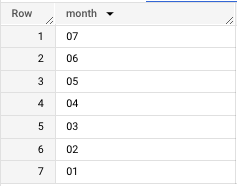
In the above query the heavy lifting is done by the “%Y%m” specification, which tells us we want the four digit year followed by two digit month, which would return:
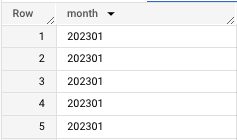
Note: The reason I created the lookup table with a leading zero is because when I first apply the FORMAT_DATE(“%Y%m”) function the date is returned as a two digit value appended to the four digit year (see above).
Then, using similar logic, we can use the RIGHT() function to grab the last two values of that month value to create our month filter so we can avoid ingesting data that may be incomplete (due to pending transactions).
SELECT SAFE_CAST(RIGHT(FORMAT_DATE("%Y%m", CURRENT_DATE("America/New_York")), 2) AS STRING) AS current_month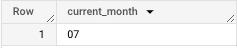
And if you want to get the string representation of a date, you can create and join to a lookup table, which I covered in the following story:
When establishing a date filter, you’ll want to make sure you FORMAT_DATE() so you’re matching on the correct intervals.
I guarantee you likely haven’t spent much time thinking about the implications of correctly filtering your SQL queries by date.
While, in some instances, you might be able to get away with shortcuts like not including a timezone or using CURRENT_DATETIME() instead of CURRENT_DATE(), these bad date habits can snowball and cause issues later.
This topic might seem hyper specific but the logic behind these choices is the same that should underlie most programming: Think before you code.
And, remember, never hard code.
Once you master SQL date functions, you can move to more complex operations like materializing your existing SQL views:
Go from SELECT * to interview-worthy project. Get our free 5-page guide.


