
SQL Users: Reduce Your CASE Statements With A Lookup Table
Map fields in your SQL tables without using CASE.
You’re Using The Wrong Logic In Your SQL CASE Statements

CASE statements, while useful, are one of the most overused SQL commands.
At a certain point, if your script is dominated with CASE statements that means you’re hard coding instead of finding a dynamic way to generate your output, like using a lookup table (a concept we’ll discuss below).
For smaller, simpler use cases, like when you only need to change 1–3 fields, this is generally ok.
However, what if I wanted you to convert a numeric variable (01, 02, 03, etc.) into its respective month in string form, like the below snippet shows?
SELECT day, month
CASE
  WHEN month LIKE "%01%" THEN "January"
  WHEN month LIKE "%02%" THEN "Februrary"
  WHEN month LIKE "%03%" THEN "March"
  WHEN month LIKE "%04%" THEN "April"
  WHEN month LIKE "%05%" THEN "May"
  WHEN month LIKE "%06%" THEN "June"
  WHEN month LIKE "%07%" THEN "July"
  WHEN month LIKE "%08%" THEN "August"
  WHEN month LIKE "%09%" THEN "September"
  WHEN month LIKE "%10%" THEN "October"
  WHEN month LIKE "%11%" THEN "November"
  WHEN month LIKE "%12%" THEN "December"
ELSE month END AS month_str
FROM table
This is objectively messy code that demonstrates the writer had to create a workaround for a problem that should have a dynamic solution.
Below, we’ll see how creating a lookup table reduces script messiness and increases the dynamic aspect of your SQL code.
Lookup Table: A Stupid Simple Way To Map Your SQL Fields
Instead of manually searching a column for a given value, a SQL lookup table contains your 1:1 mapping relationship and a primary key to JOIN to your initial table.
The end goal is to generate a new column that uses the table as a point of reference instead of hard-coded, convoluted CASE logic.
For a real-world example, I chose to work with one of the tables in the GCP Billing export dataset, an automatic daily transfer of my GCP product usage.
Not only does the billing export contain a date field that needs to be extracted and parsed, but it is also a solid representation of data you might actually encounter in a work environment.
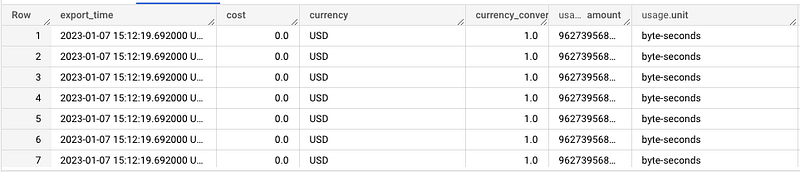
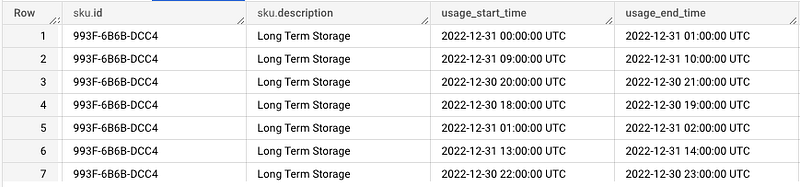
Even though this table gives us a lot of fields, in particular, I want to focus on this: invoice.month
SELECT DISTINCT invoice.month FROM `***********.billing_sample.gcp_billing_export_resource_v1_016BDC_5CA2DE_633652`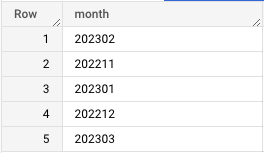
When I was initially exploring this data, I wanted a column that would represent just the month without the numeric year value.
Having both smooshed together looks a bit messy and, if I handed this to an analyst, they’d have to do extra work to access and convert such a value.
So, before we even worry about mapping the numeric values to string equivalents, I need to isolate just the two-digit month.
While we could use the LIKE operator, we would have to hard-code every possibility we expect to encounter (01, 02… 12), as we saw above.
Instead, I‘ll use the RIGHT operator to grab the last two digits in the string.
SELECT SAFE_CAST(RIGHT(invoice.month, 2) AS STRING) AS invoiceMonth
FROM `**********.billing_sample.gcp_billing_export_resource_v1_016BDC_5CA2DE_633652`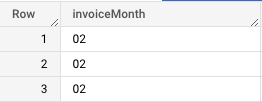
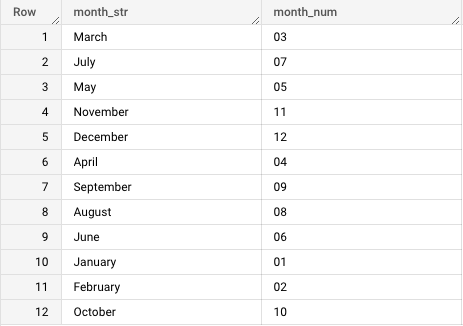
Now that I can isolate the month, I need to create mapping for each two-digit value between 01 and 12 that the query might process.
I can use this query to populate the lookup table (an empty table I already created using the BigQuery SQL environment’s UI).
INSERT INTO `***********.billing_sample.lookup_month`
(
SELECT "January" AS month_str, "01" AS month_num
UNION ALL
SELECT "February" AS month_str, "02" AS month_num
UNION ALL
SELECT "March" AS month_str, "03" AS month_num
UNION ALL
SELECT "April" AS month_str, "04" AS month_num
UNION ALL
SELECT "May" AS month_str, "05" AS month_num
UNION ALL
SELECT "June" AS month_str, "06" AS month_num
UNION ALL
SELECT "July" AS month_str, "07" AS month_num
UNION ALL
SELECT "August" AS month_str, "08" AS month_num
UNION ALL
SELECT "September" AS month_str, "09" AS month_num
UNION ALL
SELECT "October" AS month_str, "10" AS month_num
UNION ALL
SELECT "November" AS month_str, "11" AS month_num
UNION ALL
SELECT "December" AS month_str, "12" AS month_num
)
Giving us the (out of order) output:
Combining Lookup Table With Main Table
Now all that’s left to do is to JOIN this with the billing export table to dynamically create the new invoiceMonth column.
First, we create CTEs that will both include the billing_account_id, which can be used as a common key between the two tables.
WITH bill_month AS (
SELECT * FROM (
SELECT SAFE_CAST(RIGHT(invoice.month, 2) AS STRING) AS invoiceMonth, billing_account_id
FROM
  `***********.billing_sample.gcp_billing_export_resource_v1_016BDC_5CA2DE_633652`
)
),
bill_export AS (
SELECT * FROM
`***********.billing_sample.gcp_billing_export_resource_v1_016BDC_5CA2DE_633652`
)
Then, in the outer query, we’ll LEFT JOIN everything from these tables with the lookup table we just created.
SELECT month_str, month_num, be.* FROM bill_month
LEFT JOIN `************.billing_sample.lookup_month` month ON bill_month.invoiceMonth = month.month_num
LEFT JOIN bill_export be ON be.billing_account_id = bill_month.billing_account_id
Note that be.* just references the alias for bill_export and tells the query to select all columns in that table.
Additionally, for our two joins we’re joining the table back to itself using the billing_account_id AND joining the bill_month CTE to the lookup table using the two-digit month field (invoiceMonth and month_num, respectively).
We can use this query to check our work:
SELECT DISTINCT month_num, month_str
FROM (
SELECT month_str, month_num, be.* FROM bill_month
LEFT JOIN `*********.billing_sample.lookup_month` month ON bill_month.invoiceMonth = month.month_num
LEFT JOIN bill_export be ON be.billing_account_id = bill_month.billing_account_id
)
ORDER BY month_num ASC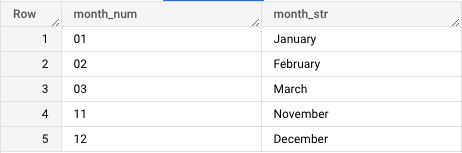
And, to be sure the fields appear in the final table, we can just run a SELECT * of that whole JOIN statement.
SELECT *
FROM (
SELECT month_str, month_num, be.* FROM bill_month
LEFT JOIN `***********.billing_sample.lookup_month` month ON bill_month.invoiceMonth = month.month_num
LEFT JOIN bill_export be ON be.billing_account_id = bill_month.billing_account_id
)
ORDER BY month_num ASC
Takeaway
When I was beginning to learn SQL, I leaned on CASE as a crutch for conditional logic.
Now, after using SQL professionally for years, I prioritize dynamic, efficient SQL statements over anything that might be considered manual coding.
Incorporating methods like lookup tables not only reduces the lines in your SQL scripts, they also demonstrate a certain level of knowledge and maturity as a SQL coder.
Often, it’s more helpful to do the extra leg work to arrive at a durable, elegant solution.
Once you’ve reduced the clutter of your scripts, you can improve the efficiency of your processing by materializing your SQL views:
Go from SELECT * to interview-worthy project. Get our free 5-page guide.


