
How to pad a string in JavaScript
ES2017 added the padStart() and padEnd() methods, which add whitespace or other characters to a string until it reaches a specific length.

What is padding a string?
Padding a string in JavaScript refers to filling a string up with a repeated character or string of characters, usually whitespace.
The string is padded to a certain length, which is what is passed to the String.prototype methods .padStart() and .padEnd().
Calling .padStart(length) or .padEnd(length) returns a new string of the given length, with the start or end of the string padded with spaces.
These padding functions do not modify the string that they are called on.
Both .padStart() and .padEnd() take two parameters, the length in characters to pad the string to and the string to be repeated while padding:

Why one would pad a string
Padding a string would be useful for sanitizing data input, for example if a certain input requires a string of a certain number of characters.
In printing with monospace font, padding can be used to right-align text by calling the .padStart() method with the width of the screen.
For a “screen” of 20 characters, .padStart(20) would align to the right:

Introducing .padStart() and .padEnd()
ECMAScript2017 introduced two helper methods that make the task of padding a string much easier than before.
Previously padding strings would have required some math, a dynamically allocated string, and a string concatenation call.
Now with string.prototype.padStart() and string.prototype.padEnd(), padding is a simple as calling a built-in JavaScript string function.
These two methods are similar to the new methods to trim strings, .trimStart() and .trimEnd().

Example use: pizzeria menu
Displaying a menu in a monospace font is a task that could be completed using a bit of math and the .padStart() function.
The following example assumes a “screen” of 40 characters:

Performance test
The question with any new feature added to JavaScript is whether it runs slower. Losing performance may not be worth the convenience.
I wondered if the .padStart() method would be slower than the old way.
To find out, I ran some test cases using jsPerf, a free tool to test JavaScript performance, in order to compare string padding to string concatenation.
I compared .padStart() to dynamically padding by creating an array and then joining it into a string using a whitespace character.
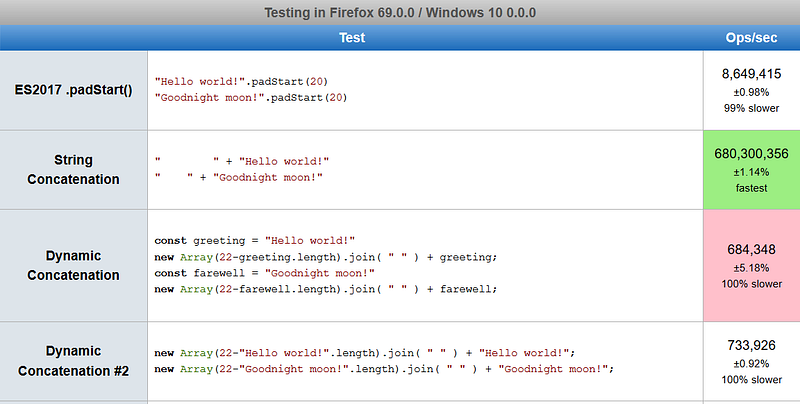
Here are the results, showing a clear 1st, 2nd, and 3rd place:

Ten times faster
Not only was .padStart() not slower than padding with dynamic concatenation of an array, .padStart() was actually 10x faster.
Of course, if there is a case where one can use static string concatenation, without needing to dynamically create a string, that would result in another 100x speed boost over padStart().
I did not test padEnd(), though it should work the same as padStart().

What about the MDN polyfill?
I admit it, the Array method seemed like a bit of a hack. Surely there would be a better way to pad strings in older version of JavaScript, and that way would surely be much faster. So I set out to find a faster algorithm.
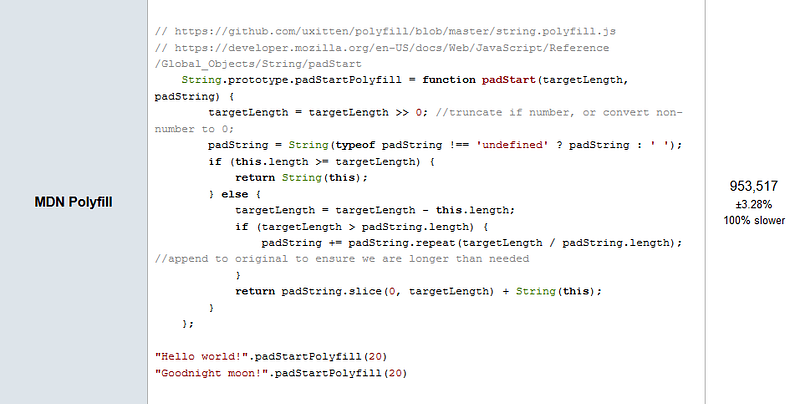
The best option appeared to be the polyfill recommended in the MDN docs, so I added that implementation as another jsPerf test case.
It turned out that the polyfill’s performance is about 20% better than the Array method, but still almost 9 times slower than padStart():

Conclusion
Padding is a useful type of string manipulation, and the ES2017 methods padStart() and padEnd() make padding easy in JavaScript.
Testing using jsPerf showed that these methods are much faster than the old method of manually padding a string using a dynamic concatenation.
The new methods are also much faster than the recommended polyfill, showing that using the latest features can improve performance.

Further reading
- Brandon Morelli examines
padStart()andpadEnd()in codeburst:
- Yazeed Bzadough takes a deep dive into how padding methods work:
- Samantha Ming focuses in on the usefulness of
padEnd()on Medium:
- Alligator.io has an article about
padStart()andpadEnd():
- Daniel Lempesis explains benchmarking JavaScript code on Medium:

Dr. Derek Austin is the author of Career Programming: How You Can Become a Successful 6-Figure Programmer in 6 Months, now available on Amazon.


