
padEnd String Method in JavaScript
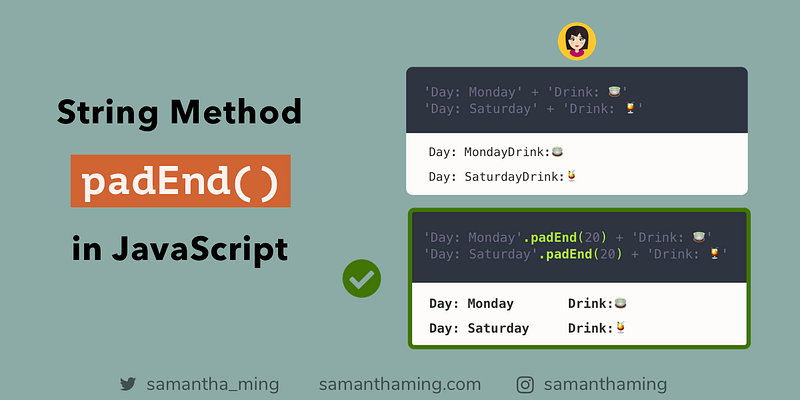
With padEnd, it adds characters to the end of a string so it reaches a specified length. This is great for us to add some padding to display our strings in a tabular format. Isn’t it so much easier to read, yay 🍹
// Display String in Tabular Format with padEnd// ❌
'Day: Monday' + 'Drink: 🍵'
'Day: Saturday' + 'Drink: 🍹'// ✅
'Day: Monday'.padEnd(20) + 'Drink: 🍵'
'Day: Saturday'.padEnd(20) + 'Drink: 🍹'padEnd Parameters
The padEnd accepts 2 parameters:
string.padEnd( <length>, <character>)1st Parameter: Length
This is the final length of your result string. It is required.
Let’s say you begin with a string that has 3 characters. And you set the length to be 5 characters. That means, padEnd will pad it with 2 characters so the total length meets your target length of 5 characters.
Here’s an example. I’m denoting the space character with · to show you the padded space.
'abc'.padEnd(5);// abc··2nd Parameter: Character
This is an optional parameter. As you see from above, the default padded character is an empty space. However, you might want to pad it with a different character. No problem! Just pass it here.
'hi'.padEnd(10, '!');// 'hi!!!!!!!!'Tabular Format only works with Monospace Font
So in my example of using padEnd to create table formatted string. One thing to note is that it only works with Monospace Font.
A monospaced font, also called a fixed-pitch, fixed-width, or non-proportional font, is a font whose letters and characters each occupy the same amount of horizontal space.
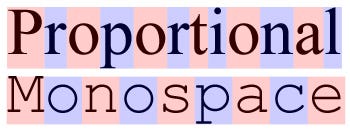
Fonts such as “Roboto” or “Monaco” are Monospace Font. Meaning each character will have the same width. Whereas fonts such as “Times New Roman” are not monospace. They are proportional, so each character will have different widths. And since each character has a different width, it would be hard to create the Table format using padEnd.
padEnd vs padStart
The purpose of string padding is to add characters to a string, so the outcome has a specific length.
padEnd adds characters at the end of the string. Whereas padStart adds characters at the start of the string
padEnd
'hello '.padEnd(10, '👋');// 'hello 👋👋'padStart
' hello'.padStart(10, '👋');// '👋👋 hello 'Watch out! — padding with Emojis
If you’re padding with emojis, you might run into this issue.
'hello '.padEnd(11, '👋');// 'hello 👋👋�'Notice the last “👋” is not displayed. But instead “�” is shown. Well, that’s because emojis are typically made up of 2 characters.
'👋'.length === 2 // trueSo if you’re padding with emojis, just be mindful that the emoji might be cut off if you don’t provide it enough length.
Community Input
- @2alin: Just something to add: to have a tabular style use, the font should be mono-space and HTML render will remove any extra space; which makes such application important mainly in the information displayed in the terminal.
- @Cilly_Boloe: padEnd and padStart example → link
Resources
- MDN Web Docs: String.prototype.padEnd()
- Learn JavaScript ES 2017: String padding — padStart & padEnd
- Exploring JS: String Padding
- Flaviocopes: The String padEnd method
- String padding with padStart and padEnd
- Alligator: padStart and padEnd String Methods in JavaScript
- tc39: ECMAScript spec proposal for String.prototype.{padStart,padEnd}
Share
- Like this on Twitter
- Like this on Instagram
- Originally published at www.samanthaming.com
Thanks for reading ❤
Say Hello! Instagram | Facebook | Twitter | SamanthaMing.com | Blog


