avatarYazeed Bzadough

Free AI web copilot to create summaries, insights and extended knowledge, download it at here

5064

Abstract

ode>debugger</code> statements.</p><figure id="6720"><img src="https://cdn-images-1.readmedium.com/v2/resize:fit:800/1*ttFL0luCSlQzdyOh-lpzOA.png"><figcaption></figcaption></figure><p id="1230">I also removed that <code>if</code> statement from line 1, so even the native <code>String.prototype.padStart</code> will be overridden by this function–makes it useful if you want to debug in Chrome.</p><p id="3be4"><b><i>Don’t override prototypes in production, kids!</i></b></p><figure id="2c1c"><img src="https://cdn-images-1.readmedium.com/v2/resize:fit:800/1*srYXzRnU1Qt46J3x91vKjQ.png"><figcaption></figcaption></figure><p id="55cc">Using our initial example</p><div id="c797"><pre><span class="hljs-symbol">'world</span><span class="hljs-symbol">'.padStart</span>(<span class="hljs-name">11</span>, <span class="hljs-symbol">'hello</span> ')</pre></div><figure id="5eb0"><img src="https://cdn-images-1.readmedium.com/v2/resize:fit:800/1*lFrlt-xxEwyByiesDNqHpw.png"><figcaption></figcaption></figure><p id="5bf7">Check out line 2. We see that <code>targetLength</code> and <code>padString</code> made their way into our function. No craziness yet, but it’s coming. I’ve been avoiding line 5 long enough.</p><h1 id="e1ed">Bitwise operators</h1><p id="3d21">The comment above line 5 briefly describes its purpose: “If <code>targetLength</code> is a number, round it down. If it’s not a number, make it 0”.</p><p id="ff30"><b>Bitwise operators</b> make this possible.</p><div id="260a"><pre><span class="hljs-attribute">targetLength</span> >> <span class="hljs-number">0</span></pre></div><p id="bf92">This operator <code>>></code> is known as a <a href="https://developer.mozilla.org/en-US/docs/Web/JavaScript/Reference/Operators/Bitwise_Operators#Right_shift">sign-propagating right shift</a> (LOLWUT?). You use it with two numbers</p><div id="47b9"><pre><span class="hljs-selector-tag">a</span> >> <span class="hljs-selector-tag">b</span></pre></div><p id="bc2c"><b>What this does:</b></p><ol><li><code>a</code> is converted into binary (<a href="https://developer.mozilla.org/en-US/docs/Web/JavaScript/Reference/Operators/Bitwise_Operators#Signed_32-bit_integers">details here</a>).</li><li>Binary <code>a</code> gets <i>right-shifted</i> <code>b</code> times.</li></ol><p id="c835">Our <code>targetLength</code> is 11 — that’s 1011 in binary (here’s a <a href="https://www.binaryhexconverter.com/binary-to-decimal-converter">converter</a> if you don’t believe me 😉).</p><p id="6f65">A side effect of converting to binary is that numbers get rounded down and <i>most</i> non-numbers become 0.</p><p id="9957">Try the following examples</p><figure id="7019"><img src="https://cdn-images-1.readmedium.com/v2/resize:fit:800/1*G9R342JuTLzAhZ3zXB5qYw.png"><figcaption></figcaption></figure><p id="89d6">See? Fractions become whole numbers. Non-numbers become 0, with one notable exception…</p><figure id="e340"><img src="https://cdn-images-1.readmedium.com/v2/resize:fit:800/1*S5QRnVnjsJaP6LSR-f1yVg.png"><figcaption></figcaption></figure><p id="c03f">Binary is just 1’s and 0’s, right? Those 1’s and 0’s represent “on” and “off” switches — <code>true</code> and <code>false</code>. <code>true</code>'s binary form is 1, and <code>false</code>'s binary form is 0. Just keep that in mind.</p><p id="2905">So now that we’ve “sanitized” <code>targetLength</code>, we begin the right-shifting.</p><p id="87e6">Right-shift means you move each bit to the right <code>n</code> times. That’s it.</p><p id="9b5c">Here’s a PowerPoint visualization of <code>11 >> 1</code> (I forgot how great PowerPoint actually is).</p><figure id="2a0f"><img src="https://cdn-images-1.readmedium.com/v2/resize:fit:800/1*jANUTARhf9DaSPo_FdobsQ.gif"><figcaption></figcaption></figure><p id="973c">Turn 11 into 1011 and right-shift it 1 time. Your end result is 101, which is 5 in binary.</p><figure id="e39d"><img src="https://cdn-images-1.readmedium.com/v2/resize:fit:800/1*hWhIMjgIzV8HsBHsoqaXkw.png"><figcaption></figcaption></figure><p id="f636">But our code says <code>targetLength >> 0</code>.</p><h1 id="000b">So we’re right-shifting 0 times…</h1><p id="309e">The whole point of right-shifting 0 times is to abuse that side effect of converting <code>targetLength</code> into binary. We don’t actually want to shift anything because that’ll change the value.</p><h1 id="5015">Moving on</h1><figure id="89da"><img src="https://cdn-images-1.readmedium.com/v2/resize:fit:800/1*9fp5LQLp8M02XXNypggPAw.png"><figcaption></figcaption></figure><p id="4686">Jump to line 7’s <code>debugger</code> now. <code>targetLength</code> has been sanitized. <b>Next!</b></p><figure id="cd8b"><img src="https://cdn-images-1.readmedium.com/v2/resize:fit:800/1*5olkuOlk90Alu9tVfbjS9Q.png"><figcaption></figcaption></figure><p id="17fd"><b>Line 11.</b></p><div id="7f55"><pre><span class="hljs-attr">padString</span> = String(padString || <span class="hljs-string">' '</span>)<span class="hljs-comment">;</span></pre></div><p id="696e">If we don’t provide a <code>padString</code>

Options

argument, it defaults to an empty space. I actually never noticed until now.</p><figure id="0809"><img src="https://cdn-images-1.readmedium.com/v2/resize:fit:800/1*esccGoVlxpemIBmMunjmXA.png"><figcaption></figcaption></figure><p id="7ec0"><b>Line 17.</b></p><p id="280e">Notice how line 13 had another safety check, “If the original string’s length is greater than <code>targetLength</code>, don’t do anything. Just return the original string”</p><p id="81ca">That makes sense because if our <code>targetLength</code> is 1, but the string is already 10 characters, what’s the point? We demonstrated that earlier with</p><div id="4e61"><pre><span class="hljs-regexp">//</span> just returns <span class="hljs-string">'world'</span> <span class="hljs-string">'world'</span>.padStart(<span class="hljs-number">0</span>, <span class="hljs-string">'hello '</span>)</pre></div><p id="6b50">Line 18 determines how many <i>more</i> characters we need by subtracting <code>targetLength</code> from the original string’s length. We need 6, in this case.</p><figure id="78c7"><img src="https://cdn-images-1.readmedium.com/v2/resize:fit:800/1*fNa4w2qk360VICQLqvp6jQ.png"><figcaption></figcaption></figure><p id="ea6f"><b>Line 27.</b></p><p id="ac8e">We skipped that <code>if</code> statement on line 20 because <code>targetLength</code> and <code>padString.length</code> just happened to be the same, but we’ll revisit that soon.</p><p id="4b3f">For now, we’re stopped right before line 29. Let’s break it up.</p><div id="ff66"><pre><span class="hljs-attribute">padString</span>.slice(<span class="hljs-number">0</span>, targetLength)</pre></div><p id="9c73">The good old <code>String.prototype.slice</code> method.</p><p id="7907"><a href="https://developer.mozilla.org/en-US/docs/Web/JavaScript/Reference/Global_Objects/String/slice"><b>MDN Docs</b></a>:</p><p id="bb67" type="7">The slice() method extracts a section of a string and returns it as a new string.</p><p id="80cd">It’s index-based, so we’re starting at index 0 of <code>padString</code>, and grabbing the amount of characters equal to <code>targetLength</code>. It’s kind of like</p><figure id="1b1d"><img src="https://cdn-images-1.readmedium.com/v2/resize:fit:800/1*5fgldncMrn1M42TDNexc5w.png"><figcaption></figcaption></figure><p id="c73c">Return that sliced <code>padString</code> combined with the original string, and you’re done!</p><figure id="77f2"><img src="https://cdn-images-1.readmedium.com/v2/resize:fit:800/1*dPcP4geY5bM3H_Qu53rF3Q.png"><figcaption></figcaption></figure><h1 id="f3de">Almost done</h1><p id="5bb4">I’d normally conclude here, but we haven’t explored that <code>if</code> statement on line 20. To make sure we hit it this time, let’s try another earlier example</p><div id="110c"><pre><span class="hljs-symbol">'yo</span><span class="hljs-symbol">'.padStart</span>(<span class="hljs-name">20</span>, <span class="hljs-symbol">'yo</span>')</pre></div><figure id="e63a"><img src="https://cdn-images-1.readmedium.com/v2/resize:fit:800/1*xMe4-5cz9E4TcaxRV-OpCw.png"><figcaption></figcaption></figure><p id="18c8">I skipped to line 20 because we already know what happens up to this point.</p><div id="df34"><pre><span class="hljs-keyword">if</span> (targetLength > padString.<span class="hljs-built_in">length</span>)</pre></div><p id="d217"><code>targetLength</code> is 18, and <code>padString</code> is <code>'yo'</code>, with 2 as its length. 18 > 2, so what next?</p><div id="edf7"><pre>padString += padString.<span class="hljs-keyword">repeat</span>(targetLength / padString.<span class="hljs-built_in">length</span>);</pre></div><p id="64af">Remember, <code>padStart</code> returns a <i>sliced </i><code>padString</code> + original string. If you want to pad <code>'yo'</code> with <code>'yo'</code> until it’s 20 characters long, you’ll have to repeat many times. This is where that logic happens, using <code>padString.repeat</code>.</p><p id="008e"><a href="https://developer.mozilla.org/en-US/docs/Web/JavaScript/Reference/Global_Objects/String/repeat"><b>MDN Docs</b></a>:</p><p id="7a7c" type="7">The repeat() method constructs and returns a new string which contains the specified number of copies of the string on which it was called, concatenated together.</p><p id="4c42">So it copy/pastes the string <code>n</code> times.</p><p id="20c5">In order to find out how many repeats we need, divide <code>targetLength</code> by <code>padString.length</code>.</p><figure id="ff40"><img src="https://cdn-images-1.readmedium.com/v2/resize:fit:800/1*8uNfkR56h7AhooHJILFSJQ.png"><figcaption></figcaption></figure><p id="57bf">Repeat <code>'yo'</code> 9 times and get a string of <code>'yo'</code>s that is 18 characters long. Add that to your original <code>'yo'</code>, and your final count is 20 characters.</p><figure id="3815"><img src="https://cdn-images-1.readmedium.com/v2/resize:fit:800/1*0A9siQbKWnKn6cFuidfNMQ.png"><figcaption></figcaption></figure><p id="97d3">Mission accomplished. Until next time!</p><p id="dc18">Take care, Yazeed Bzadough</p></article></body>

How does String.padStart actually work?

Previously, I shared my usage of padStart to elegantly replace what would’ve been loads of if statements. This magical method threw me off my rocker. I simply couldn’t believe it existed.

What it does

Mozilla Developer Network (MDN) Docs:

The padStart() method pads the current string with another string (repeated, if needed) so that the resulting string reaches the given length. The padding is applied from the start (left) of the current string.

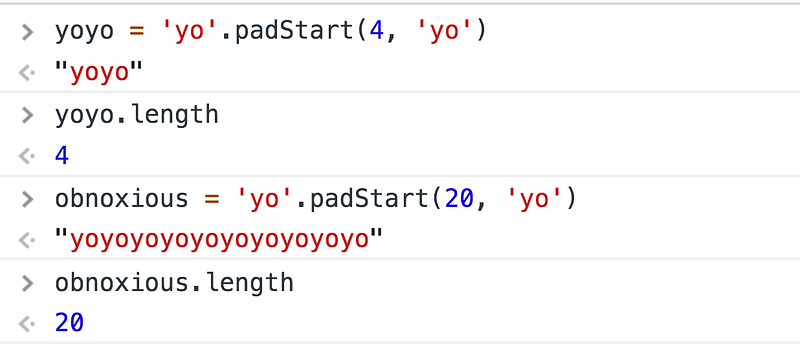
Keep prepending a string to another string until the target length is met.
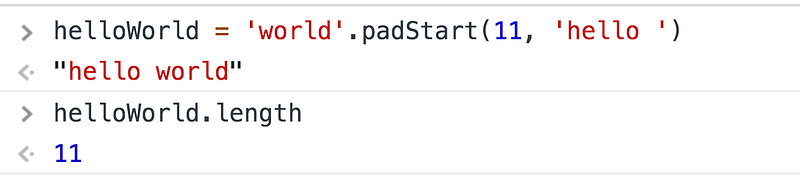
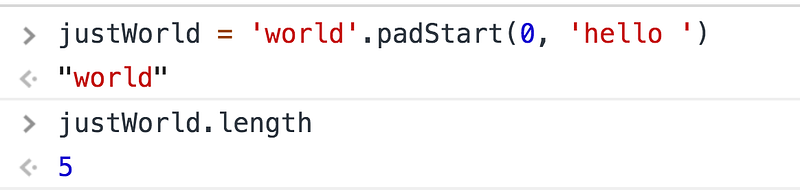
If the length is already less than the original string’s length, nothing happens.
And since padStart returns a string, we can chain its methods.
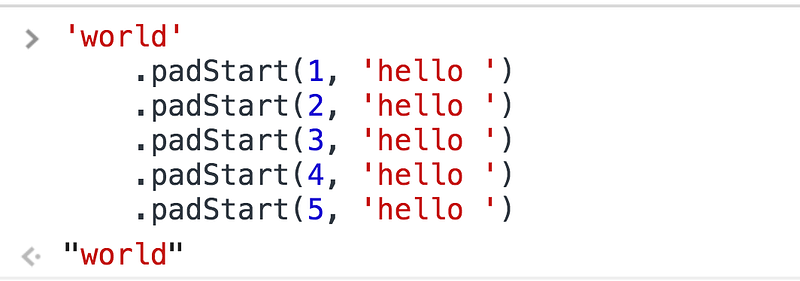
See? 1, 2, 3, 4, and 5 are all less than or equal to world's length of 5, so padStart doesn’t do anything.

Browser support

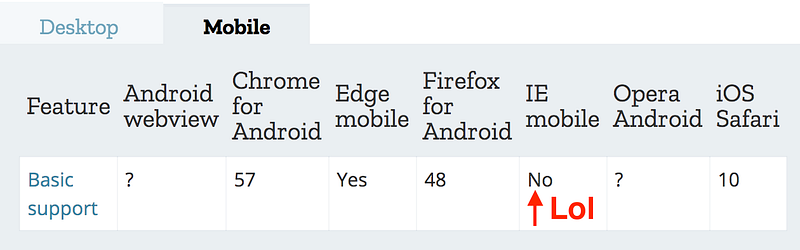
Unfortunately, support’s currently “meh”
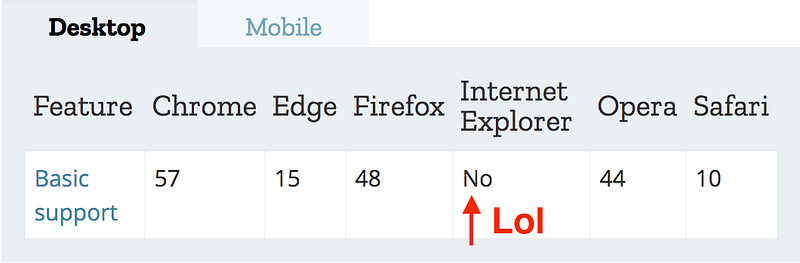
Desktop support
Mobile support

You can either use babel-polyfill or the polyfill by MDN.

Here’s MDN’s polyfill.
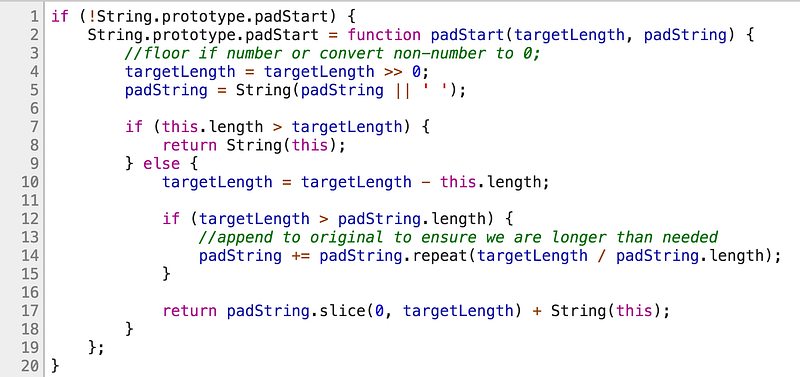
Some points of interest:

  • Prototypes (lines 1 and 2)
  • Bitwise operators (line 4)
  • padString.repeat (line 14)
  • padString.slice (line 17)

I’m down to step through them if you are 😁

Lines 1 and 2 aren’t that bad: “If padStart isn’t supported by the browser, let’s create our own padStart and add it” (that’s polyfill-ing in a nutshell).

A common way to check a method’s browser support is to inspect its object’s prototype. Since padStart is a string method, it should exist on String.prototype.

My old version of Safari doesn’t support padStart.
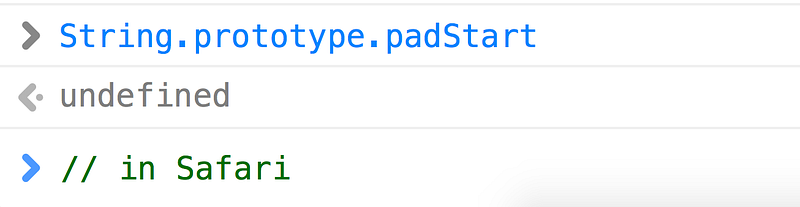
My Safari’s padStart support

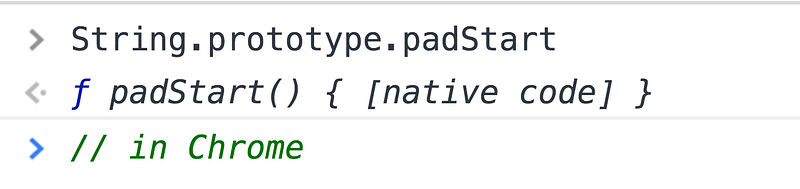
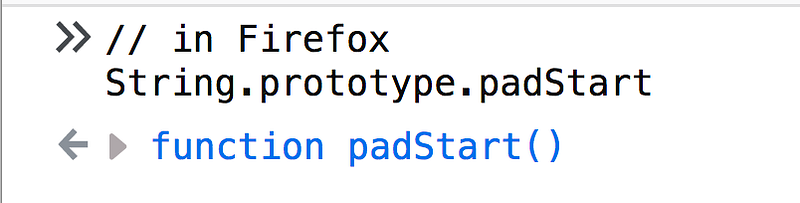
But my Chrome and Firefox do.

Chrome padStart support
Firefox padStart support

Consider this safety check on line 1

if(!String.prototype.padStart)

That if statement would only return true in my old Safari. It returns false in Chrome/Firefox, so no polyfill-ing happens.

Moving on, line 2 creates a new function called padStart and assigns it to String.prototype.padStart. Because of JavaScript’s inheritance model, any string created afterwards can use padStart.

This function takes two parameters

1. targetLength: How long should the resulting string be?

2. padString: What are we padding it with?

Let’s shower this code with debugger statements.
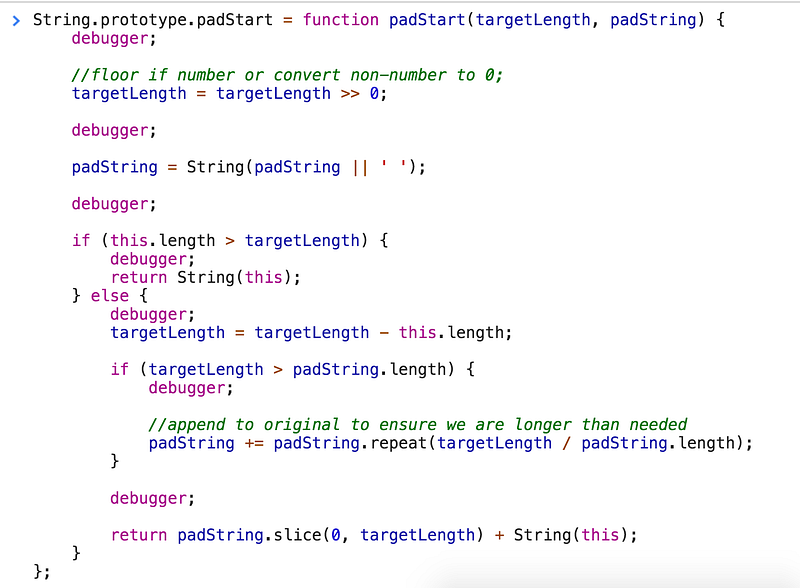
I also removed that if statement from line 1, so even the native String.prototype.padStart will be overridden by this function–makes it useful if you want to debug in Chrome.

Don’t override prototypes in production, kids!

Using our initial example

'world'.padStart(11, 'hello ')
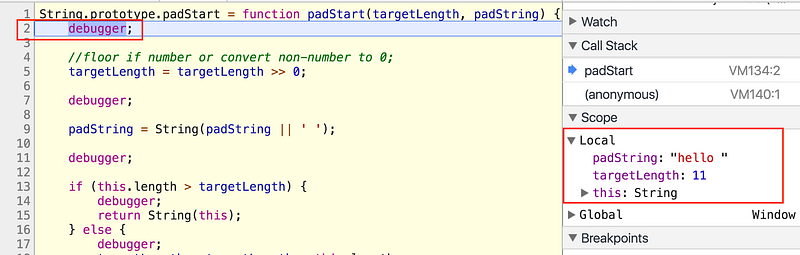
Check out line 2. We see that targetLength and padString made their way into our function. No craziness yet, but it’s coming. I’ve been avoiding line 5 long enough.

Bitwise operators

The comment above line 5 briefly describes its purpose: “If targetLength is a number, round it down. If it’s not a number, make it 0”.

Bitwise operators make this possible.

targetLength >> 0

This operator >> is known as a sign-propagating right shift (LOLWUT?). You use it with two numbers

a >> b

What this does:

  1. a is converted into binary (details here).
  2. Binary a gets right-shifted b times.

Our targetLength is 11 — that’s 1011 in binary (here’s a converter if you don’t believe me 😉).

A side effect of converting to binary is that numbers get rounded down and most non-numbers become 0.

Try the following examples
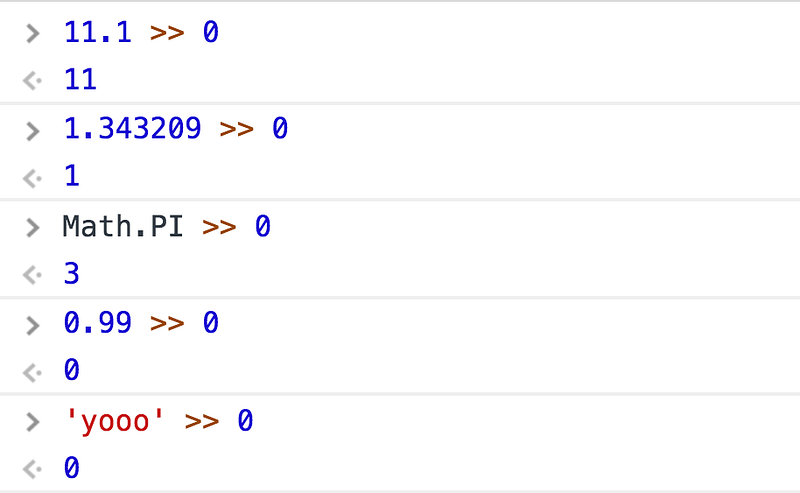
See? Fractions become whole numbers. Non-numbers become 0, with one notable exception…
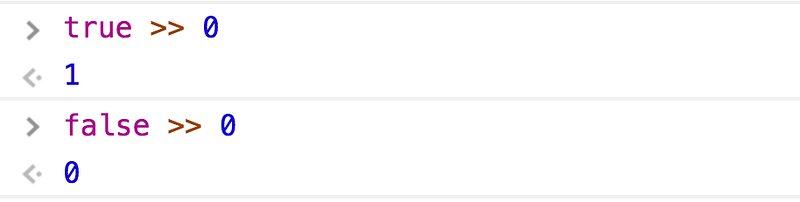
Binary is just 1’s and 0’s, right? Those 1’s and 0’s represent “on” and “off” switches — true and false. true's binary form is 1, and false's binary form is 0. Just keep that in mind.

So now that we’ve “sanitized” targetLength, we begin the right-shifting.

Right-shift means you move each bit to the right n times. That’s it.

Here’s a PowerPoint visualization of 11 >> 1 (I forgot how great PowerPoint actually is).
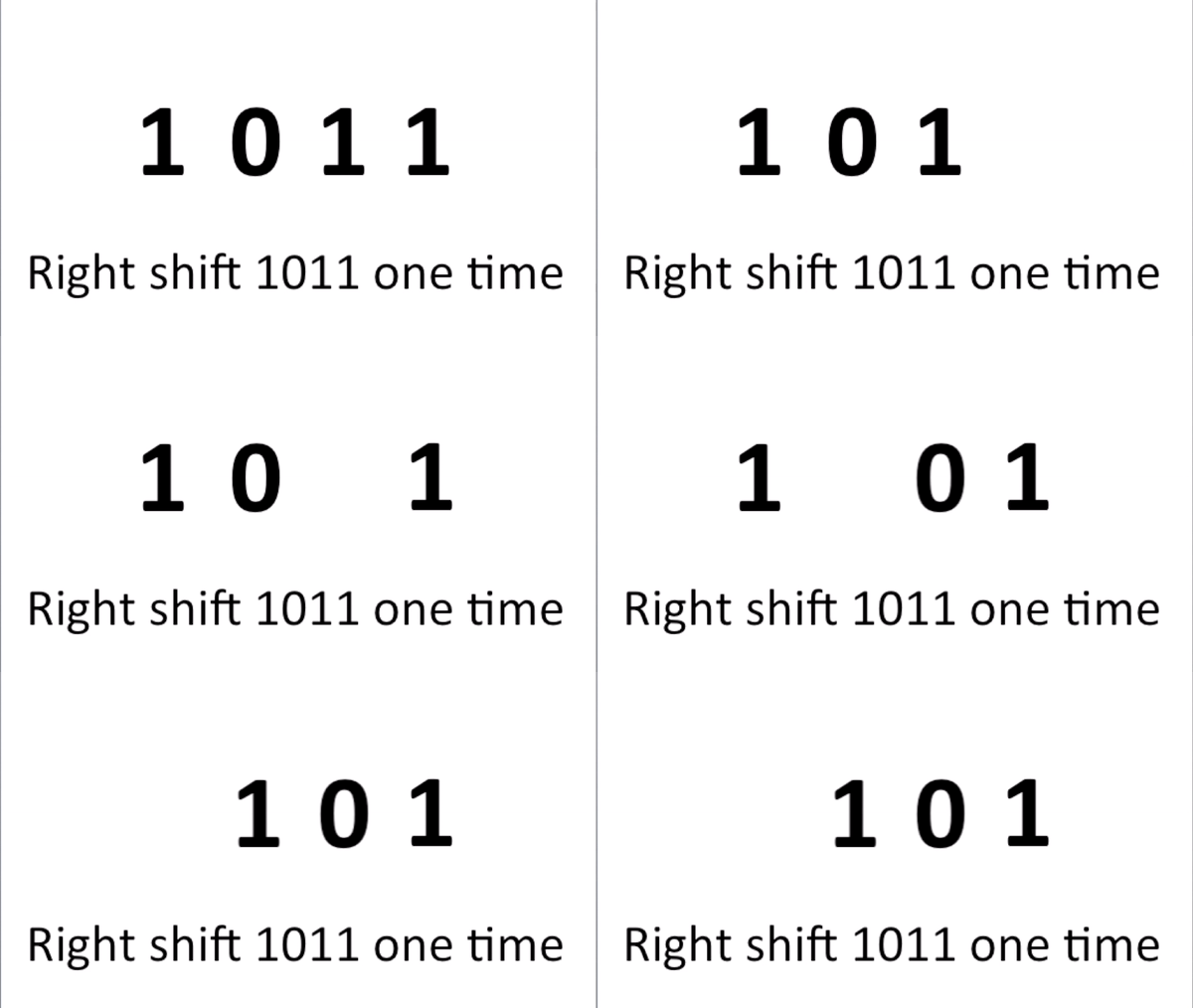
Turn 11 into 1011 and right-shift it 1 time. Your end result is 101, which is 5 in binary.
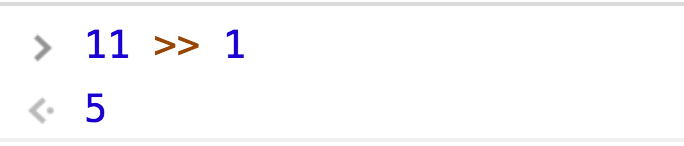
But our code says targetLength >> 0.

So we’re right-shifting 0 times…

The whole point of right-shifting 0 times is to abuse that side effect of converting targetLength into binary. We don’t actually want to shift anything because that’ll change the value.

Moving on
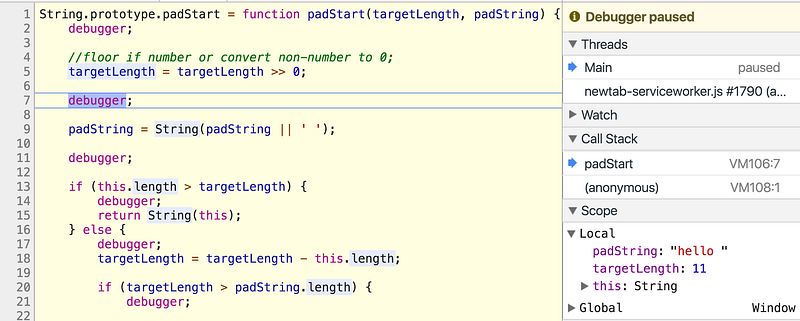
Jump to line 7’s debugger now. targetLength has been sanitized. Next!
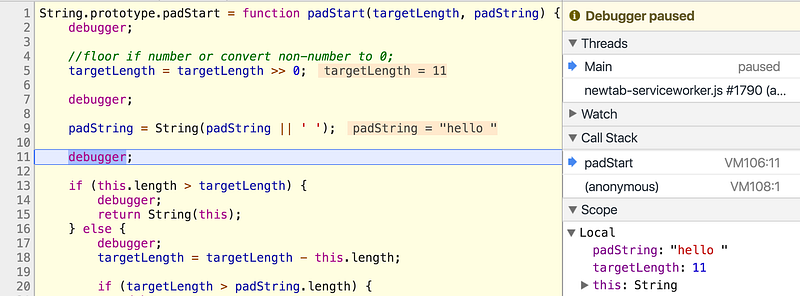
Line 11.

padString = String(padString || ' ');

If we don’t provide a padString argument, it defaults to an empty space. I actually never noticed until now.
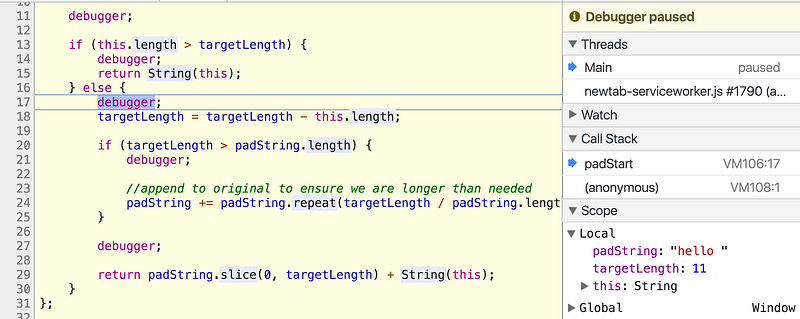
Line 17.

Notice how line 13 had another safety check, “If the original string’s length is greater than targetLength, don’t do anything. Just return the original string”

That makes sense because if our targetLength is 1, but the string is already 10 characters, what’s the point? We demonstrated that earlier with

// just returns 'world'
'world'.padStart(0, 'hello ')

Line 18 determines how many more characters we need by subtracting targetLength from the original string’s length. We need 6, in this case.
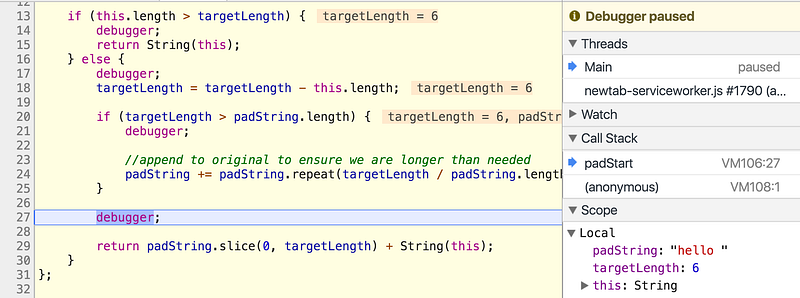
Line 27.

We skipped that if statement on line 20 because targetLength and padString.length just happened to be the same, but we’ll revisit that soon.

For now, we’re stopped right before line 29. Let’s break it up.

padString.slice(0, targetLength)

The good old String.prototype.slice method.

MDN Docs:

The slice() method extracts a section of a string and returns it as a new string.

It’s index-based, so we’re starting at index 0 of padString, and grabbing the amount of characters equal to targetLength. It’s kind of like
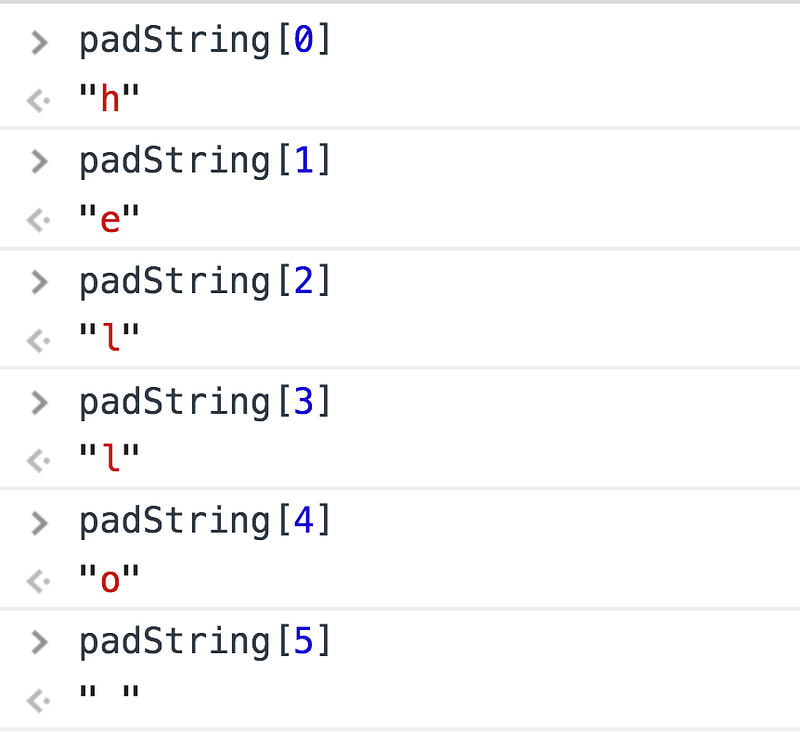
Return that sliced padString combined with the original string, and you’re done!

Almost done

I’d normally conclude here, but we haven’t explored that if statement on line 20. To make sure we hit it this time, let’s try another earlier example

'yo'.padStart(20, 'yo')
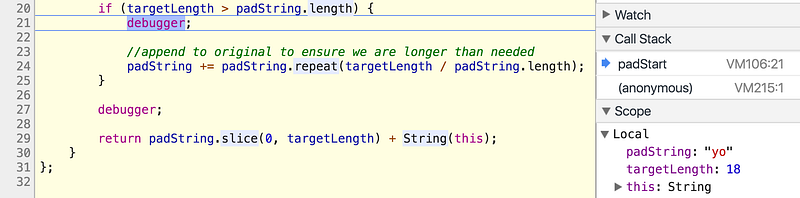
I skipped to line 20 because we already know what happens up to this point.

if (targetLength > padString.length)

targetLength is 18, and padString is 'yo', with 2 as its length. 18 > 2, so what next?

padString += padString.repeat(targetLength / padString.length);

Remember, padStart returns a sliced padString + original string. If you want to pad 'yo' with 'yo' until it’s 20 characters long, you’ll have to repeat many times. This is where that logic happens, using padString.repeat.

MDN Docs:

The repeat() method constructs and returns a new string which contains the specified number of copies of the string on which it was called, concatenated together.

So it copy/pastes the string n times.

In order to find out how many repeats we need, divide targetLength by padString.length.

Repeat 'yo' 9 times and get a string of 'yo's that is 18 characters long. Add that to your original 'yo', and your final count is 20 characters.
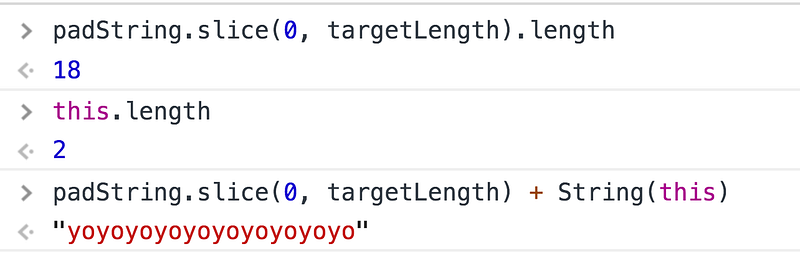
Mission accomplished. Until next time!

Take care, Yazeed Bzadough

JavaScript
Bitwise
Binary
Tech
Programming
Recommended from ReadMedium