
YouTube durations in 4 lines of JavaScript
While very gradually creating a YouTube clone in my spare time, I marveled at how easy making consistent video durations was. By durations, I mean the little running times in the corner of each video.

Durations can vary greatly, but YouTube’s UI has a good ruleset for consistently formatting them. Some rules I noticed were
- Durations must be 4 characters minimum–a 1 second video is represented as 0:01.
- Anything under a minute must be padded with 0:, like 0:59 or 0:12
- Anything under ten seconds must be padded with 0:0, like 0:09 or 0:01
YouTube’s Data API returns durations in ISO_8601 format. The duration’s prefixed with PT. P stands for period, T stands for time.
Some examples
- 30 seconds => PT30S
- 4 minutes, 42 seconds => PT4M42S
- 1 hour => PT1H
- 6 hours, 41 minutes, 55 seconds => PT6H41M55S
Since manually parsing these would’ve sucked, I leaned on the awesome moment-duration-format library to handle it with two easy function calls.
processDuration = (duration) => moment
    .duration(duration)
    .format('h:mm:ss')
We’re not done yet, however. This function doesn’t always conform to YouTube’s formatting rules.
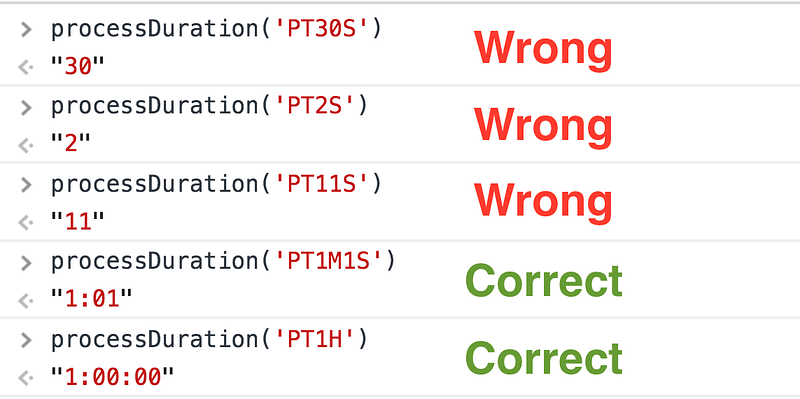
In those first three, we expect 0:30, 0:02, and 0:11.
What to do, what to do…?
Well remember I titled this post “4 lines of JavaScript”? We’ve only written three.
Here’s the last one.
processDuration = (duration) => moment
    .duration(duration)
    .format('h:mm:ss')
    .padStart(4, '0:0')
Please, check out the MDN Docs while I try not to fly out of my chair.
The
padStart()method pads the current string with another string (repeated, if needed) so that the resulting string reaches the given length. The padding is applied from the start (left) of the current string.
padStart(4, ‘0:0’) says, “Until the string is 4 characters long, keep adding to it from ‘0:0’. If it’s already 4 or more, leave it alone.”
Our results?
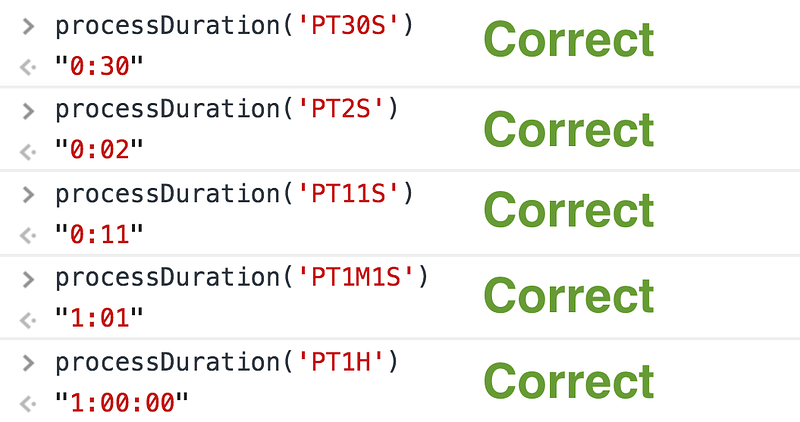
Honestly, what more do you want? This magical method saved me a lot of time.
Please drop a comment if this method’s ever saved you! Until next time!
Take care, Yazeed Bzadough


