
3 Efficient Time Management Techniques for Busy People
Do you feel like you don’t have enough time for anything? You are not alone.

“The bad news is time flies. The good news is you’re the pilot.” — Michael Altshuler
The kitchen is dirty, the deadlines are screaming for your attention, and the fridge is inconveniently empty. Again. It might feel like you just woke up and the day is already over. It might feel like you always don’t have enough time and your schedule is ever-growing. We’ve all been there. The question is…what are you going to do about it?
While I don’t know how to build a time machine (sigh), I know that time management can surely help. Not all techniques work equally well for everyone, so keep trying different methods until you get the desired results. There are dozens of time management techniques out there — but these 3 are my absolute favorites.



Timeboxing Technique
The name says it all. Timeboxing is an efficient, goal-oriented technique for time management and boosting productivity. The idea is simple — you allot a specific time to a specific task and focus only on one task at hand. No multitasking.
There are two types of timeboxes that you can schedule your work in:
- Hard timeboxes are very strict so I would recommend starting with soft timeboxes first. Adding a few minutes or even seconds with hard timeboxes is out of the question. If your time is up, just move on to the next task in hand. Hard timeboxes can prove beneficial especially when you aim to improve your efficiency over time. However, this method might take a little getting used to.
- In contrast, soft timeboxes are beginner-friendly, flexible timeframes in which you are notified whenever the specified time is up. Then, you can make adjustments in your work accordingly. Soft timeboxes don’t have any strict limitations. Their main aim is to bring back your focus to the task so that you can speed up your work and complete the task.
Timeboxing isn’t about just doing everything as fast as possible and checking things off a to-do list. Always include time for planning, action, and evaluation after each task. Don’t spend more than one hour on each box. Use your breaks to refuel, recharge, and reflect.
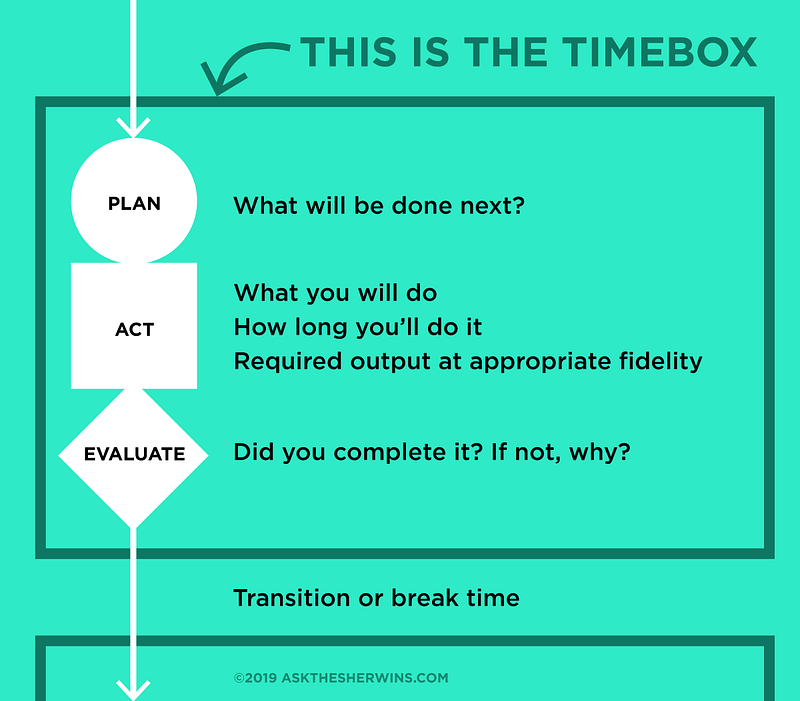
How to use:
- Determine the complexity of each task on your to-do list and create timeboxes for them
- Set a timer
- Evaluate and revise
- Take a break
- Move on to the next task
Pomodoro
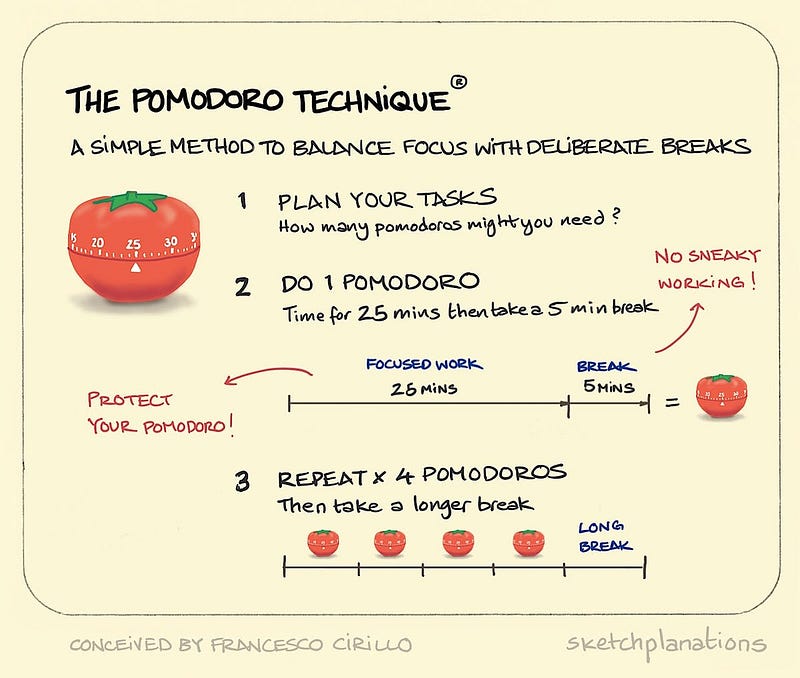
Chances are, you’ve heard about the Pomodoro technique before. This method was created by entrepreneur Francesco Cirillo and named after his popular tomato-shaped timer. This technique uses a timer to break down your work into even intervals with frequent breaks. I’ve never used a timer for this, but there is a handy Google Chrome extension that I absolutely love and recommend.
How to use:
- Choose a task
- Set a timer for 25 mins (you can do more or less if needed)
- Focus on the task at hand
- When the timer rings, put a checkmark on a piece of paper
- Take a short break for about three to five minutes
- Repeat steps two to five. Once you have completed four Pomodoros, you can begin to take longer breaks (20–30 mins)
Pareto Analysis (also known as the 80/20 rule)

The 80/20 rule was created by the Italian economist Vilfredo Pareto. It’s the idea that 20% of your actions are responsible for 80% of results. This principle is widely used in business and, well, time management. Pareto analysis helps to prioritize tasks that are most effective at solving a problem at hand.
How to use:
- Make a list of all the problems that need to be solved
- Find the root cause of each problem, write it down
- Assign a score to each problem. The bigger the problem, the higher your number will be
- Take a look at your list again and group problems by cause
- Add up the problem scores in each group: The group with the highest score is the one you should start working on first
- Start solving the first problem
While Pomodoro and timeboxing techniques are good for creative thinkers, the Pareto analysis is perfect for problem-solvers and people with analytical thinking. But if none of these techniques proved to be useful, there are other techniques out there, such as Eisenhower Matrix, Parkinson’s Law, or Time Blocking… Keep experimenting until you find the perfect method that works for you. Good luck!
Further Reading: