
Your Knowledge System Is Useless Without Metadata
Building out your Knowledge System with Roam Research Metadata

Over the past year, Knowledge workers have become increasingly isolated. With Zoom calls, remote meetings, and work from home, it becomes harder to retain context with what we are working on because of the uniformity of our current work environment. How do we build this context in our Knowledge System?
I have become ever more dependent on notes, task lists, and online research to meet my work needs. I have created a personal knowledge system with Roam Research. To date, my graph has:
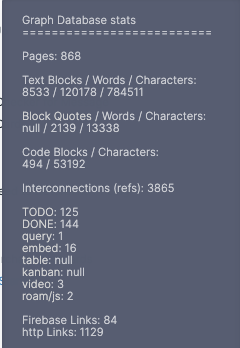
- 868 Pages
- 120,178 Words
- 3,865 Connections
- 1,129 Links
But is creation enough? How much of this research are just in-the-moment thoughts that are never revisited? Are we retaining our learnings? I’m able to surface things that I need when I search my graph, like this article:
The author, Eva Keiffenheim, MSc, makes the following point:
I’ve noticed a recurring pattern: it’s less important what kind of brain you have — what matters is how you use it.
The first step that we need to make is how to retrieve the information that we have gathered. Enter metadata.
Metadata is data that describes our data
Before we can begin to resurface data, we have to know what the data is about. Enter Roam Research. Roam Research, at its core, is based on Pages or Topics. These pages help you organize your thoughts, and you can create bi-directional links between pages to make connections. I use Pages, Attributes, and Tags to identify the metadata associated with each block.
- [[Pages]] — Used for Overall Topics
- Attributes:: — Used for tracking items or creating a table based on metadata
- #Tags — I use these to create items that I want to remember or otherwise find within my database — I use these often to indicate items that I want to query for in Roam Research but aren’t necessarily part of an overall topic
Research Metadata in Roam Research
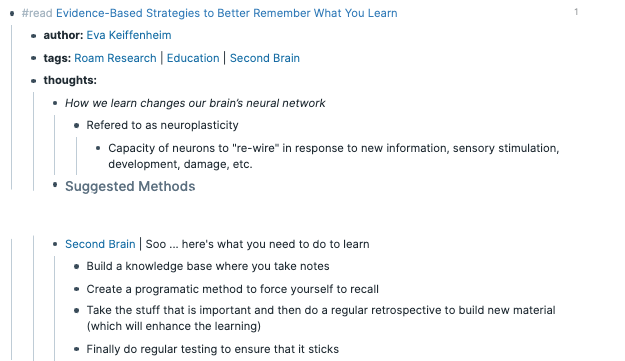
Every time I read an article, I take notes in Roam Research. Using templates, I type ‘;;’ and up comes my Read Articles template.
- Link to the Article (with the #unread tag)
- author:: [[Author Name]] An attribute so that I can find all of the authors that I have read and I create a new page for the author — this Allows me to group all of an author’s articles.
- tags: This allows me to develop bi-directional links to multiple topics
- thoughts: Here, I either copy and paste from the article, add my thoughts and musings and connect to other things that I have read.
Let’s look at one entry from the article above. You’ll notice that the quotes from the article are italicized (sometimes I use the tag #quote) to distinguish between my thoughts and the authors. Things that I want to remember are tagged with #surface. I also change my tag to #read so that I can track when I have completed consuming an article.
If you’re interested in Scraping multiple articles for your research, check out this post on using Python to get articles from the web.
Human Connections are critical
As a consultant, I have worked on many different projects with many people. Being able to retain connections (or at least be able to remember who they are) is critical. Thus my People CRM was born. I use Roam Research to connect topics, projects, and clients within my graph. Here’s an example of the metadata that I create for each one of my connections to add people to my knowledge system. When I start traveling again, I also know where people are so that I can visit them!
Utilizing your Knowledge System
You’ve taken the first step to wrangling your Knowledge System. By applying metadata throughout your notes, you can now easily search for items with Roam Research, create queries to corral your thoughts, and flag things you want to follow up on. With Roam Research, you could even make a shared graph for your Scrum Team or Department to share these connections.
Check out some templates for your metadata here on GitHub.
In our upcoming articles on Building your Second Brain, we will use this metadata to tie all of your tools together.
- Connect your Todo List to your Roam Research Pages
- Surface information about your clients before you have meetings with them
- Surface Research when you start a new Project
- Build over Turn Over Documents with Context and Lessons Learned
For your personal use, you may want to import your personal readings or viewing history. To find out more check out this follow up article:
If you want to create your own Second Brain, please join our mailing list for periodic articles!

Originally published at https://recursiveautomation.com on April 25, 2021.


