
Web Development Tips
You Should Pick Only One For React: Framer Motion VS GSAP
A well-designed animation can easily take a website to another level but using the right tools is as important as animation design.
Nowadays, it is impossible to imagine a professional and modern website without animation because animations give life to a website. It helps people link elements on the page and let the website respond to users based on interaction. Moreover, you can pass emotion using animations. For instance, if you have a website about sea or sea products, you can use spring animations to pass the feeling of liquidity to the users.
As animations are a significant component of user experience, they should be treated carefully and handled with the right tools. Because having the right tool is as important as the outcome. For example, you can draw literally anything using CSS but while there’s SVG, it is implausible to waste so much effort to do so.

I have been working with React for more than 3 years now and I’ve used almost every remarkable animation technology with React: WAAPI, Framer Motion, GSAP, CSS Animations, React Spring… Based on all this experience, I have 2 unbeatable candidates for my projects at the end of the day: Framer Motion and GSAP. Both libraries are sophisticated and well-designed, they can handle almost any type of animation. However, today we will discuss, and try to find which one is superior for web animations.
So, What’s GSAP?
GSAP, pronounced as /dʒiːsæp/, is an imperative JavaScript library to handle complex animations without diving deep into JS. It utilizes GPU rendering for heavy-weight animations so that all animations run smoothly and at 60 FPS (same with Framer Motion), which is impressive because, usually, even native CSS animations aren’t that smooth.
Unlike Framer Motion, instead of the whole library, you use only what you need due to its built-in plugin system. This plugin system is very comprehensive and practical. It has a variety of different plugins to handle all kinds of animations. Do you want to create scroll-linked animations? Add the ScrollTrigger plugin. Is the animation you designed include FLIP? Include the FLIP plugin so that GSAP handles it seamlessly. However, in Framer Motion, once you included it in the React project, you get all of the components and hooks such as AnimateSharedLayout even though the animation you want to implement doesn't need most of it. That’s why using GSAP over Framer Motion is more bundle-friendly.
The main part GSAP shines is the orchestration of multiple animations, in other words, timelines.
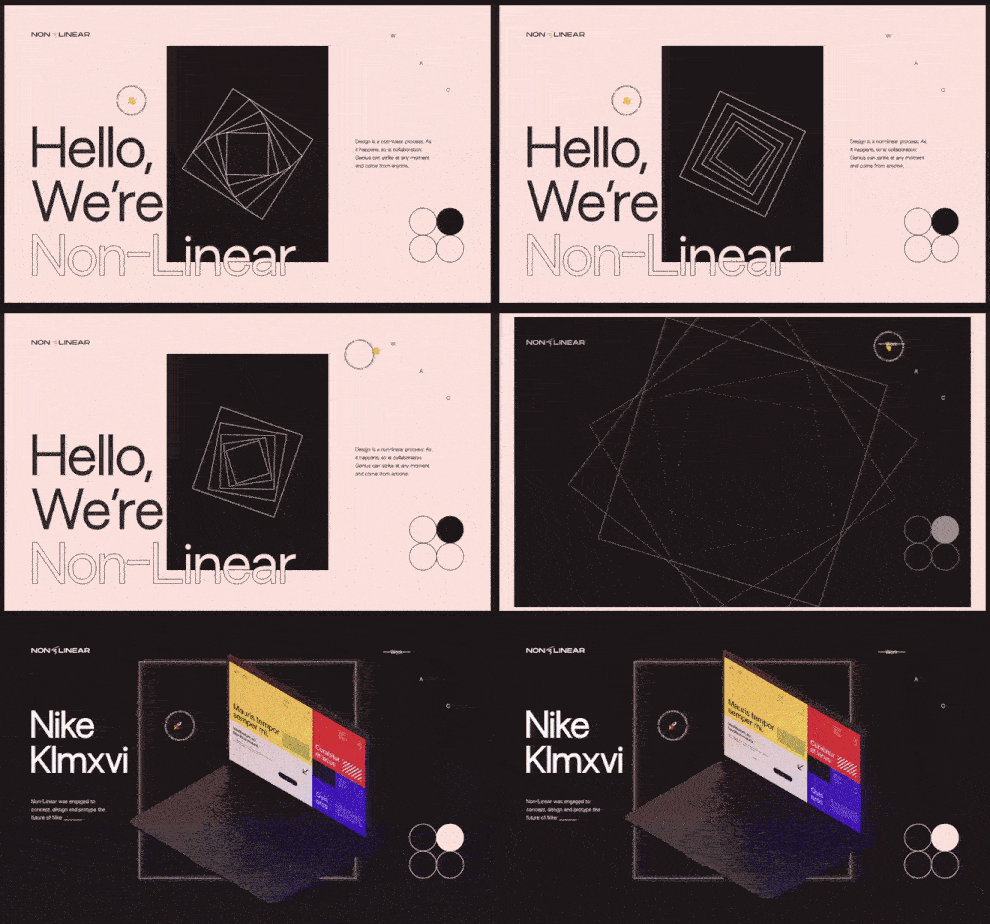
In the page transition above, once the button is clicked, many different DOM elements start to move but with different delays, animations, curves, and times. Some elements wait for others to finish the animation before starting. All in all, lots of elements animate dependently one another. Creating this effect, using the GSAP timeline, is not so hard because you can order animations and start them one by one. If you are not happy with the order, simply reorder the animations and see the resulting animation.
Unfortunately, in Framer Motion, there is no such timeline. You have to start animations manually and calculate the start time of the animation by hand. Besides, when you wanna change the order of the animations, you have to start all over from the start and replace the timing values by hand.
The Weak Sides Of GSAP — Where Framer Motion Shines
Yes, like every superhero, GSAP has some weak points compared to Framer Motion, as well. The approach Framer Motion uses is much more relevant to React concept. Unlike GSAP, Framer Motion uses a declarative approach for animations, and by doing so, the ongoing animation is usually more understandable. That’s why Framer Motion is the right tailored tool for micro-interactions and animations such as hover or active state animations.

The other issue with GSAP is that to create exit animations, you need an additional JS library, which is React Transition Group, or you have to implement your own logic. However, in Framer Motion, creating exit animations is pretty easy. All you have to do is wrap the components using AnimatePresence component coming with Framer Motion. Then you can fire animations when an element leaves the DOM.
The price of GSAP is also another concern. The basic plugins are free such as ScrollTrigger or TweenMax but to create more complex animations you need additional plugins such as FLIP or Morph plugins which are paid. This is not the case for Framer Motion. It is totally free and open-source.
Conclusion
In JavaScript, there’s no one way to achieve something. To create stunning animations, you can use CSS, WAAPI, or one of the millions of libraries out there. However, based on the tools you choose, the process of creating will become easier or harder. That’s why picking the right tool is crucial. So, here’s my advice for the ones who cannot decide which one to pick:
- If the app you’ll create will have many animations depending on one another -like an animation is waiting for another to finish- or it has scroll-linked animations, then go for GSAP.
- If animations don't include any orchestration and everything happens instantly, moreover, if you don't have any money for GSAP plugins, go for Framer Motion.
If you liked this story make sure you clapped it and if there are some points that you think need to be corrected, feel free to leave a comment. In another story, see you later.
Enjoy reading stories like these and want to support me as a writer? Consider signing up to become a Medium member. It’s $5 a month, giving you unlimited access to stories on Medium. If you sign up using my link, I’ll earn a small commission.


