
You Need to Check Your Account Settings on Medium This Instant!
It’s highly recommended to use this feature.
It can be confusing when you create your new Medium account. There are so many settings! I know I spent a good amount of time going through each option.
In this story, I’d like to focus on Private Notes. At first, I felt like I wanted to minimize the number of emails and notifications for my account.
Well, it’s a good thing I checked twice!
Private Notes are incredibly important.
Let’s dive in a little more.
What are Private Notes?
Readers can choose to send you a Private Note. This means that only you can see the note. If the story was published in a publication, the editor can see the note as well.
It’s a very useful feature.
For example, a reader may want to send you a private note to notify you of a mistake in your story. Private notes also make it possible for the editor to contact you if necessary.
If you disable this option in your account settings, nobody can send you a Private Note. In other words, you can’t be reached.
Read on for more about checking this setting on your account and how you can also send private notes to other writers.
How Do I Check My Account Settings?
Reviewing your account settings for Private Notes is super easy.
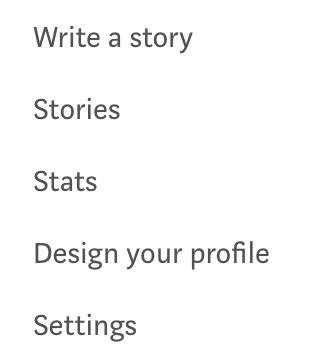
- Click into your Account Settings. You can access it by selecting “Settings” in the menu below.
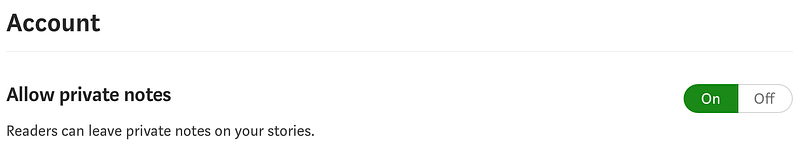
2. Once you’re in your Account Settings, scroll down to the section “Account”.
3. Make sure the “Allow Private Notes” option is toggled to On. You’ll know it’s selected properly if “On” is highlighted in green.
What If I Want to Leave a Private Note?
It’s just as easy if you want to leave a private note to a writer!
- Highlight a passage in the story, so that the menu bar shows up.

2. You’ll see a Lock icon at the far right of the menu bar.
3. Select the Lock icon. A new window pops up.
4. In the new window, you’ll be able to type your message. Click Send.
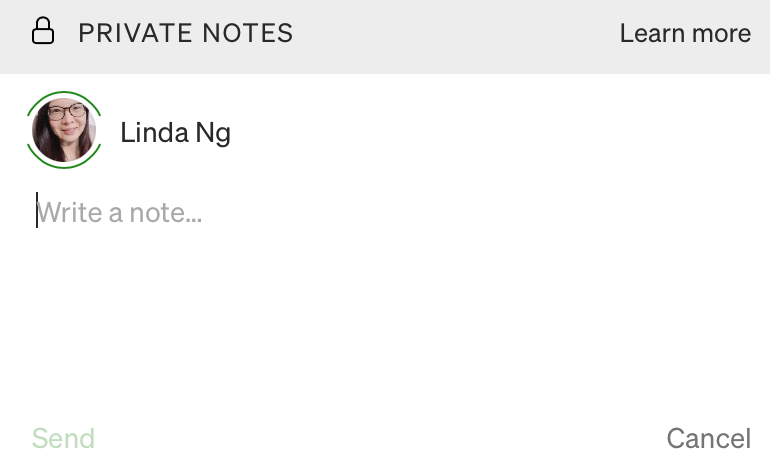
After you click Send, the writer will receive a notification about the Private Note on their end. Once they respond, you will also receive a notification.
You’ll see a little asterisk on your story if a Private Note was added.

And that’s all there is to it! It’s an easy setting, but can be easily overlooked.
Take a minute to check your account settings today.
Hope this helps you on your Medium journey! Happy writing!
If you enjoyed this article and would like to support me, please consider buying me a coffee. My frozen Canadian hands will be forever thankful. Yea. It’s spring time and they are still frozen right now. Thank you!
Are you enjoying the articles on Medium so far? Consider joining Medium to read unlimited articles! It’s only $5 per month. Cheaper than a fast food meal nowadays!
You can sign up today with the following link! It will only take a few minutes. You will also be directly supporting writers (including me) by signing up. And I’ll receive a small commission. Happy reading!