https://chrome.google.com/webstore/search/emoji">emoji keyboard</a>.” The two top hits are from JoyPixels and Emoji Keyboard.</p><p id="f237">I prefer JoyPixels, but they’re pretty much the same.</p><figure id="be40"><img src="https://cdn-images-1.readmedium.com/v2/resize:fit:800/1*n2D8gBd2P3wJ2BJ00zYjWw.png"><figcaption>Screenshot: Google Chrome Web Store</figcaption></figure><p id="1c71">Once you add either plugin to Chrome, make sure to pin them to your plugin dashboard at the top of your browser window.</p><p id="8cd3">Just click the puzzle piece logo at the top of your browser, and toggle the thumbtack icon to red (active) to make sure you can use it with a single click.</p>
<figure id="bdab">
<div>
<div>
<img class="ratio" src="http://placehold.it/16x9">
<iframe class="" src="https://cdn.embedly.com/widgets/media.html?src=https%3A%2F%2Fgfycat.com%2Fifr%2Fclearfarflungamericanalligator&display_name=Gfycat&url=https%3A%2F%2Fgfycat.com%2Fclearfarflungamericanalligator&image=https%3A%2F%2Fthumbs.gfycat.com%2FClearFarflungAmericanalligator-size_restricted.gif&key=a19fcc184b9711e1b4764040d3dc5c07&type=text%2Fhtml&schema=gfycat" allowfullscreen="" frameborder="0" height="1396" width="1592">
</div>
</div>
</figure></iframe></div></div></figure><h1 id="e5ad">How Emojis Work</h1><p id="36fb">And that’s pretty much it. Now you can search for emoji
Options
s in the plugin window and copy + paste them into your Medium articles. No coding required. 🤘</p><p id="55c9">What’s great is that emojis are technically a <a href="https://readmedium.com/emoji-on-the-web-537c5769dffa#:~:text=Emoji%20began%20their%20existence%20as,'re%20all%20different%20formats).">supported web font</a>, so they respond to the formatting (like sizing) on Medium:</p><p id="ddaf">Here’s a pufferfish 🐡 in the default font size.</p><h2 id="2e80">Here’s an H2 pufferfish 🐡</h2><h1 id="9d09">And here’s an H1 pufferfish 🐡</h1><p id="b330">Same emoji, different formatting. And I didn’t have to do a thing.</p><h1 id="b532">Less is More 🤏</h1><p id="04db">Remember, emojis are all about subtlety. This isn’t your MySpace profile in 2004. If you decide to use these bad boys, keep it in check. You don’t need to use an emoji every other sentence.</p><p id="266e">But now you know how.</p><p id="f94a">Have fun 🥳.</p><p id="0b06">🤘🥷🕴️🐧🦔💥🌯🎷🩻💯🎵🏁</p><p id="1819"><i>Shawn Forno is a very left-handed travel writer with 15 years of experience, (Lonely Planet, Tortuga Backpacks). He’s also created and managed content strategies for creators like Matt D’Avella (director of Netflix’s, Minimalism).</i></p><p id="ed19"><a href="https://dayswespend.substack.com/publish/home"><i>Sign up for his newsletter</i></a><i> or check out <a href="https://www.youtube.com/c/DaysWeSpend">Days We Spend</a>, the travel channel he runs with his wife.</i></p></article></body>
I didn’t realize that other writers don’t know how to add emojis to Medium articles, so here’s a quick tutorial so you can add emojis without any code or confusing
symbols.
All you need to do is download a browser plugin.
Download an Emoji Chrome Plugin
Go to the Chrome web store and search for “emoji keyboard.” The two top hits are from JoyPixels and Emoji Keyboard.
I prefer JoyPixels, but they’re pretty much the same.
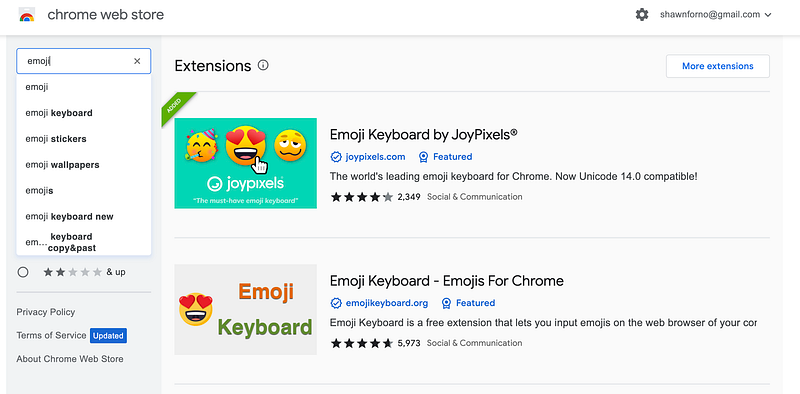
Screenshot: Google Chrome Web Store
Once you add either plugin to Chrome, make sure to pin them to your plugin dashboard at the top of your browser window.
Just click the puzzle piece logo at the top of your browser, and toggle the thumbtack icon to red (active) to make sure you can use it with a single click.
How Emojis Work
And that’s pretty much it. Now you can search for emojis in the plugin window and copy + paste them into your Medium articles. No coding required. 🤘
What’s great is that emojis are technically a supported web font, so they respond to the formatting (like sizing) on Medium:
Here’s a pufferfish 🐡 in the default font size.
Here’s an H2 pufferfish 🐡
And here’s an H1 pufferfish 🐡
Same emoji, different formatting. And I didn’t have to do a thing.
Less is More 🤏
Remember, emojis are all about subtlety. This isn’t your MySpace profile in 2004. If you decide to use these bad boys, keep it in check. You don’t need to use an emoji every other sentence.
But now you know how.
Have fun 🥳.
🤘🥷🕴️🐧🦔💥🌯🎷🩻💯🎵🏁
Shawn Forno is a very left-handed travel writer with 15 years of experience, (Lonely Planet, Tortuga Backpacks). He’s also created and managed content strategies for creators like Matt D’Avella (director of Netflix’s, Minimalism).